
Previous parts:
- PART 1 https://hybrismart.com/2017/11/23/useful-groovy-scripts-part-1/
- Display any file on the server
- Execute a command
- Show last N lines from the console log
- Execute a Flexible Search query
- Retrieve an item by PK
- Execute a raw SQL query
- Modifying objects
- Removing items
- Sending data by e-mail
- Importing IMPEX
- Print all properties of an object
- Print all methods of an object
- Show the hybris type tree
- Print hybris type stats
- PART 2 https://hybrismart.com/2017/12/02/useful-groovy-scripts-part-2/
- Turn on/off logging for any class
- Print a bean list from the particular context
- Executing the method from the page controller bean
- Print all URLs from all controllers (RequestMappings)
- Print all web contexts
- PART 3 https://hybrismart.com/2017/12/08/useful-groovy-scripts-flexible-search-query-generator-for-any-type/
- Flexible Search Generator
- PART 4 https://hybrismart.com/2017/12/17/useful-groovy-scripts-part-4-external-references/
- Finding all external references to an object (EARLY BETA)
- PART 5. https://hybrismart.com/2018/01/17/groovy-scripts-for-hybris-part-5/
- Restart hybris server
- Converting FlexibleQuery to SQL
- All hybris types that use the particular type
- Executing SQL (DDL)
- Print mysql table structure from hybris HAC
- Print all indexes
- PART 6. https://hybrismart.com/2018/07/20/useful-groovy-scripts-part-6/
- Executing an SQL Query. For hybris 6.0+
- Accessing the file system and fetching a text file via HAC
- Invalidating a cache for a particular item
- Executing the multi-column flexibleSearch
- Executing a long/resource-intensive Groovy script
- PART 7 (this one)
- Clear Specific Cache Region
Clear Specific Cache Region
This approach is useful for troubleshooting database interaction. After clearing the cache before the operation, subsequent commands or requests will be performed with no data in the caches, and you can be sure that all SQL statements generated after this point will be properly logged in the JDBC log, at least once.
defaultCacheController.clearCache(entityCacheRegion);
defaultCacheController.clearCache(queryCacheRegion);
defaultCacheController.clearCache(mediaCacheRegion);
defaultCacheController.clearCache(cmsCacheRegion);
Turn Off Caching Subsystem
Warning! Your system will work tremendously slowly after applying this setting. You can turn the cache off, perform some operations, and turn it on again for debugging purposes or to collect performance metrics.
tenant.getCurrentTenant().getCache().setEnabled(false);To turn it on, change false to true.
Turn Off the Cronjobs
It is convenient for debugging components called not only from the code you are troubleshooting, but from cronjobs too. To ease the process, turn all cronjobs off by setting active to false.
q = "select {pk} from {CronJob} where {active} = true";
flexibleSearchService.search(q).getResult().each {
    it.setActive(false); modelService.save(it);
}
Type system: Get information about a type
Change Product to your type in the code below, and you will see all attributes, their types, and type classes.
de.hybris.platform.core.Registry.getPersistenceManager().getPersistenceInfo("Product");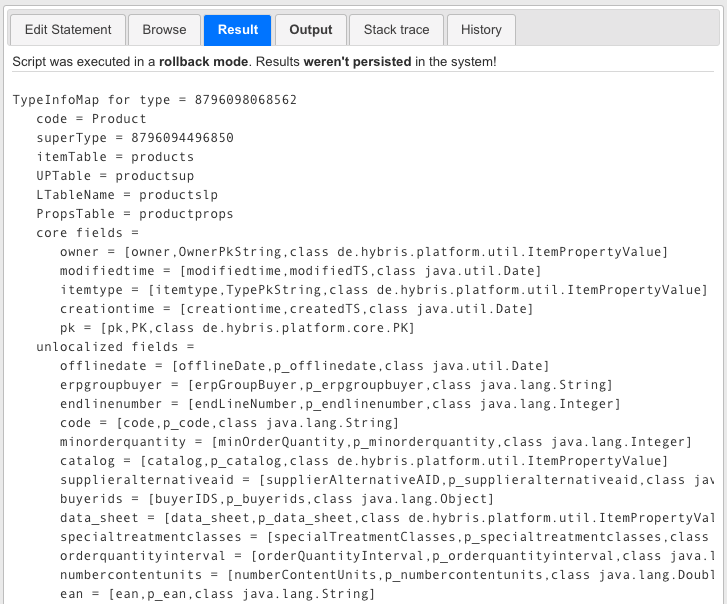
Create a Groovy-powered REST API Server
Thanks to hybrisarchitect.com for a great article about a REST API server powered by Groovy in hybris. This approach is great for adding temporary functionality accessible via the HTTP protocol. https://hybrisarchitect.com/how-to-build-a-rapid-prototype-rest-api-server-using-sap-hybris-commerce/
CMS: Print all page/slot/component structure
import de.hybris.platform.cms2.enums.CmsPageStatus;
import de.hybris.platform.cms2.model.pages.AbstractPageModel;

void showComponentDetails(component) {
    println " \\-- " + component.getUid();
}

void showSlotDetails(slot) {
    println "* " + slot.getUid();
}

void showPageDetails(page) {
    println "[" + page.getUid() + "]";
}

void showComponents(slot) {
    showSlotDetails(slot);
    components = slot.getCMSComponents();
    components.each {
        component -> showComponentDetails(component);
    }
}

void showSlotsAndComponents(page) {
    slots = defaultCMSAdminContentSlotService.getContentSlotsForPage(page);
    slots.each {
        slot -> showComponents(slot);
    }
}

void showPageConfiguration(AbstractPageModel page) {
    showPageDetails(page);
    template = page.getMasterTemplate();
    println template;
    showSlotsAndComponents(page);
}

SUCCESS_STATUS = Arrays.asList(CmsPageStatus.ACTIVE);
catalogVersionStaged = catalogVersionService.getCatalogVersion("lynxContentCatalog", "Staged");
pages = defaultCMSAdminPageService.getAllPagesForCatalogVersionAndPageStatuses(catalogVersionStaged, SUCCESS_STATUS);
site = defaultCMSAdminSiteService.getSiteForId("lynx");
sessionService.setAttribute("activeCatalogVersion", catalogVersionStaged.getPk());
sessionService.setAttribute("activeSite", site.getPk());
pages.each {
    page ->
    showPageConfiguration(page);
}
Discussion
Powered by GitHub Discussions — sign in with a GitHub account to join the conversation.