


In this article, you will find a review of the new product from SAP: a single-page storefront for SAP Commerce Cloud, known as Spartacus.
Until recently, SAP Commerce Cloud offered two toolsets for mobile: a Mobile SDK for iOS and Android, and a responsive storefront template. Spartacus is the next step in this direction toward a better customer experience.
Spartacus was officially introduced at SAP CX Live Barcelona. However, the idea of a single-page storefront for Commerce was new for SAP. For example, many years ago SAP released a very basic but functional SPA template for YaaS (AngularJS). It was initially designed as a separate and experimental stream.
This article couldn’t have happened without the great help of Igor Sokolov, a solution architect at EPAM Systems. Huge thanks and enormous gratitude.
Before going into the technical details of Spartacus, I need to give a short overview of the technologies and concepts used in mobile web development today.
Short Overview of Multi-Platform Mobile Frameworks
It was long believed that a native application was a good companion to the mobile and desktop versions of a website. That meant the developer had to maintain at least four different systems: mobile apps for iOS and Android, and web apps separately for mobile and desktop. This is how Hybris looked years ago. We had separate folders for mobile templates and desktop templates, plus an SDK to create iOS and Android applications.
Later, mobile and desktop versions were merged into a single responsive website, which was able to render the website differently for different device types and screen resolutions. That reduced the number of different code bases from four to three, which was not a big win. Over time, many apps were abandoned or became outdated because it was too expensive to keep all these products in sync.
Installing new apps is a challenge for many people, and the number of installations was too low while the cost of keeping them in sync with the web version was high. Eventually, only large e-stores could afford separate native apps for Android and iOS, but even they were continuously looking for better options. Despite the fact that users spend more time with mobile apps than in the browser, half of U.S. smartphone users download zero apps per month, according to Comscore.
So, we came to a point where native apps became too complex and expensive to support and develop. This is why more and more developers use cross-platform development tools for native apps, such as PhoneGap, Apache Cordova, React Native, Xamarin, or Flutter.
The common belief that native apps are much faster than JavaScript mobile sites lost its position when WebAssembly was announced. It enables executing code nearly as fast as native machine code, and it was envisioned to complement JavaScript to speed up performance-critical parts of web applications and later to enable web development in languages other than JavaScript. Critical fragments can be rewritten in C/C++ and converted into JavaScript using Emscripten. Some components with heavy calculations can now be executed on the device rather than on the server. A good demonstration of this is AutoCAD Online. For mobile versions of e-commerce websites, such performance is not required, of course. However, AR/VR and audio and video processing may change the landscape. For example, TensorFlow.js allows you to use machine learning algorithms in JavaScript, even when your device is not connected.
Another argument for native apps is the limitation of the web browser in accessing hardware. In recent years, some interesting technologies have been introduced by Google, Microsoft, and Mozilla.
- Clipboard API is used to work with the clipboard.
- Presentation API can detect whether an external display is on.
- Web Share API is used for sharing a page on social networks.
- Web Bluetooth API is available for integrating with nearby physical devices. IoT solutions can use it, for example.
- Generic Sensor API is used to work with sensors, such as an accelerometer, gyroscope, light sensor, compass, and others.
https://whatwebcando.today/ is a great resource with a list of the latest features implemented in browsers. I believe web applications will take more and more from native apps.
There is a similar technology for multi-platform desktop software: Electron. For example, Skype and Atom are built with Electron. Electron accomplishes this by combining Chromium and Node.js into a single runtime, and apps can be packaged for Mac, Windows, and Linux.
Back in late 2015, Google went public with an exciting new approach to app development that would herald a departure from the limited functionality and platform-locked design prevalent in the industry. This new method was fittingly referred to as a “progressive web app,” or PWA.
Progressive Web Applications
This concept brought the promise of providing an experience that combined the very best qualities of the web with native apps.
PWA is not a framework or toolset; it is a concept, a set of features you need to implement in your app to bring the customer experience to a new level. There are good implementations and bad implementations, complete and incomplete.
So, there is no exact definition of what a PWA is, and nobody will say whether your app is PWA-enabled or not. PWA has an “analog” nature: a website can be PWA to some degree. The more features from the PWA checklist it meets, the closer it is to this concept. In other words, developers are given the tools (Service Worker, Push Notifications, etc.) and goals (fast, reliable, engaging), and how far the developers are able to go depends entirely on them; this determines the PWA-ness.
The key features of PWA are:
- Progressive enhancement: The app runs in as many environments as possible. If it needs a service, it should use whatever is available and degrade gracefully if nothing is there.
- Responsive user interface: The app adapts to various input methods (touch, speech, etc.) and output methods (different screen sizes, vibration, audio, braille displays, etc.).
- Connectivity-independence: The app works well offline and with intermittent or low-bandwidth connectivity.
- App-like UI: The app adopts UI elements of native platforms, including a fast-loading user interface, which can be achieved by caching important assets via service workers.
- Continuous updates (“freshness”): The service worker API defines a process for automatically updating apps to new versions.
- Secure communication: The app is served and communicates via HTTPS to prevent snooping and attacks.
- App discovery: Metadata such as W3C web app manifests enables search engines to find web apps.
- Push interaction (“re-engagement”): Features such as push notifications actively keep users up to date.
- Natively installable: On some platforms, you can install a web app so that it feels like a native app: an icon on the home screen, a separate entry in the app switcher, and optional browser chrome. All without going through a native app store.
- Linkability: Easily share apps via URLs and run them without installation.
Some consider, however, that the only feature that makes a web app PWA is app install banners, which developers can get by hitting the right heuristics, and that all the rest is basically marketing.
PWA started at Google, so it is better supported by Android than by iOS. In Samsung Internet, there is a feature called “ambient badging.” If the browser detects the page is a PWA, it will dynamically update the usual bookmark icon in the URL bar to a special “+” icon, giving users an easy shortcut to add it to their home screens. And in Chrome for Android, you now actually get a real Android app with their new WebAPK feature. When you install a PWA on your home screen, it automatically creates a lightweight Android app wrapper, so your app actually appears in the Apps list and is a true first-class citizen.
The heart of PWA is a Service Worker. This is a proxying layer between a browser and a server. All browser requests go through it. Service Workers can access Cache Storage for web resources and IndexedDB for data. For example, the system can receive a browser request, check the network state, retrieve the data from storage, process it somehow, and return the result back to the browser. The browser will think it is working with a network resource, but in fact, the request was intercepted and the result was retrieved from storage instead. You can check the readiness of different browsers at isServiceWorkersReady.
With iOS 11.3 (March 30, 2018), Apple silently added support for the basic set of new technologies behind the idea of Progressive Web Apps. Specifically, iOS supports Service Workers and Web App Manifest specs. However, from Apple’s perspective, PWAs are just “web apps from the home screen,” and the icon is something referred to as a WebClip.
If you need to have a native app using only the PWA, you can create it from PWA using https://www.pwabuilder.com/. For Windows, it generates .appx, and you can send it to Windows Dev Center. For Google, it creates a Java wrapper app that includes your PWA. You compile this project in Android Studio and upload the package to Android Dev Center. For Apple, it generates an Xcode project. After compiling, you can send the package to the Apple Store.
PWA Storefronts
Of course, any e-commerce solution can be implemented from scratch using any PWA-ready framework or mobile UI library. However, this approach will definitely take more time and resources than using specialized products.
Specialized solutions help you release a product faster. For simple cases, you can launch your solution in weeks.
Divante VUE STOREFRONT. This storefront was developed for Magento 2, Magento 1, and Pimcore. It is production-ready, and there are about 10 live e-shops built with it. This product looks mature, flexible, and well-built, but you need to make significant changes to get it working with SAP Commerce Cloud. MIT License. The product was released this year, in June. The official demo is here: https://demo.vuestorefront.io/. Live stores built with Vue Storefront: Special, La Nature, The Hour Glass, CucinaBarilla.
SAP Spartacus. Developed by SAP specifically for SAP Commerce Cloud. Officially presented in October 2018. The product has just been released as pre-alpha. It doesn’t cover all PWA features yet, but SAP promises it will be production-ready in the first half of 2019.
Google Polymer Storefront. Actually, the Polymer framework is a powerful tool, but the storefront implementation is very basic and trivial. It serves only as a demonstration of the Polymer library for building web applications using Web Components. A demo is available: https://shop.polymer-project.org/.
UPDATE, Nov 19. Recently, E-Point announced its own implementation of a PWA storefront: a headless React.js accelerator storefront with all PWA advantages (100% on Google Lighthouse), ready and pre-integrated for the SAP Hybris/Commerce base apparel UK catalog. At EPAM, we have our own PWA implementation ready to be integrated with SAP Commerce. However, unlike the products listed above, both are commercial offerings, and licensing is built around proprietary rights.
SAP Spartacus in Detail
Spartacus is a framework for PWA apps developed by SAP for its Commerce platform. It is still in pre-alpha status, but once it was officially announced, I decided to take a closer look at the internals.

This Angular storefront was expected to replace the JSP-based Accelerator in the future.
The strong point of the solution is that the new storefront is no longer part of the e-commerce platform. Being decoupled, you can upgrade both the platform and the storefront code separately without needing to rewrite the templates, because API interfaces will remain the same.
Architecture
As of now, Spartacus is based on the following technology stack:
- Angular 6.1.8, TypeScript 2.9, and Sass 3
- RxJS 6.3.3, Ngrx 6.1, and Bootstrap 3.2.2
- Jasmine, Karma, and Protractor
- GitHub, webpack, and npm
For each website page, you need to have an Angular template. In other words, if you create a page in CMS Cockpit or SmartEdit, you will need to ask developers to add this page in the Angular code too.
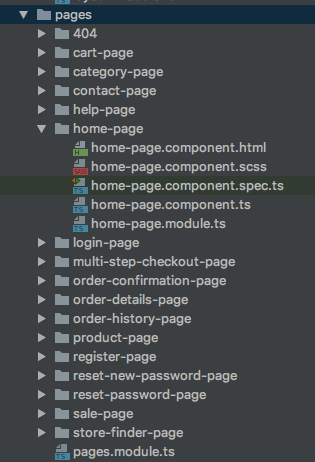
The system is not yet capable of pulling new pages from WCMS automatically.
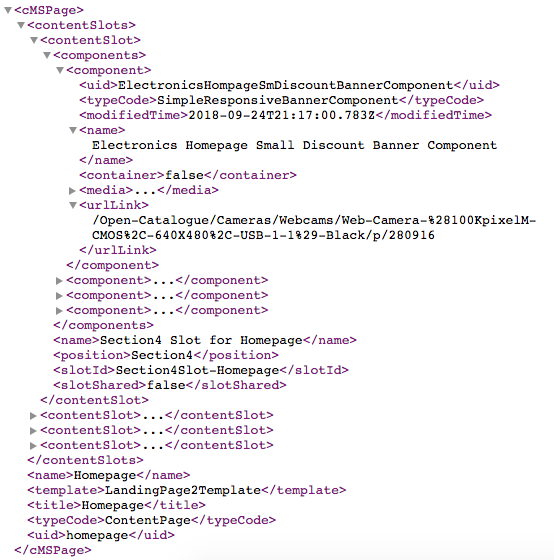
The client (Angular app) requests a CMS page, parses JSON, and renders the page based on the page description in the payload.
/rest/v2/electronics/cms/pages?pageType=ContentPage&pageLabelOrId=faq&lang=en&curr=USD
The full specification of the available services can be found by requesting the Swagger UI of the service:
This is how all pages with certain grouping work; for example, multi-step checkout is treated as one page, one template, and all checkout-step transitions are handled by the client logic (Angular app code).
The response contains a list of content slots and components in them. The components are managed in Commerce Cloud Content Management, CMS Cockpit, or SmartEdit.
The template for a home page, as well as for other pages, is hardcoded in Angular:
Home-page.component.html:

This template refers to the landing-page-layout component.
landing-page-layout.component.html:
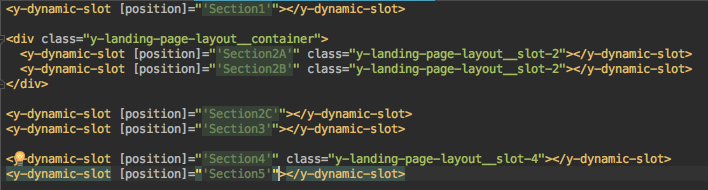
The layout contains the slot definitions. The banner will be placed into Section4.
The Angular component y-dynamic-slot injects the components according to the Commerce Cloud component ↔ Angular component mapping.
Spartacus has a built-in mapping configuration that helps a dynamic renderer map traditional Hybris WCMS component/page template names in the REST response (i.e., /some-pages) into Angular components.
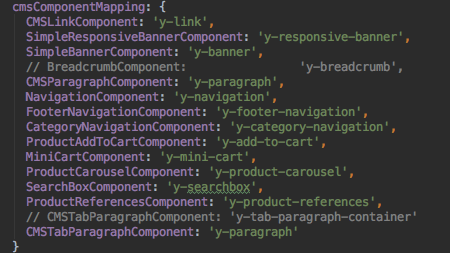
This mapping is a class that implements the interface CMSComponentMappingConfig (storefrontlib/src/lib/cms/cms-module-config.ts), which is then extended and combined together with all other configs into one major configuration interface, StorefrontModuleConfig (storefrontlib/src/lib/storefront-config.ts). We can reconfigure this mapping and add our own entries here. See the section below about adding a component.
For our example, SimpleResponsiveBannerComponent is mapped into the responsive-banner component, with the selector y-responsive-banner.
The Angular template of this component is the following:

For example, the URL for the link is taken from the XML generated by Commerce Cloud (see above), from the attribute urlLink.
If you add a new component in Commerce Cloud, you need to implement the Angular part too and add it to the mapping.
Let’s take another component, Product Carousel.
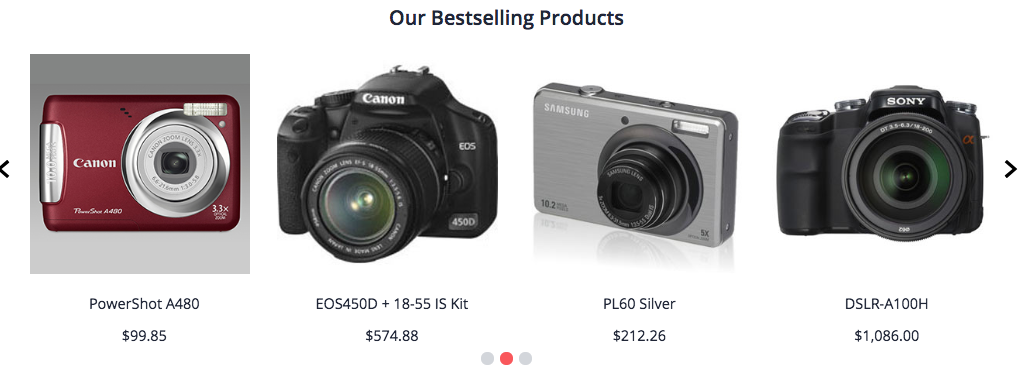
The information about these products is delivered with the page information XML:
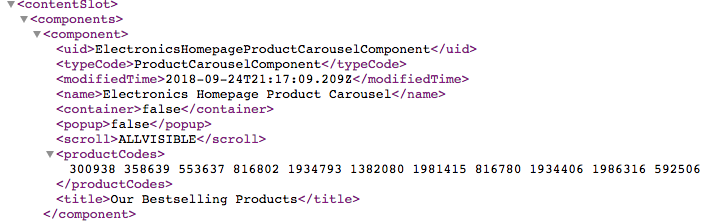
The component ProductCarouselComponent is mapped to the y-product-carousel selector, the product-carousel component. This component fetches data about the products listed in productCodes:
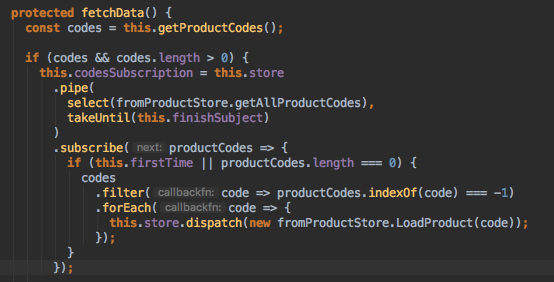
fetchData is executed for each component as part of the initialization. For some components, it is empty if there is no need to fetch data for the component. For this one, the system generates 11 calls to the server to get detailed product information for each of the 11 products listed in the carousel component definition. It is worth noting that all these calls are done asynchronously. Specifically, they are done using RxJS; you can see the subscribe function, which is part of the reactive JavaScript library RxJS.
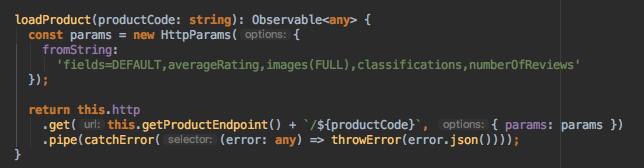
Currently, if you have N carousel components on the page with the same products, the system will request the product information N times. However, both browser and server caching should make this point minor.
To draw a line under this section, let’s compare the JSP-based CMS approach (a legacy storefront) and the Angular-based approach. If we do that, we will find many similarities:
For a page template, we need a JSP file with an HTML template. The same thing applies in Spartacus: we need to have an Angular component to provide an HTML template. As we understand it, SAP decided to divide responsibilities in this case into two Angular components: the page component itself and the page layout component. For example, LoginPageComponent is an Angular page component with a template defined in login-page.component.html that includes the layout component LoginPageLayoutComponent using a tag
<y-login-page-layout>. The layout page template defines the backbone of the HTML page inlogin-page-layout.component.html.For WCMS components, we still need a persistent model to represent the configured state of the component. The JSP-based approach assumes you have a controller and a template. In a quite similar approach in Spartacus, you need an Angular component to be created in the storefront, and there is a mapping object between the WCMS component and the Angular component, as mentioned above in the file cms-module-config.ts. For example, BannerComponent is the Angular part of the simple, non-responsive banner WCMS component. The TypeScript class
BannerComponentis defined as a subclass of the abstract AbstractCmsComponent. The component layout is defined in banner.component.html. The parent class AbstractCmsComponent provides a fieldcomponentthat will be populated by the Spartacus platform based on the response from OCC. In more detail, you will see how it works below in the section “Adding custom components.” Returning to the parallels between JSP and Angular-based approaches, we can say that the role of the component controller in Spartacus is played by the class BannerComponent.
The next couple of sections will demonstrate our understanding of how Spartacus can be extended and customized using several typical scenarios:
- Creating a custom static page
- Adding a custom component
- Changing the existing component template or its part
Creating a Custom Static Page
You need to have this page configured on the server side. Use SmartEdit or WCMS for that. In the examples below, I will use the faq page instead to make the examples work without this step. Change faq to your page label.
We create two components, my-page and static-page-layout. The second component can be used for other static pages too. It is here just as a demonstration of the layout component.
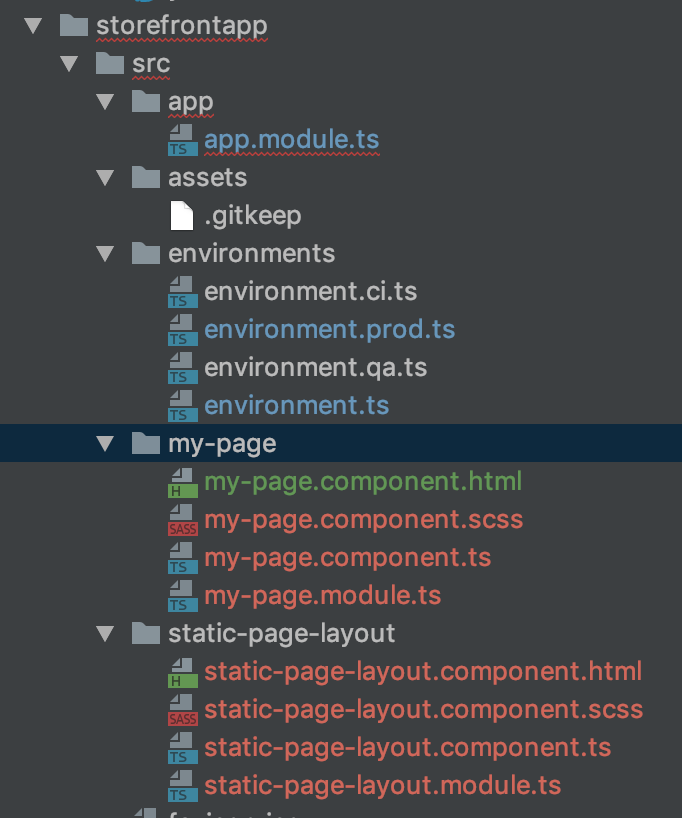
My-page.component.html:
<y-static-page-layout>
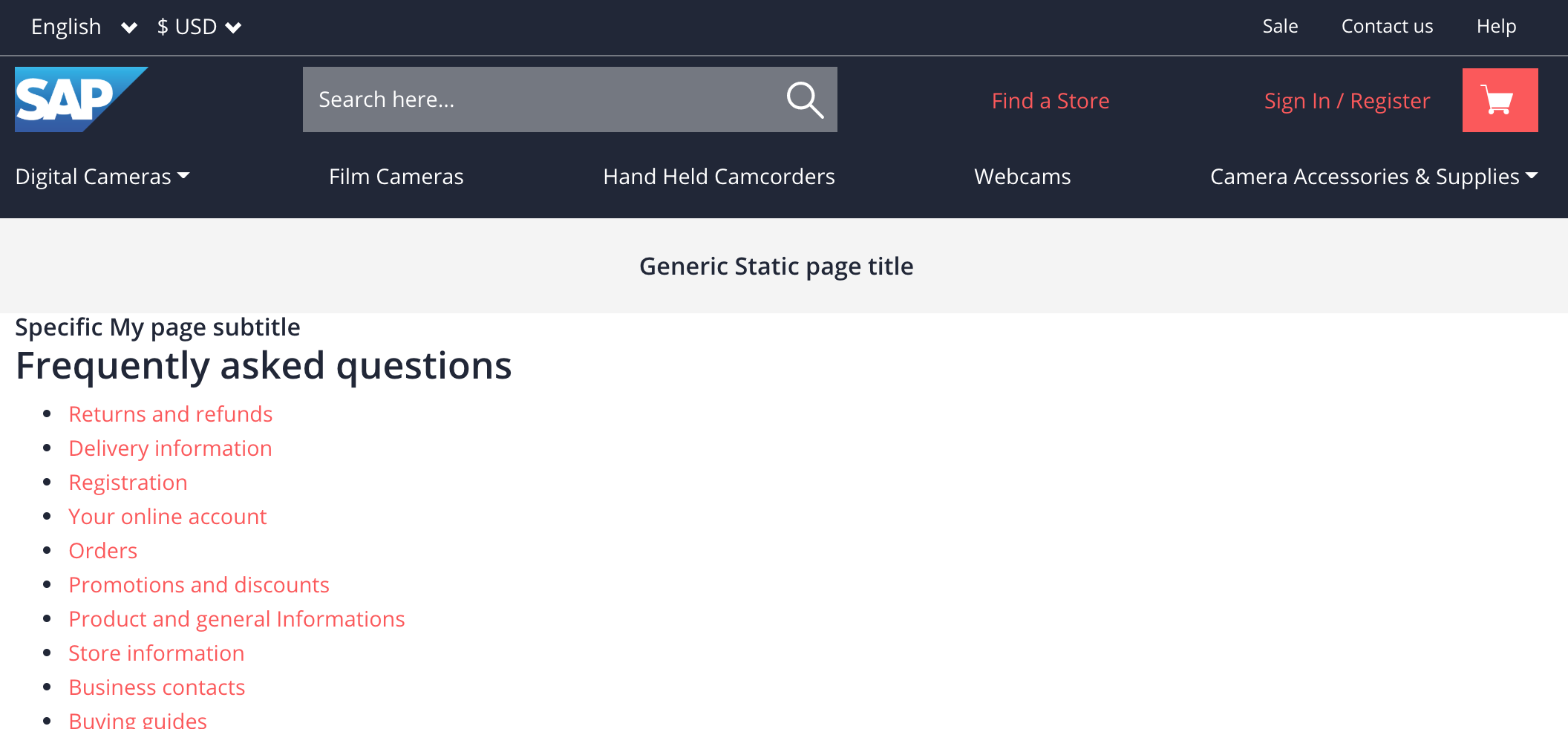
  <h2 class="y-page__title">Specific My page subtitle</h2>
  <y-dynamic-slot [position]="'Section1'"></y-dynamic-slot>

  <div class="y-landing-page-layout__container">
    <y-dynamic-slot [position]="'Section2A'" class="y-landing-page-layout__slot-2"></y-dynamic-slot>
    <y-dynamic-slot [position]="'Section2B'" class="y-landing-page-layout__slot-2"></y-dynamic-slot>
  </div>

  <y-dynamic-slot [position]="'Section2C'"></y-dynamic-slot>
  <y-dynamic-slot [position]="'Section3'"></y-dynamic-slot>

  <y-dynamic-slot [position]="'Section4'" class="y-landing-page-layout__slot-4"></y-dynamic-slot>
  <y-dynamic-slot [position]="'Section5'"></y-dynamic-slot>
</y-static-page-layout>
The slot names should be the same as those used on the server side (WCMS). For each slot, the storefront retrieves the content in the form of a JSON structure. The FAQ page we use in this demo is built with the template where these slots are used.
My-page.component.ts defines the template:
import { Component } from '@angular/core';

@Component({
  selector: 'y-my-page',
  templateUrl: './my-page.component.html'
})
export class MyPageComponent {
  constructor() {}
}
My-page.module.ts defines the page label and a path:
import { NgModule } from '@angular/core';
import { CommonModule } from '@angular/common';
import { Routes, RouterModule } from '@angular/router';

import { MyPageComponent } from './my-page.component';
import { StaticPageLayoutModule } from '../static-page-layout/static-page-layout.module';
import { CmsModule, CmsPageGuards } from '@spartacus/storefront';

const routes: Routes = [
  {
    path: 'my',
    canActivate: [CmsPageGuards],
    data: { pageLabel: 'faq' },
    component: MyPageComponent
  }
];

@NgModule({
  imports: [CommonModule, CmsModule, StaticPageLayoutModule, RouterModule.forChild(routes)],
  declarations: [MyPageComponent],
  exports: [MyPageComponent]
})
export class MyPageModule {}
It refers to StaticPageLayoutModule. This component has a template:
<div class="y-page">
  <header class="y-page__header">
    <h1 class="y-page__title">Generic Static page title</h1>
  </header>
  <div class="y-container">
    <ng-content></ng-content>
  </div>
</div>
and a module:
import { NgModule } from '@angular/core';
import { CommonModule } from '@angular/common';

import { StaticPageLayoutComponent } from './static-page-layout.component';
import { CmsModule } from '@spartacus/storefront';

@NgModule({
  imports: [CommonModule],
  declarations: [StaticPageLayoutComponent],
  exports: [StaticPageLayoutComponent]
})
export class StaticPageLayoutModule {}
and standard component code:
import { Component } from '@angular/core';

@Component({
  selector: 'y-static-page-layout',
  templateUrl: './static-page-layout.component.html'
})
export class StaticPageLayoutComponent {
  constructor() {}
}
This is how our page looks in the browser (http://localhost:4200/my):
However, better handling of routes is on the roadmap.
Adding Custom Components
In this section, you will learn how to add a new component to the storefront. Of course, adding a UI component is a trivial thing; it is Angular’s standard feature. The question is how to connect the Angular component to the SAP Commerce component.
Above, I mentioned that the component structure is managed via CMS Cockpit or SmartEdit, and SAP Commerce provides web services to deliver information about the component configuration to the Angular storefront. This information contains a list of components and their details grouped by content slots.
Spartacus renders the components in the browser, so it should know which SAP Commerce component corresponds to which Angular component. This mapping is preconfigured for the list of standard out-of-the-box components.
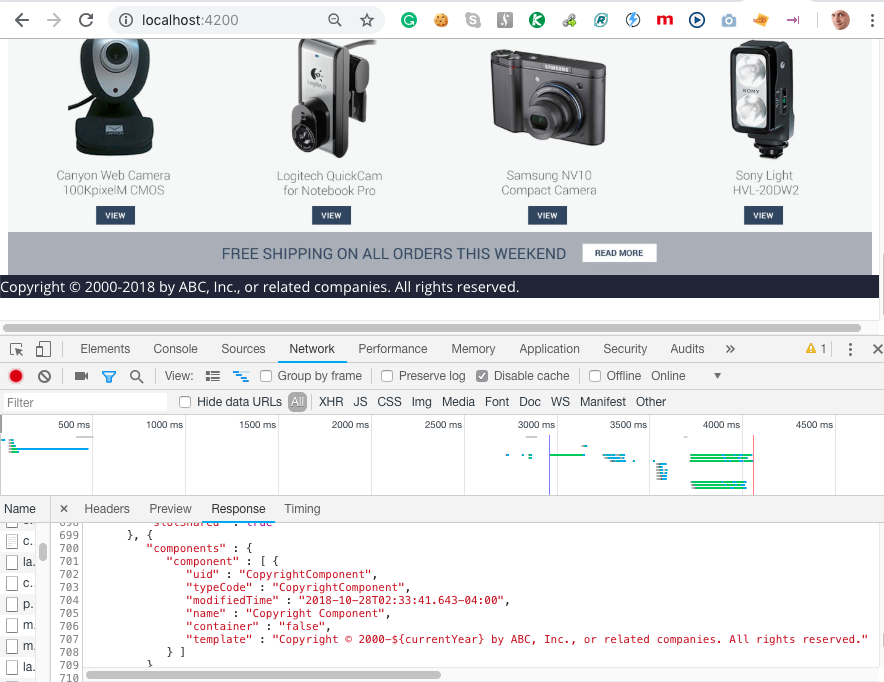
For the demonstration purpose, we have chosen an example of a simple custom component to print a copyright with an automatically updated current year. The first step is to define a new WCMS component called CopyrightComponent.
<items xmlns:xsi="http://www.w3.org/2001/XMLSchema-instance"
       xsi:noNamespaceSchemaLocation="items.xsd">
  <itemtypes>
    <typegroup name="Components">
      <itemtype code="CopyrightComponent" extends="SimpleCMSComponent" jaloclass="com.epam.mycomponents.jalo.CopyrightComponent">
        <description>It represents product references component, that is the component that displays configured references to the specified product.</description>
        <attributes>
          <attribute qualifier="template" type="java.lang.String">
            <persistence type="property" />
            <modifiers optional="false" />
            <defaultvalue>Copyright © 2000-${currentYear} by ABC, Inc., or related companies. All rights reserved.</defaultvalue>
            <description>Copyright text template</description>
          </attribute>
        </attributes>
      </itemtype>
    </typegroup>
  </itemtypes>
</items>
Also, we need to create an instance and assign the component to the slot (ImpEx):
$contentCatalog=electronicsContentCatalog
$contentCV=catalogVersion(CatalogVersion.catalog(Catalog.id[default=$contentCatalog]),CatalogVersion.version[default=Online])[default=$contentCatalog:Online]

INSERT_UPDATE CopyrightComponent;$contentCV[unique=true];uid[unique=true];name;&componentRef;template
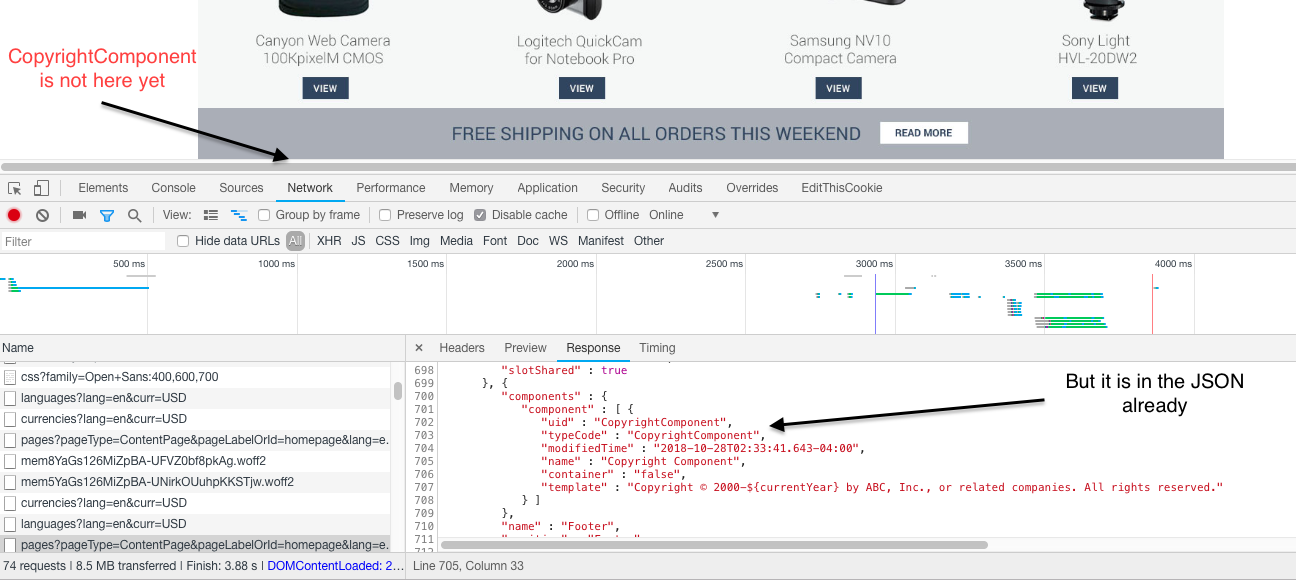
;;CopyrightComponent;Copyright Component;CopyrightComponent;Copyright © 2000-${currentYear} by ABC, Inc., or related companies. All rights reserved.

INSERT_UPDATE ContentSlot;$contentCV[unique=true];uid[unique=true];cmsComponents(uid,$contentCV)
;;FooterSlot;CopyrightComponent
After the change, the Angular Storefront will receive the updated JSON with our component in the FooterSlot, but it will not be displayed yet because there is no Angular component for it:
Now let’s create an Angular component for CopyrightComponent:
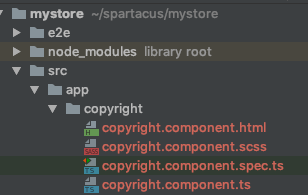
ng g c copyrightThat will add files in our Angular project:
The next step is to implement client-side logic and the template.
copyright.component.ts:
Here we replace ${currentYear} with the current year on the fly.
import { Component, ChangeDetectionStrategy } from '@angular/core';
import { AbstractCmsComponent } from '@spartacus/storefront';

@Component({
  selector: 'app-copyright',
  templateUrl: './copyright.component.html',
  styleUrls: ['./copyright.component.scss'],
  changeDetection: ChangeDetectionStrategy.OnPush
})
export class CopyrightComponent extends AbstractCmsComponent {
  public getText(): string {
    return this.component.template.replace('${currentYear}', (new Date()).getFullYear().toString());
  }
}
The module refers to the template.
copyright.component.html:
<p [innerHtml]="getText()"></p>We need to register our new component in the mapping object. This can be done when the root storefront module, StorefrontModule, is initialized:
import { BrowserModule } from '@angular/platform-browser';
import { NgModule } from '@angular/core';

import { AppComponent } from './app.component';
import { StorefrontModule } from '@spartacus/storefront';
import { CopyrightComponent } from './copyright/copyright.component';

@NgModule({
  declarations: [
    AppComponent,
    CopyrightComponent
  ],
  imports: [BrowserModule, StorefrontModule.withConfig({
    server: {
      baseUrl: 'https://localhost:9002',
    },
    cmsComponentMapping: {
      CopyrightComponent: 'app-copyright',
    }
  })],
  entryComponents: [CopyrightComponent],
  providers: [],
  bootstrap: [AppComponent]
})
export class AppModule { }
After making these changes, we’ll see our copyright component in the footer.
Changing Component Layout
Let’s try to modify the title of the product by adding some text before and after.
First, we need to check what outlet is used for this block:
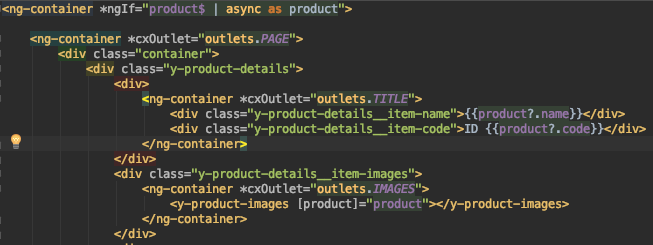
We are interested in the section ng-container *cxOutlet="outlets.TITLE". The method outlets is defined as return ProductDetailsComponent.outlets here. All we need to remember is this name: ProductDetailsComponent.TITLE.
<cx-storefront>Loading...</cx-storefront>

<ng-template [cxOutletRef]="pdpOutlets.TITLE" let-product>
  <div class="y-product-details__item-name">[[[{{product?.name}}]]]</div>
  <div class="y-product-details__item-code">[[[ID {{product?.code}}]]]</div>
</ng-template>
So, on the website, we’ll see the changed TITLE area.

Other Considerations
Service Workers, SSR and offline mode
Currently, the framework doesn’t support the PWA spec in full. Offline mode, server-side rendering, service workers, and add-to-home-screen are not supported yet, but the work is in progress.
Spartacus also doesn’t use IndexedDB, the in-browser database engine that helps with offline mode.
Multi-site support
It is still on the roadmap too. You can specify the site ID in the storefront configuration, but it is too basic. The server-side code is capable of determining it automatically, and this is expected to be in the Angular storefront too.
Checkout
The current version supports only one checkout flow in the storefront. Basically, the entire checkout process is defined in the checkout component, and the whole flow is defined in the storefront code. For reference, the traditional Spring/JSP-based storefront used to have a checkout framework, and several CMS sites could have different checkouts within one shared storefront code base.
Conclusion
Spartacus looks very promising, even in its pre-alpha version. Of course, many things will change until it is officially released as stable and production-ready.
No one disputes that SPA/PWA is the future of web applications, a next step in getting apps closer to perfection. They are fast, and the interface is unified.
Possibly, you remember how slowly progress comes into our lives when it is not fully supported by large players in the market. Large companies tend to avoid experimenting even with non-critical components. For example, some time ago, many large car manufacturers kept installing cassette players in their cars years after the iPod revolution. It is good to see that SAP is moving in the right direction toward openness, cutting-edge technologies, and innovation.
For developers, learning Spartacus will help their careers: the Angular storefront will inevitably replace the current JSP-based Accelerator. For both developers and businesses: “The early bird catches the worm.”
Discussion
Powered by GitHub Discussions — sign in with a GitHub account to join the conversation.