
The Groovy console is a very handy tool for developing and running scripts inside SAP Commerce without touching the source code. It is a powerful tool for debugging, especially if you need to troubleshoot a remote system. In this article, I have collected some of the scripts I regularly use in my work.
This is Part 2 of the series. Today I will share the following solutions:
- Add any class to the logging subsystem
- Print a bean list from a particular context
- Execute a method from a page controller from HAC/Groovy console
- Print all URLs from all controllers (request mappings)
- Print all web contexts
Certainly, all of these scripts are not for production use. They are intended only for troubleshooting and debugging.
Turn on/off logging for any class
To turn on logging for a particular class, in the latest versions of SAP hybris Commerce you normally need to make some changes in local.properties and restart the server. After adding the class to the list, you will be able to turn logging on and off for this class using HAC.
However, sometimes we need to turn on logging temporarily, just for troubleshooting. This is a very common scenario. So I believe my solution will make things easier for developers.
The following code adds the logger for jalo.flexibleSearch.FlexibleSearch with a DEBUG level:
import org.apache.logging.log4j.*;
import org.apache.logging.log4j.core.config.*;
import de.hybris.platform.util.logging.log4j2.HybrisLoggerContext;

// example:
setLogger("de.hybris.platform.jalo.flexiblesearch.FlexibleSearch", "DEBUG");

public String setLogger(String logClass, String logLevel ) {
    final HybrisLoggerContext loggerCtx = (HybrisLoggerContext) LogManager.getContext(false);
    final Configuration loggerCfg = loggerCtx.getConfiguration();
    LoggerConfig loggerConfig = loggerCfg.getLoggers().get(logClass);
    if (loggerConfig == null) {
        // create
        String additivity = "true";
        String includeLocation = "true";
        Property[] properties = null;
        AppenderRef[] refs = [];
        filter = null;
        LoggerConfig createdLoggerConfig = LoggerConfig.createLogger(
            additivity,
            Level.getLevel(logLevel),
            logClass,
            includeLocation,
            refs,
            properties,
            loggerCfg,
            filter
        );

        loggerCfg.addLogger(logClass, createdLoggerConfig);
    } else {

        loggerCfg.getLoggers().get(logClass).setLevel(Level.getLevel(logLevel));
    }
    loggerCtx.updateLoggers();
}
After the code is executed, you will see the logger in the list in HAC without a server restart:
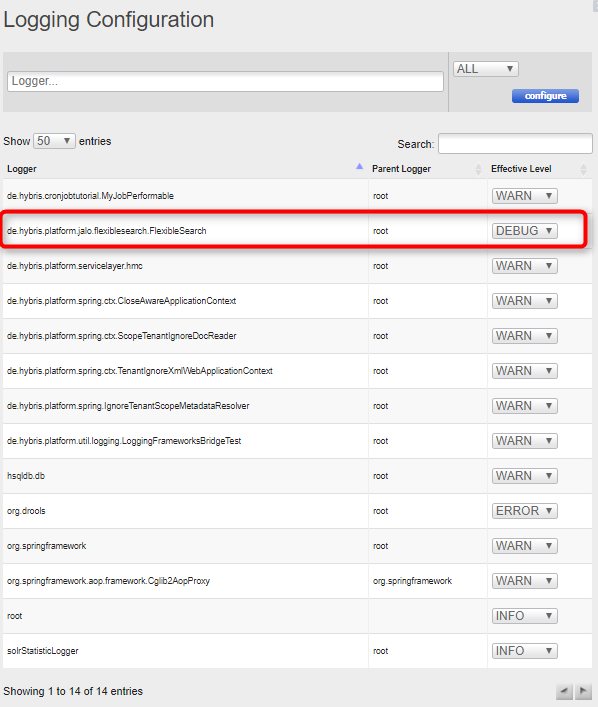
You can activate and deactivate a bunch of loggers in one go.
Print a bean list from a particular context
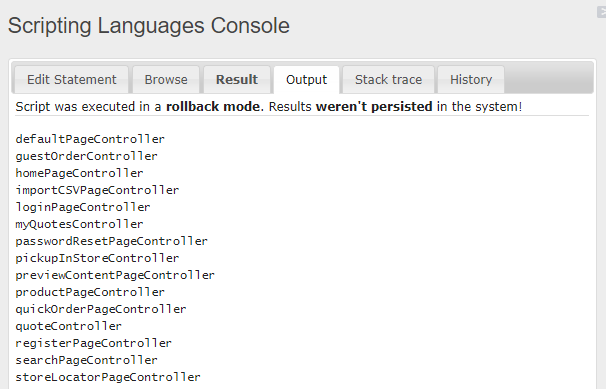
The default example from Groovy Hybris Scripting shows only the beans accessible from HAC. The list is quite short and not very useful. The code below shows the beans from any particular context.
STOREFRONTCONTEXT = "/trainingstorefront";

import de.hybris.platform.spring.HybrisContextLoaderListener;
import org.springframework.web.context.ContextLoader;
import org.springframework.web.context.WebApplicationContext;

def f = ContextLoader.getDeclaredField("currentContextPerThread");
f.setAccessible(true);
appContext = null;
Map<ClassLoader, WebApplicationContext> contexts = f.get(HybrisContextLoaderListener);
for (loader in contexts) {
    contextName = loader.getKey().getContextName();
    if (contextName == STOREFRONTCONTEXT) {
        appContext = loader.getValue();
    }
}

if (appContext == null) { println ("context is not found. Please set up STOREFRONTCONTEXT (for example, '/trainingstorefront') "); }

printAllBeans(appContext);

void printAllBeans(context)
{
    beanFactory = context.getAutowireCapableBeanFactory()
    for (String beanName : beanFactory.getBeanDefinitionNames()) {
        println beanName;
    }
}
Executing the method from the page controller bean
You may want to execute a method from the controller bean. Normally, this is not possible because the bean is not accessible, the context is not set up properly, and so on. The code below shows that it is feasible.
// replace "printAllBeans(appContext)" from the example above with the code below
import de.hybris.platform.catalog.model.CatalogVersionModel;
import de.hybris.platform.core.model.c2l.LanguageModel;
import de.hybris.platform.catalog.model.CatalogModel;
import org.springframework.validation.support.*;
import de.hybris.platform.commercefacades.user.data.CustomerData;
import de.hybris.platform.commercefacades.storesession.data.*;
import org.springframework.web.servlet.mvc.support.*;

catalog = "electronicsContentCatalog";
catalogVersion = "Online";
siteUid = "electronics";
currentUser = new CustomerData(); //set up the customer if needed ...
currentCurrency = new CurrencyData(); //set up the currency if needed ...
currentLanguage = new LanguageData(); //set up the language if needed
currencies = new java.util.ArrayList();
currencies.add(currentCurrency);
languages = new java.util.ArrayList();
languages.add(currentLanguage);

CatalogVersionModel catalogVersionModel = catalogVersionService.getCatalogVersion(catalog, catalogVersion);
CatalogModel catalogModel = catalogService.getCatalogForId(catalog);
LanguageModel languageModel = i18NService.getLanguage("en");
Collection<CatalogVersionModel> catalogVersions = new ArrayList<CatalogVersionModel>();
catalogVersions.add(catalogVersionModel);

sessionService.setAttribute("currentCatalogVersion", catalogVersionModel);
sessionService.setAttribute("catalogversions", catalogVersions);
sessionService.setAttribute("language", languageModel);
baseSiteService = spring.getBean("baseSiteService");
currentSite = baseSiteService.getBaseSiteForUID(siteUid);
sessionService.setAttribute("currentSite", currentSite);
locale = new Locale("en");
sessionService.setAttribute("locale", locale);

homePageController = appContext.getBean("homePageController");
model = new BindingAwareModelMap();
model.put("user", currentUser);
model.put("siteUid", siteUid);
model.put("siteName", siteUid);
model.put("currentCurrency", currentCurrency);
model.put("currentLanguage", currentLanguage);
model.put("currencies", currencies);
model.put("languages", languages);
redirectModel = new RedirectAttributesModelMap();
template = homePageController.home(false, model, redirectModel);
println "template = $template";
for (modelItem in model) {
    println modelItem;
}
We can see in the output that some model values were set by the home page controller. The controller returns the name of the JSP template, and you can find it in the output as well.
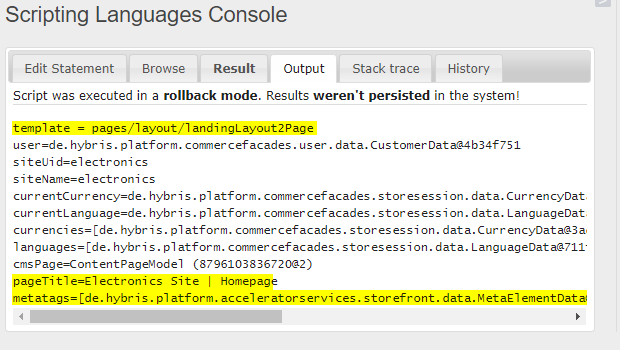
Print all URLs from all controllers (RequestMappings)
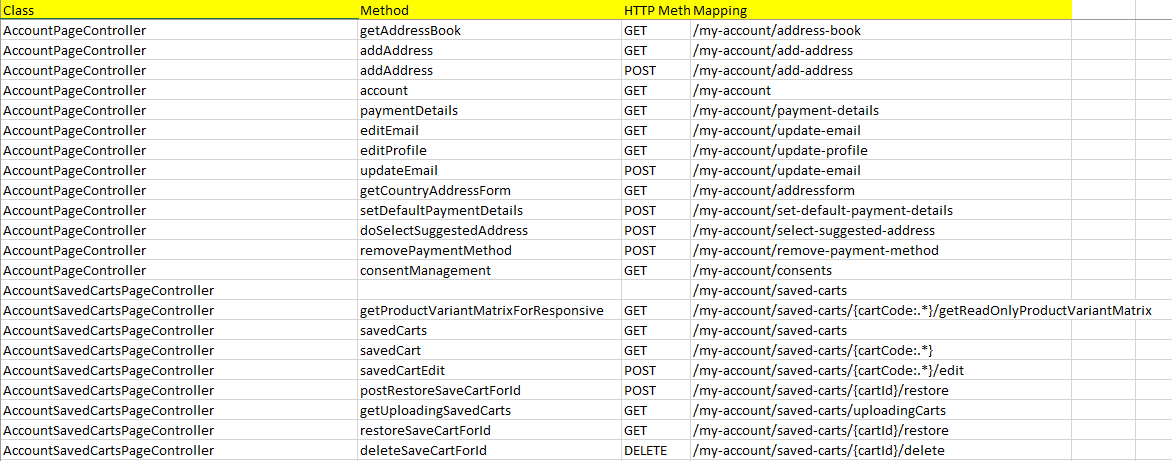
The code below shows all request mappings from all controllers of a particular context.
STOREFRONTCONTEXT = "/trainingstorefront";

import de.hybris.platform.spring.HybrisContextLoaderListener;
import org.springframework.web.context.ContextLoader;
import org.springframework.web.context.WebApplicationContext;
import org.springframework.web.bind.annotation.RequestMapping;
import java.lang.reflect.*;
import java.lang.annotation.Annotation;
def f = ContextLoader.getDeclaredField("currentContextPerThread");
f.setAccessible(true);
appContext = null;
Map<ClassLoader, WebApplicationContext> contexts = f.get(HybrisContextLoaderListener);
for (loader in contexts) {
    contextName = loader.getKey().getContextName();
    if (contextName == STOREFRONTCONTEXT) {
        appContext = loader.getValue();
    }
}

if (appContext == null) { println ("context is not found. Please set up STOREFRONTCONTEXT (for example, '/trainingstorefront') "); }

beanMap = appContext.getBeanNamesForAnnotation(RequestMapping.class);

for (beanName in beanMap)
{
    requestMapping(appContext.getBean(beanName).getClass());
}

String requestMapping(Class clazz)
{
    classValue = "";
    if (clazz.getDeclaredAnnotations()) {
        for(Annotation annotation :clazz.getDeclaredAnnotations()){
            if(annotation.toString().contains("RequestMapping"))
                printAnnotation(annotation, "class", null, clazz, "");
            classValue = getValue("value", annotation.toString());
        }
    }
    for(Method method :clazz.getMethods()){
        for(Annotation annotation :method.getDeclaredAnnotations()){
            if(annotation.toString().contains("RequestMapping"))
                printAnnotation(annotation, "method", method, clazz, classValue);
        }
    }
}

String printAnnotation(Annotation annotation, String type, Method method, Class clazz, String classValue)
{
    print clazz?.getSimpleName() + "\t"+
    ((method==null)?"":method.getName()) + "\t" +
    getValue("method", annotation.toString()) + "\t" +
    classValue + getValue("value", annotation.toString()) + "\t" +
    getValue("param", annotation.toString()) + "\n";
    ;
}

String getValue(String param, String annotation) {
    retValue = "";
    annotation.findAll(/$param=\[(.*?)\]/) { full, value -> retValue = value; }
    return retValue;
}
Result:
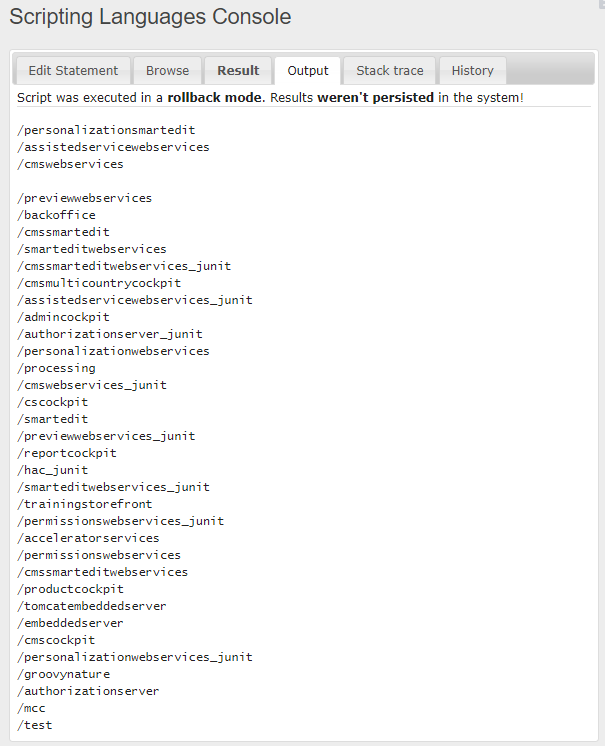
Print all web contexts
import de.hybris.platform.spring.HybrisContextLoaderListener;
import org.springframework.web.context.ContextLoader;
import org.springframework.web.context.WebApplicationContext;

def f = ContextLoader.getDeclaredField("currentContextPerThread");
f.setAccessible(true);
appContext = null;
Map<ClassLoader, WebApplicationContext> contexts = f.get(HybrisContextLoaderListener);
for (loader in contexts) {
    contextName = loader.getKey().getContextName();
    appContext = loader.getValue();
    // print any of context attributes (appContext)
    println contextName + "\t" + appContext.getId();

}
We can see a list of contexts. For each context, you have appContext.
© Rauf Aliev, December 2017
Discussion
Powered by GitHub Discussions — sign in with a GitHub account to join the conversation.