
Previous parts:
- PART 1: /2017/11/23/useful-groovy-scripts-part-1/
- Display any file on the server
- Execute a command
- Show last N lines from the console log
- Execute a Flexible Search query
- Retrieve an item by PK
- Execute a raw SQL query
- Modifying objects
- Removing items
- Sending data by e-mail
- Importing IMPEX
- Print all properties of an object
- Print all methods of an object
- Show the hybris type tree
- Print hybris type stats
- PART 2: /2017/12/02/useful-groovy-scripts-part-2/
- Turn on/off logging for any class
- Print a bean list from the particular context
- Executing the method from the page controller bean
- Print all URLs from all controllers (RequestMappings)
- Print all web contexts
- PART 3: /2017/12/08/useful-groovy-scripts-flexible-search-query-generator-for-any-type/
- Flexible Search Generator
- PART 4: /2017/12/17/useful-groovy-scripts-part-4-external-references/
- Finding all external references to an object (EARLY BETA)
- PART 5: /2018/01/17/groovy-scripts-for-hybris-part-5/
- Restart hybris server
- Converting FlexibleQuery to SQL
- All hybris types that use the particular type
- Executing SQL (DDL)
- Print mysql table structure from hybris HAC
- Print all indexes
- PART 6: /2018/07/20/useful-groovy-scripts-part-6/
- Executing an SQL Query. For hybris 6.0+
- Accessing the file system and fetching a text file via HAC
- Invalidating a cache for a particular item
- Executing the multi-column flexibleSearch
- Executing a long/resource-intensive groovy script
Executing an SQL Query. For hybris 6.0+
In the latest versions of SAP Hybris, the classes from HAC are no longer available in Groovy. The code I published before won’t work anymore.
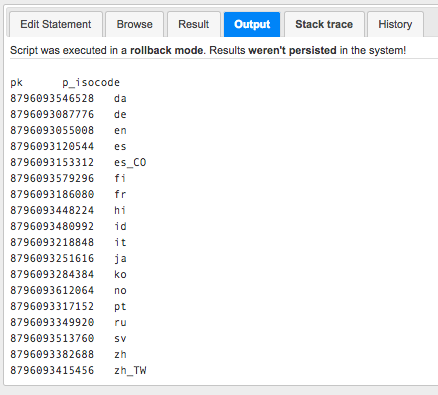
sql = "select pk, p_isocode from languages";
result = jdbcTemplate.queryForList(sql);
result[0].keySet().forEach { print it + "\t"; }
println "";
result.forEach
{
    it.values().forEach { print it + "\t"; }
    println "";
}
The result can be copied to Excel for further processing. Paste it as text, and don’t forget to change the cell types to Text to avoid automatic cell value type detection in Excel.
Accessing the file system and fetching a text file via HAC
For example, the following one-liner shows the contents of localextensions.xml.
"cat ../../../../config/localextensions.xml".execute().text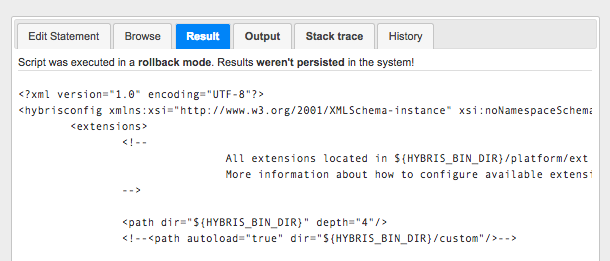
Invalidating a cache for a particular item
cv = catalogVersionService.getCatalogVersion('mycatalog', 'Online')
p = productService.getProductForCode(cv, '123456789')

de.hybris.platform.util.Utilities.invalidateCache(p.pk)

modelService.refresh(p)
"" + p.pk + ":" + p.name
Executing the multi-column flexibleSearch
import de.hybris.platform.jalo.JaloSession;

query = "select {isocode}, {name} from {Language} ";
jaloSession = JaloSession.getCurrentSession();
List result = jaloSession.getFlexibleSearch().search(
    query,
    Collections.EMPTY_MAP,
    Arrays.asList(
        //types of arguments in Select
        String.class,
        String.class
        //String.class, String.class
        //
    ),
    true,
    true,
    0, -1
).getResult();

result.forEach {
    it.forEach { print it + "\t"; }
    println "";
}
The result can be copied to Excel for further processing. Paste it as text, and don’t forget to change the cell types to Text to avoid automatic cell value type detection in Excel.
Executing a long/resource-intensive Groovy script
There is a common problem: some scripts need more time than Tomcat/hybris allows. After a couple of minutes, the system kills the script. To overcome this problem, you need to create a cronjob with this script and launch it. However, remember that if your script is resource-intensive, you may face a lack of resources, and it is not fixable: you won’t be able to stop the script after it is launched.
There are two options. The first one is creating a thread, and the second one is creating a cronjob.
Thread
import org.apache.logging.log4j.LogManager;

def log(String s) {
    println(s)
    LogManager.getLogger().info(s)
}

def thread = Thread.start {
    sleep(2000)
    log "new thread - this line will be in the hybris log only after 2 sec"
    sleep(20000)
    log "new thread 20sec finished - this line will be in the hybris log only after 20 sec"
    sleep(20000)
    log "new thread last 20sec finished - this line will be in the hybris log only after 40 sec"
}

log "immediate message in the groovy console and hybris log"
Cronjob
First, you need to create a Groovy script and save it in HAC as “test1”. This script name is specified in the script below. Of course, you can use any name instead of “test1”; just replace it with your script name in the fourth line of the script below.
As an example of a long-running script, let’s take one that shows the files from the hybris media folder.
def p = ['/bin/bash', '-c', 'ls -lR ../../../../data/media/sys_master/* > /tmp/media-folder-size.tmp'].execute()
p.waitFor()
println p.text
import de.hybris.platform.servicelayer.internal.model.ScriptingJobModel;
import de.hybris.platform.cronjob.model.CronJobModel;
scriptName = "test1"
CRONJOBNAME = "myHacScriptCronJob1";
MYHACSCRIPTJOBNAME = "myHacScriptJob1"
def scriptingJob = null;
def myHacScriptDynamicCronJob = null;
scriptingJobResults = flexibleSearchService.search("select {pk} from {ScriptingJob} where {code} = '" + MYHACSCRIPTJOBNAME + "'").getResult();
if (scriptingJobResults.size() > 0) {
scriptingJob = scriptingJobResults.get(0)
} else {
scriptingJob = modelService.create(ScriptingJobModel.class);
scriptingJob.setCode(MYHACSCRIPTJOBNAME);
scriptingJob.setScriptURI("model://" + scriptName);
modelService.save(scriptingJob);
}
try {
myHacScriptDynamicCronJob = cronJobService.getCronJob(CRONJOBNAME);
} catch (de.hybris.platform.servicelayer.exceptions.UnknownIdentifierException e) {
myHacScriptDynamicCronJob = modelService.create(CronJobModel.class);
myHacScriptDynamicCronJob.setCode(CRONJOBNAME);
myHacScriptDynamicCronJob.setJob(scriptingJob);
myHacScriptDynamicCronJob.setActive(true);
myHacScriptDynamicCronJob.setSingleExecutable(true);
myHacScriptDynamicCronJob.setLogToFile(true);
modelService.save(myHacScriptDynamicCronJob);
}
dynamicCJ = cronJobService.getCronJob(CRONJOBNAME)
cronJobService.performCronJob(dynamicCJ, true)After the cronjob is over, open the temporary file from /tmp/media-folder-size.tmp to see the results:
"cat /tmp/media-folder-size.tmp".execute()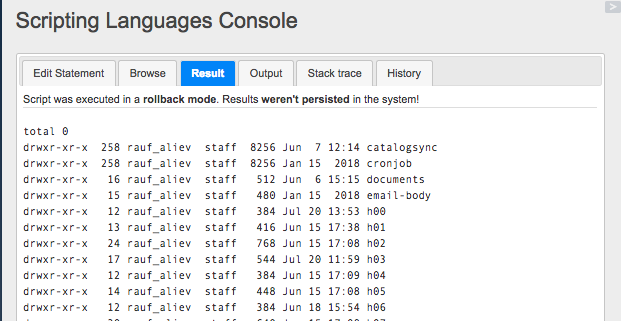
For this particular case, the large size of the file can be an issue. This file can be preprocessed in Groovy before being delivered. For example, all non-relevant stuff, such as file flags, a user ID, and a group ID, can be removed.
Discussion
Powered by GitHub Discussions — sign in with a GitHub account to join the conversation.