
This article explains how to create a copy of a product or content catalog. For example, you may want to create a second store using an existing one as a starting point, or you may want to create a new country version of an existing e-shop. You can use this solution for creating a custom data exporter as well. These recommendations are useful when the website you want to use as a template has been manually changed by administrators since it was launched. In this case, the set of IMPEX files with the initial setup is no longer relevant, and you need to create a new set from the live system.
There is an out-of-the-box exporter, but unfortunately it is not flexible enough in terms of configurability and extensibility. For example, I can’t specify the catalog version for the objects to export. Some object properties are exported separately from the objects they belong to. For example, the OOTB Product export doesn’t include product supercategories as part of Product. This information is exported as part of the CategoryProductRelation type.
I compared the impexes created by the out-of-the-box script generator and the one explained in this article:

…

The Impex on the right includes the relations closer to the object it refers to. For particular use cases, it is more convenient than the out-of-the-box approach. However, it also creates complexity: we need to process N:N relations. In the current PoC, I blacklist some attributes of some types to avoid mutual references for N:N relations. It is not a nice workaround, but it is enough for a PoC. Of course, in the PoC, for the sake of simplicity, there are other drawbacks and points to improve in the next versions, including this one.
When we discuss object cloning, there is also a dedicated tool for this purpose. Hybris 6.4.0 introduced a new CMS Cloning Strategy that enables us to clone CMS pages. It is well documented. However, today we are talking about catalog-aware objects in general, both product and content data.

The approach below demonstrates how to address the problem for the out-of-the-box storefronts, both for product and content catalogs.
In order to create a copy of the catalog, we need to clone all catalog items with all attributes. In the solution explained below, I export the items into IMPEX and import them back into the new catalog. The same approach is used in the out-of-the-box Impex script generator.
However, there is a complication: external links and relations. Some external links need to be rewritten: for the cloned copy, the objects they link to are also cloned. For example, you may not want to clone media objects. This is useful if media is designed to be shared between catalogs.
The key point here is simple: we don’t know what cloning logic should be applied for a particular reference. For example, you have a product linked to a category. If you create a cloned copy of the product, should you preserve the link to the category or use a new item of Category created as part of the cloning process? This means you need to configure, per type and attribute, whether you want the objects to be referenced (shallow copy) or cloned too (deep copy).
The good point here is that these rules are already defined in the catalog synchronization configuration for the existing types and attributes.
So my goal is to create an IMPEX file for all these types, taking into account the synchronization configuration with some manual tuning. If it says that the object needs to be cloned, I am going to resolve the link into a set of external symbolic keys, such as UID or CODE. If the configuration says that the object needs to be referenced, I will use a PK instead.
For example, the fields of this type are selected in the IMPEX below (BTW, this IMPEX is generated by my script):
INSERT_UPDATE  SimpleResponsiveBannerComponent;\
  actions(catalogVersion(catalog(id), version), uid);\
  catalogVersion(catalog(id), version)[unique=true];\
  container;\
  containers(catalogVersion(catalog(id), version), uid);\
  media(catalogVersion(catalog(id), version), qualifier)[lang=en];\
  media(catalogVersion(catalog(id), version), qualifier)[lang=de];\
  name;\
  onlyOneRestrictionMustApply;\
  restricted;\
  restrictions(catalogVersion(catalog(id), version), uid);\
  sealed;\
  slots(catalogVersion(catalog(id), version), uid);\
  type[lang=en];\
  type[lang=de];\
  typeCode;\
  uid[unique=true];\
  urlLink;\
  visible;\
For the selected fields, the values are also generated:
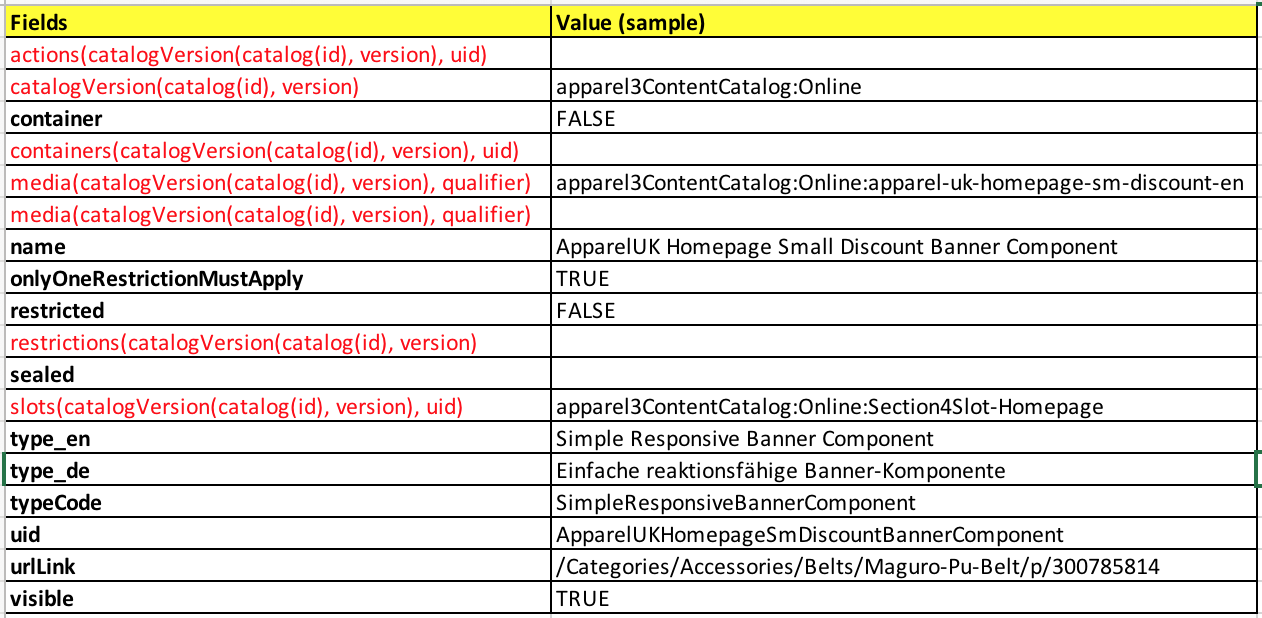
Why IMPEXes? Because they help me split the process into two separate phases: exporting and importing. I will be able to change the data in the middle. I can extract the data from one environment and apply the impexes to another environment. At the very least, I can use this information as a backup of the catalog-aware objects.
Some objects don’t need to be copied. This is very specific to the task, though. For example, PriceRow and Media are catalog-aware, but creating copies of all media might not be part of your task because it is a resource-intensive process. So we need to mark such objects as “referenced”.
Many types are subtypes of one or more supertypes. An object of the subtype also belongs to the supertype, so we need to take it into account to avoid doing the work twice. For example, there are objects of the Product type and objects of ApparelSizeVariantProduct, which is a subtype of Product.
We need to split attributes into language-dependent (localizable) and language-independent. For the sake of clarity, each group can be additionally split into two categories: values and references.
Solution in detail

- “Script 1”: Generate a list of types to export
- Apply additional (manual) rules to the list
- “Script 2”: Generate a list of attributes of each type and resolve the references
- unique attributes
- language-independent
- values
- references
- catalog-aware references
- catalog-unaware references
- language-dependent
- values
- references
- catalog-aware references
- catalog-unaware references
- “Script 3”: For each of the categories above, generate an Impex script for exporting.
- Export data from hybris via the generated Impex script (OOTB)
- Create a cronjob with this Impex file.
- Run the cronjob.
- “Script 4”: Replace the
catalogVersionwith the target one.- In order to get the copy of the existing data, we need to replace the catalog name with the target (new) catalog name.
- Import the dataset back to hybris (or apply it to a new instance)
The first task we need to address is identifying the catalog-aware hybris types. We need to clone items in them. For example, if you clone a content catalog, all pages, page slots, and components need to be cloned.
Script 1. Generate a list of types to export
The catalog-aware types are marked with the property catalogItemType in items.xml. The following Groovy script shows the type tree with the catalog-aware status:
The fragment of the output:

As you can see, some types may be catalog-aware while their parent types are not, and vice versa.
To have a clone, we need to process the types marked with
truein the output. For SAP hybris 6.6 OOTB, the final list of such objects has 177 objects.
You may need to reduce the number of types to export because there are many of them that are not very important for the process or are empty. However, you need to remember that excluding Media won’t create clones of the images, and you need to configure the exporting or importing modules to process the external references to images correctly. For example, ProductX from CatalogA has an image Y from CatalogA. After creating a copy of ProductX in CatalogB, the system will expect that ImageY is also copied. If you exclude Media from the list of types, the image won’t be created and the IMPEX file will have an issue. You may need to fix it manually or automatically by processing image types with some custom rules.
Script 2. Generate a list of attributes of each type and resolve the references
Let’s create a list of attributes for IMPEX for the types created at the previous step. The output of this script will be used as input for the IMPEX statement generator.
The script is written in Groovy, so you can execute it in HAC without installing any additional software.
https://github.com/raliev/hybrismart-cloningcatalogs/blob/master/script2-types-and-attributes.groovy
The script creates a list of attributes in the following form:

For each type from the list, it finds the exportable attributes and creates parameters for columns in the Impex, such as (catalog(id), version). You can see the block with the 0s and 1s in the screenshot above: these digits are the attribute flags, such as unique attribute, mandatory attribute, or relation type flag.
In order to push the data to the next script, we need to include the data created here as an input for the Impex generator Groovy script. However, there is a limitation: a hybris Groovy script can’t pull data from CSV easily. The simplest solution is to include the data as part of the Groovy script. There is no limitation on the size of the script, so it will work well:

So I decided to slightly change the output format: this script creates semicolon-delimited values enclosed in quotes, followed by a comma, to use this block as a constant array (lines).
Script 3. Generating an Impex script for use with the default hybris export module
This script is relatively simple. It transforms the data from the previous step into instructions for hybris about what types and attributes should be exported.
The script converts these lines from the input (generated by the script from the previous step):

To the following IMPEX script:

Having executed, this script creates a zip file with the CSV data:

CMSNavigationEntry.csv:

In order to import it back, you need to change catalogVersion to a new value: a new catalog created for a data copy. However, there are things you need to take into account as well:
- The scripts above are designed to work with only one catalog at a time. That means you need to repeat the steps separately for Product and Content catalogs.
- A classification catalog is also a catalog you may want to copy, but the attribute for it has a different name,
systemCatalog. Currently, the scripts are not designed to process classification catalogs. It is easy to add this feature, though. - Some attributes are excluded because they have a special purpose. They are listed in the scripts. You may need to exclude more attributes for your set.
- Some attributes conflict with each other. For example, Object A refers to Object B while Object B refers to Object A as well. Hybris can handle it via lean imports, but in some cases it doesn’t work nicely. For example, the attribute
contentSlotsfor the page objects was excluded because ContentSlots are defined via contentSlot objects.
The script can process multi-language attributes correctly. If you have more than one language, you may need to export data in all available languages. In this case, you need to include a list of languages in the script as well:
languages = ['en', 'de'];For each language, you will have a separate attribute definition in the IMPEX header:

Script #3 is available here:
https://github.com/raliev/hybrismart-cloningcatalogs/blob/master/script3-create-impex.groovy
The output of the script can be used in the out-of-the-box exporting module.
Results
After applying the impexes back to hybris, but in the new catalogs (Product and Content), and configuring a new website,
duplicateappareluk.localour website is available as a copy:

Product information in the backoffice:

As you can see, the new Product catalog is available here, and the product is linked to the right supercategories from the same catalog (apparel 2).
The scripts are available on GitHub:
https://github.com/raliev/hybrismart-cloningcatalogs
Please take into account that these scripts are not designed as a complete and universal solution. It is just a proof of concept. Using these scripts as a starting point, I’ve developed project-specific solutions for the needs of my project.
Discussion
Powered by GitHub Discussions — sign in with a GitHub account to join the conversation.