
What is the best strategy for sorting products on category pages?
The simplest way is to set up the order manually. In retail outlets, it is called merchandising. For e-commerce, this method works well for small catalogs, up to 50–100 items.
In contrast, the alternative comprehensive way is to use big data analysis. You can collect all behavioral data, browser information, device information, and screen resolution to create a dynamic customer profile. You can find similar profiles in your history to identify customer expectations and push some products higher based on this information. This approach is at the other end of the complexity scale. If you are not Amazon, Booking.com, or eBay, this approach can be too expensive and less efficient than you might expect.
Hybris default product sorting options
By default, hybris Accelerator is equipped with the following sorting methods:
- Relevance (default)
- Top Rated
- Name (ascending)
- Name (descending)
- Price (lowest first)
- Price (highest first)
By default, sorting by Relevance means sorting by inStockFlag and Score, where Score is a Solr relevancy index and inStockFlag is an availability flag used to push unavailable products toward the end of the list.
However, for category pages, “relevance” doesn’t make sense because the query is very specific: “select all products from category X and its subcategories.” As a result, the sorting is undefined, except for inStockFlag, which splits the results into two parts: available and unavailable.
Using hybris Backoffice CommerceSearch, some products can be marked as boosted, and they will be displayed at the very top of the product list.
Manual sorting of products
Let’s start with the simplest approach: manual sorting. If you have fewer than 50 products in the catalog, this way is the most recommended.
However, for larger catalogs, neither customers nor merchandisers are able to keep all products in their minds.
Hybris out of the box doesn’t provide an efficient mechanism for manual sorting. A good candidate for hybris Marketplace!
Sorting by best-selling products
The next step is putting bestsellers toward the top. There are, however, some deficiencies. Sorting by sold quantities, or number of sales, moves the least profitable products higher on the list as well as cheap offers.
Hybris doesn’t provide this feature out of the box. To implement it, you need to update the Solr product index with sold quantities and add a custom sorting method that uses this attribute. A good candidate for hybris Marketplace!
Using product ratings and reviews
User ratings could be used as a secondary sorting method. However, this approach has serious drawbacks as well. In the default hybris, the product rating value is created or updated once the customer writes a product review. The average rating means different things for one user review and for one hundred. Users don’t like writing reviews, so the majority of your products will not be rated properly.
The solution is obvious: use the number of reviews as a weighting factor in the formula. The correlation coefficient is not linear: different weighting factors should be used for different ranges. Over time, however, product ratings followed a Gaussian distribution. The majority of products are in the 2–4 range, on a scale of 1 to 5, with a maximum at 3.5–4. All bestsellers were rated as 4.5 on average, while most of the remaining products were rated as 4 on average. Over time, these groups became closer to each other, and sorting by rating didn’t seem useful anymore.
Another issue is the rating form. To avoid cheating counters, you need to implement specific anti-cheating logic and/or authentication. The latter is too complicated for customers and eventually leads to a reduction in the number of reviews. Anti-cheating tools like captchas or IP checks won’t help because, with a small number of reviews, every single review counts and pushes the product toward the top. If you sell products from different suppliers or manufacturers, cheating will not be long in coming.
The alternative solution is to use the Facebook LIKE button. Anti-cheating and authentication are handled by Facebook, and the number of likes is available for processing in the e-shop and for use as a sorting criterion.
The main problem with this method is that old SKUs will always rank higher than newer ones, which in turn will take more time to move upward.
Hybris OOTB provides this sorting method in the default configuration. Hybris calculates the average rating at the indexing phase and saves it into the Solr index. This value is used for sorting when “Sort by rating” is selected.
Useful links:
Sorting by price
This approach is very clear for the customer. As a rule, customers know their budget, and they are able to choose between products in the same price category. When you sort by price from low to high, you can see the progression in price as you scan the list of products.
Customers use this sorting to understand the price range of the available products and make a decision based on these numbers. Very often, they turn to the average-priced products.
This aspect of human nature is exploited to increase sales. Some stores deliberately add expensive products to shift the average. There, in the absence of any price information, consumers are more likely to buy expensive products.
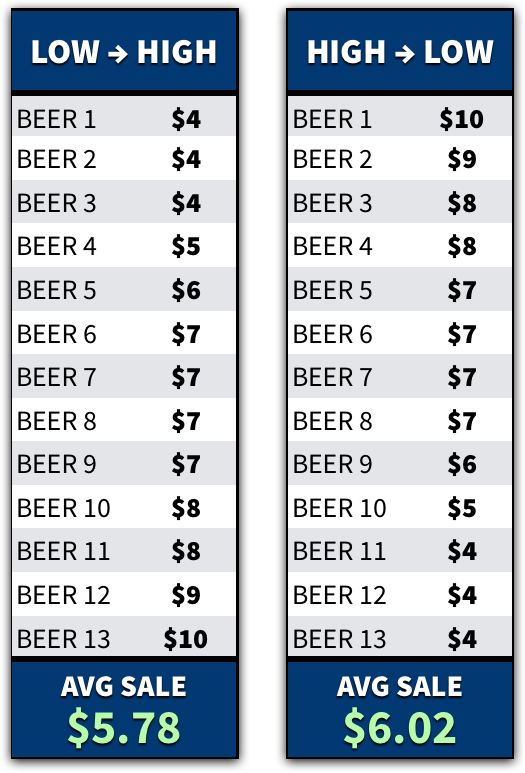
Suk, Lee, and Lichtenstein (2012) tested that claim in a bar. Over an 8-week span, and 1,195 beers, the researchers alternated the sequence of beer prices. They maximized revenue when they sorted prices from high to low.
Thanks to a simple change in sequencing, the bar owners now make an extra $0.24, on average, for every beer sold.
But why does that happen? The researchers proposed two reasons.
Anchoring / Reference Prices. When consumers evaluate a list of products, they use the initial prices to generate their reference price.
Reason 2: Loss Aversion. As humans, we focus on losses. Whenever we choose an option, we lose benefits from the options that we didn’t choose. And that hurts. Depending on your pricing sequence, i.e., low to high vs. high to low, customers perceive different losses when they scan down the list of products.
When you sort products by ascending price, i.e., low to high, customers view each new product as a loss in price. With each new option, they’re gradually losing the ability to pay a lower price. Thus, they feel motivated to minimize that loss by choosing a lower-priced product.
But here’s the flipside. When you sort products by descending price, i.e., high to low, customers view each new product as a loss in quality. Thus, they feel motivated to retain a higher-quality, more expensive product.
Sorting by price has its flaws.
The first problem is that bestsellers are usually not on top of the list. The cheapest products are generally not interesting.
The second issue is crowding out of “normal products” by cheap accessories and consumables.
The third issue is about navigation: it works well if all items are on the same page. Pagination makes navigation difficult. From a customer’s point of view, for a result set of 100,000 items, sorting by price actually filters the result set, selecting at most 300 items with the lowest prices and effectively removing the remaining 99,700 higher-priced items from consideration.
This approach looks like a good candidate for a secondary sorting method.
When price sorting is selected, you can think about rethinking the price facet design and moving it to the fore:

A good candidate for hybris Marketplace!
Hybris OOTB provides sorting by price in the default configuration.
Sort by turnover/margin
To overcome the issue with accessories and consumables in the first positions, you can use turnover/margin as a popularity index. You can use a time window of 30 days, or as per the business requirement. You can recalculate turnover/margin periodically for all products using the value of sales for the last N days or weeks. It also shows good results for seasonal products. The shorter this period of time is, the higher new and trending SKUs will appear. Longer periods move established SKUs toward the top. However, this approach has its flaws too. For example, products sold more during the Valentine’s Day season may unduly influence product sorting in April.
This approach seems the best and can be used as the default one for product listings.
Hybris OOTB doesn’t provide this functionality.
Most viewed
This sorting criterion is close to ratings, but with a simpler rate mechanism: just visit the page. The drawbacks are the same. No protection against cheating. I don’t recommend considering this option at all.
Hybris OOTB doesn’t provide this functionality.
Category-specific sorting
Unfortunately, this sorting method is completely overlooked by the e-commerce community. By “category-specific sort types,” I mean any sorting options that are only available in one or a few selected categories, because they wouldn’t make sense as site-wide sorting options; they only make sense for the products within those particular categories.
Examples include being able to sort suitcases by volume, fishing rods by length, pens by point size, hard drives by storage capacity and spindle speed, road bikes by weight, etc. It’s this category specificity that makes them different from common site-wide sort types such as “Best Selling,” “Relevance,” “User Ratings,” and “Price,” which are typically available for all products and categories throughout a site.
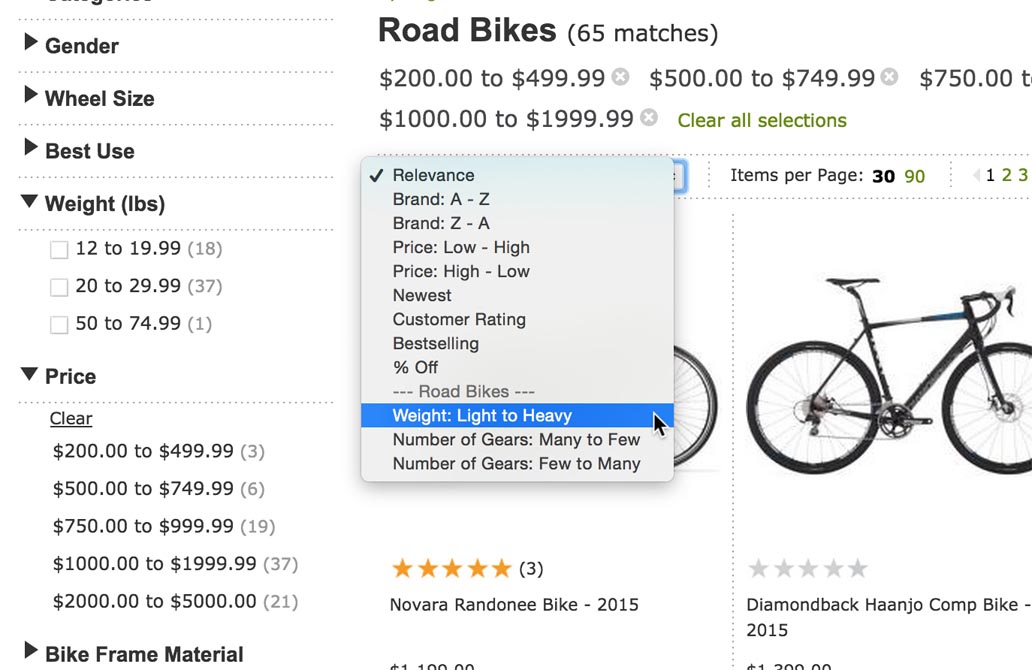
If users could sort lipstick by color, the progression in color shades, that would be an enormously popular feature. Users sort as a way of grouping, or to help them find a particular item if they know where it will be in a list, e.g., sort by name, and there doesn’t need to be a natural progression to be useful.
Hybris OOTB doesn’t provide this functionality. To implement that in hybris, we need to display different sorting methods for different categories based on the configuration and facet information. If the results have no products with a weight attribute, there is no need to display this sorting method in the list and confuse the customer.
A good candidate for hybris Marketplace!
Stay tuned.
© Rauf Aliev, November 2016
Discussion
Powered by GitHub Discussions — sign in with a GitHub account to join the conversation.