
Every hybris project is unique: a different set of modules, different configuration, different design, and different customer expectations. Increasing demands and challenges make us create highly customized solutions.
I was wondering which pieces of functionality would be useful for any hybris project, regardless of its specific purpose, requirements, and expectations.
In this article, I will talk about three components that seem to be “must-haves” for all systems I can imagine. They are optional, and of course they will add extra costs to your project. However, in my view, without them you will spend more after the system is launched.
#1 Feature toggle component
Feature toggles are a technique that allows you to modify system behavior without changing code and to deliver new functionality to users rapidly but safely.
The most basic implementation of feature toggles is hybris configuration files. For example, for the hybris built-in multi-step checkout, the following configuration parameters help manage the behavior:
site.pci.strategy=SOP
#site.pci.strategy=HOP
#hop.pci.strategy.enabled=false
#hop.pci.strategy.enabled.apparel-uk=true
#hop.pci.strategy.enabled.apparel-de=true
#hop.pci.strategy.enabled.electronics=true
Using these keys, you can enable the PCI strategy for a particular storefront as well as configure the strategy itself by choosing the proper implementation. These keys can be changed either permanently by changing the configuration files, or temporarily using the web interface.
However, the built-in implementation is too basic and very limited. I highly recommend implementing a custom module for feature switching.
Benefits and Use Cases of Feature Toggles
The typical benefits and use cases of feature toggles are:
- Kill Switch and Sunset. Quickly turn off a poorly performing feature. Cleanly sunset old, unused features.
- Early Access and Opt-In. Allows users to opt in for early access to new features and test beta programs on your live application. You can explicitly include the people or groups you want to see a new feature.
- Scalable Rollouts. Perform phased rollouts to verify that there are no scalability issues.
- Run A/B Tests of features to see which features perform better.
- Maintenance (Debug) Mode. Put portions of your application, or your entire application, into maintenance mode.
Drawbacks of the Hybris Default Implementation
There are a number of possible flaws in hybris built-in feature toggles.
- All your changes via HAC are temporary. Once you restart the server, all the toggles will be reset to their initial state defined in the configuration file. So to make them persistent, you need to deploy a new patch or version.
- It is not documented whether hybris reads the configuration variable once or uses the cached value instead of rereading the configuration. You can change the value in HAC, but this change may affect nothing.
- There is no validation. Some incorrect values can lead to exceptions or inadequate behavior.
- Some parameters are not predefined.
- There is no common naming system for the parameters.
- You can’t intercept the change.
- There is poor CSS and JavaScript support.
It is absolutely clear that hybris feature flags functionality needs to be improved.
Solutions
The solution to most of the listed issues is similar to what I explained in one of my previous posts, “Managing localized messages in Backoffice”.
For our projects at EPAM, we use our module called Feature Switcher.
#2 Data analytics components
This section is not only about web analytics. By that I mean a wide range of collecting data, processing it, and generating events when the data is particularly wrong.
Web analytics tools like Google Analytics are only one thing. The default support for Google Analytics is very basic in hybris. Google Tag Manager is not supported at all, although it is used in most web projects along with GA. For instance, checkout and form tracking are crucial for e-commerce websites, but they are not implemented in the default hybris accelerator template.
Besides web analytics, there is a wide range of other types of data to collect, process, and analyze automatically and progressively as data accumulates. Business objects such as orders, registrations, and purchases, as well as technical objects such as memory consumption, processor load, and database load, are objects for continuous monitoring.
Your system should be capable of exposing this information to systems that are purposely designed for monitoring and alerting. It is one of the most important tools for early detection of system health problems.
Some problems may be hidden in hybris, and without these tools you will face the problem when the solution becomes costly and comprehensive. For example, one of your modules creates items in a table every second. Your database is getting much larger, much faster than it was before the update. It may take months before you realize the roots of the problem.
#3 Test productivity components
Everyone knows that automated software testing is the best way to increase the effectiveness of the development process. However, in many cases, automated testing costs too much. It is common to be concerned about the costs. However, the reason test automation costs so much is that it’s done in a silo far removed from the development effort. Test automation specialists should work in close cooperation with developers. In most projects, the test automation flow and the development flow run in parallel to each other. The code is covered with tests blindly, and the resulting costs become higher and higher.
If you are limited in resources to do automated testing properly, I recommend the following strategies:
One strategy is to find the right quality level. Not all products need to be free of defects. Not every function needs to work. Sometimes, you have options to do a lot about lowering product quality. This means you can cut down testing in less important areas.
Another strategy is priority: tests should find the most important defects first. Most important often means “in the most important functions.” These functions can be found by analyzing how every function supports the mission and checking which functions are critical and which are not. You can also test more where you expect more defects. Finding the worst areas in the product early and testing them more will help you find more defects. If you find too many serious problems, management will often be motivated to postpone the release or give you more time and resources.
A third strategy is getting someone else to pay. Typically, this someone else is the customer. You release a lousy product and the customer finds the defects for you. See the “Feature toggles” section above. You can allow users to opt in for early access to new features and test beta programs on your live application. You can explicitly include the people or groups you want to see a new feature. These first users are your early adopters, and the feedback they provide will be instrumental in the early stages of your product. But as much as you need your early adopters, there’s one thing that you must remember about them: your early adopters are not your mainstream users.
All these strategies require including some special code in your system. I recommend thinking about the testing framework in advance.
Technical details: Feature Toggles
The following objects need to use feature toggles:
- Java code
- JSP code
- Data
- Impex
- Data objects
Java code and feature toggles
Hybris Configuration supports config change listeners. You can define custom code that reconfigures the system once the property is changed in HAC, not in the file. The configuration file is loaded only once at startup.
ConfigurationService is a simple tenant-level wrapper around the hybris low-level implementation.
JSP code and feature toggles
To use hybris feature toggles in JSP templates, there are dedicated JSTL core tags. Some configuration variables should be set by the BeforeViewHandlers rather than controllers to be used in different templates. See the example below in the section about CSS.
In the FeatureSwitcher module at EPAM, we use custom tags to mark fragments that depend on the feature state.
<featurecontent featurename="...">
...
</featurecontent>
hybris JavaScript and feature toggles
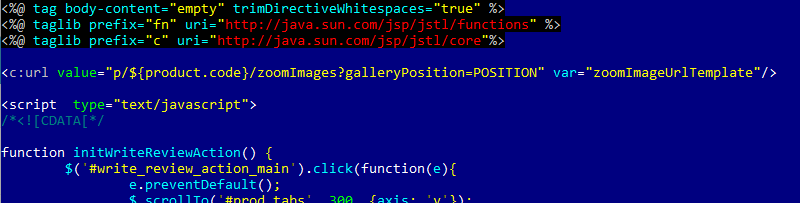
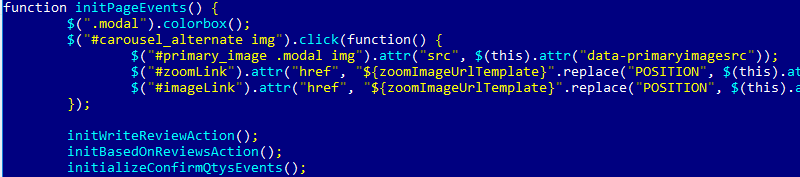
JavaScript files are static in hybris. To make them dynamic and dependent on feature toggles, hybris generates JavaScript code from JSP templates.
The following example doesn’t use configuration properties, but it illustrates the approach. Look for zoomImageUrlTemplate:
…
hybris CSS and feature toggles
The default hybris can’t generate CSS on the fly, and that’s OK. The workaround, if the need arises, is the same as for JavaScript code: using JSP templates and building CSS fragments conditionally.
The conditional include link is also used:

By the way, wro4JEnabled is set by the BeforeView handler. It reads:
storefront.wro4j.enabledand pushes the value into all templates:
modelAndView.addObject("wro4jEnabled",
 Boolean.valueOf(getSiteConfigService().getBoolean("storefront.wro4j.enabled", false)));
You can use the sample implementation from hybris to create your own configuration populators:
de.hybris.platform.yacceleratorstorefront.interceptors.beforeview.ConfigWro4jBeforeViewHandlerData and feature toggles
For simple objects and small sets of data, you can use custom restrictions that expose some items only if the specific configuration variable is set. However, this approach is ambiguous and questionable in terms of performance and supportability. If you need to deal with different sets of data, I recommend creating a Groovy script that enables and disables the feature. This code can be launched when the configuration value is changed and the saved value in the class doesn’t correspond to the value in the configuration file. Depending on the change, the activation or deactivation logic is performed.
If possible, deactivation scripts shouldn’t remove any items.
Impexes and feature toggles
Hybris uses the following syntax to execute different value lines depending on the configuration properties:
#% if: !"responsive".equalsIgnoreCase(Config.getParameter("commerceservices.default.desktop.ui.experience"));
...
#% endif:
© Rauf Aliev, November 2016
Discussion
Powered by GitHub Discussions — sign in with a GitHub account to join the conversation.