
Introduction
There is a well-known mechanism for internationalization (i18n) in Java known as resource bundles. They contain locale-specific resources, usually one file per language version. Hybris uses the following naming convention for the files used as resource bundles:
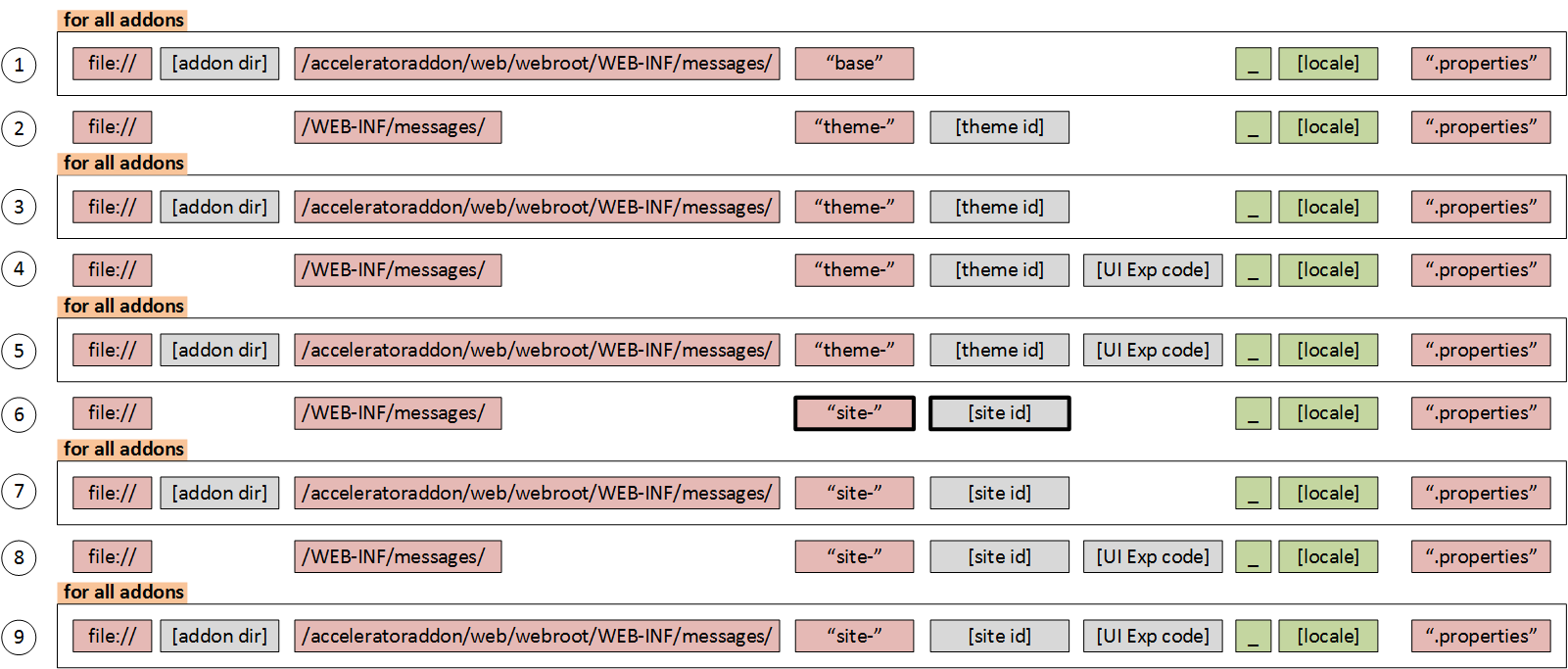
There are different families of bundles for different websites and add-ons. Each resource bundle in the family contains the same items, but the items are translated for the locale represented by that resource bundle. These are key/value pairs. The keys uniquely identify a locale-specific object in the bundle.
Hybris uses this concept for system messages, labels, and button titles used in templates to make them dependent on a particular website state, such as the language version.
Bundle properties are named after the content they are supposed to describe. There is a convention to use dot-separated words. For example,

There are more than 2,000 items used mainly in templates. Some of the items are used directly from Java code. Many of them are not used at all.

Using CMS, you can change page components and their parameters, but these messages are not editable. If you need to change them, you need to ask the developers because these files are part of the codebase. It can be said that these messages are hard-coded. It is good that all of them are in the same place and tagged, but the truth is that they are not editable by administrators.
If you find a shameful typo when your website is up and running, it can take hours to fix it. From a technical perspective, there is not a big difference between fixing a minor bug in the code and fixing a typo in the resource files. In both cases, you need to create a patch and apply it to the cluster.
That is why some of my clients ask to move the messages from the file system to the database to make them editable.
In addition, managing localized messages is very convenient for translators.
For example, some design elements may not be suitable for the translated text if it is much longer or shorter than the original version. There is a property named:
checkout.multi.paymentMethod.addPaymentDetails.generalErrorLet’s compare its values for English and German:
English version: “An error occurred contacting the payment provider. Wait a few minutes and try again. If the problem persists, please contact our sales team.” (139 chars)
German version: “Während der Kontaktaufnahme zum Zahlungsanbieter ist ein Problem aufgetreten. Warten Sie einige Minuten und versuchen Sie es erneut. Wenn das Problem weiterhin auftritt, wenden Sie sich an unser Vertriebsteam.” (209 chars)
The difference is 70 characters, which could be too much for the window or area designed for the message. It is clear that all these cases should be verified before the system goes live, but multiply the number of language versions by the number of messages in these files (~2,000), and you will get the number of items in your QA checklist.
However, suffice it to say that most of these messages are tightly connected to the visual design and functionality. For example, the property named:
general.month.januarycontains “July” in the English package, and nobody wants to change it to any other value. Some messages have parameters, such as:
popup.cart.showingwith the value “Showing {0} of {1} Items”. Some messages have HTML tags. Some messages can be used in different contexts. In the article about the CMS template structure, you will find the template/property mapping that is useful for analysis.
Solution
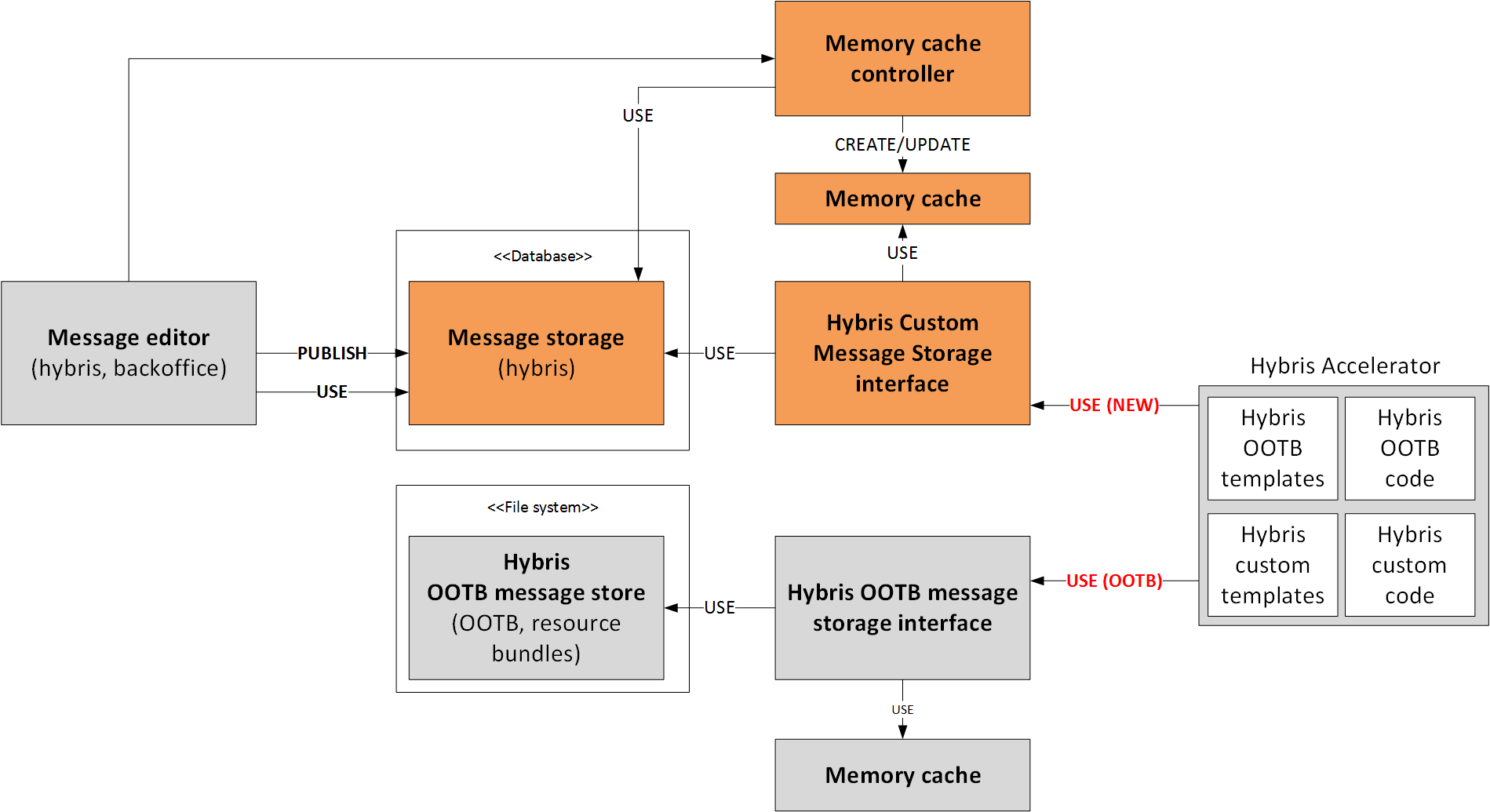
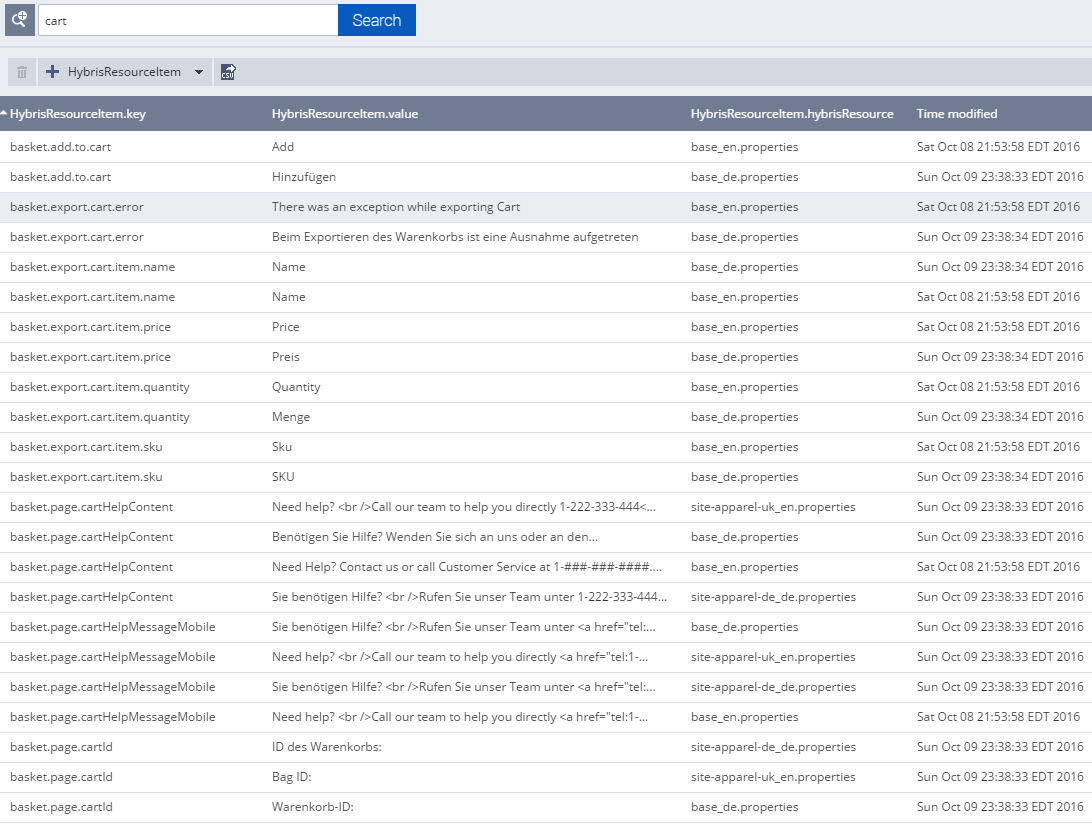
The extension I would like to introduce pulls the messages from the database instead of the file system. It also allows administrators to manage the localized properties using the Backoffice interface. All changes are immediately applied to the storefront.
The important feature of this solution is that it is fully compatible with the existing templates.
Screenshots
Technical details
- Messages are now in the database. There is a key/value list in Hybris, a new object called HybrisResourceItem, and a Backoffice extension to work with the object data: key, value, and storage.
- There is a storage that plays the same role as a property file does in the file system. Storage is used to group the key/value items. The same key can be created in different storages. Different language versions or different websites are different storages. There is an object named HybrisResource for this. If your e-shop uses 10 different property files, you will have 10 records in
HybrisResource. - There is a memory cache for the messages to speed up retrieval. The memory cache is implemented as a simple map: key -> storage content. This cache is invalidated each time you change
HybrisResourceItem. - There are two large components of the solution:
- New resource management module:
- Extends the Spring resource management module and replaces the built-in property management with one that uses Hybris services.
- Synchronization:
- Async event-based synchronization
HybrisResourceItem->HybrisResource(async merging of key-value items into a storage item to speed up retrieval)HybrisResource->HybrisResourceItem(async splitting of the storage item into key-value items)
- Sync synchronization
HybrisResource-> Memory Cache (if not cached before or when the cache was invalidated)
- Async event-based synchronization
- New resource management module:
HybrisResourceLoader
public class HybrisResourceLoader extends DefaultResourceLoader implements ResourceLoader {
    Map<String, Resource> resourceCache = new HashMap<>();
    @Override
    public Resource getResource(String s) {
       Resource resource = getResourceFromCache(s);
       if (resource == null) {
         Resource hybrisMessageResource = getResourceFromHybris(s);
         addResourceToCache(s, fileresource);
         ...
       }
       ...
     }
    }
    private addResourceToCache(String s, Resource resource ) { resources.add(s, resource) }
    private getResourceFromCache(String name) { return resources.get(s); }
    private getResourceFromHybris(String s) { ... }
    public clearCache (String name)
}
HybrisReloadableResourceBundleMessageSource
public class HybrisReloadableResourceBundleMessageSource extends ReloadableResourceBundleMessageSource {
    @Resource
    HybrisResourceLoader hybrisResourceLoader;
    HybrisReloadableResourceBundleMessageSource(){
        super.setResourceLoader(hybrisResourceLoader);
    }
    public void setResourceLoader(ResourceLoader resourceLoader) {
        super.setResourceLoader(hybrisResourceLoader);
    }
}
HybrisStorefrontResourceBundleSource
public class HybrisStorefrontResourceBundleSource extends StorefrontResourceBundleSource {
    @Resource
    HybrisResourceLoader hybrisResourceLoader;
    protected AbstractMessageSource createMessageSource(final String basename)
    {
        ReloadableResourceBundleMessageSource messageSource = (ReloadableResourceBundleMessageSource) super.createMessageSource(basename);
        messageSource.setResourceLoader(hybrisResourceLoader);
        return messageSource;
    }
}
HybrisResourceUpdatedEventListener
public class HybrisResourceUpdatedEventListener extends AbstractEventListener {
    static final private Logger LOG = Logger.getLogger(HybrisResourceUpdatedEventListener.class);
    @Autowired
    HybrisResourceLoader hybrisResourceLoader;
    @Override
    public void onEvent(final HybrisResourceUpdatedEvent event)
    {
        hybrisResourceLoader.clearCache(event.getName());
    }
}
© Rauf Aliev, October 2016
Discussion
Powered by GitHub Discussions — sign in with a GitHub account to join the conversation.