

1. Introduction
The purpose of this work is to describe and demonstrate how Vue Storefront can be integrated with SAP Commerce as well as identify the weaknesses, pitfalls and bottlenecks of the solution.
1.1. What is Vue Storefront?
Vue Storefront is known as an open-source mobile-first Progressive Web App storefront, one of two available on the market. Initially developed for Magento, it was later integrated with a number of backend platforms, such as Pimcore, Prestashop, BigCommerce, WooCommerce or Shopware.
1.2. What makes it unique?
- Platform-agnostic. Vue Storefront has a layer which is in charge of translating the platform-specific API calls and formats into the Vue Storefront general data abstraction.
- Mobile first. The product is consistent with the principles of progressive advancement: designing for the smallest screen and poor connection and working the way up. People have spent more and more time on the internet from mobile ends, and mobile devices are becoming the main screen in their lives.
- Offline first. With some exceptions, many components of Vue Storefront can be usable even if the customer is temporarily offline. That is is achieved by the “offline first” or “cache first” pattern: if a resource is cached and available offline, return it first before trying to download it from the server. If it isn’t in the cache already, download it and cache it for future usage.
- Server-Side Rendering. The SSR is used for handling the render when a user or search engine crawler requests the first page. When the server receives the request, it renders the required component into the HTML, and then sends it as a response to the client. Pre-fetching of some frequently used pages, such as Homepage, Category page, Product page, and Checkout page helps to make it even more universal. Read more: https://medium.freecodecamp.org/what-exactly-is-client-side-rendering-and-hows-it-different-from-server-side-rendering-bd5c786b340d
- Modern technology stack. Being built with Node.js, the storefront technology allows developers to write JavaScript server-side and client-side coding. Javascript is definitely a natural part of your e-commerce development process. Besides that, this architecture becomes easy to send and synchronize the data between client and server components automatically. The system is built to be customizable via extensions, themes, easy to update with separated core when new versions are released.
- Frequent updates, great support, and a clear roadmap. The storefront was introduced last summer. The developers keep us on our toes with new releases almost every week. The official slack channel is also very responsive. There is also a planning board available publicly on the GitHub.
- Open source and MIT License. The license allows programmers to put their code in proprietary software (on the condition that the license is given with that software). MIT license is GPL-compatible, meaning that the GPL permits programmers to combine and redistribute it with software that uses the MIT License. It means that if you want to use it with the commercial software, everything you need is to include a copyright notice for the work it has used. It doesn’t mean the entire commercial work is then licensed under the MIT license.
There are many interesting features of the smaller scale, such as
- Image Lazy Loading of Images. The idea behind lazy loading images is that you wait until a user scrolls further down the page and the image comes into view before making the network request for it. If your web page contains multiple images, which is the case of the product lists, you’ll end up saving bandwidth as well as ensuring that your web page loads quicker.
- Native app features, such as “Install on Home Screen” supported by iOS, Android, and Chrome. Push notifications are not supported in full, but there is some foundation. Read more: https://developers.google.com/web/fundamentals/app-install-banners/
- Supports both browser’s offline storages (IndexedDB, WebSQL, or localStorage) and ServiceWorker native caching (Cache API). Each caching approach has its pros and cons, and you can map the services to the caching approach in the configuration.
1.3. Challenges
1.3.1 Is it production ready?
Of course, there are risks we need to take into account:
- The product is still new and immature, but promising. Because of the relatively large codebase, it cannot be learned in a day. The product requires effort before you are able to master them. You may need to hire a trained person to make things easier, but this will incur additional costs. The technologies used are not common for typical SAP Commerce project.
- Vue storefront is being changed in terms of architecture. Some components might not be backward compatible because of inevitable changes in architecture.
As an example, in the last version, the developers got rid of IndexedDB for the offline cache because of the network-related issues and problems with network errors handling.
However, we need to recognize that in its first six months of existence, Vue Storefront was integrated with many backend platforms and was a foundation for a dozen (at least) of commercial projects.
1.3.2 SAP Commerce Cloud
Despite on a great integration layer and tooling, SAP Commerce Cloud is not on the list of the platforms Vue Storefront has connectors to. As we found in our research, SAP Commerce Cloud integration interfaces and data model are not fully compatible with Vue Storefront API calls and data model and require customization at least on the SAP Commerce’s side.
Also, you need to understand that many SAP Commerce OOTB backoffice capabilities won’t work with Vue Storefront in full without touching Vue Storefront codebase.
Some examples of the pieces of functionality of SAP Commerce which won’t work with Vue Storefront without customization:
- AdaptiveSearch and Search configuration won’t work in full because of different implementation of facet and search UIs
- SmartEdit and WCMS won’t work because they are built around a page builder. Data-driven component-based dynamic page composition is not supported by Vue Storefront.
- Assisted Service Module, Promotions and so on.
It’s also worth noting that the listed drawbacks are not related to Vue Storefront only. They are common for any setup where a custom storefront is involved. A big advantage of Spartacus storefront is that this support is in the roadmap.
Other VueStorefront-specific challenges we faced to are listed below in the Challenges section.
2. Objective
The objective of the work is to
- Understand the maturity and readiness of the product, limitations, and capabilities.
- Design and implement a proof-of-concept of Vue Storefront/SAP Commerce integration, document the architecture decisions and rationale behind those decisions, challenges, and pitfalls.
- Create a foundation for the full-fledged solution.
3. Authors
- Rauf Aliev, Solution Architect, EPAM, Rauf_Aliev@epam.com
- Timofey Klyubin, Lead Software Engineer, EPAM, Timofey_Klyubin@epam.com
I would like to commend Marshall Levin for his useful advice and his effort to read this long report.
4. Approach
4.1. Vendor-recommended Solution for Integration
As the official documentation says, Vue Storefront is platform-agnostic, which is explained as an ability to get connected to any CMS/e-commerce platform. In fact, it can be easily integrated only to the products which share with Vue Storefront some set of concepts. For others, “you need an adapter”.
The out-of-the-box integration mechanism involves the use of ElasticSearch as a backend for all catalog operations and direct calls to the e-commerce platform for all cart/user/order related operations (See https://github.com/DivanteLtd/vue-storefront-api) . Both sets of interfaces are standardized and documented.
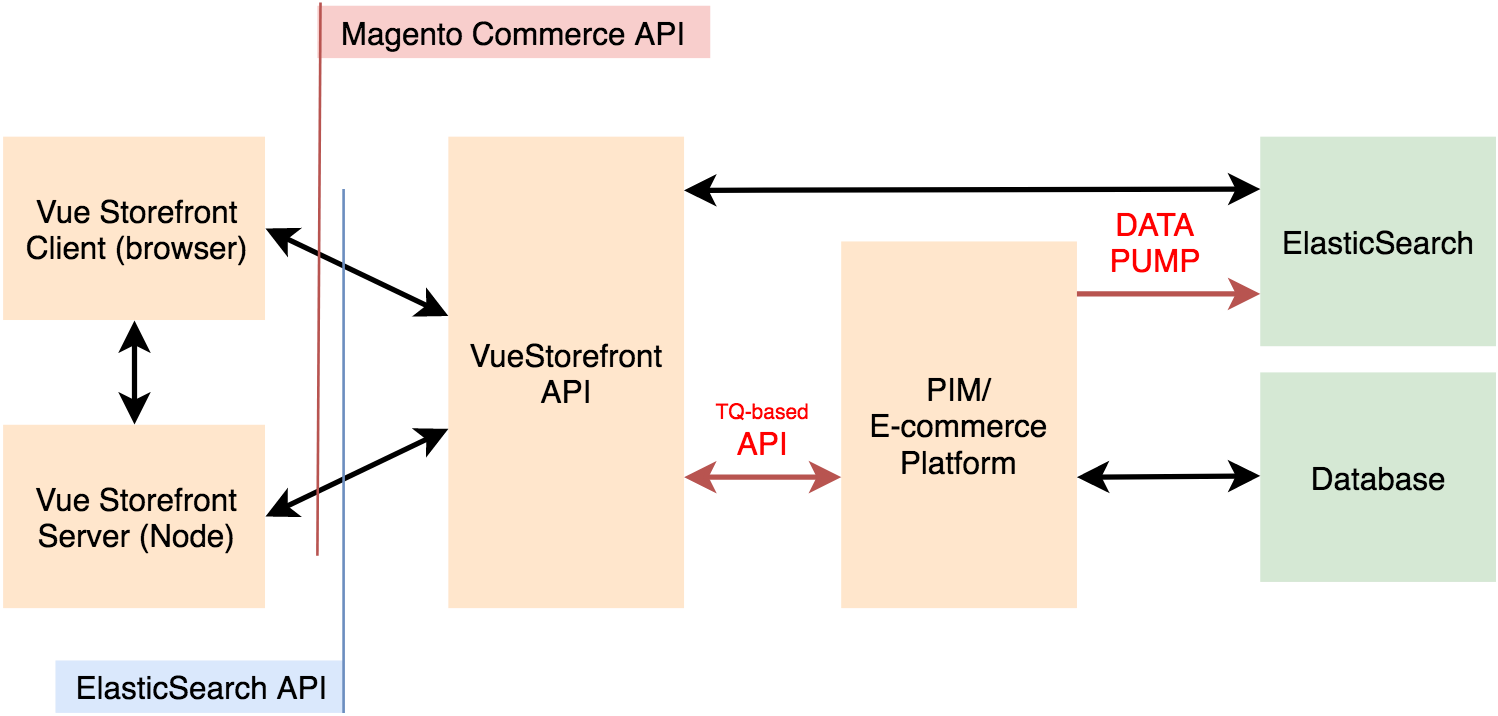
Figure 1. Vendor recommended integration approach.
The out-of-the-box API connector works in two phases:
- Data pump. This component is used for pulling static data, such as catalog or orders, from the eCommerce platform to Vue Storefront ElasticSearch. The format of the pulled data will be changed to the one consumed by the integration layer, vue-storefront-api. After pulling the data you can display a product catalog in Vue Storefront. After pumping the data into ElasticSearch it will stay in sync with changes on the backend platform side and update its content.
- Task queue / Worker pool APIs. It involves synchronization of so-called dynamic calls (user sessions, cart rules etc) that can’t be stored in the database and needs to be called by vue-storefront-api directly from the backend platform.
Getting these components adopted for the particular platform, Vue Storefront will work with them as is, without any customizations in its code.
Some of the backend platforms already have their integrations (Magento 2, Magento 1, CoreShop, BigCommerce, WooCommerce) but you can easily make your own with integration boilerplate.
This is how the recommended approach looks like.
4.2. Alternative Solutions
Along with the recommended approach, we have developed a couple of project-specific solutions to consider.
Vendor-recommended:
- Vue Storefront Integration Boilerplate integration approach. Zero customizations the SAP Commerce: the integration module uses the out-of-the-box API from SAP Commerce.
- Extending Vue Storefront API integration approach with zero customizations on the SAP Commerce side.
Alternatives:
- Using vanilla OOTB SAP Commerce API (OCC v.2) directly from the storefront or from the extension for the VueStorefont API.
- Extending SAP Commerce only. Zero customizations in the API layer, Vue Storefront and boilerplate.
4.3. Analysis of the Possible Solutions
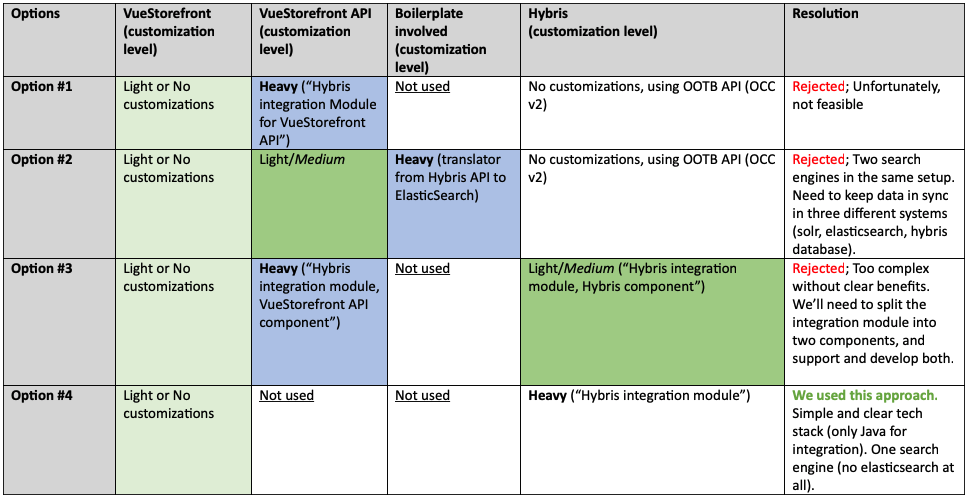
Table 1. Integration approaches to consider and resolutions
After some analysis, we have come to believe that using custom middleware only for a bunch of simple requests is an additional burden and thick layer of complexity. We decided to get rid of it as well.
So, option #4 turned out to be the best choice. For the option #4, we need to parse Magento and ElasticSearch APIs and generate the compatible responses.
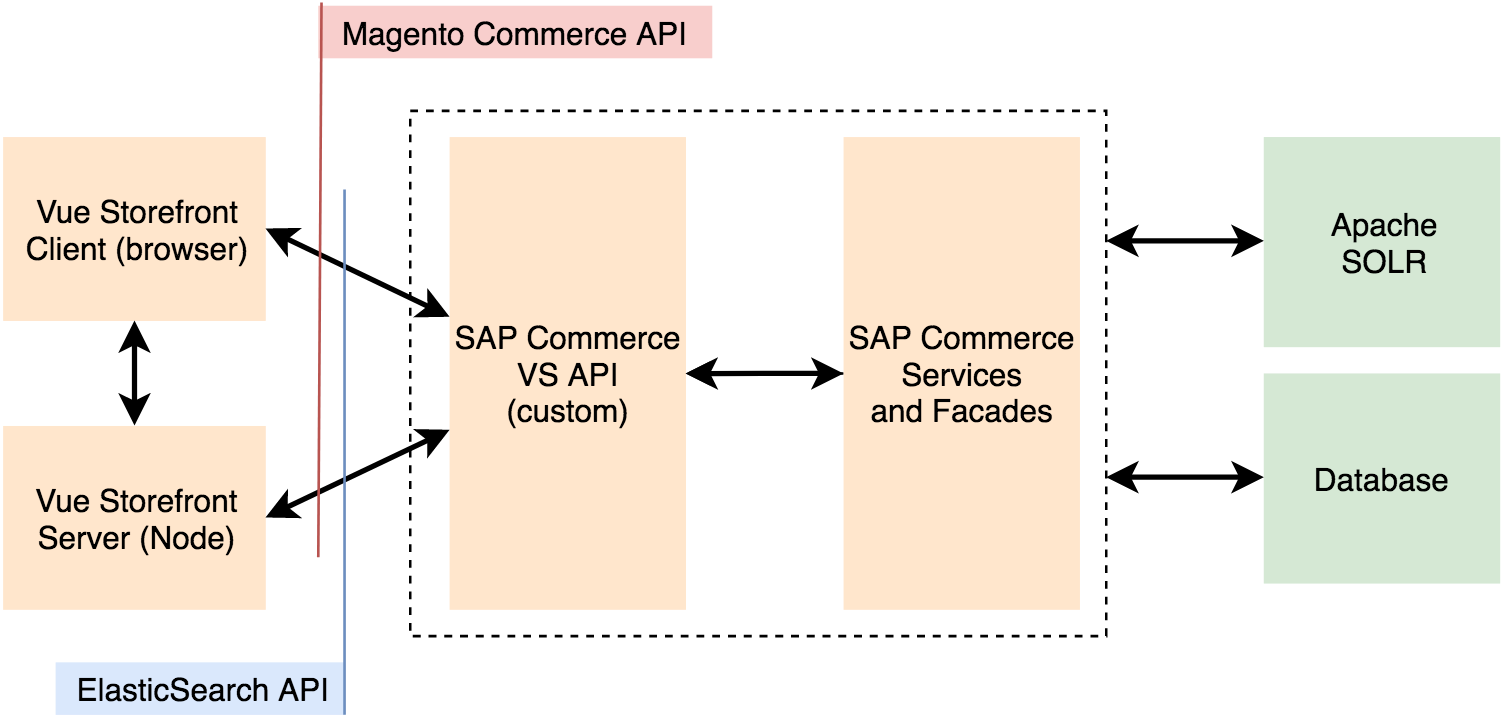
Figure 2. Chosen integration approach (Option #4)
The Vue Storefront connector (SAP Commerce CS API at the diagram above) exposes all required interfaces mimicking the API interfaces of ElasticSearch and Vue Storefront API layer. To emulate the interfaces in full, we used the following approaches:
- Reconstructing business logic from the source code of Vue Storefront.
- Logging reverse proxy to log all requests and responses as well as the POST payloads for further analysis.
In order to get possible to see the results as the new API endpoints come to play, we created a reverse proxy with conditional URL routing capability.
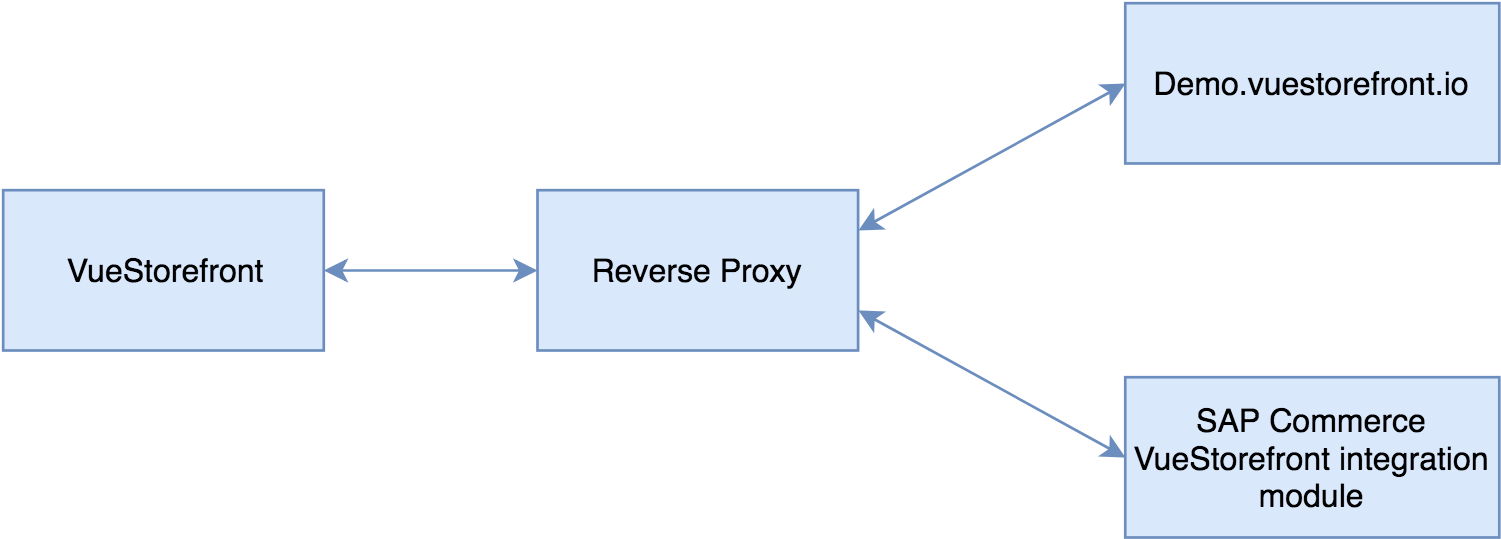
Figure 3. Using a reverse proxy for the first phases of development
The development was structured into the following four phases:
- **Phase 1. Reverse proxy redirects all requests to demo.**Vue Storefront.io and delivers the results back to Vue Storefront. Vue Storefront is configured to work only with a proxy.
- Phase 2. Some of the requests are redirected to the SAP Commerce module. The module delivers static JSONs only.
- Phase 3. All requests are redirected to the SAP Commerce module by proxy. We remove the proxy from the request flow and connect SAP Commerce module directly to Vue Storefront.
- Phase 4. Static JSONs are replaced with a response generator with real business logic, one entity at a time: categories, then products, then reviews etc.
Reverse proxy was developed using Python and werkzeug (a WSGI Server python library). After phase 3, this server was excluded from the project and used occasionally only for troubleshooting of protocol-related issues.
5. Challenges
The details of the challenges below, as well as the solutions for them, are explained below in the “Architecture/Challenges”.
All unique identifiers are numbers in Vue Storefront, not strings! Not a big deal, of course, but it made us come up with the workarounds.
On-the-fly image resize is part of the reference architecture and part of core functionality. SAP Commerce can’t resize images on-the-fly. Also not a big deal.
**Documentation. **The principle “Good code is its own best documentation” doesn’t work with Vue Storefront primarily because of the prototype-based nature of Javascript. At run-time, you can read, change, add or remove properties of any object, and it makes difficult to collect all possible attributes and separate them from the attributes not used in the code.
- Need to parse ElasticSearch Query DSL. Need to generate/process nested documents. The ElasticSearch protocol is documented, but only a subset (a finite number of use cases) is actually used by Vue Storefront.
- API is poorly documented. For example, only some non-documented subset of product and category properties are actually used by Vue Storefront.
Internationalization. We found that it is not 100% compatible with the concepts used in SAP Commerce. For example, a product or category in hybris is the same business object for all language versions, but some specific product or category attributes, ‘localized attributes’, may have more than one language version. Vue Storefront works with the separate sets of products or categories for different language versions.
Shopping cart and checkout are implemented completely on the Vue Storefront side and they are relatively independent of the e-commerce platform. The good side of this implementation approach is that there is a mechanism to keep data in sync with an e-commerce platform. In Vue Storefront, both the shopping cart page and checkout are implemented differently than these in SAP Commerce.
Facets. The facet search setup is not platform or data-driven, but configuration-driven, and it is completely on the Vue Storefront side. Such useful tools as SAP AdaptiveSearch won’t work with Vue Storefront facets in a similar way as it is implemented in the SAP Commerce reference stores. Ranges are not implemented well; Currently, a range facet functionality is designed/used primarily to implement a price group facet.
Performance. In hybris, some services are backed by the relatively slow database layer while in Vue Storefront they are backed by super-fast NoSQL layer (ElasticSearch). For example, categories and facet definitions are stored in the database in Hybris. In Vue Storefront/Magenta they are indexed in ElasticSearch.
6. Results
We developed a custom module for SAP Commerce, the sole objective of which is converting the requests from Vue Storefront to hybris service calls and converting the responses to the format Vue Storefront expects.
As of today, we don’t share the source code of the PoC.
7. Architecture and technical details
Let’s start with the quick overview of the Vue Storefront architecture, followed by the details of the integration with SAP Commerce.
7.1 Architecture of Vue Storefront in a Nutshell
In this section, you will know about the technologies and key architectural decisions used in the storefront solution.
7.1.1 Vue Storefront Technology Stack Overview
Two-tier, client-server, separate deployment
Vue Storefront is built upon the client-server pattern and can be installed separately from the e-commerce platform.
The storefront can be deployed separately, with its own release cadence. You can use more than one storefront instance.
NodeJS
Node.js is a way to develop web applications using one language for the whole web app, rather than two – and this language is JavaScript. In some tests, NodeJS shows better performance for backend tasks than such languages as Python, Ruby, or PHP.
VueJS and VueX
Vue.js is a popular JavaScript framework with various optional tools for building user interfaces. One of the greatest advantages of Vue.js is its small size. The size of this framework is 18–21KB and it takes no time for the user to download and use it. It beats all the bulky frameworks like React.js, Angular.js, and Ember.js.
Vue.js makes the use of virtual DOM, which is also used by other frameworks such as React, Ember, etc. The changes are not made to the DOM, instead, a replica of the DOM is created which is present in the form of JavaScript data structures. Whenever any changes are to be made, they are made to the JavaScript data structures and the latter is compared with the original data structure. The final changes are then updated to the real DOM, which the user will see changing. This is good in terms of optimization, it is less expensive and the changes can be made at a faster rate.
VueX is a state management pattern and library for Vue.js applications. It serves as a centralized store for all the components in an application, with rules ensuring that the state can only be mutated in a predictable fashion. Unlike similar patterns such as Flux and Redux, Vuex is also a library implementation tailored specifically for Vue.js to take advantage of its granular reactivity system for efficient updates.
In Vue Storefront, NodeJS and VueX are core technologies you need to know to understand the architecture and plan customizations.
7.1.2 Overall architecture diagram
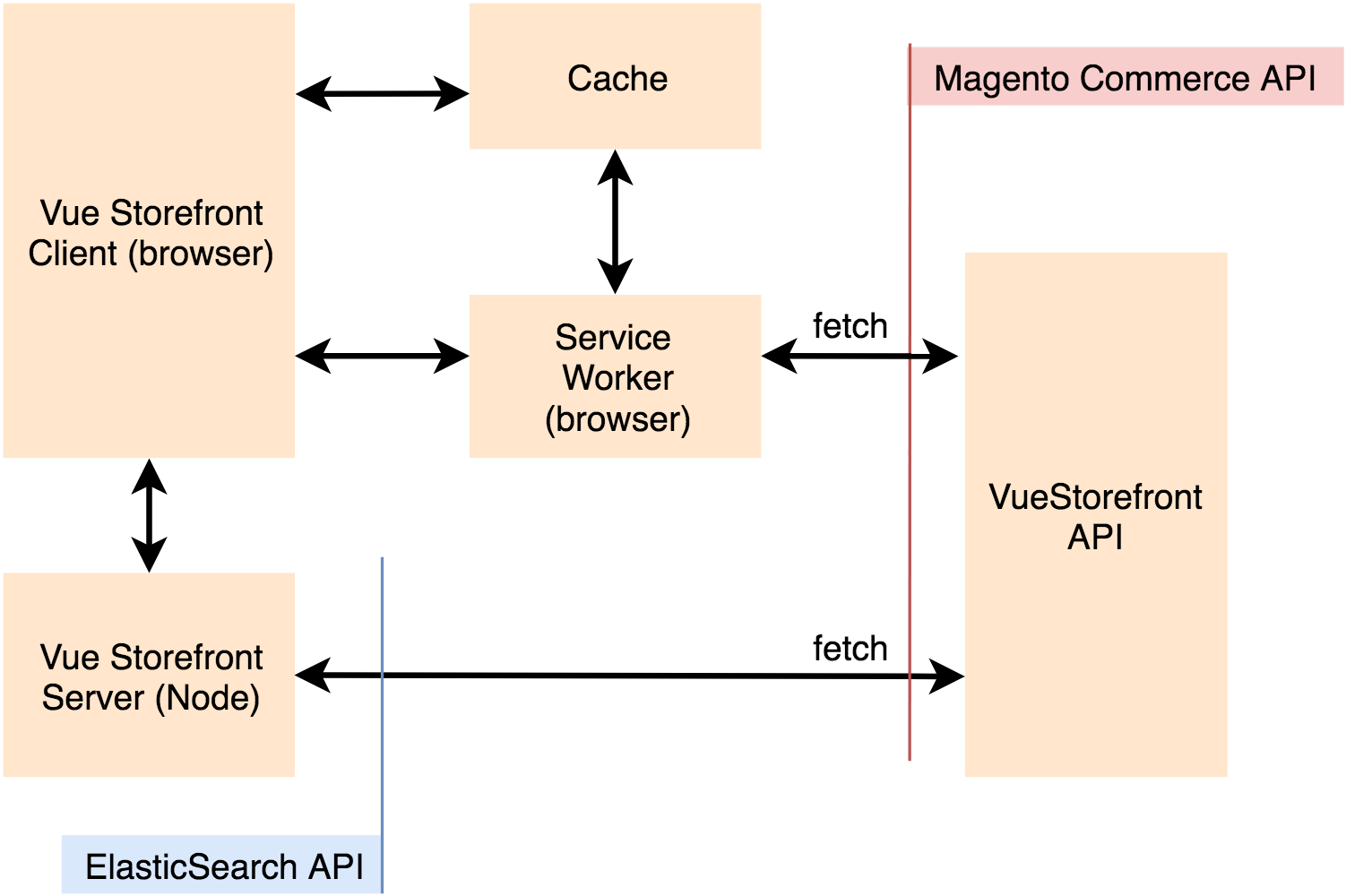
Figure 4. Vue Storefront. The overall architecture diagram.
7.1.3 Concepts
Service Worker
A service worker is a script that your browser runs in the background, separate from a web page. Today, they already include features like push notifications and background sync. Vue Storefront uses this concept for caching out static and dynamic data feeds and to make them available offline as well as to run offline data sync.
Caching and IndexedDB
For the version 1.7, the Vue Storefront development team made a decision to get rid of using an in-browser IndexedDB (IndexedDB) in favour of ServiceWorker caching. Explaining the reason, they reported that the indexedDB caching proved to be a problematic solution because of problems with network-errors handling and that the indexedDb sometimes has really strange response times (>800ms) and sometimes even kind of deadlocks.
Task Queues
Task Queues are used to manage background work that must be executed outside the usual HTTP request-response cycle. Tasks are handled asynchronously either because they are not initiated by an HTTP request or because they are long-running jobs that would dramatically reduce the performance of an HTTP response.
Task queues in Vue Storefront supports API authentication mechanisms and re-request a token if session is over.
The task queue has two interfaces, “offline mode friendly” and “normal”.
Some types of network calls shouldn’t have been queued. For example the shopping cart synchronization or other tasks that operate on the volatile data/state. This is where the normal mode is used. The requests initiated via the normal mode should fail if the user is offline.
The second mode is used to support the offline mode, and queue the request in the browser’s offline storage if a network is not available and execute it when the Internet is back. There is a background process which iterates over the items in the queue and sends them out
For example, product stock information requests are sent using an offline mode friendly. Also, the system uses this mode for updating the user profile.
All other requests are made using a normal mode. For the placed orders, there is a special case explained in the corresponding section below.
Modularity
Vue Storefront separates the core and theme components. Core components implement only the business logic while the theme components are what you really see in your browser. They can inherit business logic from core components or be created as theme-specific components. Think of the core components as an external API. You can inherit the functionalities and extend them in theme but never change it in a core.
7.2 Vue Storefront Backend Integration Architecture
The integration module has two APIs,
- Catalog & CMS APIs, for product information, reviews, categories, CMS data, tax rules etc.
- Task Queue APIs, for shopping cart data, orders, payment, and delivery options etc.
For the details of the vendor-recommended integration mechanism, please read “4.1 Vendor-recommended Solution For Integration”.
7.2.1 Search Adapters and Catalog and CMS APIs
Search Adapter is a module inside Vue Storefront which is used to access over network non-transactional data such as
- product information,
- product review,
- categories,
- CMS Blocks,
- CMS hierarchy,
- CMS Page,
- Tax rules,
- and custom attribute metadata.
Vue Storefront comes with two search adapters:
- GraphQL. Used for testing purposes
- API. An interface to the API layer. In terms of URL scheme and data formats, it is compatible with ElasticSearch.
As I told earlier, we decided to go with reusing the existing search adapter, API. With this approach, the SAP Commerce integration component is required to emulate the protocols and URL schemes used in the API layer / ElasticSearch.
So the requests and responses for all APIs listed above are built around the same concepts, namely:.
- For all these requests, the system uses a cache (the specific type of cache is configurable on per type basis).
- ElasticSearch query protocol is used both for the request and response.
7.2.2 Task Queue APIs
Vue Storefront uses a number of external API requests which are implemented outside the search adapter. All these calls are handled with use a module called Task Queue. It was explained earlier in the Concepts section.
The following groups of APIs use Task Queue:
- Shopping cart API
- Payment and Shipping API
- Coupons API
- Stock API
- Users API
- Orders API
- Mailer API
Shopping cart
To some extent, the shopping cart functionality is isolated from the e-commerce platform. It can work independently from the platform’s shopping cart. However, normally the cart should be synchronized with the server the server (e-commerce platform), and there is a number of interfaces for that.
- Create a cart. It is used to create a server cart and store the cart id (for further synchronization).
- Update item. Updates a shopping cart item in the e-commerce platform
- Delete item. Removes an item from the e-commerce platform’s shopping cart.
- Pull a cart. Requests the current cart from the server. It is used to synchronize the current state of the cart items back and forth between the server and current client state. There is a configuration parameter saying that the communication should be one-way only (client -> server) or two-way (server -> client and client-> server). This operation returns only a list of products in the cart. No totals or discounts applied.
- Pull Totals. Requests the current cart from the server. It is called whenever the cart totals should have been synchronized with the server (after
Pull). It overrides local shopping cart grand totals and specific item values (for example prices after discount). Unlike the previous operation, it calculates discounts and totals.
Payment and Shipping
- Payment Methods. The list of the payment methods to use at the checkout. Each time the server cart is successfully pulled from the server.
- Shipping Methods. The list of the shipping methods to use at the checkout. Each time the non-empty server cart is successfully pulled from the server.
- Shipping Info. Requests cart totals.
Coupons
There are two interfaces for coupons:
- Delete coupon
- Apply coupon
Stock
Requests for a stock status or product quantity. This service is used mainly for removing a product from the cart is it is no longer available.
Users
This group of API contains the following services:
- User info
- Order history
- Reset password
- Change password
- Create a user
- User Login
- User data refresh
Their names are self-explanatory.
Orders
One of the cool features of Vue Storefront is queued order sync. This means whenever a user makes an order in the application we store the order in the local browser cache (indexedDb instance) and send it to the server as fast as the Internet connection is available.
So, there is an endpoint for placing orders. Unlike other calls, the order placement can be performed from ServiceWorker that makes it possible to send an order when the internet connection is back even if the tab is not active.
MailChimp subscription
This endpoint is used for handling the subscription requests.
Mailer Subscription
This endpoint is used for sending e-mails from the storefront.
7.2.3 Image API
Products’ media pictures are served by NodeJS. The pictures are resized on-the-fly, using width and height provided in the URL. A sample URL looks like this: /img/310/300/resize/w/t/wt06-blue_main.jpg which means that the images are resized to fit the box of 310×300 pixels.
This functionality is not provided by SAP Commerce out-of-the-box. There are at least two ways for that: a custom Commerce controller and nginx resizing reverse & caching proxy.
8. The architecture of the SAP Commerce/Vue Storefront integration
SAP Commerce application should provide an API layer, that can be used by Vue Storefront. This layer is implemented using a separate extension with web context. Multiple REST controllers mimic Magenta API.
8.1 Overall integration diagram
There is an SAP Commerce extension which has two sets of interfaces required by the storefront:
- Catalog & CMS
- Task-Queue based interfaces.
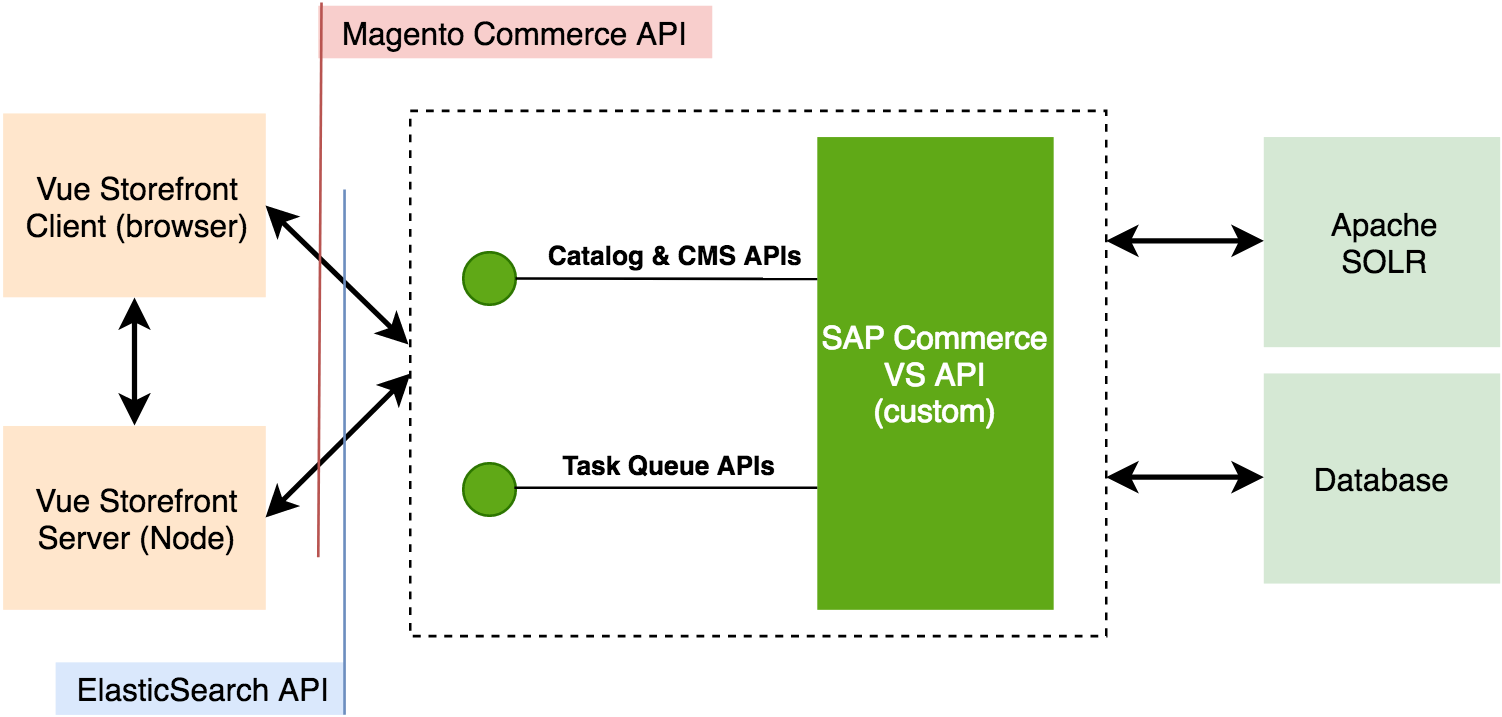
Figure 5. Overall architecture diagram of the integration module
8.2 Challenges
8.1.1 Unique Identifiers in Hybris and Vue Storefront
One of the crucial architecture differences in the two products is the approach to assigning unique identifiers to entities. In SAP Commerce a common approach would be to use some text code. For instance: cart code, product code, an enum’s value code and so on. On the other hand, Vue Storefront uses integers for that purpose.
This difference is much more significant than it might seem. Basically, what you need is some kind of integer values associated with text code. You can, in theory, change this in Vue Storefront but most likely it will require a ton of work. And most importantly, you will have to apply those changes to every new version of Vue Storefront.
So, having the thought about changing Vue Storefront out of the way, we can start to think about how to work around this in SAP Commerce. A straightforward way to do this is to implement an in-memory map, that’ll hold all necessary values and their corresponding integer identifiers. Another way to go would be to add a new integer field to GenericItem and use it, but we went with the former approach for now.
8.1.2 Internationalization
The system uses a standard internationalization plugin, VueI18n. The translations are in the CSV files. So, OOTB the messages listed in these files are not editable from the backoffice.
Internationalization is not 100% compatible with the concepts used in SAP Commerce. For example, a product or category in hybris is the same business object for all language versions, but some specific product or category attributes, ‘localized attributes’, may have more than one language version. Vue Storefront works with the separate sets of products or categories for different language versions.
8.1.3 ElasticSearch Query DSL Protocol
Vue Storefront uses ElasticSearch GET API for pulling product information, category structure, attributes, and some other objects. In our case, we decided to use Solr instead of ElasticSearch. Also, we decided not to access Solr directly, and use SAP Commerce Facades and Services to access data from different sources, including Solr.
8.1.4 Prices
Currently prices come with the product data. So, we populate prices in the product information controller.
8.1.5 Ranges and prices
Both in Solr and ElasticSearch there is a feature called ‘range facet’; price facet in Vue Storefront is implemented using this feature. You’ve probably seen how price ranges facet is implemented in SAP Commerce: it generates unique values for each predefined range and stores them into a corresponding field during indexing.
Vue Storefront’s ‘Range facet’ approach is a bit different. As for a stored document, you just store a value itself—whatever it is. And then, when you specify facets during the search you add a range facet definition. It consists of three main parts: a start value, an end value, and a gap. It allows you to dynamically define ranges, not like ‘Hybris way’, in which you need to re-index everything in order to change the range. Both approaches have their own pros and cons. However, the main point here is that Vue Storefront already has an implementation for range facets. But there’s a catch: it is implemented only for an attribute named ‘price’, in a hard-coded manner.
There are two aspects of the challenge:
- The way how ranges are used is limited in the current implementation only for the needs of price selection.
- A facet name ‘price’ conflicts with Hybris OOTB facet with the product attribute having the same name. However, SAP Commerce’s price is not a number, so it cannot be used for range facets. This point is minor and easily avoidable.
9. Learnings and Recommendations
Replacing an SAP Commerce out-of-the-box storefront with unofficial or your own will certainly have the effect of having a lot of backoffice stuff knocked out the grid. Getting all this stuff work as it should be is huge work. Today, for the particular project and current set of requirements, you may decide that these things are not so important to get them to work in the first instance. Tomorrow you will need to add a banner on the cart page or change sorting and filtering criteria for the particular category, and you will come back to this point. Out-of-the-box SAP Commerce Accelerator features will require extra efforts to get implemented for Vue Storefront, and some of them will require changing the core code.
You need a knowledgeable team. Vue Storefront is a comprehensive piece, and it will take about a month for the team to get into all details and be able to plan the development and design their own extensions in a proper way.
10. References
https://medium.com/the-vue-storefront-journal/vue-storefront-1-7-b1cc028c664c
Discussion
Powered by GitHub Discussions — sign in with a GitHub account to join the conversation.