A practical ETL-based approach to migrating e-commerce content, media, and CMS data into SAP Commerce using loaders, transformers, and ImpEx.
Rauf AlievE-Commerce Architect
A note from 2026: This article was published in 2017, when SAP Commerce Cloud was still widely referred to as hybris. The hybris brand has since been phased out, but the migration concepts and ImpEx-based loading approach described here still apply to SAP Commerce Cloud.
Introduction
Data migration, as a fundamental aspect of projects that modernize legacy systems, has been recognized as a challenging task that may result in failed projects as a whole. One of the main reasons for time and budget overruns is the lack of a well-defined methodology that can help handle the complexity of data migration tasks.
The process of data migration is tightly linked to the project scope. That explains why there is no universal tool that could be used for every situation. However, some ideas, concepts, architecture, and even components can be reused to make the process smoother and more predictable.
In this article, I tell you about my own experience and my personal vision on the topic. I have been testing it in different projects I have been involved in for the last 15 years. Data migration tools have been implemented by my teams and me in different programming languages, from Perl to Java.
Business process
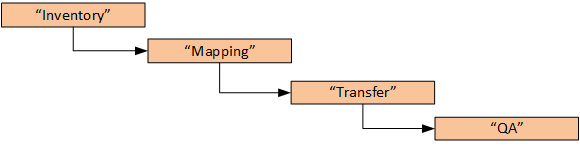
From a business process perspective, there are four sequential phases:
Inventory phase defines:
What data is moving,
What data we can get rid of,
How it can be grouped,
What data requires special handling,
What data requires changes,
How volatile the data is, etc.
Since we are talking about e-commerce, you are likely going to migrate at least the following data:
Users (including customers, business users, usergroups, and permissions)
Sales history (including orders and order details)
CMS pages (pages, page components, embedded images, original URLs, etc.)
Mapping phase is focused on the following topics:
How is data going to “fit” and work in hybris?
How is the overall structure of the data going to transfer?
The following points should be considered if you deal with CMS/rich text content:
What changes are required for rich text content?
What HTML is templated and what is embedded?
Images (img, background, etc.) in the embedded HTML code?
Links? How will the legacy system’s URLs change in hybris? How are you going to keep all these links valid?
Styles and classes?
Colors and fonts?
Tables and responsive design?
HTML validation?
A bullet character instead of LI, etc.
Migration of rich text content is one of the most challenging topics. Manual migration could be a good alternative.
Transfer phase is about how the actual bytes will be moved from legacy systems to hybris. The remaining part of this article is devoted to shedding light on this phase.
The QA phase is actually comprised of two sub-phases:
Internal technical QA
Client review, editorial QA
You need to define how much data is going to be reviewed for compliance. It might be a representative sample or a whole set of data.
Let’s look more closely at the Transfer phase.
Data transfer phase
Data migration moves data from legacy systems into new systems. Data sources in the new system can have different structures and limitations. There are several issues that can considerably complicate this process:
Legacy systems may have a number of heterogeneous data sources. These data sources are interconnected but were designed by different teams, at different times, using different data modeling tools, or interpreted under different semantics. In addition to that, they might be used differently than they were originally intended to be used by design.
Legacy systems may have inaccurate, incomplete, duplicate, or inconsistent data, and new systems may also require additional semantic constraints on data after migration. Thus, bringing the quality of data up to the standards of new systems can be costly and time-consuming.
Many data migration tasks, such as data profiling, discovery, validation, cleansing, etc., need to be executed iteratively in a project, and specification changes frequently happen in order to repair detected problems.
From a traditional perspective, the process of data migration involves three stages: Extract, Transform, and Load.
Extract – the process of reading data from a specified source and extracting a desired subset of data. The extraction phase largely deals with the technical heterogeneity of the different sources and imports relevant data into a staging area.
Transform – the process of converting the extracted/acquired data from its previous form into the form it needs to be in so that it can be placed into another database. The transformation phase is the heart of an ETL process. Here, syntactical and semantic heterogeneities are overcome using specialized components, often called stages:
All data is brought into a common data model and schema;
Data scrubbing and cleansing techniques standardize the data;
Aggregating or combining data sets;
Duplicate detection algorithms, etc.
Load – this phase loads the integrated, consolidated, and cleaned data from the staging area into hybris.
Off-the-shelf solutions
There are a number of off-the-shelf software solutions. I am going to tell you more about one of them, Pentaho Community Edition, but not in this article. Using Pentaho with hybris is a large topic that deserves a separate article.
As for off-the-shelf products in general, the majority of off-the-shelf solutions are too heavy and expensive to use in hybris projects. Sometimes, the barriers to entry are too high for this market. However, for large projects, using off-the-shelf ETL tools might be the best option.
So I’ll explain the details in a separate article on the blog (next week?). It is already being prepared and will be published on the blog soon.
The approach explained in this article works well for small and medium projects. If the transformation rules are comprehensive, creating the data migration tool from scratch may work much better than using off-the-shelf software.
Architecture
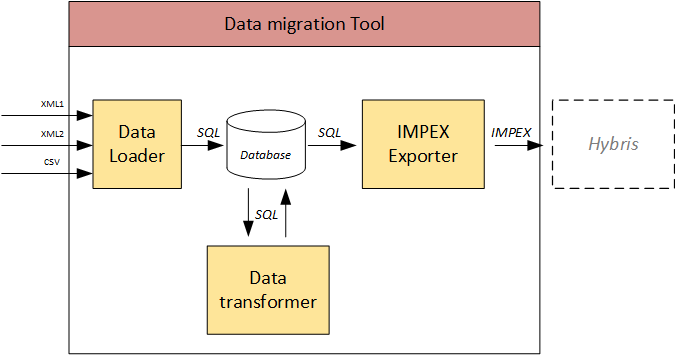
These three modules cover the Extract, Transform, and Load phases of the process.
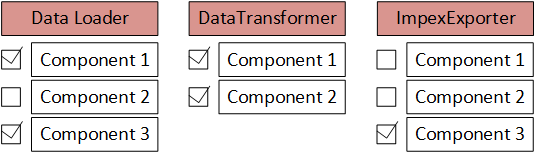
Each module is configurable. It consists of module components:
By default, all components are executed one after another in the configured order. However, some components can be skipped. It makes the system scalable and manageable. Components are generally custom. However, they share some common code that is part of the module.
The database is used as a staging area for the loaded data.
All modules support rerunability. This means that if the process fails halfway through the batch, the module can be run again with the updated input data sets or configuration.
Data loader
During the extract phase of ETL, the desired data sources are identified and the data is extracted from those data sources.
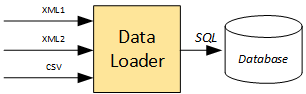
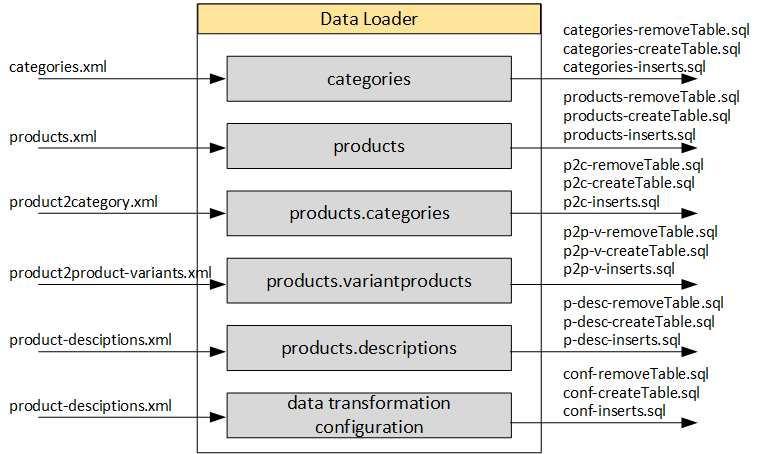
In my solution, the data loader converts input text files (XML) into database create/insert statements (SQL). It looks like a very basic solution, but for small and medium projects, my experience shows that it is good enough.
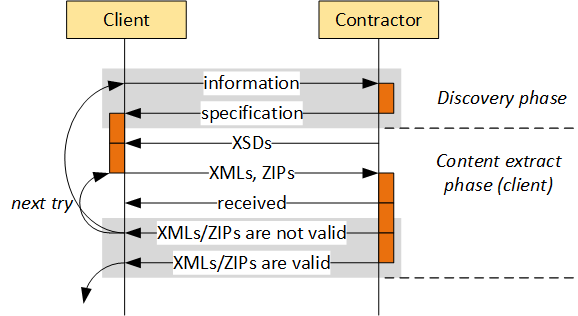
Input files. As a rule, there is a milestone in the project when the input files (data extracts) are provided to the developer according to the agreed specification (formats, data structures, etc.). It is virtually impossible to get the data right on the first try, so you need to take into consideration that this phase needs to be executed iteratively in a project.
SQL statements are created in the folder called:
output
There is a final step when they are executed before advancing to the next phase: data transformation. The purpose of splitting the data load process into “Generating SQL statements” and “Executing SQL statements” is twofold: it is easier for debugging and partial runs.
The following data formats are commonly used for the input files:
XML files. It is the most convenient format for the data loader. XML schemas help constrain the content and prevent mistakes in data.
CSV files. I recommend using CSV files only for very large amounts of data with a very simple structure. CSV files are good only when your data is strictly tabular, you know its structure 100%, and this structure won’t be changed.
ZIP files. For binary content referenced from XML: images, digital assets, documents.
If possible, try to collect all input data as deliverable packages. It is obvious and clear that files are stateless objects. This point is very important for proper sharing of responsibility.
Output files are SQL statements. They include three sections:
Remove tables
Create tables
Insert data
In my solution, the data loader works with configurable data loader components that can be executed separately or in groups. For example, in my last project the following components were used:
Each component should do only one thing: the single responsibility principle. No data transformation. No merging or splitting. The module is basically a text format converter: it reads one text file (XML, CSV) and creates another text file (SQL). ZIPs are loaded by copying into a folder that is used by the Data Transformer.
In my solution, the structure of the tables is based on the structure of the XMLs. If you add a field to the XML, the database field will be automatically added to:
-createTable.sql and -inserts.sql
The Java object model used in the data loader is supposed to be regenerated/rebuilt as well (JAXB).
Usage:
./data-loader -enable categories,products,product.descriptions
./data-loader -enable all
./data-loader -enable all -disable products,categories
In order to execute SQLs, I use a separate app. The full cycle looks like this:
./cleanSQLs
./data-loader -enable all
./executeSQL
After this phase, the database has been created and all data has been uploaded into the database. It is the data transformer’s turn.
Data transformer
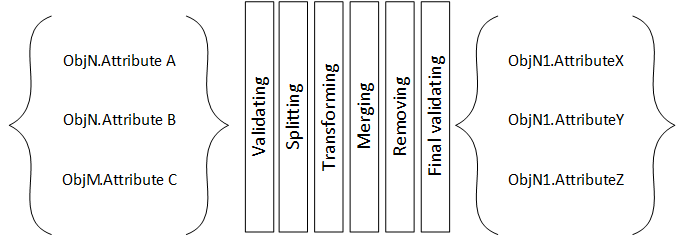
The transform step applies a set of rules to transform the data from the source to the target.
saves the transformed data into new tables and/or fields
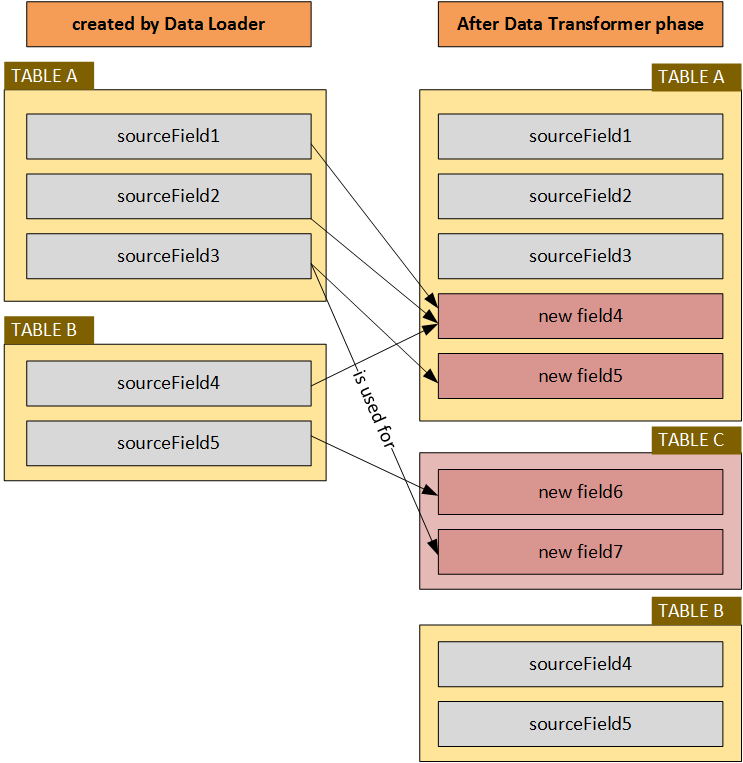
The transformation rules are grouped so they can be executed separately if the need arises. A very important feature of this solution is that the target fields are always new tables or fields. You can run the transformation as many times as you want.
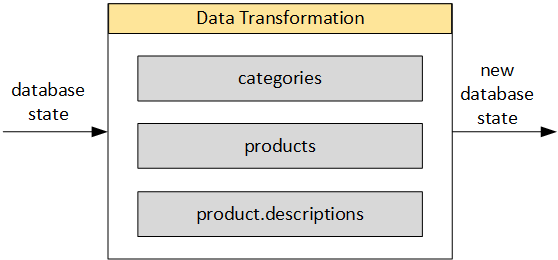
In my solution, the data transformation module also works with configurable data loader components, which can be executed separately or in groups. For example, in my last project the following components were used:
The same concept of single responsibility is used here for the components: they should do one specific thing, or responsibility, and not try to do more than that.
Images and links
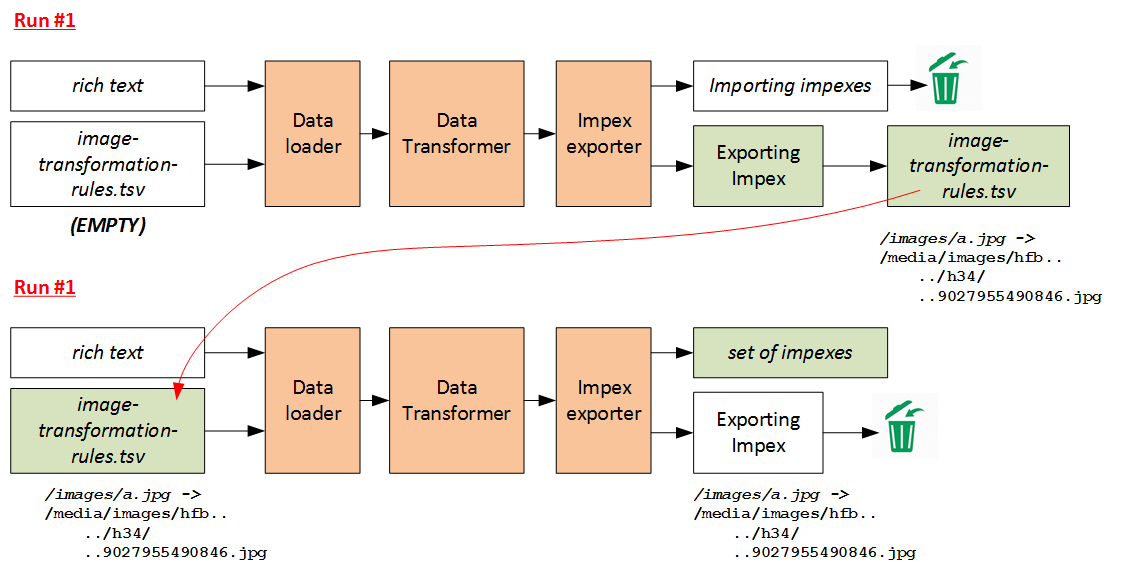
One of the challenging topics is converting embedded images and links into hybris media and page URLs.
At the data transformation phase, the new URLs of images are not known because they haven’t been uploaded to hybris yet.
In my solution, the conversion is performed in two phases. The first phase ends with the data (ImpEx: Export) that is used in the second phase. The following diagram is self-explanatory:
Usage:
./data-transformation -enable categories,products
./data-transformation -enable all
./data-transformation -enable all -disable products,categories
Along with the previous phase:
./cleanSQLs
./data-loader -enable all
./executeSQL
./data-transformation -enable all
After this phase, the database has been updated, the data has been cleansed and enriched, and the duplicates have been removed, etc. It is the ImpEx exporter’s turn.
ImpEx Exporter
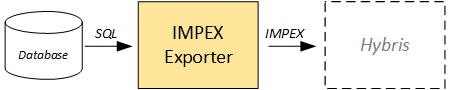
The exporter module creates a set of ImpEx files to load the data received from the previous two steps into hybris.
There is no data modification; the data in the output files is exactly the same as the data in the database. If any transformation is needed, it should be performed earlier.
There is a set of components or their groups that can be enabled or disabled from the command line. The output files are placed into the:
output
folder. Each component does only one thing and can be used separately from the others.
There is common code for all components that helps generate valid ImpEx files. Each ImpEx file has a header and a set of data sections. Each section has a section header and section data. The section header is basically an INSERT or INSERT_UPDATE statement. The section data is a CSV data block compatible with ImpEx syntax.



Discussion
Powered by GitHub Discussions — sign in with a GitHub account to join the conversation.