
Introduction
In general, the FlexibleSearch engine is well documented on the hybris Wiki. However, as one of the oldest components of hybris, the engine has undocumented behavior that is good to know about. In this article, I am going to talk about field and type modifiers and predefined named values. You will also learn about an interesting issue with the “order by” markers.
Basic syntax
SELECT selects
FROM types
( WHERE conditions ( ORDER BY order )? )?
Fields and modifiers
What you likely know about fields:
- The field name is the hybris type attribute.
- The field name is converted into the database table property (
code=>p_code). - You can specify a type name before the attribute name (
Product.code). - Type and attribute are separated by
..
What you likely don’t know:
- Type and attribute can also be separated by
:. - You can specify modifiers. The modifiers value is a string that can contain the following letters:
c,l, oro, or their uppercase equivalents. All other letters are ignored. Example:Product:code:o.cstands for “core field”.lstands for “localized field”.ostands for “optional”.
The last point is the most interesting. The o modifier forces the localization property table to be outer joined.
Compare two SQL queries, with and without the modifier:
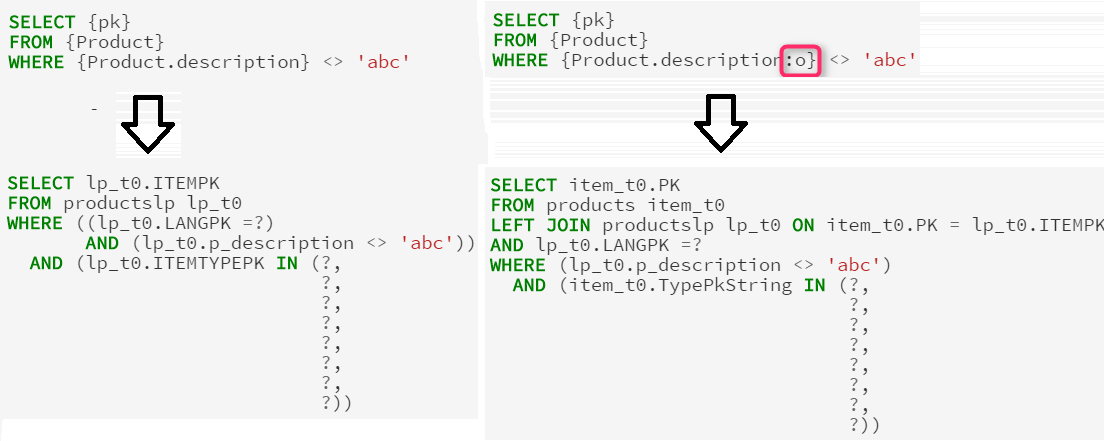
Outer joins can be useful if you search for an absence of values. For outer joins, you need to add an IS NULL check as an additional condition for the joined column to filter the absent values.
Predefined Named Values
You should know that FlexibleSearch supports named values, a parameter that can be pushed into the statement from the code. But you likely don’t know that there are some predefined session attributes:
?session.user?session.language?session.currency
You also likely don’t know that the attributes of item values can be accessed in the value map:
String queryStr = "select {code}, ?language.isocode from {Product} order by {name}";
FlexibleSearchQuery query = new FlexibleSearchQuery(queryStr);
query.addQueryParameter("language", currentLanguageModel);
query.setResultClassList(Arrays.asList(String.class, String.class));
SearchResult<List> searchResults = fss.search(query);
Thus, named values can be used as objects in FlexibleSearch if they contain objects.
Type modifier
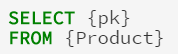
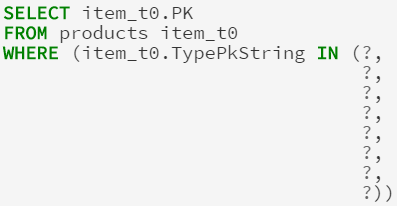
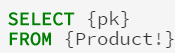
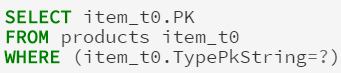
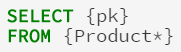
You may know that ! at the end of the type alias performs the search over the subtypes of the specified type. However, you may not know that there is another modifier, *. Compare:
 |
 |
 |
 |
 |
 |
Take a look at the last example. There are no type restrictions at all.
Order by marker issue
FlexibleSearch identifies an ORDER BY clause to replace it with a user-defined one. To mark this fragment, the engine uses two markers: [-- and --].
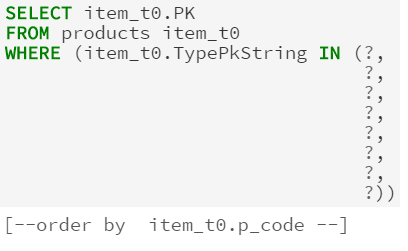
Then FlexibleSearch removes these markers before processing. What is interesting is that it removes both the markers that were created by the engine and all other substrings in the query that match the pattern. So the following queries are fully identical in terms of the result: they pass FlexibleSearch validation and give the same result.
Select {name} from {Language} where {isocode} = "--]ru[--"
Select {name} from {Language} where {isocode} = "ru[--"
Select {name} from {Language} where {isocode} = "[--ru--]"
Select {name} from {Language} where {isocode} = "--]ru[----][--"
Select {name} --]from {Language}[-- where {isocode} = '--]ru[----][--'
As you can see, --] and [-- are removed from the resulting SQL query wherever they are placed. You can’t split the keywords and object name anyway.
© Rauf Aliev, November 2016
Discussion
Powered by GitHub Discussions — sign in with a GitHub account to join the conversation.