
I found a way to speed up data import in hybris. The approach explained below allows you to import data two times faster than regular ImpEx. A video of the PoC, some numbers, and technical details are below.
Hybris importing capabilities overview
There are two main ways in hybris to update data from external sources:
- ImpEx.
HotFolderandImport Cockpitare also in this category because Spring Integration and Import Cockpit convert CSVs to ImpExes. - hybris API (modelService). This approach is to create your own importers with custom logic.
In hybris 6.0, SAP introduced ServiceLayer Direct as a projected replacement for the legacy JALO layer. However, the new engine has not become the default engine in 6.0/6.1 due to the amount of crucial legacy business logic working only with Jalo. I leveraged some of its components to work with objects that meet the new engine's compatibility criteria.
Objects such as StockLevel and PriceRow are common key players in the integration process. If your prices or availability data are region-specific or store-specific, the amount of data could become really massive.
For both methods, when updating data, hybris makes three sequential requests:
- Locating the item by applying filters. For example, warehouse and product for the StockLevel object. Example of the FlexibleSearch request for this step:
SELECT {pk}
FROM {StockLevel}
WHERE ( {StockLevel.warehouse} = 8796194146261
AND {StockLevel.ProductCode} = 'LProduct_1' )- Loading the model into memory by the PK received at the previous step. The corresponding FlexibleSearch request:
SELECT *
FROM {StockLevel}
WHERE ( {pk} = 8807037634519 )- Updating the model with the data received from the external system. The SQL update statement:
UPDATE stocklevels
SET hjmpTS = 1 ,
    modifiedTS='2016-09-23 12:05:47.543',
    p_available=11021
WHERE
    PK = 8807037634519
The first two operations, locating and loading, use cached data if there is any (region cache). However, this does not solve the problem completely: if you have millions of items to change, 2/3 of your operations will take precious time, memory, and CPU resources.
The solution
The idea of the solution is to get rid of the first two requests and use prebuilt in-memory lookup tables instead.
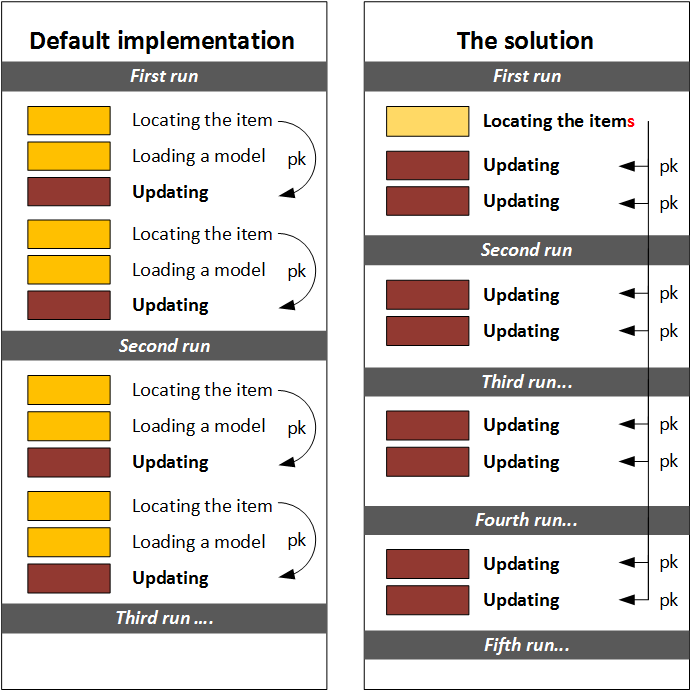
Will it work? Tests show that it works twice as fast as regular ImpEx import:
| Number of items | Average creation time | Average update time | ||
|---|---|---|---|---|
| Regular ImpEx import, 16 threads | 50000 | 19.6 sec | 14.8 sec | |
| ServiceLayer Direct Import, 16 threads | 50000 | 17.1 sec | 7.5 sec | two times faster! |
You can see the difference in the JDBC log:
| ImpEx Import | ServiceLayer Direct |
|---|---|
All three components are marked by color: lookup, loading model, and updating.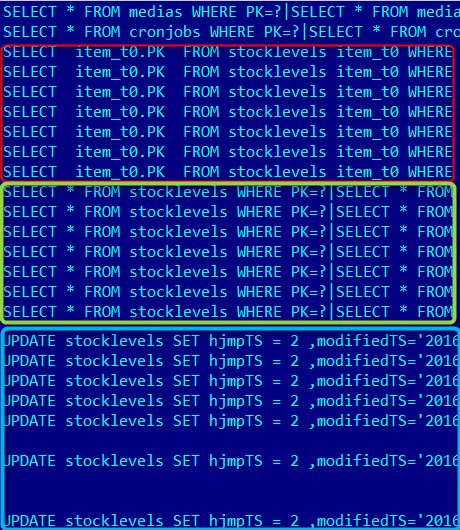 |
There is only one component: an UPDATE statement.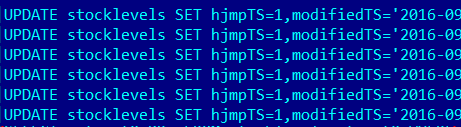 |
Technical details
- Multithreading is not implemented in hybris classes. You need to manage it on your own.
- There are three objects: UpdateRecord, InsertRecord, and DeleteRecord. The example below is about UpdateRecord; all others are used in a similar way. I used StockLevel as an example, but you can change it to other objects. There are some limitations; see the next section for details.
UpdateRecord updateRecord1 = new UpdateRecord(
        pk,
        "StockLevel",
        version,
        Sets.newHashSet(
             new PropertyHolder("available", availableValue),
             new PropertyHolder("overselling", oversellingValue)
        )
);
changeSet.add(updateRecord1);
DefaultWritePersistenceGateway defaultWritePersistenceGateway =
Registry.getApplicationContext().getBean("defaultWritePersistenceGateway",
DefaultWritePersistenceGateway.class)
CacheInvalidator cacheInvalidator =
Registry.getApplicationContext().getBean("cacheInvalidator",
CacheInvalidator.class);final Collection<PersistResult> persistResults =
defaultWritePersistenceGateway.persist(changeSet);
cacheInvalidator.invalidate(persistResults);In order to create objects (CreateRecord), you need to generate PKs. The next example shows the details:
TypeInfoMap persistenceInfo = Registry.getCurrentTenant().getPersistenceManager().getPersistenceInfo("StockLevel");
PK pk = PK.createCounterPK(persistenceInfo.getItemTypeCode());
Drawbacks and limitations
Nothing in life is free 😉 The downside of this approach is in the following points:
- There are some limitations for the types managed by SLD. According to the hybris documentation, in the following cases, you cannot use ServiceLayer Direct:
- The item attribute is configured as Jalo in
items.xml. This means there is business logic in a Jalo class (Item or Manager) for a getter or setter. - The item attribute is configured as a property in
items.xml, but it has an overridden getter or setter in a Jalo class. - The item has custom logic in the
createItem(…)protected method, usually for validation or preparation purposes.
- The item attribute is configured as Jalo in
- As for this particular architecture:
- You lose all flexibility that regular ImpEx import has.
- If you need to reference any other objects, such as warehouses, you need to perform additional requests to build a map (WarehouseId -> PK).
- You need to write more code and test it thoroughly.
Video
© Rauf Aliev, September 2016
Discussion
Powered by GitHub Discussions — sign in with a GitHub account to join the conversation.