
Nowadays, e-commerce companies need to analyze large volumes and a wide variety of data about products, customers, transactions, and deliveries to increase conversion rates.
I managed to integrate hybris and the PredictionIO machine learning server. There are different scenarios for using PredictionIO algorithms in e-commerce. This article demonstrates complementary categories functionality.
Introduction
There are different approaches to integrating hybris with machine learning (ML) software:
- Create the ML algorithm from scratch. This approach is extremely difficult and may be used only for unique tasks. You need a team of experienced gurus.
- Use ML libraries. Libraries such as Weka and Apache Mahout help developers create smart systems using ready-to-use, well-documented, and well-tested modules without going too deeply into the details. They contain tools for data preprocessing, classification, regression, clustering, association rules, and visualization. However, these tools are also for experienced algorithmists. Apache’s own machine learning library for Spark and Hadoop, MLlib, boasts a gamut of common algorithms and useful data types, designed to run at speed and scale.
- Use cloud services. Google Prediction API, Microsoft Azure Machine Learning API, and Amazon Machine Learning API take care of algorithms and provide clear interfaces for standard tasks.
- Use machine learning on-premise frameworks/servers. Microsoft introduced Microsoft Azure Stack, which enables you to deliver Azure services from your own servers. PredictionIO is also a machine learning platform that can be deployed in your data center. It offers a number of recipes, ready-made algorithms, and examples of their usage.
Architecture
The following concepts currently exist in PredictionIO:
- Items. Represent the unique ID of a product or service.
- Users. Represent the unique ID of a subject entity. Connected to an Item through a one-to-many relationship with Actions.
- Actions. Responses each user delivers to aid the prediction. Action feedback includes conversion, like, dislike, and view. Events can be sent to the PredictionIO API.
- Algorithm. The actual computation code that generates prediction models. PredictionIO currently offers native support for the Spark MLlib machine learning library. Most algorithms are mentioned as either user-based or item-based.
- Engines. Containers for algorithms and data. There are three different containers to choose from: ranking, recommendation, and similar items. You can adjust the freshness and exploration of the predictions, as well as the objective your predictions are going to maximize.
- Templates. The template library is a set of special pluggable extensions for specific machine learning tasks.
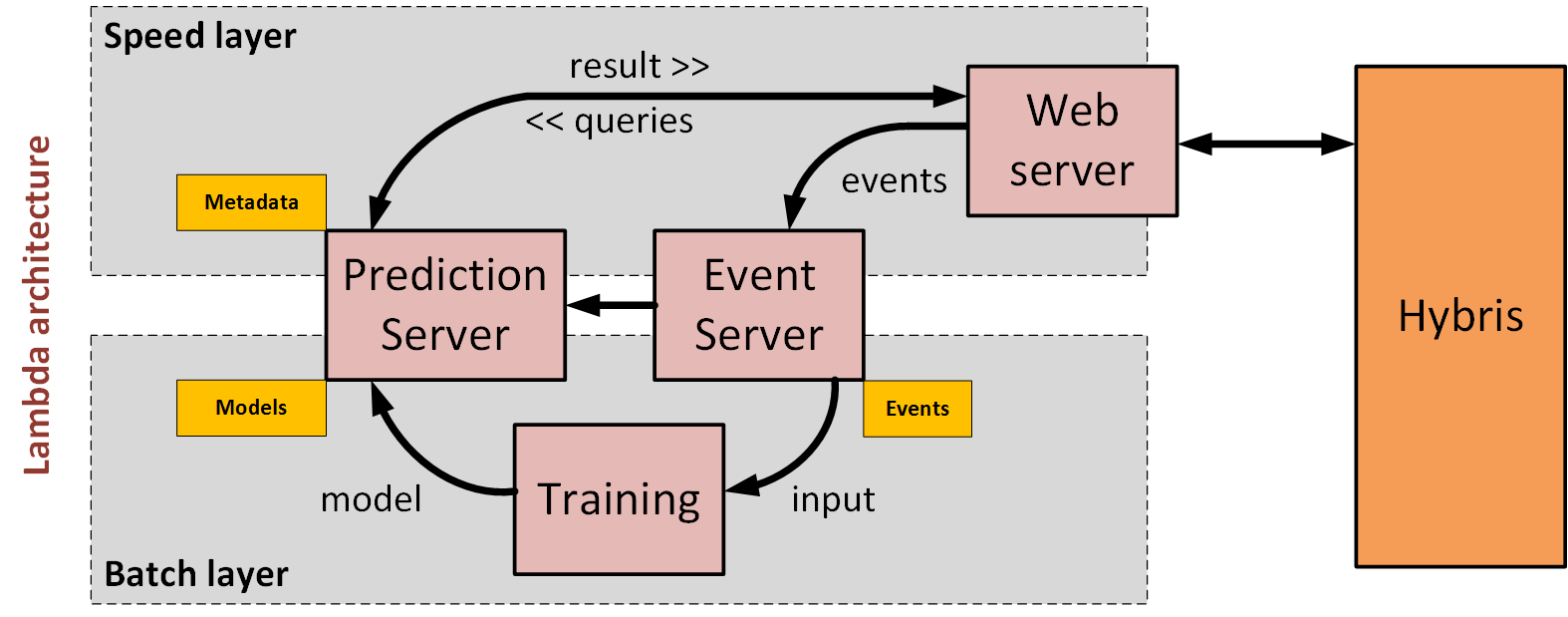
Hybris interacts with PredictionIO in two ways:
- Pushing events to PredictionIO
- Requesting recommendations
There is a clear and simple RESTful interface both for events and for queries.
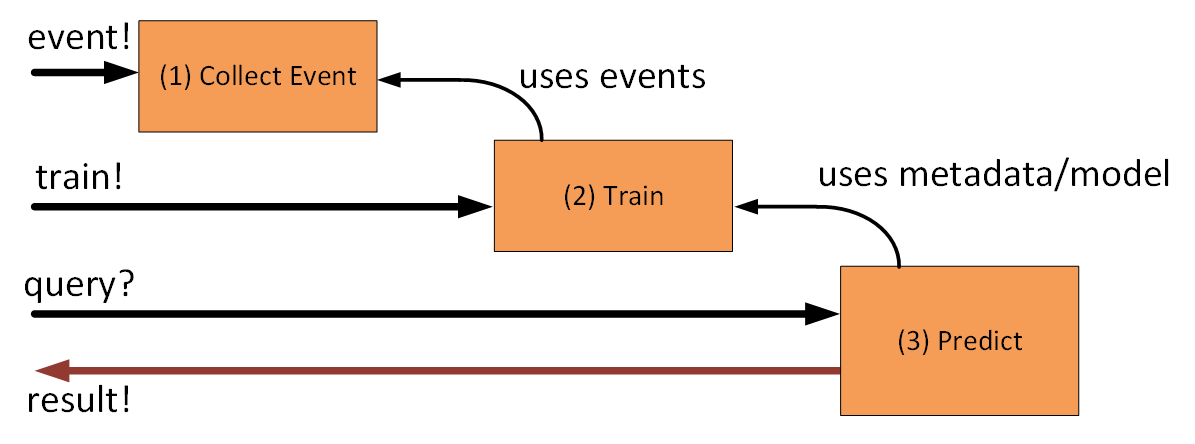
Template Library
Templates are a kind of PredictionIO configuration used to implement specific tasks. They contain custom classes and prebuilt JSONs.
Classification. The default use case of the Classification Engine Template is to predict the service plan a user will subscribe to based on user attributes, such as age, gender, etc. Requires “user” and “item” entities that are set by events.
Complementary Purchase. Recommends complementary items that users most frequently buy at the same time together with one or more items in the query. Returns an array of the top n recommended items given the condition. The engine will use each combination of the query items as a condition. The PoC (see below) demonstrates this template.
ECommerce Recommendation. Provides personalized recommendations for e-commerce applications with the following features by default: 1) exclude out-of-stock items, 2) provide recommendations to new users who sign up after the model is trained, 3) recommend unseen items only (configurable), and 4) recommend popular items if no information about the user is available. White and black lists of items and categories are optional input parameters. Returns a ranked list of recommended itemIDs.
Lead Scoring. Predicts the probability of converting the user into a customer in the current session. The input data are logs: landing page ID, referrer ID, and browser (extendable). Returns a score.
Similar Product. Recommends products that are “similar” to the input product(s). Similarity is not defined by user or item attributes but by users’ previous actions. By default, it uses the
viewaction, so products A and B are considered similar if most users who view A also view B. The template can be customized to support other action types such as buy, rate, like, etc. This template is ideal for recommending products to customers based on their recent actions. Using the IDs of the recently viewed products of a customer as the Query, the engine will predict other products that this customer may also like.This approach works perfectly for customers who are first-time visitors or have not signed in. Recommendations are made dynamically in real time based on the most recent product preference you provide in the Query. You can, therefore, recommend products to visitors without knowing a long history about them. You can also use this template to quickly and easily build functionality such as “Customers Who Viewed This Item Also Viewed…”
Product Ranking. Sorts a list of products for a user based on his/her preference. This is ideal for personalizing the display order of a product page, catalog, or menu items if you have a large number of options. It creates engagement and early conversion by placing products that a user prefers at the top. The input query contains a user ID and a list of ItemIDs, which are the products to be ranked. Returns a ranked list of recommended itemIDs.
And other templates. The full list of them is available here.
One of the earliest and most successful recommender technologies is collaborative filtering, also referred to as social filtering. Most of the listed templates use this approach. It is based on the idea that people who agreed in their evaluation of certain items in the past are likely to agree again in the future. In different systems, “evaluation” can mean different things: likes, ratings, purchases, or reviews.
Integration with hybris
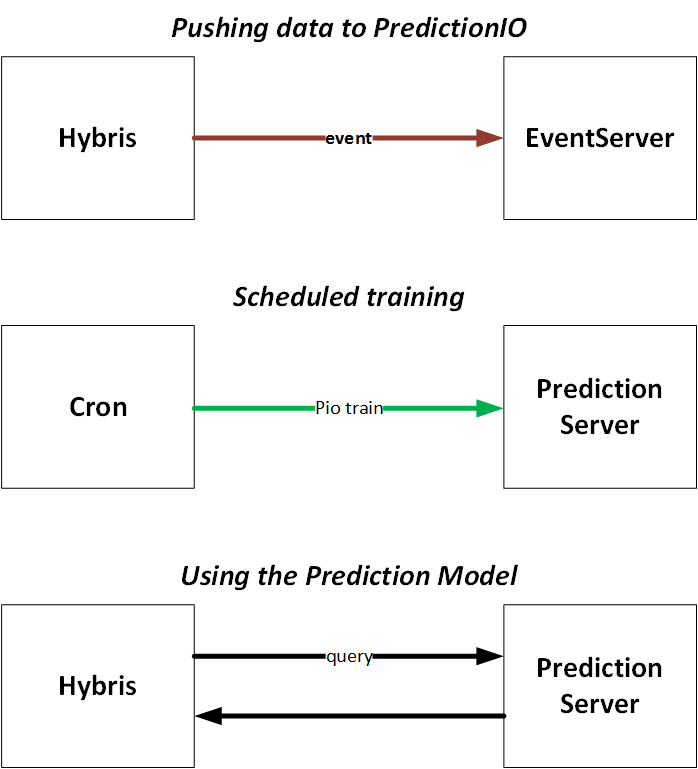
PredictionIO is a separate system with clear and simple interfaces based on REST. There are two interfaces: one for events and one for requests.
In order to update a prediction model, you need to execute a training operation.
Proof of Concept
I have access to a large amount of real e-commerce data:
- 200,000 products,
- 700 categories,
- 400,000 customers,
- 600,000 orders,
- 1,500,000 order entries
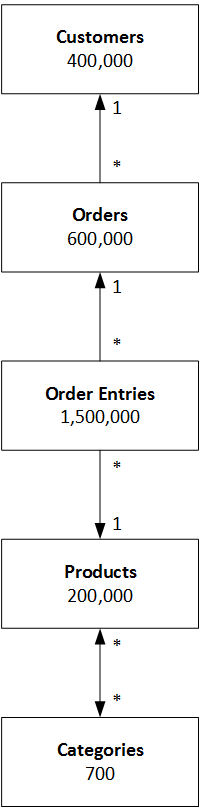
There are a number of things possible to do with PredictionIO on this data. I tested several PredictionIO templates with this data. Let’s take the Complementary Purchase template.
Complementary products are products that are used alongside each other, such as fish and chips or shampoo and conditioner. There are two ways to find these products:
- Content-based filtering,
- Collaborative filtering.
Item-to-item collaborative filtering reflects the “wisdom of crowds.” This approach is more universal and generic than content-based filtering, where the system matches the attributes of the item viewed with attributes of other items to generate recommendations.
We have too many products in the set in comparison with the number of order entries. The knowledge base will possibly not be enough to make good predictions.
However, we have a relatively small set of categories. What if we replace the product ID with the category ID in the order entries?
I removed all orders that have only one entry. The resulting set turned out to be much smaller: 170,000 items. However, it is large enough to be associated with a 700-item category set.
First, we need to create an app:
[root@fedoralocal bin]# ./pio app new MyComplimentaryApp
[INFO] [App$] Initialized Event Store for this app ID: 1.
[INFO] [App$] Created new app:
[INFO] [App$] Name: MyComplimentaryApp
[INFO] [App$] ID: 1
[INFO] [App$] Access Key: kys6151n5jAjbpPmJEw2V4qO7ftkABnz41B8noWzFHMcLbus_BRKsQj6MVJTFQ2K
Let’s check if the newly created app is in the list:
[root@fedoralocal bin]# ./pio app list
[INFO] [App$] Name | ID | Access Key | Allowed Event(s)
[INFO] [App$] MyComplimentaryApp | 1 | kys6151n5jAjbpPmJEw2V4qO7ftkABnz41B8noWzFHMcLbus_BRKsQj6MVJTFQ2K | (all)
[INFO] [App$] Finished listing 1 app(s).
Let’s generate an app from the template:
[root@fedoralocal bin]# ./pio template get PredictionIO/template-scala-parallel-complementarypurchase testApp
Please enter author's name: Rauf
Please enter the template's Scala package name (e.g. com.mycompany): com.epam
Please enter author's e-mail address: r.aliev@gmail.com
Author's name: Rauf
Author's e-mail: r.aliev@gmail.com
Author's organization: com.epam
Would you like to be informed about new bug fixes and security updates of this template? (Y/n) n
Retrieving PredictionIO/template-scala-parallel-complementarypurchase
There are 6 tags
Using tag v0.3.3
Going to download https://github.com/PredictionIO/template-scala-parallel-complementarypurchase/archive/v0.3.3.zip
Redirecting to https://codeload.github.com/PredictionIO/template-scala-parallel-complementarypurchase/zip/v0.3.3
Replacing org.template.complementarypurchase with com.epam...
Processing MyComplimentaryApp/build.sbt...
Processing MyComplimentaryApp/engine.json...
Processing MyComplimentaryApp/src/main/scala/Algorithm.scala...
Processing MyComplimentaryApp/src/main/scala/DataSource.scala...
Processing MyComplimentaryApp/src/main/scala/Engine.scala...
Processing MyComplimentaryApp/src/main/scala/Preparator.scala...
Processing MyComplimentaryApp/src/main/scala/Serving.scala...
Engine template PredictionIO/template-scala-parallel-complementarypurchase is now ready at MyComplimentaryApp
Change the name of the app in the generated engine.json:
{
  "id": "default",
  "description": "Default settings",
  "engineFactory": "com.epam.ComplementaryPurchaseEngine",
  "datasource": {
    "params": {
      "appName": "MyComplimentaryApp"
    }
  },
  "algorithms": [
    {
      "name": "algo",
      "params": {
        "basketWindow": 120,
        "maxRuleLength": 2,
        "minSupport": 0.001,
        "minConfidence": 0.1,
        "minLift": 1.0,
        "minBasketSize": 2,
        "maxNumRulesPerCond": 5
      }
    }
  ]
}
Build it:
[root@fedoralocal bin]# cd MyComplimentaryApp[root@fedoralocal MyComplimentaryApp]# ./pio build
...I slightly changed the import script in the data folder to process the data file:
[root@fedoralocal bin]# time -p python complimentaryDataImport.py --access_key kys6151n5jAjbpPmJEw2V4qO7ftkABnz41B8noWzFHMcLbus_BRKsQj6MVJTFQ2K --file /home/osboxes/recomm/order-product.csv
Importing data...
173899 events are imported.
real 1458.95
user 92.27
sys 17.65
The script basically pushes data to the Event Server using the EventServer API.
The data we imported looks like this:
[root@fedoralocal rauf]# cat ~osboxes/recomm/order-product.csv | head
33125251|10181
33125251|75191
33125251|40132
33125251|103191
33125251|71301
33125251|22181
...
The first column stands for the order number, and the second number is a category ID.
The next command trains a model using the data we imported earlier:
[root@fedoralocal MyComplimentaryApp]# ./pio train
...

[root@fedoralocal MyComplimentaryApp]# ./pio deploy
...
The last command creates a prediction server that listens on port 8000 by default. This server uses the prediction model built by:
pio trainOnce the system is trained and launched, we can try to request recommended categories for, let’s say, #10001 (Semper Purée; it is a brand-level category):
[root@fedoralocal osboxes]# curl -k -X POST \
https://127.0.0.1:8000/queries.json?accessKey=kys6151n5jAjbpPmJEw2V4qO7ftkABnz41B8noWzFHMcLbus_BRKsQj6MVJTFQ2K \
-H "Content-type: application/json" \
-d "{ \"items\" : [\"10001\"], \"num\" : 3 }"
{"rules":[{"cond":["10001"],"itemScores":[{"item":"1091","support":0.0068499758803666185,"confidence":0.5107913669064749,"lift":1.9769800291208408},{"item":"1081","support":0.003376748673420164,"confidence":0.2517985611510791,"lift":1.3897188958098698},{"item":"7591","support":0.002122527737578389,"confidence":0.15827338129496402,"lift":1.6446151349597016}]}]}[
The formatted form of the response:
{
  "rules": [
    {
      "cond": [
        "10001"
      ],
      "itemScores": [
        {
          "item": "1091",
          "support": 0.0068499758803666185,
          "confidence": 0.5107913669064749,
          "lift": 1.9769800291208408
        },
        {
          "item": "1081",
          "support": 0.003376748673420164,
          "confidence": 0.2517985611510791,
          "lift": 1.3897188958098698
        },
        {
          "item": "7591",
          "support": 0.002122527737578389,
          "confidence": 0.15827338129496402,
          "lift": 1.6446151349597016
        }
      ]
    }
  ]
}
For the sake of convenience, I created a simple bash script that resolves category names and displays the recommendations in a compact form:
[root@fedoralocal osboxes]# ./check1.sh 10001
recommendations for Semper Purée
*Purée
 - confidence=0.5107913669064749
*Oatmeal porridge
 - confidence=0.2517985611510791
*Juice
 - confidence=0.15827338129496402
Let’s try to request recommendations for “Jeans / Boys” (#22):
[root@fedoralocal osboxes]# ./check1.sh 22
recommendations for jeans_boys
*Polo
- confidence=0.3023255813953488
© Rauf Aliev, September 2016
Discussion
Powered by GitHub Discussions — sign in with a GitHub account to join the conversation.