
Introduction
AngularJS is a great tool for building rich and polished client-side web applications, particularly data-driven applications. As a framework, it requires us to follow certain rules that may not be completely compatible with other presentation-layer frameworks and technologies.
The purpose of this article is to demonstrate how AngularJS can work with hybris. For the experiments, I used version 2 of AngularJS. It isn’t out yet and is bound to change in the following months, even though it’s already in beta. However, all the recommendations below will work for the first version as well.
Basically, there are two possible ways to integrate Angular and hybris:
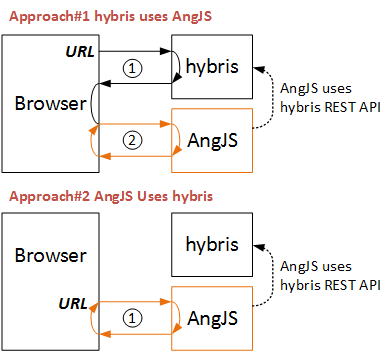
Approach #1. Hybris Uses AngularJS
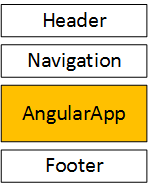
In this approach, the AngularJS application is incorporated into hybris templates. This is useful when the AngularJS application is supposed to be used mainly as part of a hybris-powered website. For instance, the customer account page may be implemented in AngularJS while the rest of the pages use plain hybris JSP templates.
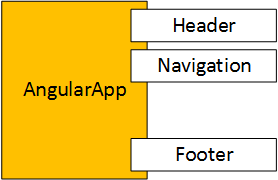
Look at the picture above. When the customer opens the account area, the page will be rendered using hybris templates. The AngularJS application looks like a component that is simply injected into the hybris-generated page as a part of it.
In order to use hybris data from an AngularJS component, for example, to show a list of ordered products, you need to create an API on the hybris side that provides the information to the AngularJS app.
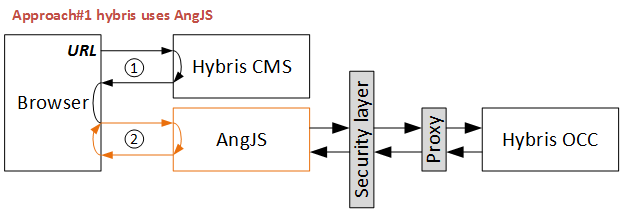
The following points should be taken into consideration:
- Multi-domain system. When used with hybris, you may face the following security issues:
- Cross-origin HTTP requests, which are blocked by browsers by default. To make it work, you need to add a custom
Access-Control-Allow-Originheader in the hybris OCC response. See CORS. - Mixed content. Hybris, AngularJS, and OCC should use the same protocol, either HTTP or HTTPS. The secure protocol is highly recommended even for the development environment. All certificates should be installed to avoid browser warnings.
- Port. In some corporate networks, custom ports may not work. So try to use standard ports for the application. Use a separate domain for the AngularJS application.
- Cross-origin HTTP requests, which are blocked by browsers by default. To make it work, you need to add a custom
- Authentication. The hybris Storefront and hybris OCC use different authentication mechanisms. OCC uses OAuth, which is good for thick, solid clients. If you want to reuse the hybris customer authentication status in the AngularJS application, I recommend looking for single sign-on solutions to support multi-domain systems.
- Exposing the data as a service. Think twice about every single piece of data or functionality exposed via web services for the AngularJS application. AngularJS requests are easily intercepted, so someone can fake the requests and steal your data using these APIs.
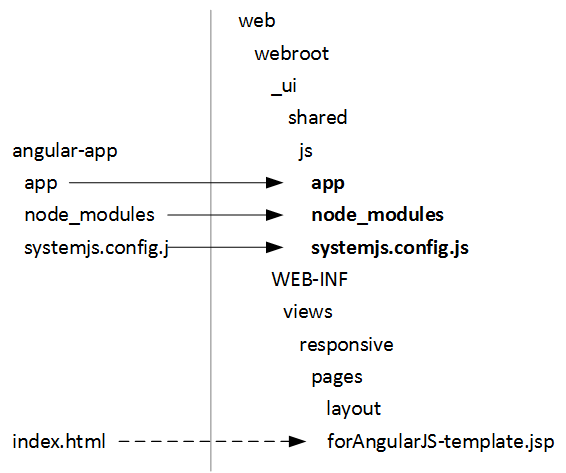
There are two ways to integrate the AngularJS base code into hybris templates: changing the page controller’s template or creating a custom component. To inject AngularJS modules into the hybris storefront, I map some files from the AngularJS project to the files and folders of the hybris storefront extension:
Approach #2. AngularJS Uses hybris
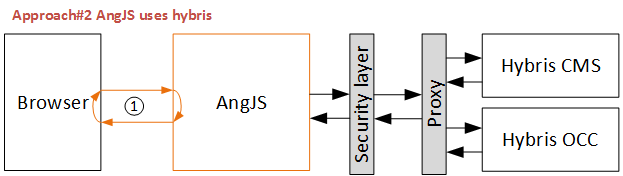
As you can see from the diagram above, this approach is a simplified version of the first one. Similar to the first option, the AngularJS application pulls something from hybris. However, in this approach, “something” is not only data wrapped in JSON or XML, but also HTML fragments, such as a header or a footer. So there are two types of requests to hybris: one for the data and one for the HTML fragments.
Default hybris doesn’t provide any functionality to work with hybris CMS objects from external applications, like AngularJS in our case.
The important part of the Angular-hybris integration is a web service that delivers Content Slot HTML fragments from hybris CMS by request.
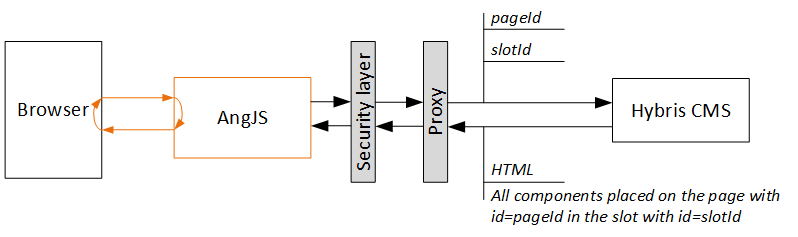
To make this service session-dependent, the simplest way is to deploy it on the same domain and within the same server context. So it will be a regular, very basic page controller whose template will look like this:
The code of the page template (“SlotContents.jsp”):
<%@ taglib prefix="cms" uri="http://hybris.com/tld/cmstags"%>
<cms:pageSlot position="${slotId}" var="feature">
<cms:component component="${feature}" />
</cms:pageSlot>
The code of the controller (“SlotContentsController.jsp”):
@RequestMapping(method = RequestMethod.GET)
public String renderSlotById(final Model model, final HttpServletRequest request, final HttpServletResponse response,
                               @RequestParam (value = "slotId", required = true) String slotId,
                               @RequestParam (value = "pageId", required = true) String pageId
                               )
        throws CMSItemNotFoundException {
    final ContentPageModel pageForRequest = getContentPageForRequest(pageId);
    response.setHeader("Access-Control-Allow-Origin", "*");
    if (pageForRequest != null)
      {
       storeCmsPageInModel(model, pageForRequest);
       setUpMetaDataForContentPage(model, pageForRequest);
       model.addAttribute("slotId", slotId);
       return "slotContents";
      }
This controller will be requested from the domain and port where the AngularJS app is deployed. Since it is a different domain and port than the ones where hybris is installed, the Access-Control-Allow-Origin header is required for cross-domain communication. Using this request, the AngularJS application will be able to show the HTML fragments from the specified hybris content slot.
Source code
AngularJS 2 source code for option #2, where AngularJS uses hybris, is public and available on Bitbucket: git@bitbucket.org:raliev/angularjshybris.git. Option #1 is trivial, so no source code is needed.
Video
© Rauf Aliev, September 2016
Discussion
Powered by GitHub Discussions — sign in with a GitHub account to join the conversation.