
Introduction
Varnish is an HTTP accelerator, also known as a caching HTTP reverse proxy. You can install it in front of hybris and configure it to cache the content.
Varnish Cache is very fast. It typically speeds up delivery by a factor of 300–1000x, depending on your architecture. However, your backend system should be compatible with Varnish to use all its features and speed. Default hybris isn’t.
Last weekend I managed to integrate Varnish with hybris. There is a module from hybris Professional Services that does the same task, but to my knowledge it has some peculiarities that limit the areas where it can be used. Hybris Professional Services can identify these areas and offers this module only if it will work well with the customer data, traffic, and website structure. Generally, their solution is good for most cases. Nevertheless, I decided to try Varnish with my page fragment caching infrastructure, which I explained in the previous post.
Below is a comparison between my solution and my understanding of the hybris Varnish caching module. Unfortunately, due to the SAP licensing model, these modules are not available for detailed study, so my comparison is based on opinions of others I managed to get.
| Varnish hybris extension | My solution |
|---|---|
| CMS objects only | Can work with any page fragments. It introduces new tags for JSP that can be used in JSP/TAG files without any limitations. |
| No capabilities for cache invalidation | For some cases, it has capabilities to manually invalidate the caches. |
| Caching “live” HTML fragments is not possible, for example, a list of customer addresses | Capable of working with “live” HTML fragments. |
| Well-tested and used on many projects, but it is not free | Experimental, but free. |
The last point is an important one. My solution seems to be more flexible and cheaper, but it might also be more expensive to support. If you do have a choice, it would be better to go to hybris Professional Services.
Solution
The overall diagram of my hybris-Varnish implementation is below.
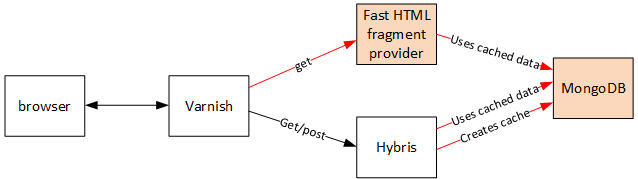
It is based on the page caching concept that I explained in the previous post.
According to that, the fragments that are supposed to be cached should be marked with the
cachetags.
This can perhaps best be illustrated with a simple example. Let’s take the following page layout:
| Section NAV | Section 1 |
|---|---|
| Section NAV | Section 2 |
The cache markers might be placed as follows:
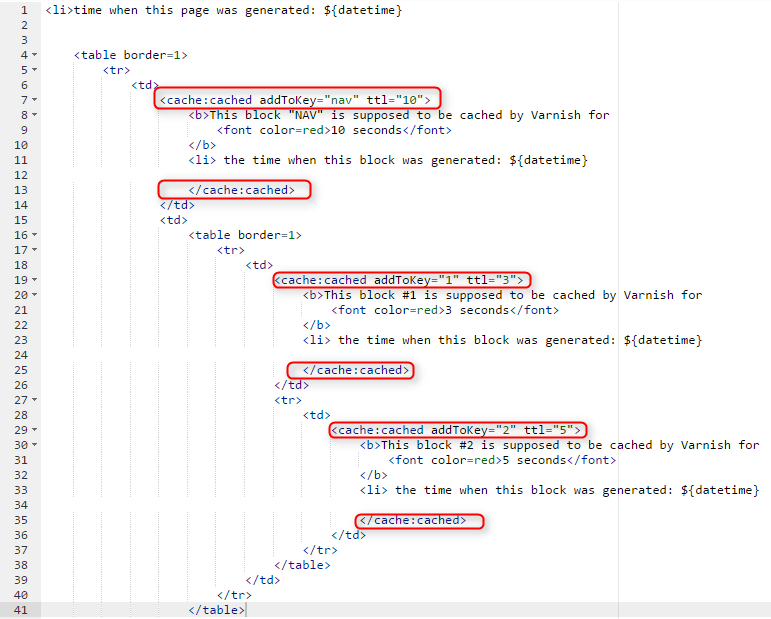
Custom tags
The cache:cached tags are processed by my custom tag library class, which extends BodyTagSupport and implements the DynamicAttributes interface. There are three methods to override: doStartTag(), doEndTag(), and setDynamicAttribute(s,s1,o).
public class CacheTags extends BodyTagSupport implements DynamicAttributes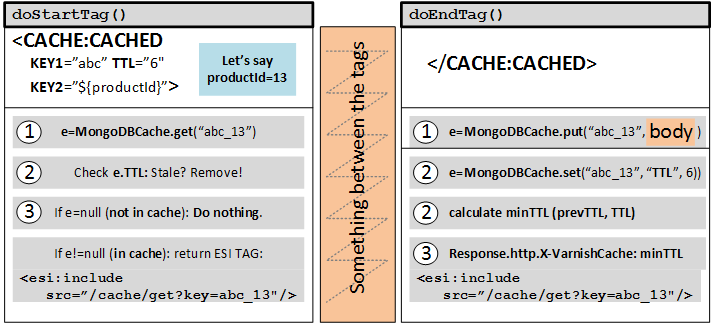
@Override
public void setDynamicAttribute(String s, String s1, Object o) throws JspException {
{ this.dynamicAttributes.put(s1, o.toString()); }
For the latter method, I used some predefined macros for attribute values: “sessionid”, “url+get”, and “url”. For example, “url” is processed by the following code:
ServletRequest sr = ((CacheTags) this).pageContext.getRequest();
String url = ((HttpServletRequest) sr ).getRequestURI();
this.dynamicAttributes.put("url", url);
So it means that for the tag <cache:cached param1="A" param="url">…</cache> you will use the page URL as part of the cache key:
"A_http://domain.ru/folder/folder" => "cached fragment"The compound key consists of keys separated by _. It is convenient for debugging purposes, but for a real system I recommend that you use a hash function to keep the key size constant. You can use any attribute names except ttl, which is reserved for the TTL value.
if (s1.equals("ttl"))
{
    ttl = Integer.parseInt(o.toString());
}
Varnish server
As I mentioned before, the Varnish server is in the middle between the user and the application server(s).
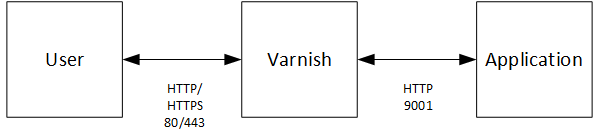
So for debugging purposes you can request the “raw” response from the application.
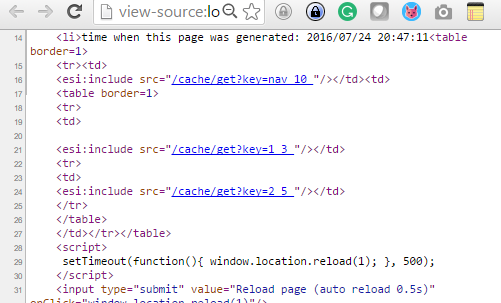
Note that ESI tags are mixed with the HTML tags. If you open this HTML in a browser, the page will be broken because some fragments were replaced with ESI tags. Your browser knows nothing about these tags, certainly.
However, Varnish is capable of processing these tags properly. For each tag, Varnish may make a request to the server to fetch the content that we replaced with this tag. I said “may” because Varnish is a caching proxy, and next time it will start looking in its cache storage first.
Cache data provider
Let’s look more closely at the ESI tag I used:
<esi:include src="/cache/get?key=2_5_"/>This URL is autogenerated by my JSP custom tag library.
Varnish makes additional requests to the backend to retrieve the page fragments and cache them to speed up the next similar page requests.
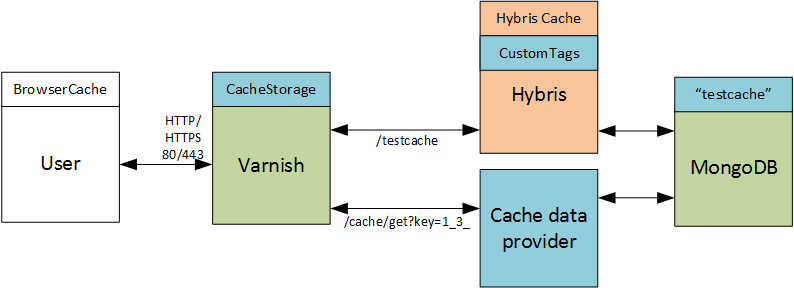
Cache Data Provider is a separate server whose sole purpose is to provide the data from NoSQL shared storage (MongoDB) to the requestor (Varnish). The key is specified as a parameter (key).
Note that the whole system operates with different types of caches: browser cache, Varnish cache, hybris cache, and MongoDB cache. We added two of them: MongoDB and Varnish.
There are the following cache cases:
| Varnish cache | MongoDB cache | Issue | Solution |
|---|---|---|---|
| Not present/stale | Present | It is a typical first query or a query after the TTL is over. | Cache the fragment in Varnish. |
| Present | Present or not present | It is a repeated query within the TTL. | Varnish shouldn’t make a request to the MongoDB Cache Provider because the cached fragment had been successfully retrieved before. This is why we shouldn’t care about the MongoDB cache for this case. |
| Not present/stale | Not present/stale | No data is available in either MongoDB or Varnish. | Varnish won’t be able to retrieve and deliver the fragment. This is a bad case, actually. See below for the solution. |
Varnish cache – MongoDB cache conflict resolution
If the fragment is removed from both caches, Varnish and MongoDB, there is no way to retrieve it from hybris separately, and that is an issue. In some situations, these fragments can be generated separately, but you need to implement specific controllers for different types of fragments. For example, for CMS content slots or CMS components this implementation is trivial, and I suspect that hybris Professional Services went this way, but for controller-related page fragments it is not. The bad point is that the custom functionality for the latter is very project-specific.
Let’s look deeper into this point. To retrieve these fragments, the hybris Professional Services extension possibly uses a custom controller to render CMS fragments separately from the page where they are placed. However, there are three issues with this approach.
- The first issue is about the “filters-page controller” interaction. Sometimes some data is prepared by custom/hybris/Spring filters to be used in the page or component controller. This means that filters must be used for each cache request. If you skip the filters, the rendered components might look different.
- The second issue is about resource-intensive filters, like BTG (personalization). Once you replace one slow request with, say, 10 slow but cacheable requests, the efficiency might be questionable.
- Sometimes the cached fragments may depend on each other, on other components, or on the same shared information, such as JavaScript variables.
How do we overcome these issues? My solution is very simple. When does the issue happen?
- When the controller page’s TTL is longer than the fragments’ TTLs.
- And when the controller page is also cached.
These points are for a plain structure, with no nested cacheable fragments. For nested ESIs, replace “controller page” with “parent ESI” in the points above.
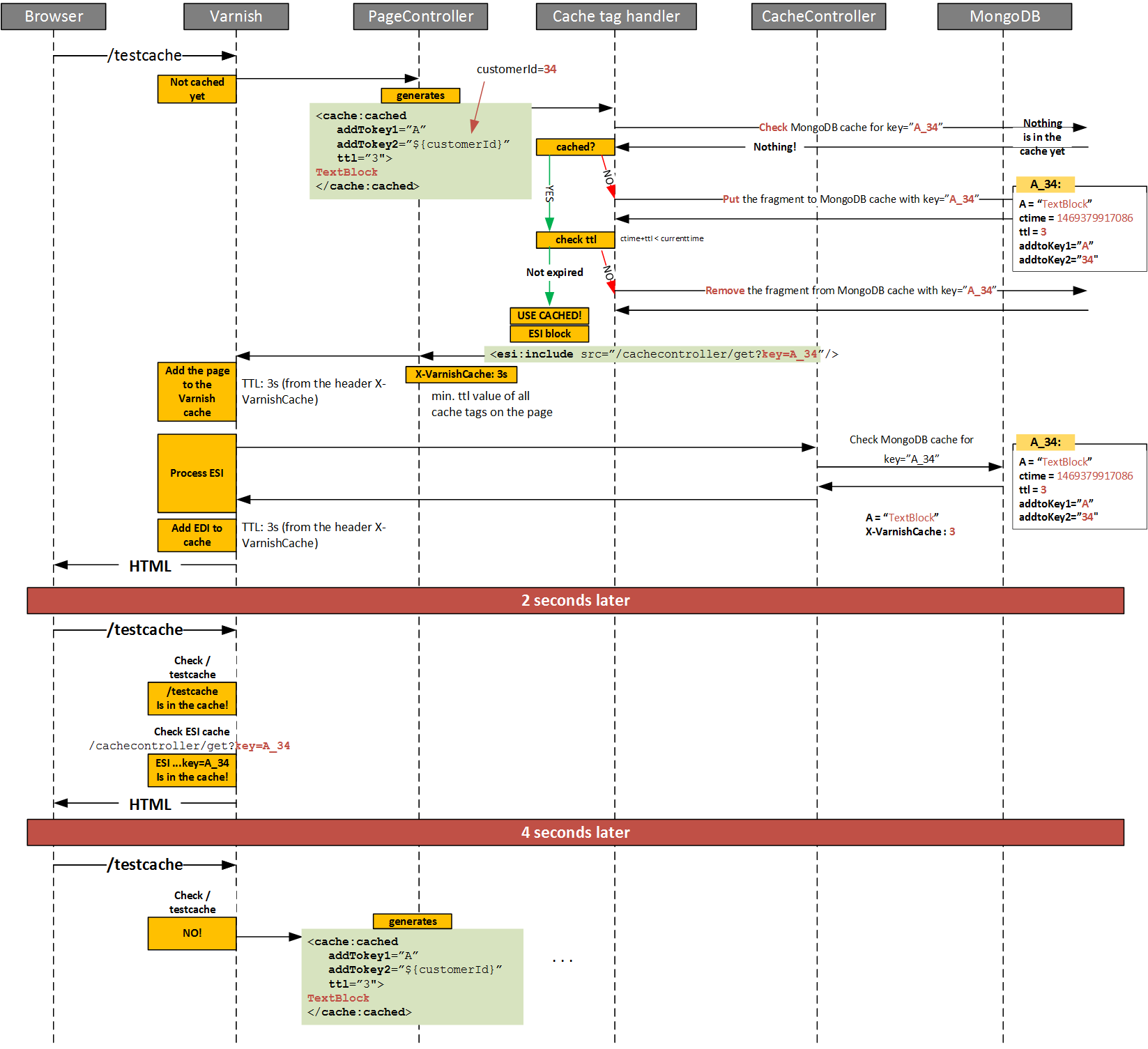
If the controller page is not cached, each request from the user to the server will recreate the ESI fragments in MongoDB. If so, case #3 will never happen.
If the controller page’s TTL is not longer than the fragments’ TTLs, the fragments’ TTL will never be removed from MongoDB.
So the solution is to set the TTL for the controller page as min(fragments TTLs). The same applies to nested cacheable fragments: the TTL of the parent ESI is calculated based on the TTLs of the nested ESIs, which are specified as a tag parameter or calculated based on their substructures.
For example, the product page has the following structure:
| Section NAV (ttl = 10) | Section 1 (ttl = 3) |
|---|---|
| Section NAV (ttl = 10) | Section 2 (ttl = 5) |
So it means that the TTL of the product page will be calculated as min(10,3,5) = 3. Certainly, you can programmatically set the TTL of the controller to 0 to get rid of controller caching.
Varnish cache configuration
The configuration below is oversimplified, just to illustrate an approach. Backend response caching depends on the requested URL and my custom X-VarnishCache header:
vcl 4.0;
import std;

backend default {
 .host = "electronics.local";
 .port = "9001";
 .connect_timeout = 60s;
 .first_byte_timeout = 60s;
 .between_bytes_timeout = 60s;
 .max_connections = 800;
}

sub vcl_recv {
 return (hash);
}

sub vcl_backend_response {

    if (bereq.url ~ "/cache/get") {
        set beresp.ttl = std.duration(beresp.http.X-VarnishCache+"s",0s);
    }
    else
    {
        set beresp.do_esi = true;
        set beresp.ttl = std.duration(beresp.http.X-VarnishCache+"s",0s);
     }
    return (deliver);
 }
Video (PoC)
The video demonstrates that the request rate on the application server side is 6 times less than the request rate from the browser.
The high-resolution version of the diagram is here

© Rauf Aliev, July 2016
Discussion
Powered by GitHub Discussions — sign in with a GitHub account to join the conversation.