
Today’s post is a follow-up to the previous articles about caching.
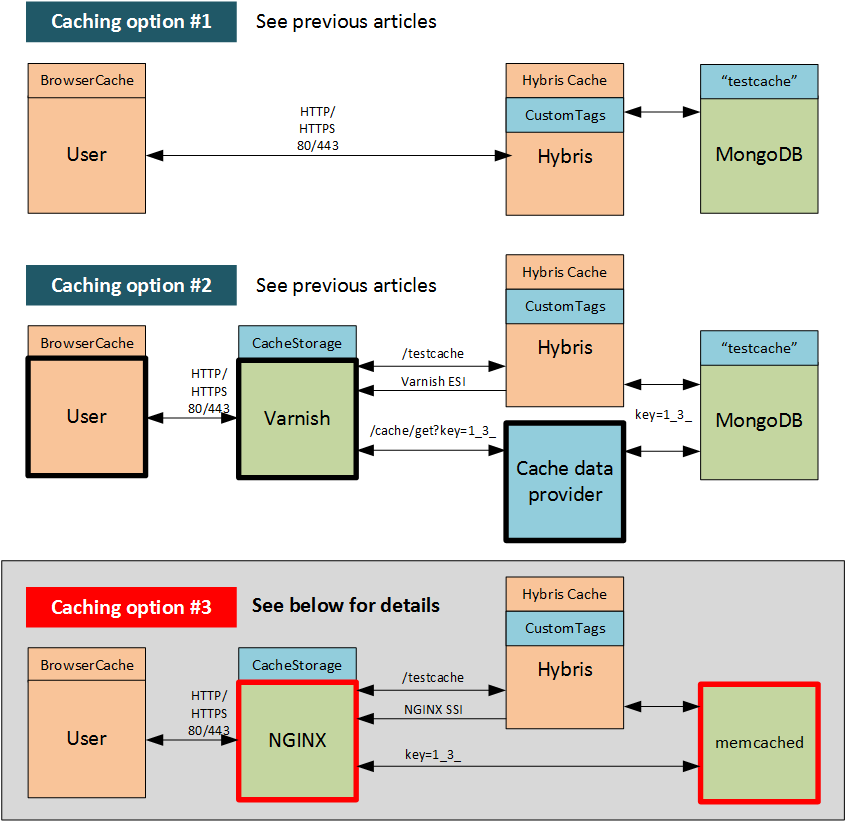
I managed to integrate hybris with NGINX as a reverse proxy and memcached as cache storage. The key distinctive feature of this solution is that NGINX works with memcached directly.
You can find all three solutions below. See the explanations of the first two approaches in the previous articles on my blog: Page fragment caching and Varnish caching.
Why NGINX?
NGINX is a high-performance web/proxy server that powers the busiest, highest-traffic websites in the world: Airbnb, Discovery Education, Dropbox, MaxCDN, Netflix, TED, WordPress.com, Zynga, and many more. It includes caching features for both static and dynamic content, and it can also be set up as a proxy for backend platforms such as hybris.
There are several reasons why I chose NGINX:
- Unlike Varnish, it is capable of working with NoSQL directly.
- Unlike Varnish, NGINX supports SSL by default.
- NGINX is a native web server, while Varnish is just a proxy cache layer.
- Along with your web servers, you may end up with too many caching layers.
People say that Varnish consumes more CPU and RAM than NGINX.
Why memcached?
Basically, because it is the only NoSQL database supported by NGINX. However, there is another strong point as well: memcached is originally intended for caching.
As for drawbacks:
- Memcached is memory storage. It is not persistent.
- Memcached is a key-value store, while MongoDB is a document store.
Hybris modifications
Architecture
The overall architecture is the same as explained in the previous article. The only differences are:
- memcached instead of MongoDB
- SSI includes (NGINX) instead of ESI includes (Varnish)
- No
/cache/get?key=XXXhandler, because NGINX is capable of working with memcached directly
Memcached client library
There are a number of Java libraries that support memcached. I chose the Java client from Greg Whalin (https://github.com/gwhalin/Memcached-Java-Client/wiki).
SSI includes
I simply replaced the format of the include tags.
Varnish + MongoDB version (the previous solution):
<ESI:include src="/cache/get?key=XXXX"/>NGINX + memcached version (this solution):
<--# include file="/cache/get?key=XXXX"/>Basically, for the NGINX configuration I used, you can use anything before the “?” sign in the path: it will be ignored. The solution doesn’t imply fetching page fragments separately from the hybris side.
Hybris Memcached Service
There are the same methods as I used for the MongoDB hybris service.
public interface ICacheService {
    public void connect() throws UnknownHostException;
    public Map<String, String> getMap(String key);
    public String get(String key);
    public String put(String key, String value, Map<String, String> attributes);
}
public class MemcachedService implements ICacheService {
...
}Unlike MongoDB, memcached is a simple key-value storage, so I needed to create more than one key in put(key, value, attributes):
put("a","b", { "attr1" -> "value1", "attr2" -> "value2" })This will create the following key-value pairs in the memcached storage:
a->b
a*attr1 -> a*value1
a*attr2 -> a*value2
NGINX configuration
In my environment, hybris uses port 9001, and NGINX uses port 39001.
server {
    listen 39001;
    ssi on;

    location / {
        ssi on;
        set $memcached_key "====";

        if ($arg_key != "") {
            set $memcached_key "$arg_key";
            memcached_pass localhost:11211;
        }

        error_page 404 502 504 = @fallback;
    }

    location @fallback {
        proxy_pass http://localhost:9001;
    }
}
Challenges
Building NGINX for Windows
NGINX for Windows comes with a limited set of modules. The required modules, such as ngx_http_ssi_module and ngx_http_memcached_module, are not included in the executable available for download. In order to build NGINX with these modules, you need to build it from the sources. There are two ways to do it: use Visual C or Cygwin. I chose the second option, so follow in my footsteps:
- Download Cygwin and the NGINX sources.
- Install Cygwin and the modules required for C (
automake,make,gcc, etc.). - Configure and make. You may have some problems with the gzip module, as I did. I took it out of the configuration (
--without-http_gzip_module).
You also need to change worker connections from 1024 (the default) to 64.
Controller page caching
In the Varnish + MongoDB solution, I used caching for the controller pages. In this solution, I decided not to cache these pages at all. The first reason is to avoid repetition: you can implement this caching in a similar way, as explained earlier. The second reason is that this type of caching would add an unnecessary layer of complexity to the system. The controller pages set the cookies (session), and these cookies might be used by the components. If you use the cached version of the page, but the session is over, the page won’t be displayed properly. These complexities are common for any type of caching, so I decided to omit this part to avoid creating a false illusion of simplicity.
© Rauf Aliev, July 2016
Discussion
Powered by GitHub Discussions — sign in with a GitHub account to join the conversation.