
Introduction
Caching is inevitable for a high-performance, scalable web application. There are different types of caching that have already been implemented in hybris. However, almost every solution requires additional tools and improvements to make hybris more resilient to high traffic or page-load-time requirements.
There are different types of caching that can be used in hybris projects. Some of them are already included in the platform, such as entity cache or query cache. Some of them are on the database side, such as database query cache. SOLR also plays the role of a caching server for products. However, for high performance, you need to add some additional components to make the system faster.
Sometimes it is impractical to cache an entire page because portions of the page may need to change on each request. In those cases, you can cache just a portion of a page.
Out-of-the-box hybris does not have any capabilities like this. There is a package from hybris Professional Services for page/page-fragment caching based on Varnish. Since the package is poorly documented and licensed separately, I decided to create my own PoC to estimate the amount of effort needed to create a similar extension.
I believe that my solution has some advantages in terms of features and flexibility, namely:
- My solution has tools for cache invalidation at a coarse- or fine-grained level. For example, if objects are changed, then caches where these objects are mentioned or used must be invalidated and recreated. For an external unmanaged reverse proxy, the only solution is to wait until the cache TTL time is complete. With my solution, you have tools to manage the cache contents and change them easily.
- My solution is not limited to CMS objects. You can cache any page fragments, including parts of components or parts of page-controller templates.
- With my solution, cache fragments may depend on each other or on external entities such as customer ID, POST data, or session parameters.
Solution
Video
Syntax: custom tags
I used JSP custom tags to mark the areas for caching.

In order to use custom tags, you need to create a custom tag library. In my PoC, I created cachetags.tld and put it into resources/WEB-INF:
<?xml version="1.0" encoding="UTF-8"?><taglib xmlns="http://java.sun.com/xml/ns/javaee"
xmlns:xsi="http://www.w3.org/2001/XMLSchema-instance"
xsi:schemaLocation="http://java.sun.com/xml/ns/javaee http://java.sun.com/xml/ns/javaee/web-jsptaglibrary_2_1.xsd"
version="2.1">
<tlib-version>1.1</tlib-version>
<short-name>cachetags</short-name>
<tag>
<name>cached</name
<tag-class>org.training.storefront.cache.CacheTags</tag-class>
<body-content>JSP</body-content>
<dynamic-attributes>true</dynamic-attributes>
</tag>
</taglib>You can specify any number of attributes in the tag, with any names and any values. The names of the attributes are used as keys in the cache, and the values are used as values.
For example:
<%taglib prefix="cache" uri="/WEB-INF/cachetags.tld"%>
<cache:cached attr1="value1" attr2="value2">
  something
</cache>
will create the following record in the cache:
{
  "value1_value2" : "something",
  "attr1" : "value1",
  "attr2" : "value2",
  ctime : 146863804587
}
ctime is the creation time in milliseconds. This value can be used to invalidate old records.
Cache storage
You can use any NoSQL database or in-memory cache library to store these JSONs. In my PoC, I used MongoDB. Among all NoSQL solutions, this one works well with Windows.
Invalidation
Some server-side logic may make the cached fragment invalid.
In my PoC, I purged the records that have the attribute or attributes that reflect the affected objects.
For example:
| Cache contents | JSP tags | ||||
|---|---|---|---|---|---|
| key | obj | ProductCode | CustomerId | CategoryId | |
| ProductDetails_1234_14 | ProductDetails | 1234 | 14 | <cache:cached obj=”ProductDetails” ProductCode=”${categoryId}” CustomerId=”${customer.id}”> … </cache:cached> | |
| ProductDetails_4321_14 | ProductDetails | 1234 | 14 | <cache:cached obj=”ProductDetails” ProductCode=”${categoryId}” CustomerId=”${customer.id}”> … </cache:cached> | |
| CategoryPage_/c/123 | CategoryPage | /c/123 | <cache:cached obj=”CategoryPage” ProductCode=”${category.id}”> … </cache:cached> | ||
| CategoryPage_/c/123 | CategoryPage | /c/123 | <cache:cached obj=”CategoryPage” CategoryId=”${category.id}> … </cache:cached> |
If Product #1234 is changed, you need to send two requests to the cache engine:
cache.purge(“ProductCode”, “1234”)orcache.purge(“obj”, “ProductDetails”, “ProductCode”, “1234”);cache.purge(“CategoryId”, getProductByCode(“1234”).getCategories);
If product 1234 is in category 123, all the records will be removed. If not, only the first two lines will be purged. The next time the customer makes a request to the product page, the cache will be updated.
However, if this product was included in the product carousel component product list, and this component was cached, it is much more difficult to understand which product carousel component caches should be invalidated. A simple solution to this problem is to associate every cache entry with a time-to-live (TTL) value. With this solution, the validity of an entry expires after some time, meaning that hits on expired cache entries are considered misses. The trade-off is content freshness versus scalability.
Examples of cached fragment definitions
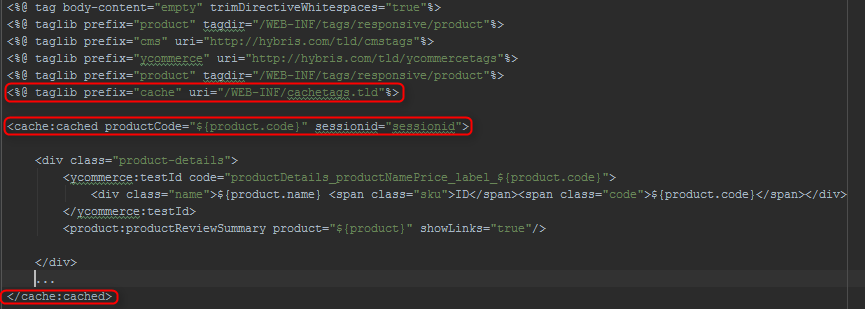
Product details. In the example below, the cached fragment depends on the product code and session. This means that hybris will use different cached fragments for different pairs of product and user sessions. If product prices are not customer-dependent, you can use only the productCode attribute. In this case, different customers will use the same cached fragment.
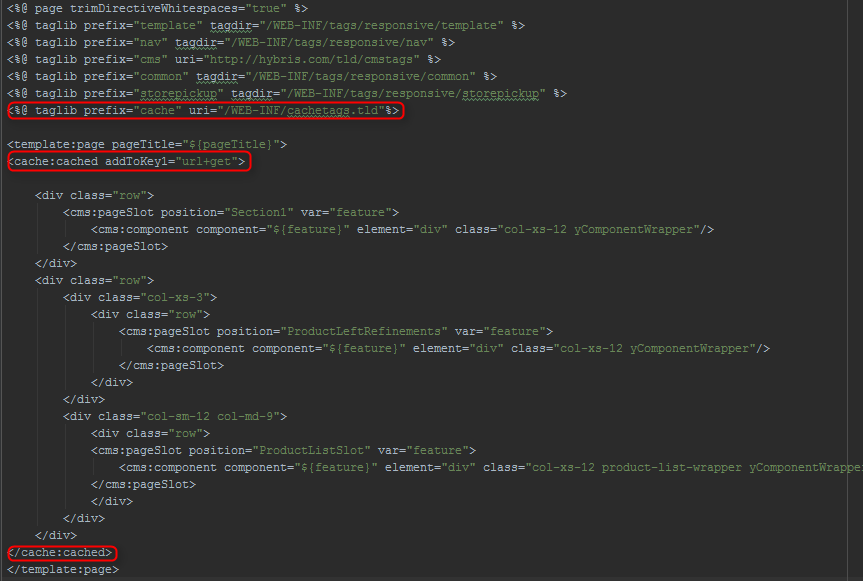
Category page. In the next example, the fragment depends on the URL and query string. Facets change the URL parameters, and the category ID is part of the URL. Therefore, with different category pages, you will have different cached fragments.
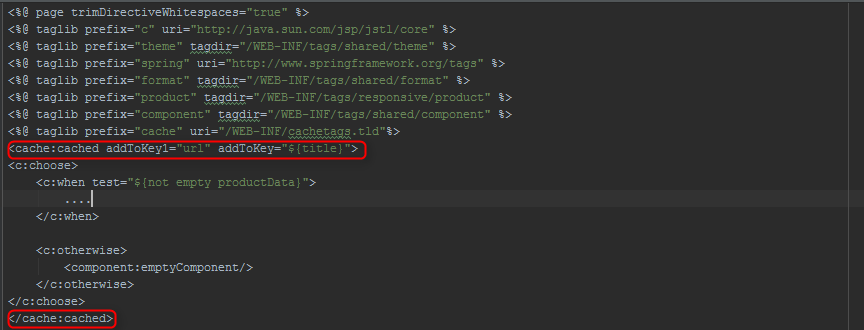
Product carousel component. As you can see from the code, the cached fragment depends on the URL and $title. The product carousel component can be put into the same page with a different configuration. In our case, the configurations have different titles. Each instance will be cached separately. If you eliminate the second attribute, you will have two identical fragments because, for the second time, the fragment from the first instance is reused from the cache. If you add ${title} as a second key, hybris will use different caches for the instances.
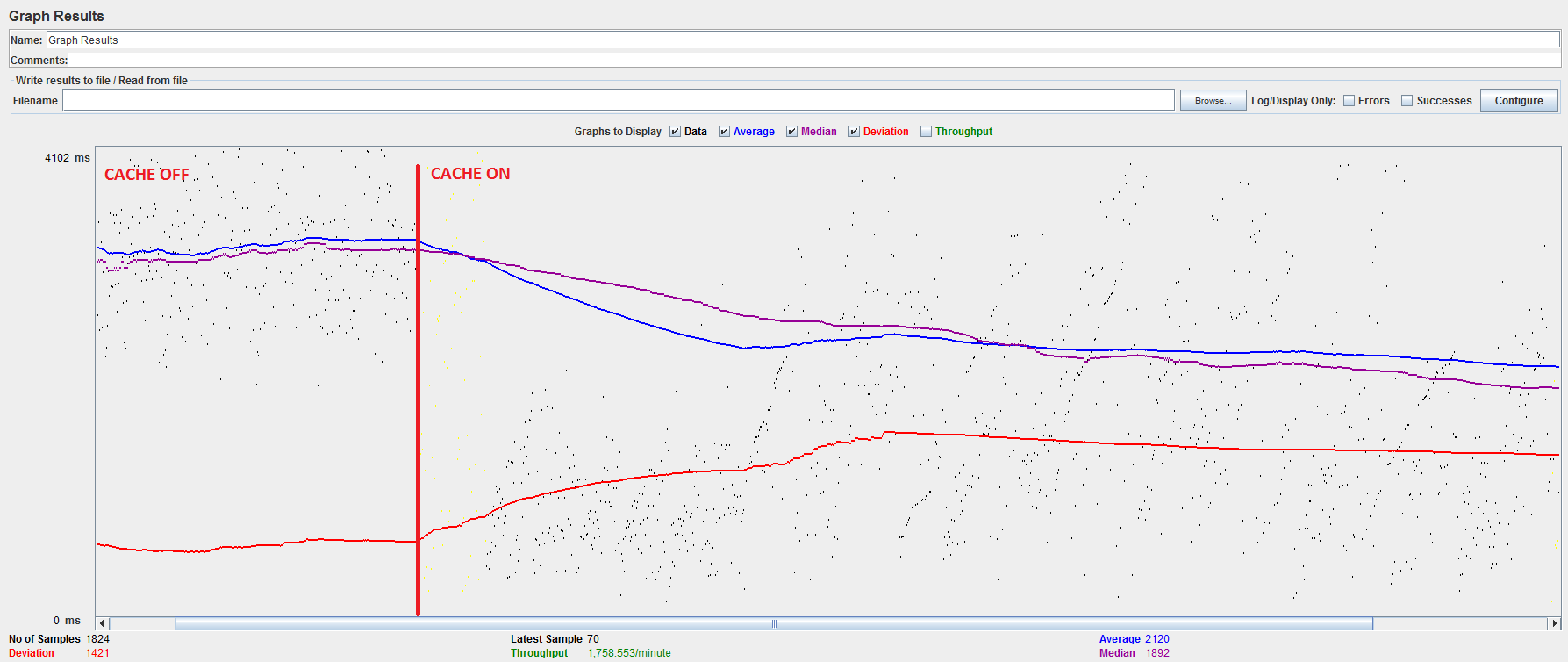
Quick and dirty performance testing
https://electronics.local:9002/trainingstorefront/electronics/en/Open-Catalogue/Cameras/c/571- Number of threads (users): 80
© Rauf Aliev, July 2016
Discussion
Powered by GitHub Discussions — sign in with a GitHub account to join the conversation.