
Introduction
The traditional Hybris Solr cluster has a number of drawbacks, including a lack of failover and scaling capabilities. In this post, I explore SolrCloud as one of the possible options for resolving these issues.
To illustrate, the traditional Hybris Solr cluster looks like this:
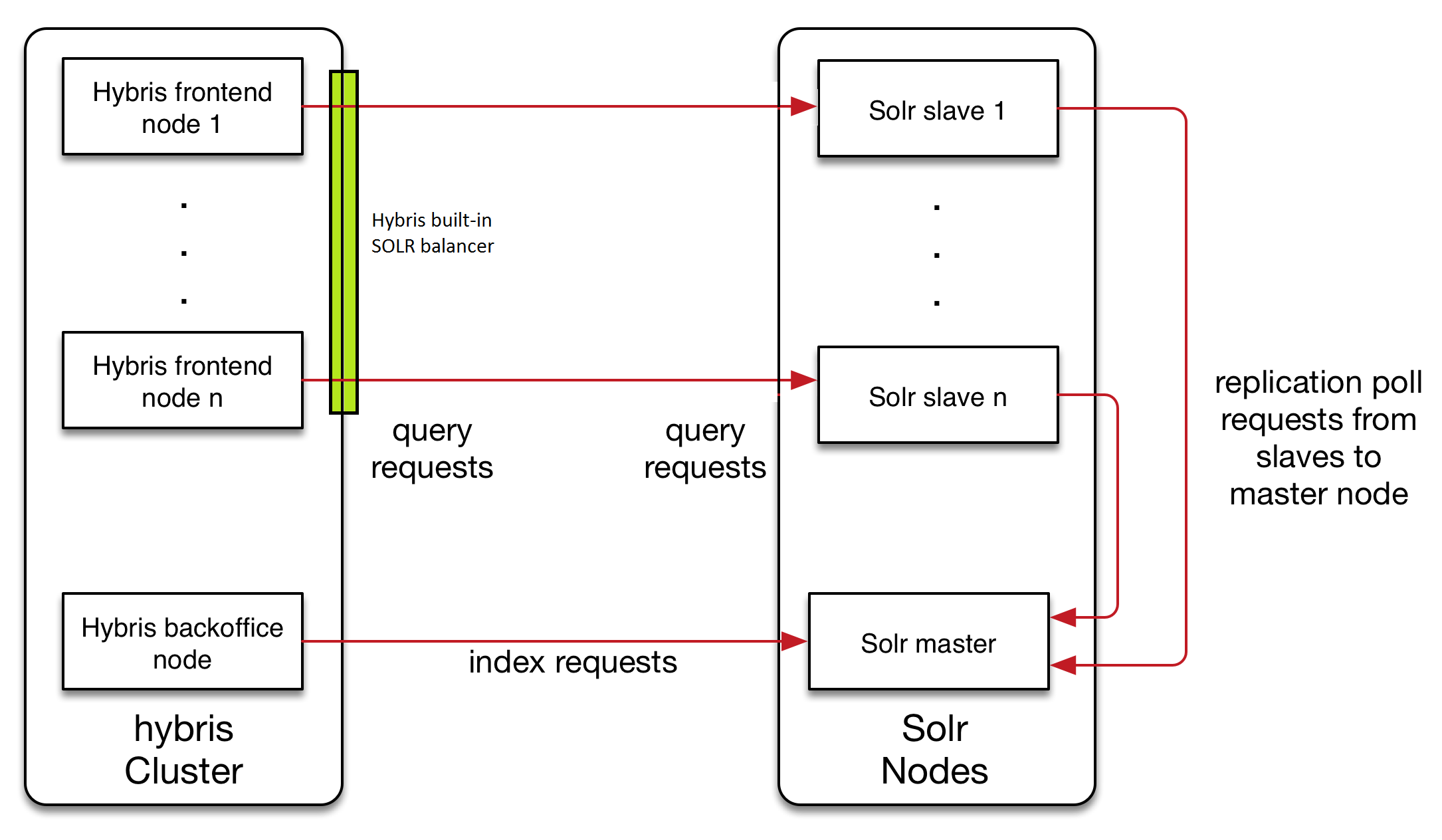
This traditional architecture has a number of drawbacks as outlined above, including:
- A lack of failover capability
- Having the cluster configuration stored in the Hybris database, which is not ideal in terms of supportability
- An inability to set up autoscaling if the need arises
To mitigate these issues, there are a couple of different routes you can take.
Option 1:
Implementing a load balancer to manage search requests:
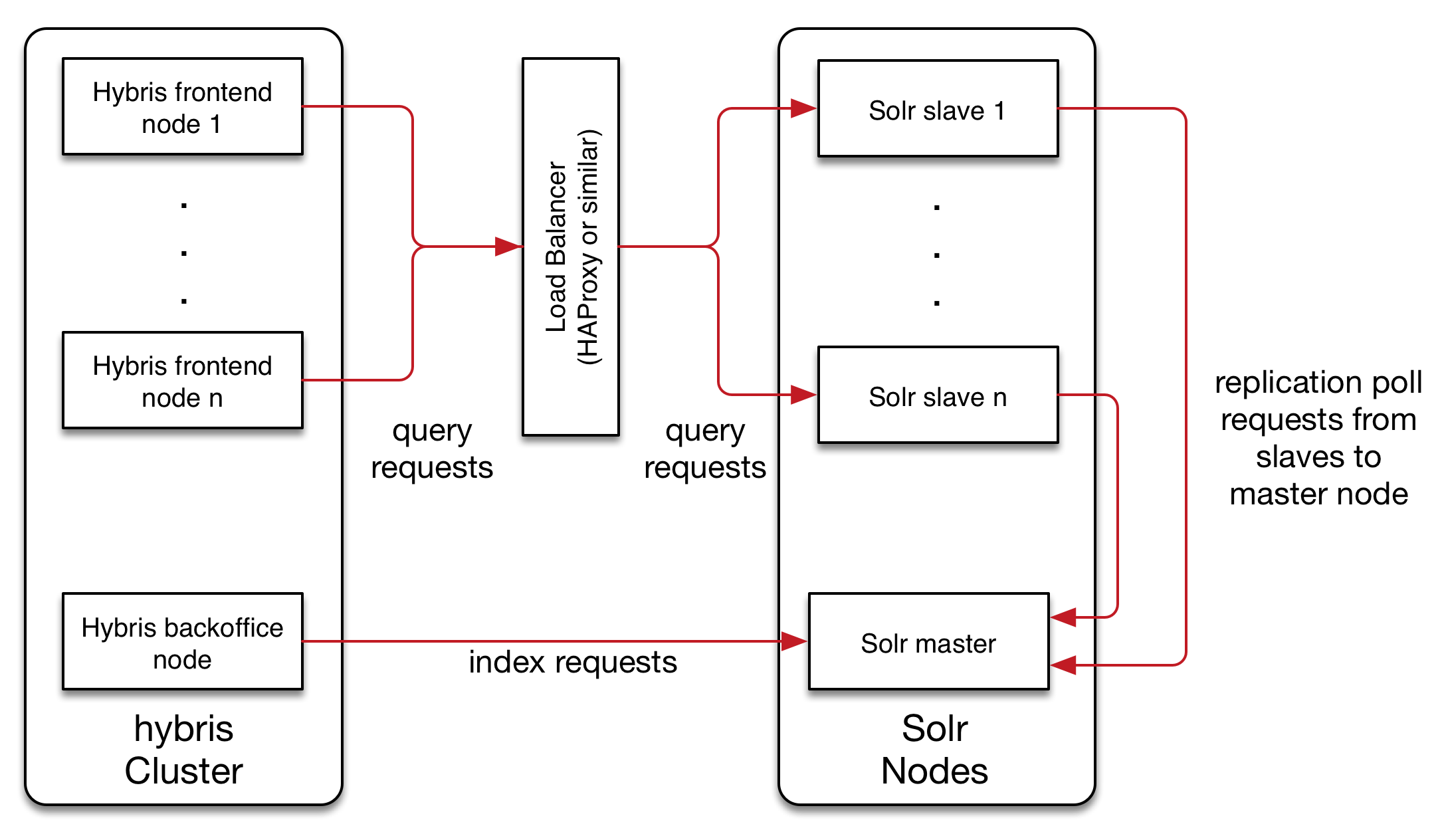
The drawback to this option is that the indexer is still not scalable, which was one of the main issues with the traditional architecture.
Option 2:
The second option, which I’ll be focusing on for the remainder of this post, is integrating Hybris with SolrCloud. This option resolves the scalability issue, provides better failover, and moves the cluster configuration out of the Hybris database.
The target architecture should look like this:
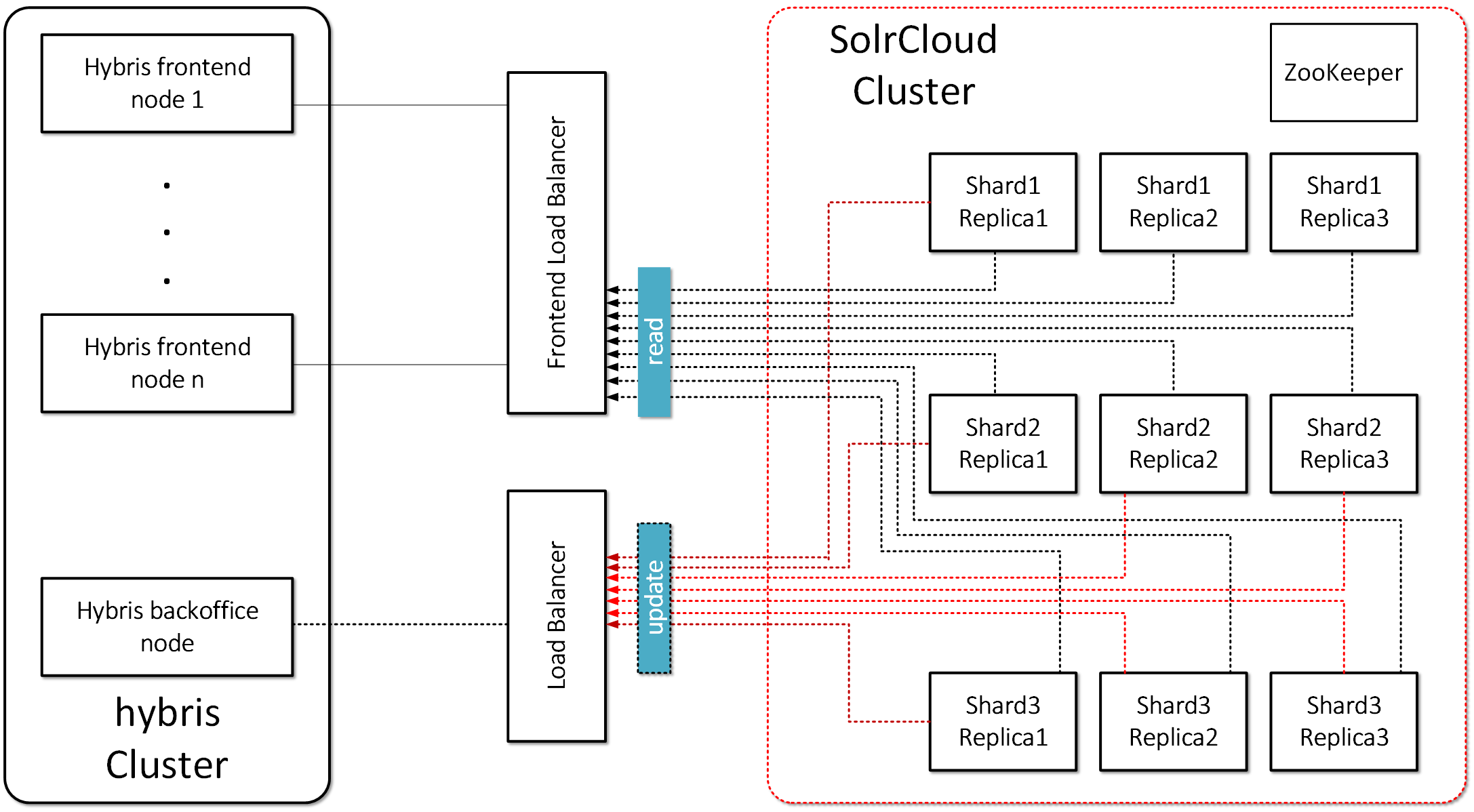
To fully understand the SolrCloud solution, it’s necessary to first define the terminology that is used.
- Collection: A search index distributed across multiple nodes; each collection has a name, shard count, and replication factor. In my example, shard count = 3 and replication factor = 3. The collections are “master_electronics_CloudIndex_collection” and “master_apparel-uk_CloudIndex_collection”. A collection is a set of shards.
- Shard: A logical slice of a collection; a shard is a set of cores. Each shard has a name, hash range, leader, and replication factor. Documents are assigned to one, and only one, shard per collection using a document routing strategy.
- The document routing strategy is based on the hash value of the ID field by default.
- Replication Factor: The number of copies of a document in a collection. For example, a replication factor of 3 for a collection with 100M documents would equal 300M documents total across all replicas.
- Replica: A Solr index that hosts a copy of a shard in a collection. Behind the scenes, each replica is implemented as a Solr core. For example, a collection with 20 shards and a replication factor of 2 in a 10-node cluster will result in 4 Solr cores per node.
- Leader: A replica in a shard that assumes special duties needed to support distributed indexing in Solr. Each shard has one, and only one, leader at any time, and leaders are elected automatically using ZooKeeper. In general, it doesn’t matter which replica is elected as the leader.
- Overseer. The overseer is the main node for the whole cluster, responsible for processing actions involving the entire cluster. If the overseer goes down, a new node will be elected to take its place.
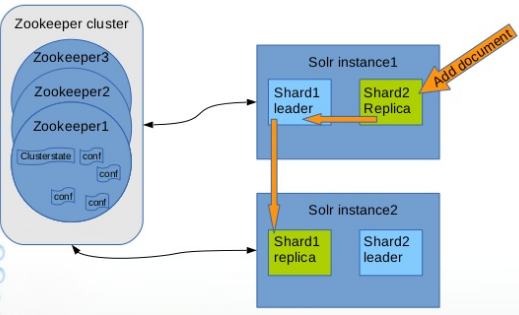
I’ve created a diagram below that shows how you can write to any node in the cluster, and it will redirect the query to the “Leader” node. Then, the leader node will redirect the query to storage. Ultimately, the client shouldn’t be aware of leaders and shards; they simply add new data to the cloud.
The main benefits of using SolrCloud as storage for Hybris include:
- Distributed indexing. In the traditional architecture, Hybris can only work with one indexer, which ends up becoming a bottleneck.
- Automatic failover. In the traditional architecture, the indexer is a weak point in terms of durability.
- Sharding. Horizontal scaling for indexing parallelization. For example, if you have 1,000,000 products and ten shard servers, each server will manage ~1/10 of 1 million. You will be able to scale the system by adding shard servers.
- Replication. For failover correction, high availability, and load balancing. Unlike traditional Solr replication, SolrCloud replication is not master-slave.
- Leader election. If the leader goes down, a new node will be elected to take its place. As a result, we have no SPOF.
- Overseer election. If the overseer goes down, a new node will be elected to take its place. As a result, we have no SPOF.
- Centralized configuration (ZooKeeper). This feature can also be added to the traditional architecture.
Complexity
Out of the box, Hybris doesn’t support SolrCloud. Hybris knows nothing about SolrCloud collections; it works with cores. In the SolrCloud model, it needs to work with collections instead.
Solution
Technical details
In summary, there are two possible solutions to improve failover capability, supportability, and autoscaling over the traditional Hybris Solr cluster:
- Replace Hybris built-in indexing strategy
- Put an adapter between Hybris and SolrCloud
I chose the second option, as it overcomes more of the limitations of the traditional structure. Some of my notes:
- In my architecture, there is a load balancer (nginx) that plays the role of an adapter and transforms incoming Hybris-generated requests into the SolrCloud format. For simplicity, my load balancer works with only one host in the cloud.
- Basically, it replaces “master_electronics_CloudIndex” with “master_electronics_CloudIndex_collection_shard1_replica1”. It is a straightforward way to make it work, and for a real project we will need to reconsider it. However, it doesn’t mean that the node with shard1_replica1 will be loaded the most. It is a cloud, and the request may be redirected to another node based on Hash(id) + see “Leader” above.
- The Hybris configuration was moved to ZooKeeper. Solr uses ZooKeeper as a system of record for the cluster state, central config, and leader election.
- The Hybris Solr plugin was moved to Solr instances in the cloud.
- There is a fake core named “master_electronics_CloudIndex”. Hybris checks the cores using checkCore() and fails with SolrCloud. Unfortunately, this functionality is critical in Hybris and difficult to turn off. It is much easier to create an empty core with the name Hybris expects, and these checks will pass.
- “CloudIndex” in the core/collection name is from itemType.indexName. By default it is empty, and Hybris uses “Product” for empty indexName (e.g. the core/collection would be named “master_electronics_Product” if indexName is empty).
- The TWO PHASE indexing mode is not working yet. I was using “DIRECT” mode. So it is in TO DO.
© Rauf Aliev, July 2016
Discussion
Powered by GitHub Discussions — sign in with a GitHub account to join the conversation.