
Situation
Today’s challenge is comprehensive pricing.
500,000 customers have unique prices for 180 products. In total, there are 90,000,000 priced items in the system. After logging in, customers should see their personal price. This is an extreme case of customer group pricing.
Complexity
For a small number of customer groups, the solution seems trivial. Indexed products are stored in Solr as documents, so each document will have records like price_customergroup_N: 1,30. Alternatively, you can use a mapping structure: price: { customer_group_N => 1,30, …}. Each time hybris indexes the product, all prices for all groups will be retrieved and stored in the index. The storefront uses this index for search results and category pages, so all you need to do is get the right data from the document.
The obvious weakness of this approach is that it is designed for small sets of customer/price groups. For larger sets, especially huge sets, you need to reconsider the design. Large Solr documents will significantly slow down search and indexing.
Solution
Actually, large sets of fields in Solr are not a serious drawback. It is possible to extend hybris to restrict the set of fields used for data retrieval. A Solr query has an fl parameter to specify the list of fields needed. This improvement is interesting, but I decided to go another way. The technical details are below; now let’s start with the demonstration.
90M price items and 500K customers:
Technical details
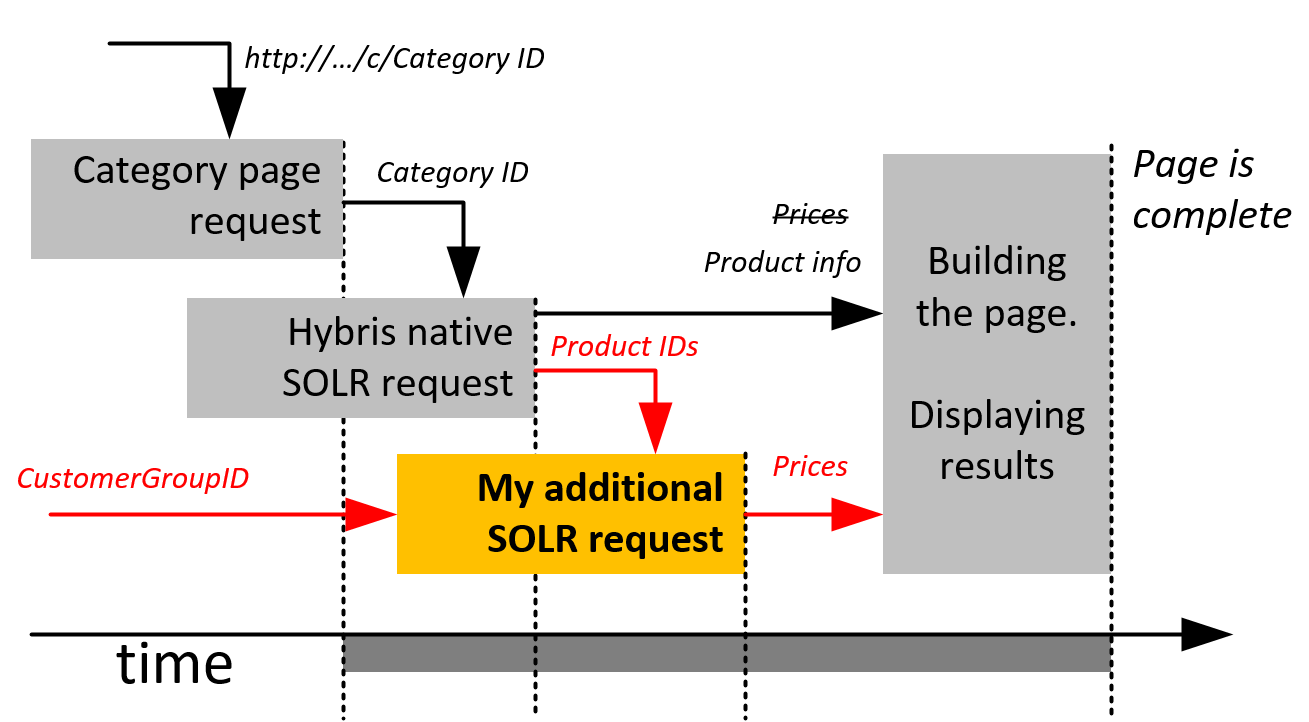
Hybris
- New
priceRequestService.injectPrices - Custom
PriceFactory: callspriceRequestService.injectPrices(prices, customerGroupId) - Custom
SolrProductSearchFacade
SolrClient solrClient = new LBHttpSolrClient("http://localhost:8983/solr/personalprices");
SolrQuery solrSearchQuery = new SolrQuery();
if (customerUid.equals("")) { customerUid = "<ALL>"; }
solrSearchQuery.set("q", "productcode:(" + listOfcodes + ") AND (customercode:"+customerUid+")");
solrSearchQuery.set("rows", "30");
QueryResponse response = solrClient.query(solrSearchQuery);

Iterator<SolrDocument> iter2 = response.getResults().iterator();
Map<String, String> productprices = new HashMap<String, String>();
while (iter2.hasNext()) {
SolrDocument solrDocument = iter2.next();
String productCode = solrDocument.getFieldValue("productcode").toString();
String price = solrDocument.getFieldValue("price").toString();
productprices.put(productCode, price);
}
Solr price request
- Additional Solr core
- Simple structure (
productCode–customerGroup–currencyCode–priceValue).
Super-fast update
The full price update takes 478 seconds on my laptop. For all customers, for all products.
The price update could be performed using the CSV import request:
http://localhost:8983/solr/personalprices/update/csv?stream.file=/hybris/solr-prices/testdata.csv&stream.contentType=text/plain;charset=utf-8Database
No additional database requests are performed to retrieve the prices to show them on the category and search pages. Hybris PriceRows were not used in this design at all.
© Rauf Aliev, June 2016
Discussion
Powered by GitHub Discussions — sign in with a GitHub account to join the conversation.