

Last night, a spark of inspiration on my evening drive turned into a monumental achievement by the early hours: I successfully migrated 6,000 posts from Facebook to my brand-new WordPress blog, then translated them into English and published them at RaufAliev.com. So now I have two blogs, in Russian and English, with the same content as my Facebook. I don’t post anything on Facebook that isn’t meant for others to see, and I don’t write or say anything that I wouldn’t say publicly, so from a privacy perspective, everything is okay. Also, I don’t transfer comments to the posts, only the posts themselves. This isn’t just about launching another blog; it’s about preserving years of shared memories and insights in a more accessible and enduring format.
I tackled the challenge of exporting and translating a vast archive of content, making it available not only in the original Russian on BeingInAmerica.com but also in English for a global audience. This project was driven by my frustration with social media’s fleeting nature and the limitations of searching tagged posts.
Curious about how I managed to automate the complex process of syncing thousands of posts across languages and platforms? I’ll be sharing the behind-the-scenes story of the tools and technologies that made this possible.
Why
I use Facebook search often because I use Facebook as my external memory. If I find something interesting, I don’t bookmark it — I post it for myself and my friends. Later, when I need it, I search among my posts. And it really annoys me when I can’t find what I definitely posted on Facebook!
The last straw was the tags you can mark some posts with to later filter out posts on the same topic. Facebook has had tags forever, and I decided to use them for the first time. The tag #artrauflikes was used to mark posts about art, which is my hobby. I thought it worked like this: you click on a tag, and you get all the posts with that tag. No dice! Right now, when I click on #artrauflikes in my browser, it shows only just over half of the 36 posts. The rest, even though tagged, can’t be found. Overall, it seems older posts suffer more. But Michelle Osman was tagged on April 19th, just four days ago, and her posts don’t show up under the tag.

If you simply search by the keyword artrauflikes, some posts that don’t show up under the tag start to appear. For example, Quang Ho. But most are still left out. You can find them by names and by filtering by me. But of course, that’s hardly a substitute.
Well, overall, that’s understandable. No one really expects Google, for example, to index 100% of a website’s pages. I mean, that’s the goal, but if it doesn’t happen, nobody is rolling out the pitchforks at Google. Facebook is dealing with huge volumes, and of course, there are compromises.
I needed good search. And that’s why I moved all my posts from Facebook to a WordPress blog. And then translated them into English.
Fetching Facebook Posts
This path is indeed thorny. Facebook provides a Graph API for accessing posts. It imposes a limit of 200 requests per hour, but that is not a problem if you have time. The problem was that this API simply didn’t work with my Facebook. I did some research into why and found out that it didn’t work because I once switched Facebook to “professional mode,” and some parts of the API were found not to be working with professional-mode Facebook accounts. It was documented — but the API for fetching posts, according to that documentation, should work well. But it did not. Online sources suggested that I needed to disable professional mode, and everything would work. But I didn’t want to disable it because it was unclear how to re-enable it. The Graph API was not an option.
So, I took a different route — I requested Facebook to export the entire archive. It takes about three days, and then you have a week to download the archive.
In this archive, there is a JSON collection and media. In the JSON, all Cyrillic characters were represented in TWO encodings. The first encoding, after being encoded for JSON, looked like this: \u00d0\u009e\u00d1\u0082\u00d0\u00ba\u00d1\u0080\u00d1\u008b\u00d1\u0082\u00d0\u00b8\u00d0\u00b5. The second encoding looked like this: на�одка. More precisely, they both initially looked like the first one; only after converting from Unicode, in one case you got normal text, and in the other it required additional decoding from ISO-8859-1. Well, with these two manipulations, the archive was parsed normally overall.
The images are in the archive as well, and the JSONs have a unique image ID, or name, so it was clear what to upload to WordPress for which posts.
Recent Facebook Posts
But what should be done with new posts that appear after exporting the archive? As I said, I found out that the Graph API didn’t work for them on a professional account. The trick /me/feed indeed doesn’t work there. It gives a Permissions error, New Pages Experience Is Not Supported, This endpoint is not supported in the new Pages experience. But /me?fields=feed provides individual posts with their IDs, and with the IDs, you can request details. In general, this is a solution. If you need to request the last 100 posts, /me?fields-feed.limit(100) will work. You can’t do this indefinitely; you can only have a maximum of 100. But that’s enough because I’ve already transferred the archive, and this is needed for recent posts — posts added since the last run of the migration tool. You can set a limit of, say, 10 if you run the migration tool every day and you don’t have more than 10 posts a day.
Another complexity was that the modification date and creation date of any post in the JSON archive export somehow did not match the modification and creation dates of the same post when you got it through the API. As a result, there was a problem with how to handle the case where the post already exists and the Graph API reports the same post with no unique keys allowing you to find out that it exists. Yes, there was no unique ID in either of them. Fortunately, it is not a problem at all: I have a clear cutoff — before yesterday, all posts came from the archive; from yesterday onwards, only from the API.
Transferring to WordPress
It is important to say that my WordPress account is free. I don’t really need any of the paid features. But fortunately, even a free account has a full-featured REST API. There is a limit of 1 GB per plan, but for some reason, the interface shows that I can upload 3 GB of media. Probably it is because I created the account many years ago and it is a glitch. Anyway, 3 is better than 1.
So, how do you transfer this to WordPress?
In the end, a WordPress post consists of HTML, consisting of:
- content without tags from Facebook — I automatically insert them,
- plus an
A HREFlink if a link is attached to the post, - plus a set of
imgtags if images are attached to the post.
The WordPress API allowed me to create and edit posts massively. So, I just looped through the Facebook export and created posts in WordPress.
I didn’t transfer videos. Firstly, they need to be uploaded somewhere, and then a post needs to be created in WordPress with an integrated player. It’s not difficult; someday I’ll bother with it.
Also, automatic uploading to WordPress sometimes goes into an endless timeout, and the script has to be restarted. It took about 20 restarts for 5,000 posts. So I added timeout handling to the script.
Another issue is posting a gallery — when there are several images, and you want to make them clickable and expand to full screen in WordPress while having thumbnails in the post. This time, the problem is with WordPress. There is an API for creating posts, but it poorly supports galleries. How to create one via API is not documented at all, but you can throw in HTML simulating what you get if you create a gallery there and then request a post from WordPress through the API. In this post, there are special figure tags, and if you emulate them when creating a new post, it sort of works, but unfortunately, it’s not clickable. I’m still figuring out if this can be fixed, but it does not seem easy.
This is how the post looked in my Facebook:

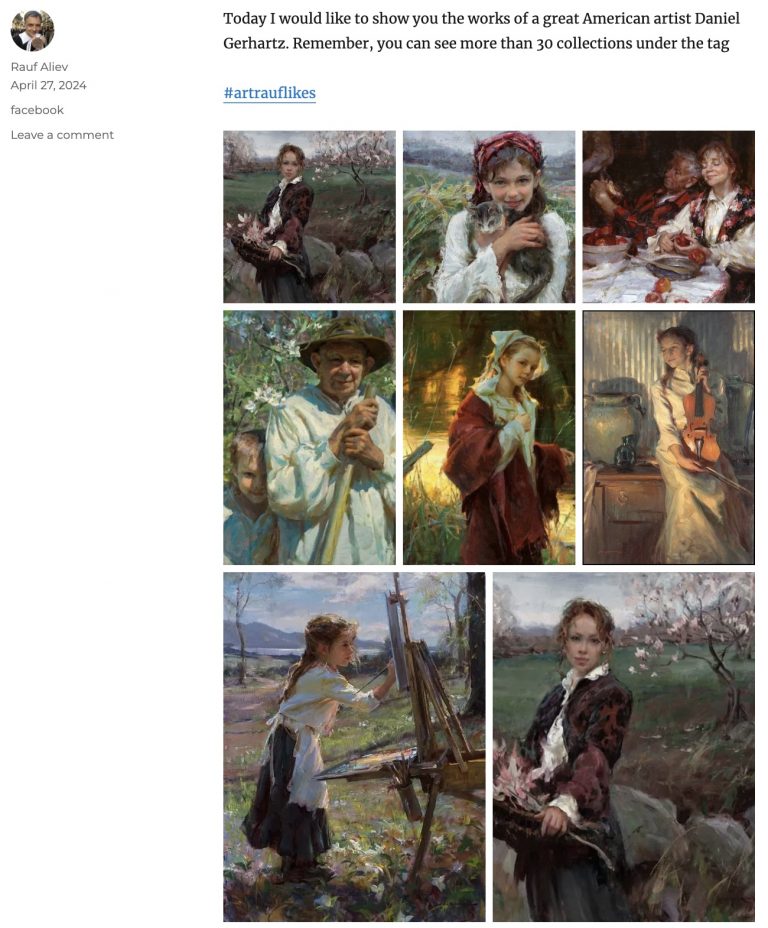
This is how it looks in the blog:
Translation
All my Facebook is full of posts in Russian. Some of them are bilingual, but most are in Russian. I’ve thought about it before, but only now has automatic translation reached a level where hardly anything needs tweaking.
For translation, I use OpenAI Completion API, GPT-4. Using large language models is much better for this purpose because their translations involve some existing knowledge about things in the world, and they correctly translate brands and names even if they are misspelled in the original language.
How do you translate 5,000 posts? All content was exported into a file, one line per post. Each post starts with a prefix like this: (2024-04-22T07:59:18.json). Then, this file was automatically divided into fragments of no more than X kilobytes each. I chose 10 KB — but normally it is the size of the context window. It is then sent to the OpenAI API with the prompt “Translate to English preserving my style and keeping the HTML markup. Each line starts with a json filename in parentheses. Your output should be formatted in the same way – each line should be started with the same, but the text should be translated to English. Below is the text”. The result was recorded in a translation file.
Translating the archive takes time, and so far 2,200 Facebook posts have been automatically translated into English and published on RaufAliev.com. The gears are moving, so by the end of the week all 5,000 posts should be translated and “migrated” to the public blogs.
Link Preview
If you share a link on Facebook, you see a Facebook link preview generated by Facebook itself. It extracts a title, image, and description from the page you share. For this purpose, I used a service called LinkPreview, which is free for my volumes and tasks. So, I connected the LinkPreview API service to pull an image and title from the link if it is in the post, making it look nicer.
So now I have two blogs in addition to my Facebook:
- BeingInAmerica.com — with ~6,000 posts in Russian
- RaufAliev.com – with ~2,500 posts in English, and counting; the conversion is currently in progress
And that was not even a weekend project, but a Saturday evening project!
I love such challenges. They keep me awake at night.
Discussion
Powered by GitHub Discussions — sign in with a GitHub account to join the conversation.