

While implementing the price calculation mechanism we faced a need to reflect the price fluctuation over the previous 30 days in SAP Commerce solution. It was required by the EU Omnibus Directive legislation for e-commerce solutions to ensure transparent price reflection especially relating to promotions and discounts and to protect the clients’ interests. Our customer was operating in the retail optical industry with thousands of products. SAP Commerce out of the box price mechanism didn’t allow for a large number of calculations in the breakdown of big volumes of products. So, we faced the need to implement a mechanism to cover the following business requirements:
Business requirements were to show the special discounted prices for products in a clear way:
- Product Details Page: When a logged-in customer views a product, he should immediately see the discounted price that he would see in his shopping cart after adding the product. We want to do this without creating a shopping cart in the database, using just one calculation.
- Bundles Configurator: Customers can customize their product with different options like frames, packages, and add-ons. While they’re choosing these options, they should see the discounted prices for each choice, exactly as they’ll appear in the final shopping cart. This involves complex calculations for various possible combinations.
- Listing Page: For users who are not logged in, we want to display discounted prices for products on the listing page. These discounts come from external sources and might trigger promotions. We’ll calculate the lowest price for each product during the SOLR indexing process. This could involve multiple calculations due to various promotion triggers.
- Promotion Specifics: The discounted prices are only for individual products, not combined promotions like “buy 3, get the 4th one free.” Since most customers in the optical industry typically buy just one product, we’re focusing on single-item purchases along with possible accessories.
Regular OOTB SAP Commerce solution for calculating promotional prices (using database backed Cart) assumed the following:
- create cart
- add product
- check if promotion was applied and get total price
- delete cart
Leveraging this solution was extremely time-consuming, overloading the platform, causing the following drawbacks:
- calculating promotional price on cart took more than 1 second and delayed PDP presentation
- calculating promotional price on configurator caused about at least few to dozen seconds delay (depends on numer of combination)
- full indexation took more than 1 day and in many cases it did not finish with success. Especially given the fact that indexation needs to be performed on a daily basis.
So, such a solution was unacceptable especially because all calculations were done on database. In backoffice we collect samples with the lowest product price to be able to present it for the customer for every product and every active promotion. So those are very big calculations as we currently have approximately 150 thousands of products and almost 2 thousands of promotions.
Data that we collect are samples with details as below.

Naturally a new requirement appeared – increasing efficiency and acceleration of prices calculation and page loading.
We considered and came up with introducing the InMemoryCart solution taking into account the following:
- InMemoryCart is not backed to database but JaloSession (a core concept of SAP Commerce which wraps up data about the current user and their settings), which means that technically cart will not survive the end of JaloSession. This cart can be used OOTB with SAP Commerce, instead of regular Cart,
- Additionally there is a possibility to create and dispose InMemoryCart on demand using the ModelService.
So, we’ve created a solution based on inMemoryCart. All promotional calculations for presentation are performed in the InMemoryCart, while the customer still retains a regular Cart, similar to what is found in most shops. Please see selected screenshots of the solution’s anonymized code below:
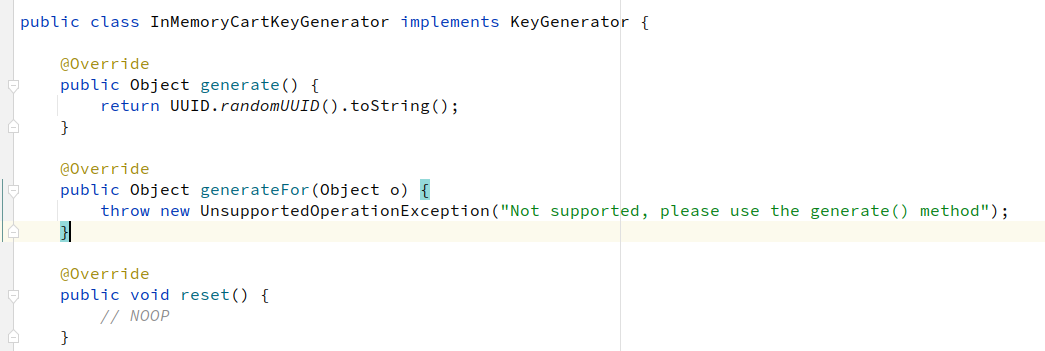
- Creating a key generator to distinguish Cart and InMemoryCart code.
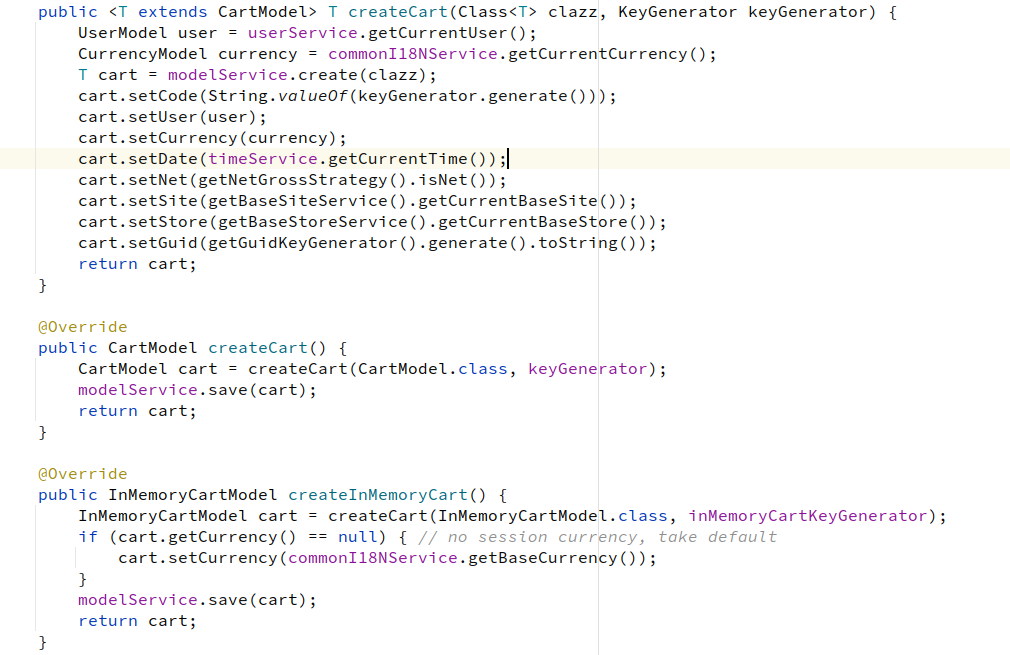
- Creating a new factory for carts
- Making a kind of InMemoryCartService. In original it can hold multiple carts but in the example just one. SessioService can also be used – all depends on the further usage.
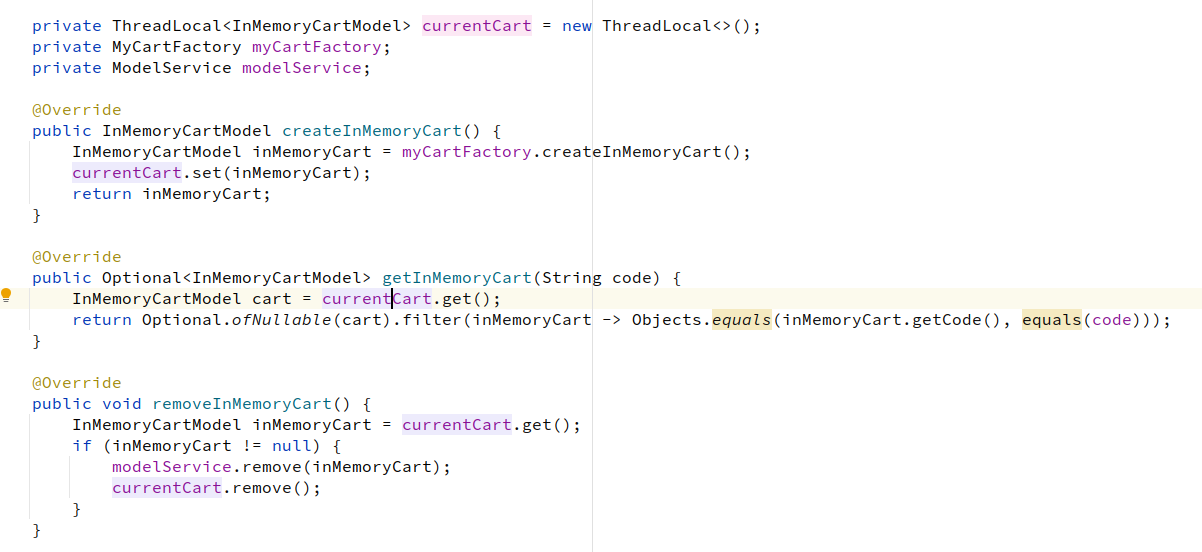
- Why making getInMemoryCart by code? Because we need to tell the promo engine that results need to be applied to InMemoryCart not to regular Cart.
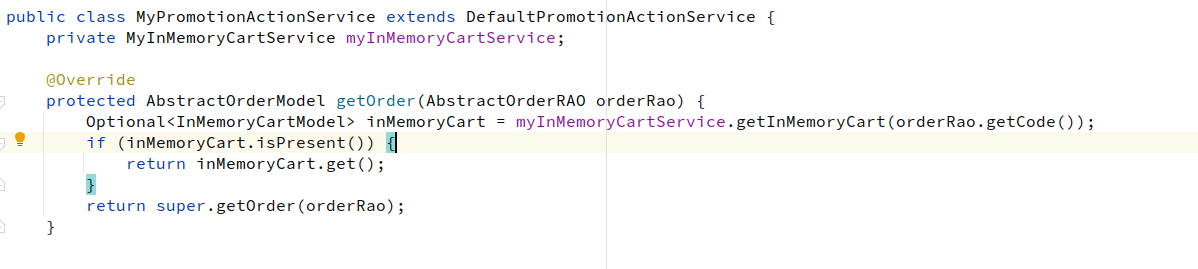
This is only one of few places where you need to do the trick. This may depend on SAP Commerce version.
When we locate all places we can try to ask promo engine for real result of promotion (not potential). This will be exactly the price that appears when user add this product to cart. Ha can have other items in cart and other promotions can be applied. How you use it later is business related.
Lets put it together in most basic example
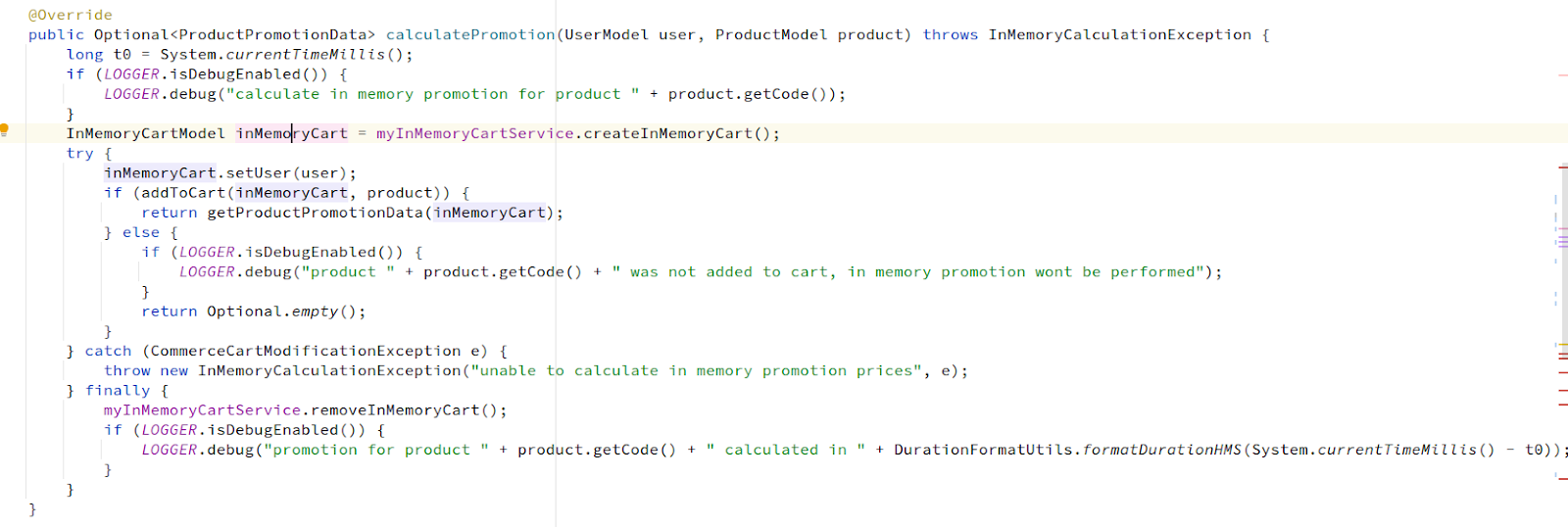
Adding a cart could look like this.

PromotionCalculationData can have, for example, promotions code, basePrie and discountPrice if any promotion was applied.
Below you can see the timing which is based on a real example.

As a result we achieved next positive effects after promotional prices calculation method change:
- shortening of calculations on PDP (up to 100ms, may vary depending on what is cached right now and specific add to cart requiments)
- similar result for bundles configurator (with using multiple threads to calculations)
- full indexation time limited to 20 minutes (can grow with incresing number or external promotion triggers, but still linear).
The conclusion is simple – in our case with the need to display the products’ prices for the previous 30 days period involving complex multiple calculations for promotional prices only for displaying them, the solution using InMemoryCart could be the best option to leverage instead of using the regular Cart.
Discussion
Powered by GitHub Discussions — sign in with a GitHub account to join the conversation.