
SAP Commerce released version 2011 of Commerce Cloud. As usual, the version number refers to November 2020. How big is this update? Should we rush to upgrade? What new capabilities will this platform update bring?
Summary
Unfortunately, there is nothing that makes this release significant or urgent enough to require an immediate upgrade. The enhancements are useful and strategic, but still not “next-gen.” No breakthroughs yet, but there are good, meaningful, and consistent moves in terms of architecture and overall integrity.
- Commerce OCC API enhancements
- Configurable Bundles APIs
- Cart Validation OCC API
- API Endpoint Deactivation
- OCC AddOn Converter
- Enhancements to Integration APIs, new extensibility features in APIs, and Runtime Data Modeling
- Virtual Attributes
- Webhooks
- Enhanced Security
- Backoffice Framework enhancements
- A set of enhancements, mostly minor
There are also some minor changes related to the Promotion Engine and Accelerator.
Let’s look at these in detail.
Commerce OCC API enhancements
SAP introduces a set of enhancements in its service-oriented commerce integration layer, Omni-Commerce Connect (OCC). These interfaces are designed to be used mainly from the front-end layer, SAP Spartacus, or mobile apps.
New features include:
- Configurable Bundles OCC APIs
- Cart Validation OCC API
- API Endpoint Deactivation
- OCC AddOn Converter
Configurable Bundles OCC APIs
The Configurable Product Bundling feature originated in the Financial Services Accelerator. It was designed to create complex and personalized product offerings to address the needs of businesses that market and sell such products, as opposed to, or in addition to, physical goods and services.
This feature was originally designed and available only for the JSP storefront. API enablement allows it to be used with decoupled storefronts such as SAP Spartacus. However, it is worth mentioning that Spartacus itself does not support it yet: the feature is “in the roadmap but currently not planned for a specific quarter.”
Cart Validation OCC API
With Commerce 2011, SAP introduced a new API to validate the cart via a REST call (/{cartId}/validate). Validating the cart before checkout helps reduce the risk of unexpected changes to the cart or any related items caused by other activities. In previous versions, validation errors were returned by the cart, order, or checkout service, which made it difficult to roll back changes made by the service before it returned an error. With this feature, it is possible to display validation errors before proceeding to the checkout page.
API Endpoint Deactivation
API endpoint deactivation allows you to disable any of the OOTB endpoints by listing their IDs in the configuration.
OCC AddOn Converter
In 2011, SAP introduced an OCC AddOn Converter, which is basically a command-line interface tool that allows you to convert OCC AddOns to OCC Extensions.
Integration APIs
In 2011, SAP Commerce Cloud introduced a variety of features that enrich the integration experience for administrators and API consumers. The new capabilities are:
- Virtual Attributes
- Webhooks
- Enhanced Security
Virtual Attributes (Integration Objects)
Virtual attributes can be added and configured, even at runtime, as part of a type and persisted in an Integration Object with a backing script to retrieve the data used to populate them. They aren’t part of the SAP Commerce Type System.
Webhooks (Integration Objects)
Once any change occurs on the root type, an event is fired, and the payload defined by the Integration Object is sent to its destination. The feature supports filtering, retries, logging, and monitoring.
Enhanced Security (Integration Objects)
In 2011, Integration Objects are not exposed as APIs automatically, as they were before. To expose them, administrators have to specify the authentication mode explicitly, either BASIC or OAuth2, in Backoffice or via Meta APIs. Also, Type Access Rights are used by default and allow fine-tuning of access-level permissions for the APIs. Administrators can now restrict access to create, read, update, and remove options for each type defined in the IntegrationObjectItemType of an Integration Object.
Promotion Engine
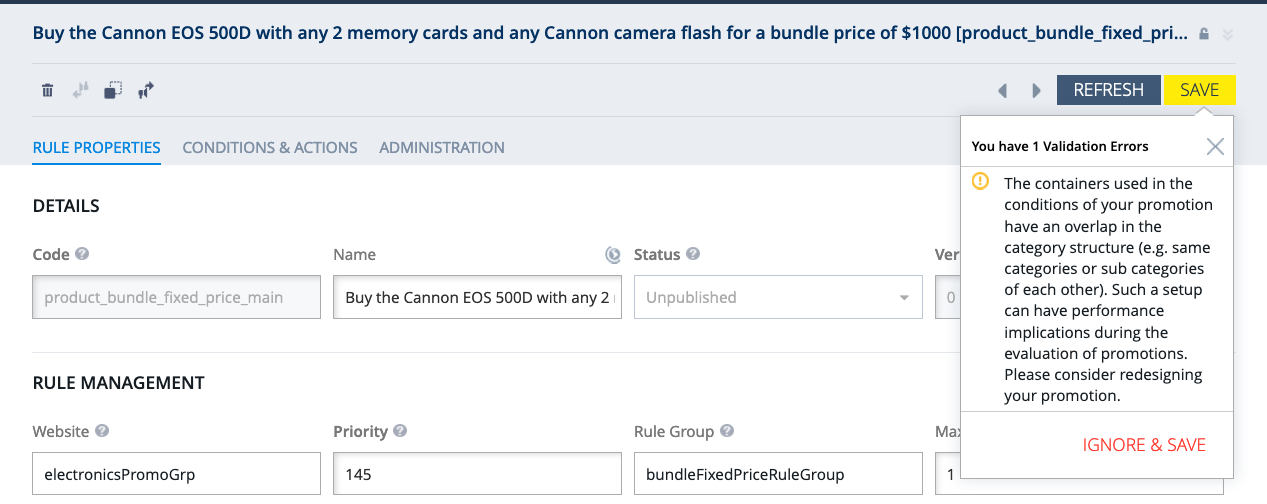
Container overlap detection
Version 2011 introduces a new feature: detecting the overlap of products or categories within containers of a promotion rule.
The container holds the products selected for a promotion rule. An overlap of the products or categories specified in those containers can lead to performance issues. The detection mechanism performs validations and displays an error if an overlap is found.
Search
Grouping Configuration
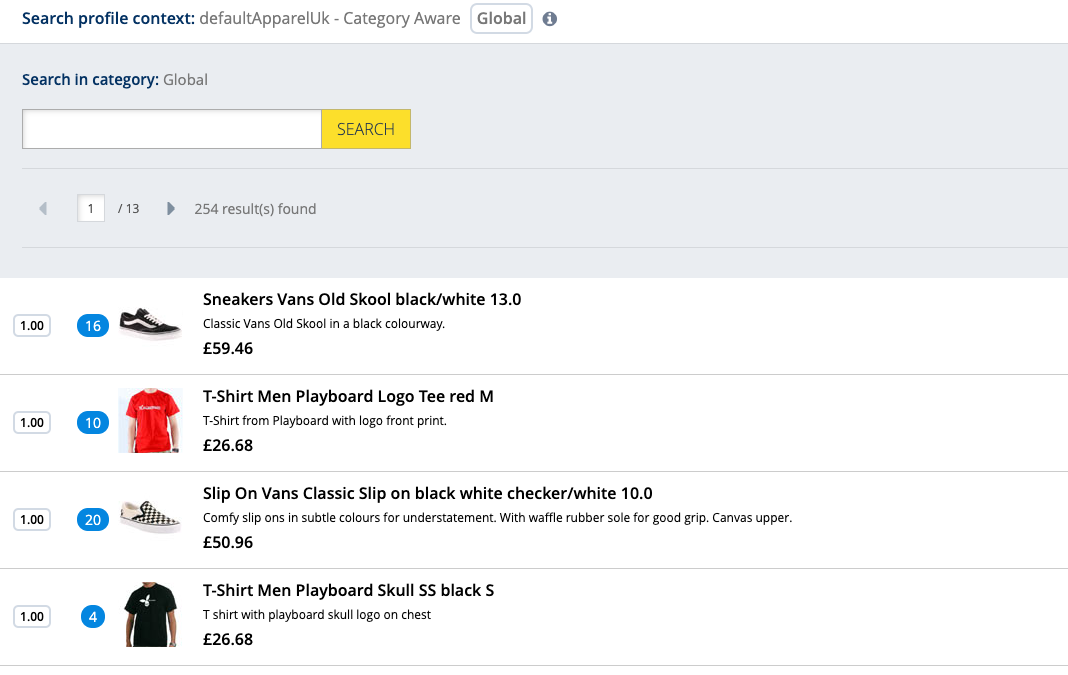
Grouping allows you to combine products in the search results based on a selected property. For example, you can group variant products together. Grouping was supported even in early versions of SAP Commerce, but it was added to Adaptive Search in Backoffice only in the latest release.
The value shown in the blue bubble indicates how many items are grouped in that single result for that item:
Voucher Brute Force Attack Detection
Previously, the functionality of voucher redemption was left to the partner to implement according to specific needs.
Version 2011 provides a simple brute force detection mechanism that is triggered when a customer attempts to add a voucher to the cart. Its aim is to prevent attempts to guess voucher codes.
In the default OOTB implementation, the system tracks attempts per IP address. If a configurable number of attempts in a configurable time window have been made, any further attempts from that IP address will be blocked for a configurable amount of time. Specifically, any further attempts from the same IP address will be denied for one hour if more than five attempts have been made within five minutes. It allows you to register when vouchers are used and enforce usage restrictions if required, such as:
- the limit of available voucher redemptions
- the limit of redemptions per customer
Backoffice Enhancements
The SAP Commerce Cloud 2011 release includes a number of minor enhancements and features for Backoffice Framework:
- Password Change. You can change a password after logging into Backoffice.
- Filtering in Dynamic Nodes. The catalog tree implementation is optimized to better support large catalogs.
- Filtering Date with Advanced Search
- Setting the Delimiter for CSV Export
- Bulk Editing. When editing multiple items, you can now bulk edit the classification attributes that belong to categories assigned to selected products.
- Classification Features. You can change the order of classification features and create classification feature groups. It is also possible to enable the WYSIWYG editor for Category Features.
- Classification Metadata. You can use the metadata endpoint to retrieve information about various data. For example, attribute meta information, attribute position, or a range of values.
Context-Driven Services
Context-Driven Services (CDS) introduced the Recommendations capability, and 2011 supports it via CDS Integration. This feature enables customers to discover relevant products based on the context of their shopping journey, including the product and category they are currently interacting with, as well as their interaction history. It is important to highlight that this component comes as a separate service.
Deprecated extensions
A set of extensions for Event Tracking is tagged as deprecated.
New Extensions
- ConfigurableBundleOCC — exposes the functionality of the Configurable Bundle module in the form of the standardized OCC (Omnichannel Commerce) API. The extension provides REST API endpoints to create, edit, and delete configurable bundles. The ConfigurableBundleOCCTests extension provides automated REST tests for ConfigurableBundleOCC.
- ClassificationGroupServices — handles classification metadata to enable grouping and sorting in classification features.
- SearchBackoffice, SearchProviderCSSearchBackoffice, SearchProviderCSSearchServices, SearchServices — support enhanced search in Backoffice.
- WebHookServices — allows SAP Commerce Cloud to send notifications to a configured destination URL when an item is saved (created or updated). See Integration APIs above.
Discussion
Powered by GitHub Discussions — sign in with a GitHub account to join the conversation.