
In mid-2016, SAP released the first version of the new-generation CMS management module, SmartEdit 6.0. All later versions updated this module, while the old CMS Cockpit had not changed for years. Of course, SAP planned to sunset the legacy WCMS, and they considered SmartEdit the “new WCMS.” I wondered: is SmartEdit ready to replace CMS Cockpit?
The CMS is a subject close to me. Many years ago, I led a CMS development project and dealt with the challenges of making the CMS functional and convenient, finding the right balance between feature richness and simplicity, and creating a solution that would be extremely flexible and configurable to an organization’s needs. It is an intense subject.
In this article, I compare the functionality of SmartEdit and WCMS and highlight my personal view of the advantages and weaknesses of these solutions. The official “feature parity” is published on SAP Hybris Help, but it does not answer all my questions.
It should be pointed out that this article sets forth the exclusively personal point of view of its author.
Technology
Despite the similarities in the UI, SmartEdit is not built with the Cockpit NG Backoffice Framework. Cockpit NG is intensively developed by SAP for data management applications in SAP hybris. For example, this framework is used as a foundation for all new cockpits, such as PCM Backoffice for products or Adaptive Search for the Search and Navigation module. SmartEdit does not use it at all.
The core of SmartEdit is the JavaScript framework AngularJS. The ZK widgets created for other backoffice applications cannot be reused for SmartEdit. This makes it unique in SAP Hybris Commerce and probably explains why the development of SmartEdit is so slow-paced. For the UI, SmartEdit 6.7 uses AngularJS UI Bootstrap 2.5.
The old WCMS Cockpit was built with a legacy cockpit framework called Cockpit Framework. I would say that every developer hates extending old cockpits because the framework is incredibly unfriendly to developers. Many components of the existing cockpits are not extendable, and it is always a challenge to add new features to cockpits if they are not in the narrow area of possible options.
SmartEdit interacts with the database and the hybris API via AJAX calls. On the hybris side, there are customizable modules, such as cmswebservices, for this purpose. For example, to show the list of CMS pages, SmartEdit makes a call to /cmswebservices/v1/sites/electronics/cmsitems. Almost all operations are handled by web services.
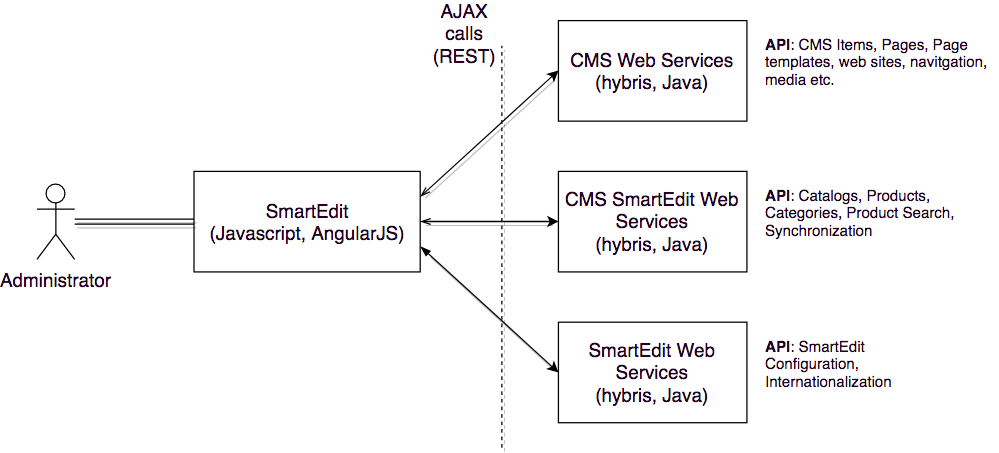
If you want to support both SmartEdit and WCMS Cockpit, you will likely need to multiply your development efforts by two. There is a lot you need to do specifically for SmartEdit in addition to what you generally do for WCMS Cockpit.
For example, some components, such as the Product Carousel Component, need access to the Product Catalog. This makes it necessary to provide e-commerce data to SmartEdit via web services to make SmartEdit components configurable. It means that if you customize any e-commerce components, you will need to extend the default set of web services just for SmartEdit, as well as define or modify the code for the components where these data are used.
AngularJS and Java developers are commonly from different worlds. So if you decide to go with SmartEdit, you will need to get both roles involved even for the smallest changes. The current implementation of SmartEdit is not very stable, but it is getting better with every version.
So, as the flip side of having a fancy UI for content management, you need to take into account that the maintenance costs will definitely be higher.
Thus, SAP hybris currently has three different frameworks for backoffice applications: Cockpit Framework, Backoffice Cockpit Framework, and SmartEdit.
Capabilities
In hybris 6.7, the majority of features commonly used for content management are supported by SmartEdit. These features are implemented even better than they are in the old WCMS Cockpit. Some features are introduced only for SmartEdit. Unfortunately, they may not have a counterpart in the old WCMS Cockpit. To provide this service to a customer, you need to support both systems, WCMS and SmartEdit, or admit that such features as “component cloning” will not be delivered with the solution at all. If you make any changes to the default data models or functionality, SmartEdit will probably break because there is a dependency. So you need to keep an eye on many things if you decide to support SmartEdit. It is not on by default.
Creating websites and catalogs
In WCMS Cockpit, administrators are able to create a new website and content catalog directly from WCMS Cockpit. I think this is an extremely dangerous operation and should be turned off for all projects to keep data safe. In SmartEdit, it is not possible. You can manage only existing websites and catalogs.
| SmartEdit | WCMS Cockpit | |
|---|---|---|
| Creating a website and content catalog | ✗ No. | ✓ Yes, but basic. SmartEdit does not work with the created website/catalog OOTB. It creates an invalid configuration for use with SE. |
| Removing the website or content catalog | ✗ No. | ✗ No, you need to use Backoffice or HMC, but it is a very complex operation. |
| Editing the website or content catalog parameters | ✗ No. | ✗ No, you need to use Backoffice or HMC. |
Page Management
As in WCMS Cockpit, the list of pages in SmartEdit is flat, not hierarchical. Search works only with page IDs and page names. If you need to find a page with a particular URL, you will need to open all pages one by one or guess the page name. Search is faster in SmartEdit. There is no way to filter pages by type or other attributes. A removed page in WCMS is not reversible. In SmartEdit, you can restore a removed page. The SEO attributes, such as description and keywords, were not added to the page edit panel. The panel itself is partly dynamic: many changes on the server side require changes in the code for SmartEdit. In WCMS, you do not need to touch the codebase or configuration in most cases; everything is completely automatic. The page can be cloned in SmartEdit, which is a great feature. Unfortunately, SAP has not implemented it for CMS Cockpit. The page template is not editable.
| SmartEdit | WCMS Cockpit | |
|---|---|---|
| Removing pages | ✓ Yes, revertible. | ✓ Yes, but non-revertible. |
| Revert removed pages | ✓ Yes. | ✗ No. |
| Edit SEO attributes | ✗ No. | Yes. |
| Page template can be changed for a page | ✗ No. | ✓ Yes. |
| Custom attributes automatically added to the editor panel | ✗ No, you need to extend the code if any changes are made in the data model. | ✗ No, ML. |
| Cloning pages | ✓ Yes. | ✗ No. |
Components and page slots
The concept of components and page slots is the same as in the old WCMS Cockpit. In SmartEdit, you can drag components to a new position on the page. In a similar manner, you can add new components from the library and group components in slots.
There is an issue with how this drag-and-drop is implemented. Sometimes, after you drop the component into a new position, SmartEdit does not move it at all, with no errors or warnings.
| SmartEdit | WCMS Cockpit | |
|---|---|---|
| Adding a component to a slot on the page | ✓ Yes, drag-and-drop from the component library. | ✓ Yes, by choosing from the list. |
| Moving a component in or between slots | ✓ Yes, drag-and-drop. | ✗ Only movable inside the slot. You need to re-link the component to the target slot. It requires an understanding of the data model. |
| Rearranging the components in the slot | ✓ Yes, drag-and-drop. | ✗ No. |
| Clone a component | ✓ Yes (6.6+). | ✗ No. |
| Hide a component | ✓ Yes. | ✓ Yes, but hidden components are not marked as hidden in the UI. |
| Convert shared content slot to a page-specific one | ✓ Yes, with component cloning support. | ✓ Yes, but you need to create/link components to a new slot from scratch. |
| Synchronize a component | ✓ Yes. | ✓ Yes. |
| Synchronize a slot | ✓ Yes. | ✗ No. |
| Synchronize a subset of components within a slot | ✓ Yes. | ✗ No. |
| Assign a restriction to a component | Partially. You can create or edit category, time, and user group restrictions only. | ✓ Yes. |
| Actions for components | ✓ Yes. | ✗ No. |
Not all component types are supported in SmartEdit and WCMS Cockpit. For example, the text on the login screen is not editable in either system:
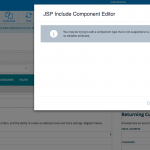
This text is stored in property files, so you need to redeploy the system to change it if the need arises.
Media Management in components
In both SmartEdit and WCMS Cockpit, media management is implemented in a terrible way.
In WCMS Cockpit, when you want to change a banner image, you need to understand the difference between changing the image of a media object, changing the media object of a container, and changing a media container. WCMS Cockpit does not support SVG preview. Large images are not displayed nicely either. Understanding the concept of media formats and their mapping with storefront entities and modes is often too hard for content managers.
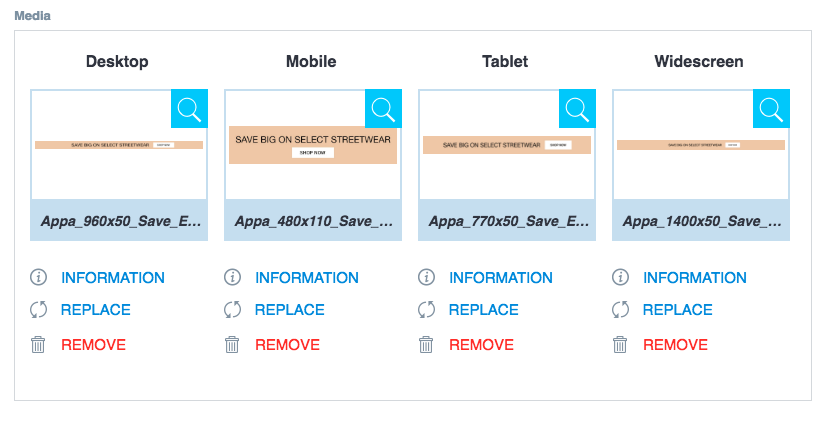
In SmartEdit, SAP oversimplified things. Now you can only upload an image instead of one that has already been uploaded. There is no way to pick the image from the library or reuse an image uploaded before. The REPLACE link opens an image upload pop-up.
Editing Permissions
Access control is derived from the hybris Platform. There is almost nothing added by SmartEdit on top of what we had before. FlexibleSearch restrictions do not help much: the web services turn them off for some operations.
| SmartEdit | WCMS Cockpit | |
|---|---|---|
| Permission management | ✓ Yes, with issues. Implemented differently than WCMS. For example, you can revoke the permission for catalog sync for the user group. It will work in CMS Cockpit, but not in SmartEdit (“respect sync permissions only” is not in play). | ✓ Yes, with issues. |
| CatalogVersion-level permissions | ✓ Yes. | ✓ Yes. |
| Page-level permissions | ✗ Not implemented OOTB. FlexibleSearch restrictions are not handled nicely. | ✗ Not implemented OOTB. The only option is FlexibleSearch restrictions. |
| ComponentType-level permissions | ✗ Not implemented OOTB. I could not restrict the list of available CMS Component Types per user/user group. | ✗ Not implemented OOTB. I could not restrict the list of available CMS Component Types per user/user group. |
| Component-level permissions | ✗ Not implemented OOTB. I could not restrict the list of available CMS Components per user/user group, even with FlexibleSearch restrictions. | ✗ Not implemented OOTB, but it is possible via FlexibleSearch restrictions. |
Navigation Management
In both SmartEdit and WCMS, you can define the navigation structure that is used to set up the links exposed in navigation components, such as the category navigation component, the footer navigation component, and the account navigation component. Each item of this structure can be linked to a hybris page, media, or external URL.
| SmartEdit | WCMS Cockpit | |
|---|---|---|
| Synchronize a node | ✗ No. | ✓ Yes. |
| Synchronize a subtree | ✗ No. | ✗ No. |
| Synchronize all items | ✗ No. | ✗ No. |
| Editing the CMSLink component of the node | ✗ No. | ✓ Yes. |
| Creating a CMS Link (External link) | ✗ No. It seems that SmartEdit assumes these links have already been created somewhere else. | ✓ Yes. |
Personalization
This was the most interesting feature for me. The legacy personalization module, BTG, is so slow that seemingly nobody uses it on traffic-intensive websites. SmartEdit Personalization seemed like a fresh wind of hope.
How does it work? In SmartEdit personalization, you can select the components to be changed if/when the user is put into one of the predefined segments or their combination. For example, the banner will be replaced with another once the system realizes that the user belongs to the group of customers from a particular city.
In BTG, the legacy personalization engine, the customer is assigned to a segment automatically on the fly once the website session, user data, or database state meets some criteria. In the new SmartEdit Personalization, this mechanism is built outside hybris; it is part of Hybris Profile or needs to be custom-built.
Out of the box, SAP Hybris does not provide any concrete integration with any other external system, but it gives the opportunity for custom implementations to do so. It is very similar to how product recommendations work in hybris: no smart mechanisms at all, just a framework and a set of design templates.
So, in order to update the information about user segments — which users belong to which segments — you need to create a custom provider (UserSegmentsProvider) or your own implementation of the user segment strategy (UpdateUserSegmentStrategy). It means that without Hybris Profile, the personalization module is not ready to be used from day 0. It is just a template for a full-scale solution.
This mechanism is used in the SAP hybris Profile integration. As part of the personalizationyprofile module, there is an implementation of the user segments provider, ConsumptionLayerUserSegmentsProvider, which gets the data from Hybris Profile and maps it to segments. It is used by DefaultCxUpdateUserSegmentStrategy to collect the user segments.
Built-in WYSIWYG Rich Text Editor
SmartEdit uses CKEditor 4.5.7, one of the best embeddable editors on the market. A similar package is used by Backoffice. Old cockpits, such as WCMS Cockpit or Product Cockpit, use the outdated version 2.6.1.
WCMS Cockpit:
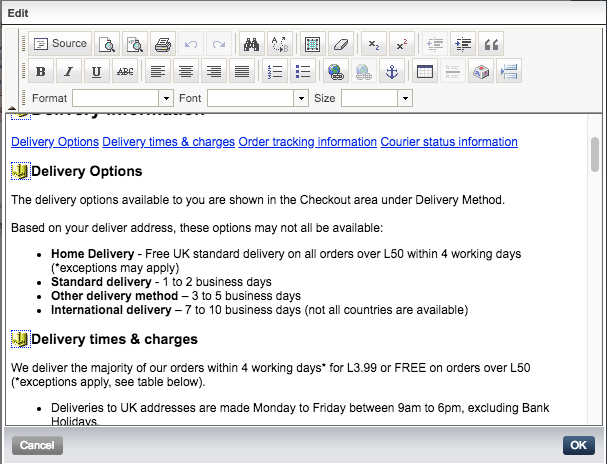
SmartEdit:
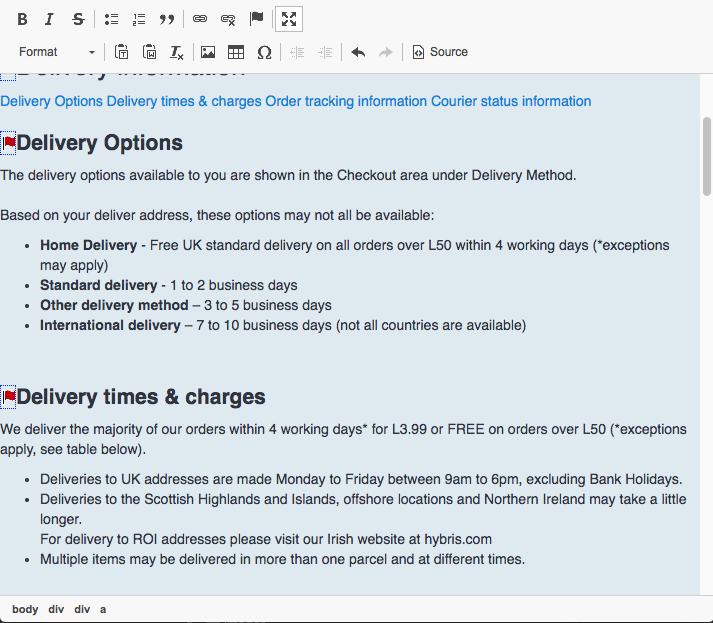
Let’s compare the default sets of editor tools.
WCMS Cockpit:

SmartEdit:

- Neither editor can upload an image. The picture icon in SmartEdit is just for inserting a link to an image with a known URL.
- Neither editor can insert an image from the hybris media library. It was quite useful, especially if you needed to use the same images in different language versions.
- The SmartEdit editor cannot align or underline text.
SmartEdit has a useful feature, “Paste from Word.” It is supposed to clean the HTML code exported from Microsoft Word to make it better aligned for the web. There are reports that it does not work in Google Chrome, but in my case, it does not work in Firefox 57.0.2 (Mac OS) either:

I would recommend that SAP pay more attention to the HTML editor. Namely, adding the following features would make content managers happy:
- Media upload and media library integration
- Images
- Downloadable files
- Language-dependent spell checking and auto-correction
- Text beautifiers: tools like http://www.typograf.ru/ are widely used for Russian texts, for example. There are solutions for English too.
- Fix Paste from Word
- Multiple configurations for the editor:
- For experienced administrators
- A simplified mode, with many features off
Summary
Too abstract; requires yProfile or additional customization/integration.
| Importance | WCMS feature | SmartEdit coverage | SmartEdit unique features | Key drawbacks | |
|---|---|---|---|---|---|
| Creating websites and categories | High | Yes | — | — | Not implemented yet |
| Page Management | High | Yes | Medium | Trashcan, Page cloning |
Forms are not dynamic |
| Components and page slots | High | Yes | High | Slot sync, better and intuitive UI, Component cloning |
Forms are not dynamic, extra efforts: dev, support, and maintenance |
| Media Management | Medium | Yes | Low | Better UI | Media library is not implemented. No way to reuse |
| Navigation Management | Medium | Yes | Low | — | Non-editable items linked to navnodes, no sync |
| Permissions Management | High | No | Low | — | Not implemented |
| Personalization | High | No* | Low | Great concept | Too abstract. Requires hybris Profile or custom development |
| Rich text Editor | High | Yes | High | Latest version of CKEditor, full-screen mode | No image manipulations; some important features are not working |
Sep’18 UPDATE:
I received a great comment from the Project Manager for SmartEdit, Olga Haurylchyk, SAP, and decided to move it from the comment area closer to the article.
“Thank you, Rauf, for a very insightful review of SmartEdit, we appreciate the interest to our product and the feedback. It gives us a good perspective of what is important for our customers and partners.
We are taking into account some of the pain points you brought up and in our roadmap and consider some of the points for future improvement. As we’re now pinning down what will be in the 1811 release we feel now is a good time to go through what has changed, and what will change.
SmartEdit is the new area of investment for Customer Experience, which means that no new features will be developed in WCMS cockpit.
As rightfully mentioned some of the new features have been greatly improved in SmartEdit, and they will not be updated in WCMS as the WCMS cockpit will be deprecated in 1811 release.
Some of the functionalities like creating new catalogs, will not be implemented in SmartEdit, because they are more administrative tasks by nature and are expected to be managed in Backoffice.
Further, I will mainly focus on potential gaps that SmartEdit has and our plans to improve them.
Page management:
One of the known pain points for our customers is the Pages View management, due to the limited capabilities of page management. In one of the upcoming releases, we plan to improve this view and enable Smartedit users to search, filter, and sort pages using different page attributes and also improve how page relationship is displayed (between primary and variation pages).
Components and page slots:
Page templates are currently static in both WCMS and SmartEdit, they can be managed/edited in Backoffice. Converting shared slot to non-shared slots allows some flexibility around page layout management and it is available in both WCMS and SmartEdit but does not allow to define page layout on the fly. We plan on enabling Content Manager to support dynamic page layouts that can be changed at a runtime in the near future with our new PWA storefront. Content Manager will be able to decide how the page slot would look like and how many components it could display. We also consider adding SEO attributes to page types available out of the box. However extending a page type with custom attributes should be fairly easy using 6.4 or later version, where cms items (like a page) were supported generically.
There are many types of restrictions available OOTB. We have thoroughly selected only a handful of most used ones to support in SmartEdit. Our research showed that most of the time customers do not use restriction types available OOTB, but rather add custom restrictions that better fit their business model. Adding new restriction type is a fairly easy task, due to the generic support for cms items. Implementation partners need to add support only to attributes that SmartEdit does yet support in order to register a new type.
Media management in components:
Your points around media management in banner components are absolutely valid. We consider in a longer term two improvements for existing components: adding search for media in the library should be available in both components, and combining the functionality of simple banner and simple responsive banner in one component, allowing content manager decide to have one image or responsive set of images.
Editing permissions:
Your assessment support of permissions is very accurate, SmartEdit supports only catalog version level permissions. However, in the upcoming release 1811 we will support fine-grained permissions to be defined on page and component type, and well as sync and attribute level OOTB.
Navigation Management
In our upcoming release 1811, we will streamline and simplify navigation management flow. We will also address the gap of not being able to create or edit a CMSLink component while building navigation. Ability to synchronize the navigation tree is on the roadmap, but not in our short-term plans.
Built-in WYSIWYG Rich Text Editor
SmartEdit currently uses the CKEditor. However, the implementation partner is flexible to replace it with any other WYSIWYG Rich text editor, if needed. This is an extensible feature. However, we plan to address the issues pointed out with an existing editor in one of the upcoming releases.
The bottom line is SmartEdit is reaching its maturity and we are working hard on offering a fully-fledged cms feature set that will enable a business user to create great looking sites. There are a few areas of improvements that we have on our radar and have a feasible plan to mitigate. In our opinion, SmartEdit is quite ready to support cms day to day activities related to content management.”
Discussion
Powered by GitHub Discussions — sign in with a GitHub account to join the conversation.