
Invisible Number Sign
If you try to use the hash symbol in input fields, with XSS filtering enabled, the server will receive the truncated value, with this symbol removed.

This happens because of the default XSS rule settings (project.properties):
yacceleratorstorefront.xss.filter.rule.javascript2=(?i)\\u0023
yacceleratorstorefront.xss.filter.rule.braces=(?i)<(.*?)>“please ensure that it is <2 and >3” will be transformed to “please ensure that it is 3” after the second rule is applied. It is also on by default.
This filtering will work for all kinds of fields, both regular and password fields. It means that if your password is “abc_123”, the following passwords will also work for authentication: “ab#c_123”, “abc####123”, “abc#########123”, etc.
In order to use this sign in configuration files, use backslashes:
property.value=hybris\\#valueSalt with pepper
Hybris uses “hybris* blue pepper can be used to prepare delicious noodle meals*” as a default salt for passwords (MD5).

How Ronald Reagan becomes the President of Russia in Hybris tests
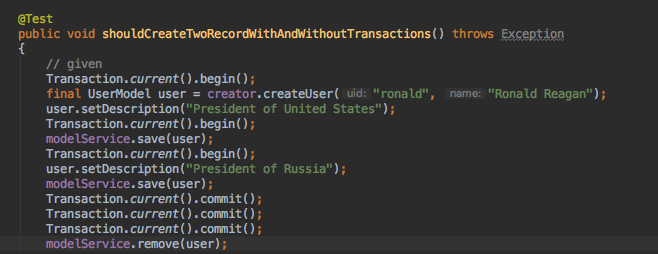
In de.hybris.platform.directpersistence.audit.impl.SaveAuditRecordsTest, a user named Ronald Reagan, described as the President of the United States, becomes the President of Russia. He is removed after the transaction is committed three times, which makes the test happy. In the same class, the user named Margaret Thatcher comes into play as well.
HAC Easter Egg
I had been waiting months for this year’s Easter to write about this. If you use HAC intensively, you are aware of it, but you likely don’t know how to turn it off once it has launched.
If you press “J” and “ESC” in any order, your HAC will go crazy:

If you haven’t saved your script in the form and want to restore the data, reloading the page is not a solution. There is a way to fix it without reloading the page. Open the web console and type the following:
for (i=0;i<document.styleSheets[0].cssRules.length;i++) { if (document.styleSheets[0].cssRules[i].cssText.indexOf("transform")>0) { document.styleSheets[0].deleteRule(i); } }It should help. In the latest version, this Easter egg was removed.
Is the website built with Hybris?
In order to figure out whether the website is built with SAP hybris, just follow the link http://DOMAIN/CONTEXT/view/NavigationBarComponentController. The context may be empty, as it is for the majority of hybris websites. For example:
https://www.hybris.com/en/view/NavigationBarComponentController

Actually, you can use any controller name, but this one is OOTB and should be on for all hybris projects.
If you see the response above and the normal 404 page looks different, the storefront is built with SAP hybris. But the reverse is not true: SAP hybris can be too deep and too customized to be revealed via this approach. However, it works for the majority of websites.
Discussion
Powered by GitHub Discussions — sign in with a GitHub account to join the conversation.