
In January this year, SAP released the second version of Travel Accelerator. This article aims to familiarize the reader with the concept of Travel Accelerator 2.0, its capabilities, and its limitations.
I think there are few companies in the world with hundreds of specialists who are able to build custom solutions using Travel Accelerator. Understanding this topic should make this circle of knowledgeable hybris people larger.
Certainly, it is not possible to deliver all the knowledge and experience I gained during my research in one blog post. All the lessons I learned during long hours of debugging and deep examination of the product cannot be explained in full detail. However, I hope this article will help you reach the same level of understanding faster than you would without it.
The documentation for TA is not available on the hybris wiki [yet?]. There is some documentation that comes with the installation package; however, the documentation for version 2 explains only the updates in 2.0. The major part of the documentation that was written for the first version has not been included in the second version for some reason.
I hope this article will help you see the big picture and understand how Travel Accelerator works.
Everything in this article reflects my personal view on the subject. If you see any discrepancies with your vision and experience, please leave your comments under the article and I will make the necessary changes.
Hybris Accelerators
If you are familiar with the concept of Accelerators in hybris, please skip this part. It is trivial, but necessary for those who are new to the topic.
“SAP hybris Accelerators” are reference demo stores that can also be used as templates for new solutions. Some of them come with hybris; others are supplied as separate products.
You are probably familiar with the Electronics, Apparel, Powertools, and Telco Accelerators. These products are included in the default installation package of SAP hybris.
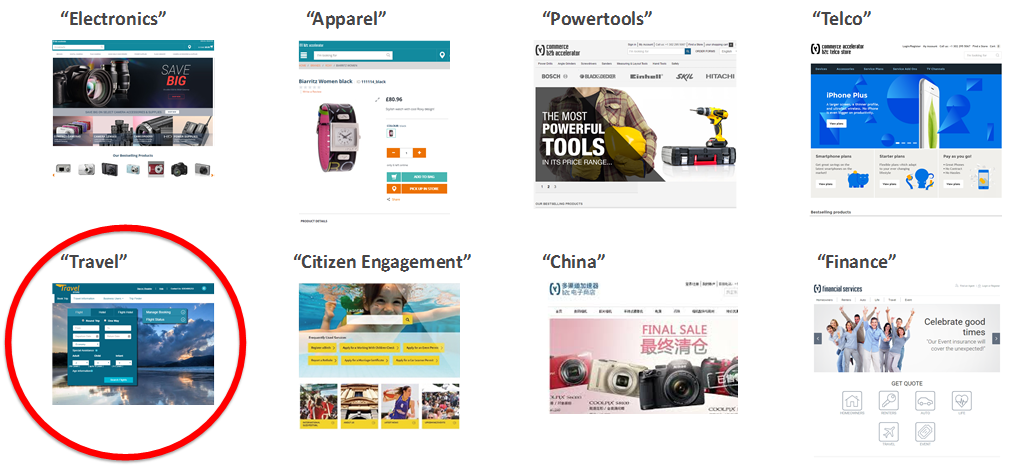
Unlike some other products with “Accelerator” in their name, Travel Accelerator comes as a separate package.
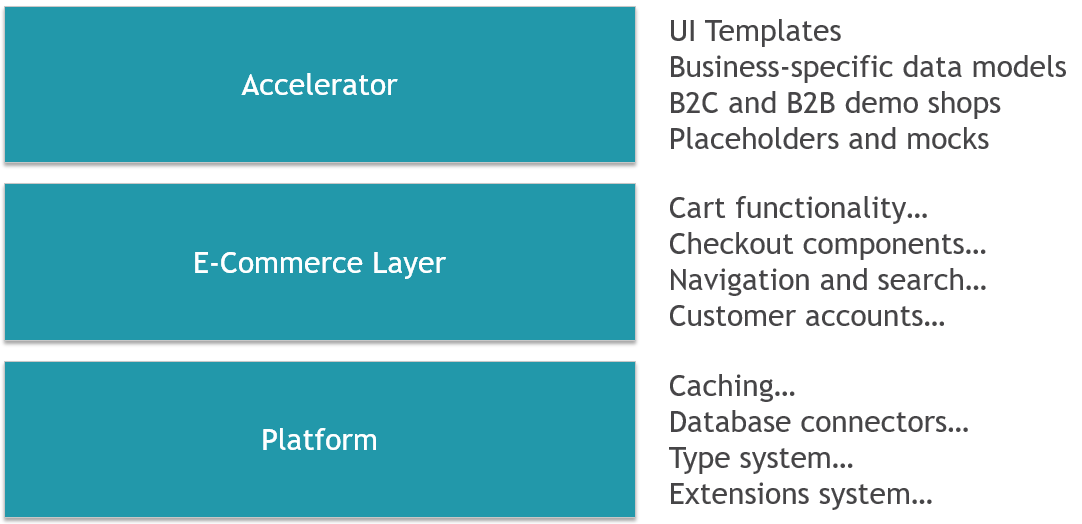
Simply stated, there are three basic layers in hybris: a Platform, an E-commerce Layer, and Accelerators.
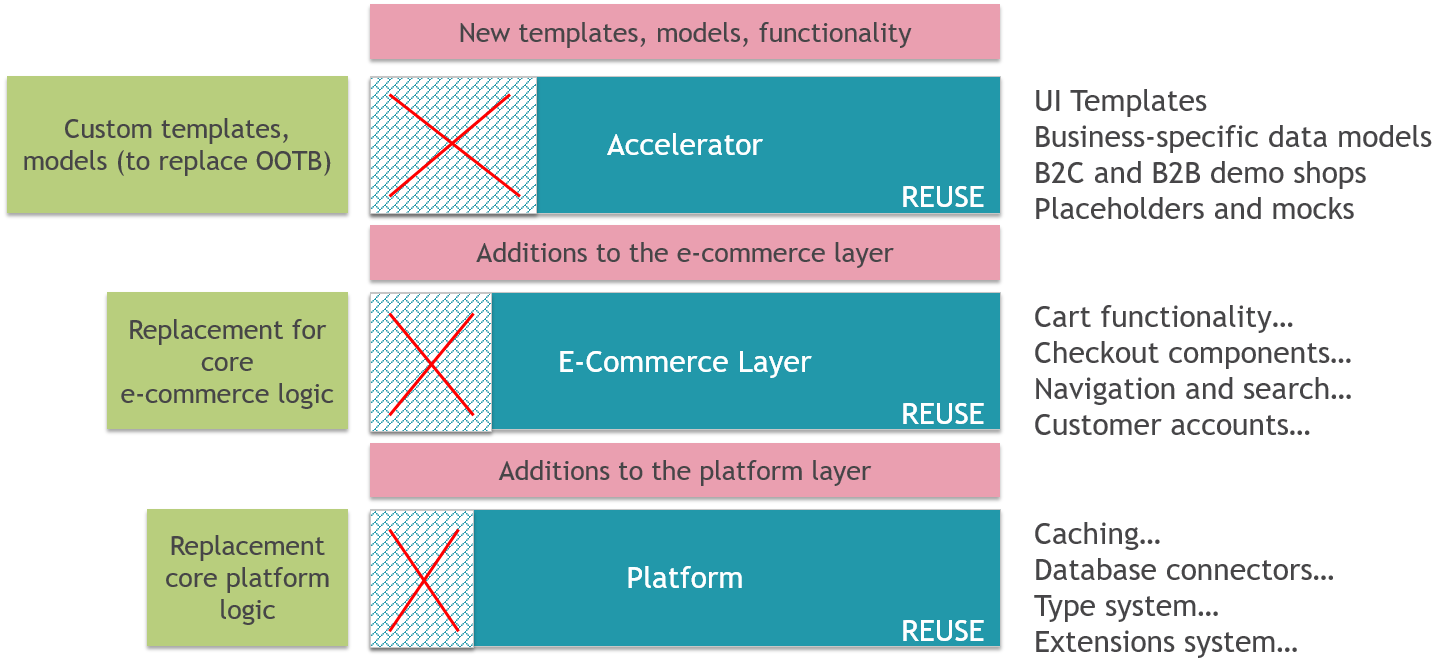
If something doesn’t meet your expectations, you can replace any part of it with your own implementation.
Travel Accelerator
A Little Bit of History
The first version of Travel Accelerator was released in April 2016, a year after SAP had announced the product. Its initial name was Airline accelerator.
In the second version, SAP added online accommodation services. The product became useful for hotels and cruise companies. The second version was released in January 2017.
The third version is expected in July 2017.
Markets
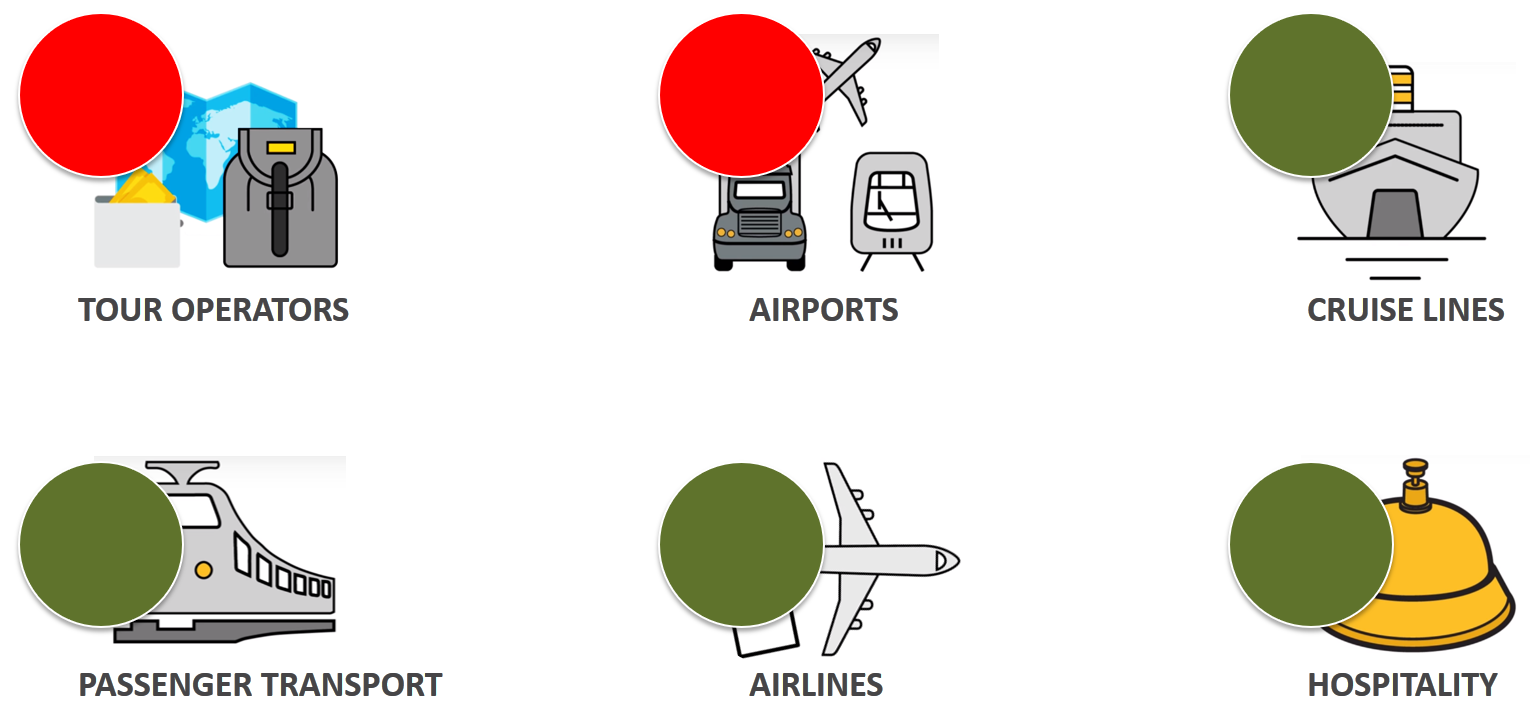
After examining the product, I came to the conclusion that Travel Accelerator is most suited for transport companies and hotels. Markets such as airports and tour operators may expect more than the product currently provides.
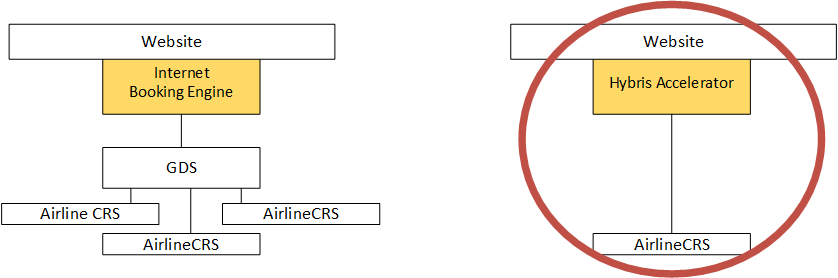
It is assumed in the Travel Accelerator architecture that all data is in the local database and that it costs almost nothing to pull it in different combinations and at the required rate.
Tour operators and airports can use external booking services, such as Amadeus or Sabre, rather than direct connections to service providers. Providers like Amadeus or Sabre don’t share raw data with travel companies. They provide APIs to pull the data, and every request is not free, both in terms of the money you need to pay them and the resources you need to have for that. Travel Accelerator is not designed to work with remote data providers. All flight schedule information, as well as all possible routes, segments, and prices, must be loaded into the system for ticket booking. The same applies to accommodation availability data for the hotel booking module.
Major components
There are two major modules of Travel Accelerator so far:
- Ticket booking
- Accommodation booking
These modules are represented by a set of hybris extensions. Some extensions are common and mandatory for any solution.
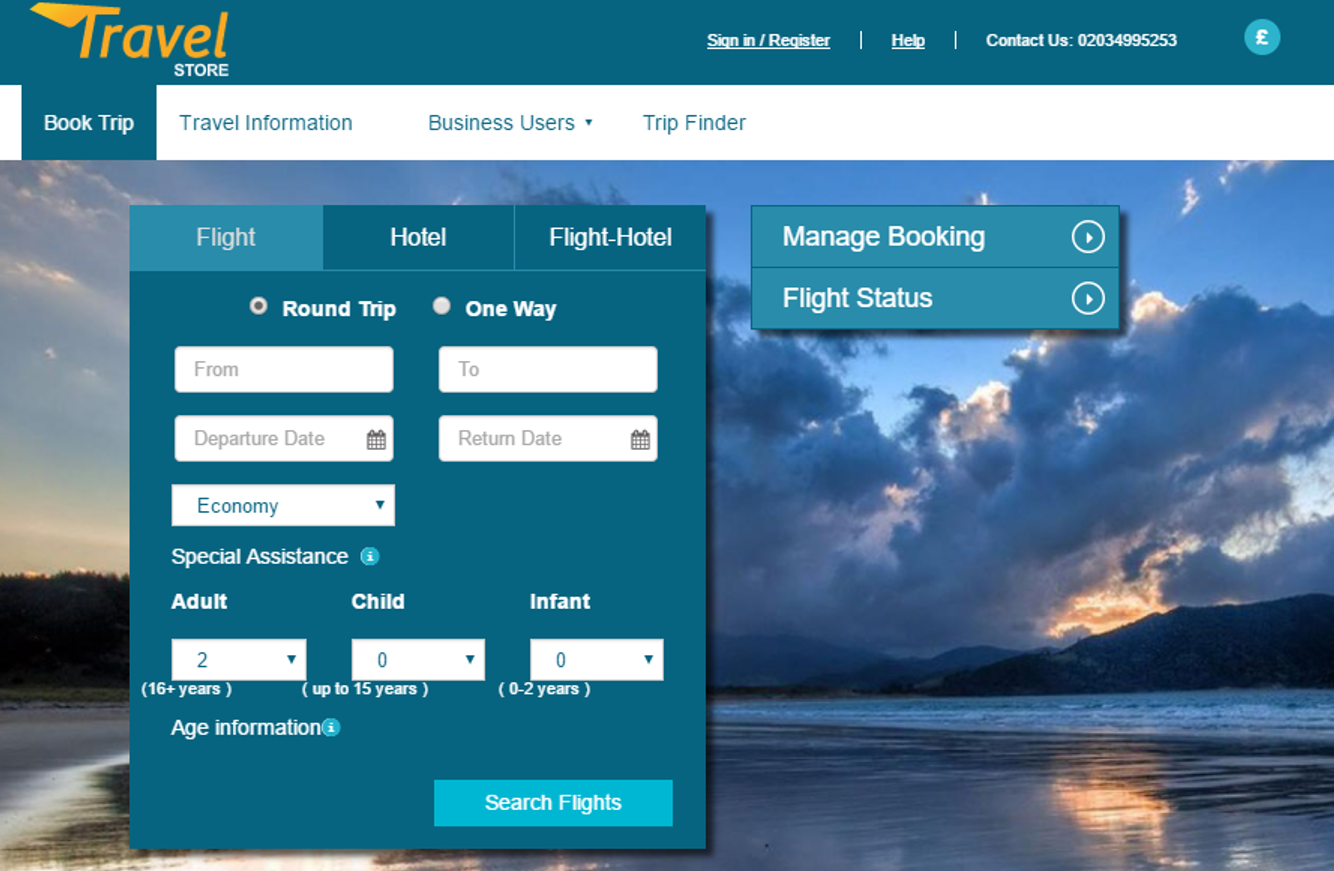
The screenshot above demonstrates the search form for the ticket booking module. A similar form is used for accommodation booking. These are the starting pages for the search and checkout processes, which are specific to each module. There are other minor starting pages as well.
Implemented processes
Two major processes have two major parts:
- search and navigation
- checkout
There are other processes of lesser importance, such as registration, ticket/accommodation amendment, returns, my orders, and B2B. I’ll come back to these points later.
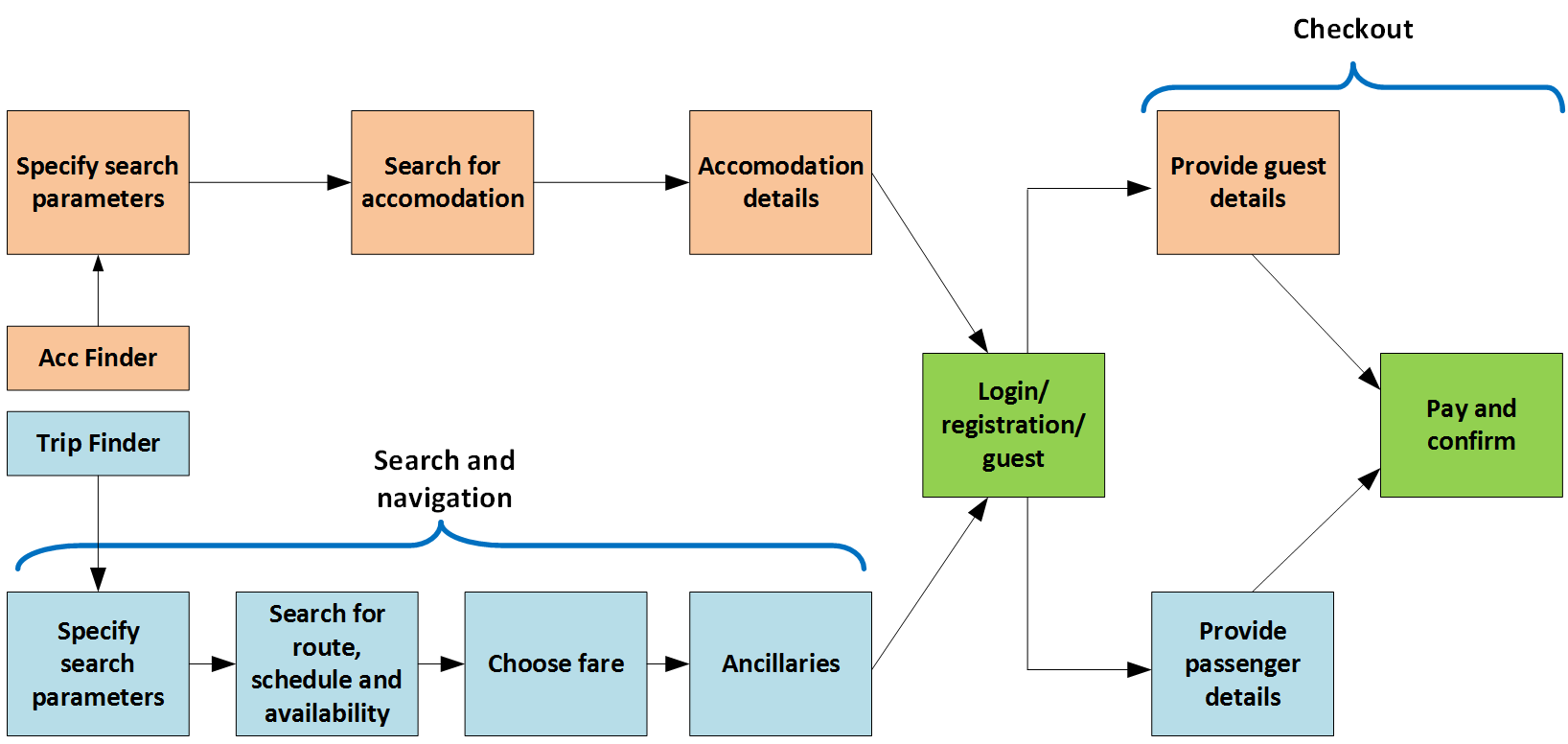
Blue boxes represent the flight ticket booking process. Orange boxes represent the accommodation booking process. Green boxes are common for both flows. They also represent the components derived from the default hybris accelerator.
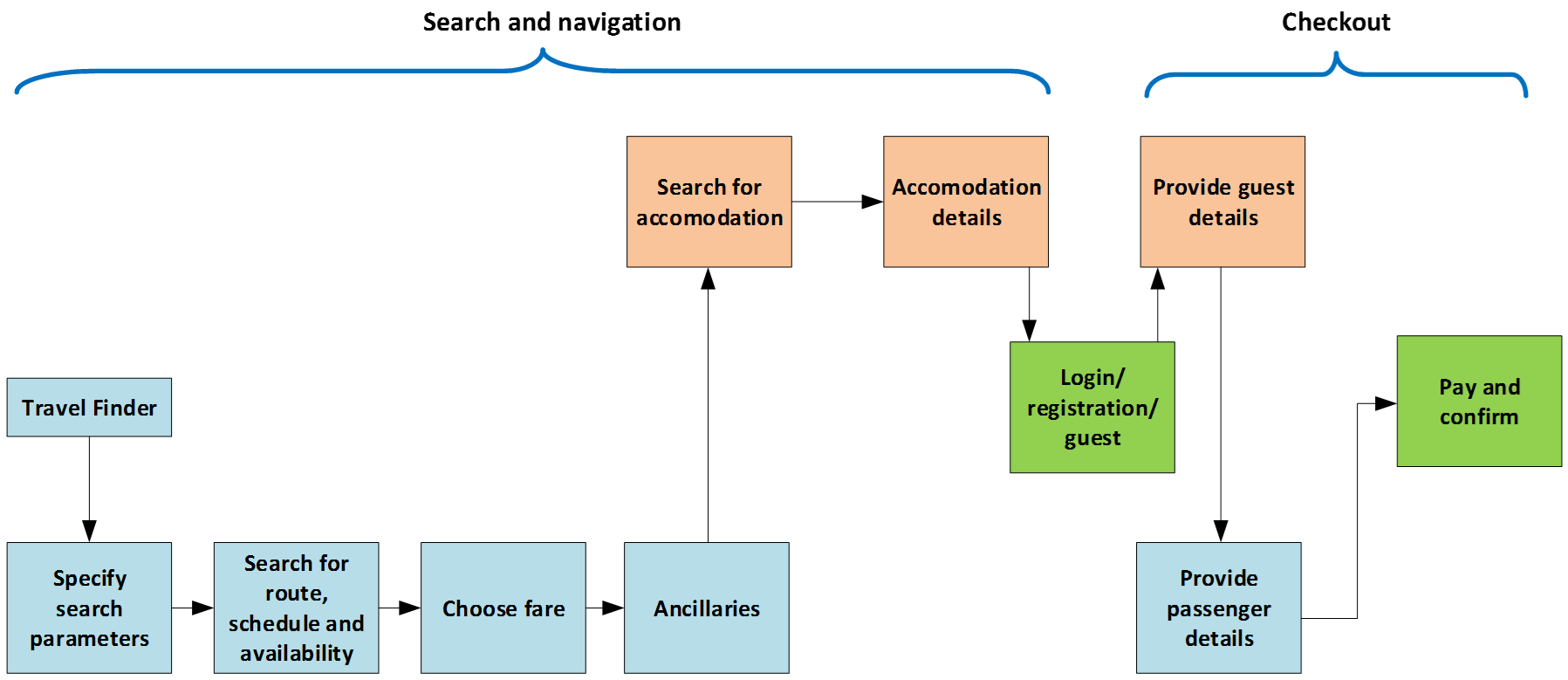
Both processes can be used separately or together in a combined flow:
Search results
The starting pages contain the search forms. After any of these forms is submitted, the system shows search results. For ticket booking, these results contain a list of offers from transport companies. For hotel booking, the results are hotel offers.
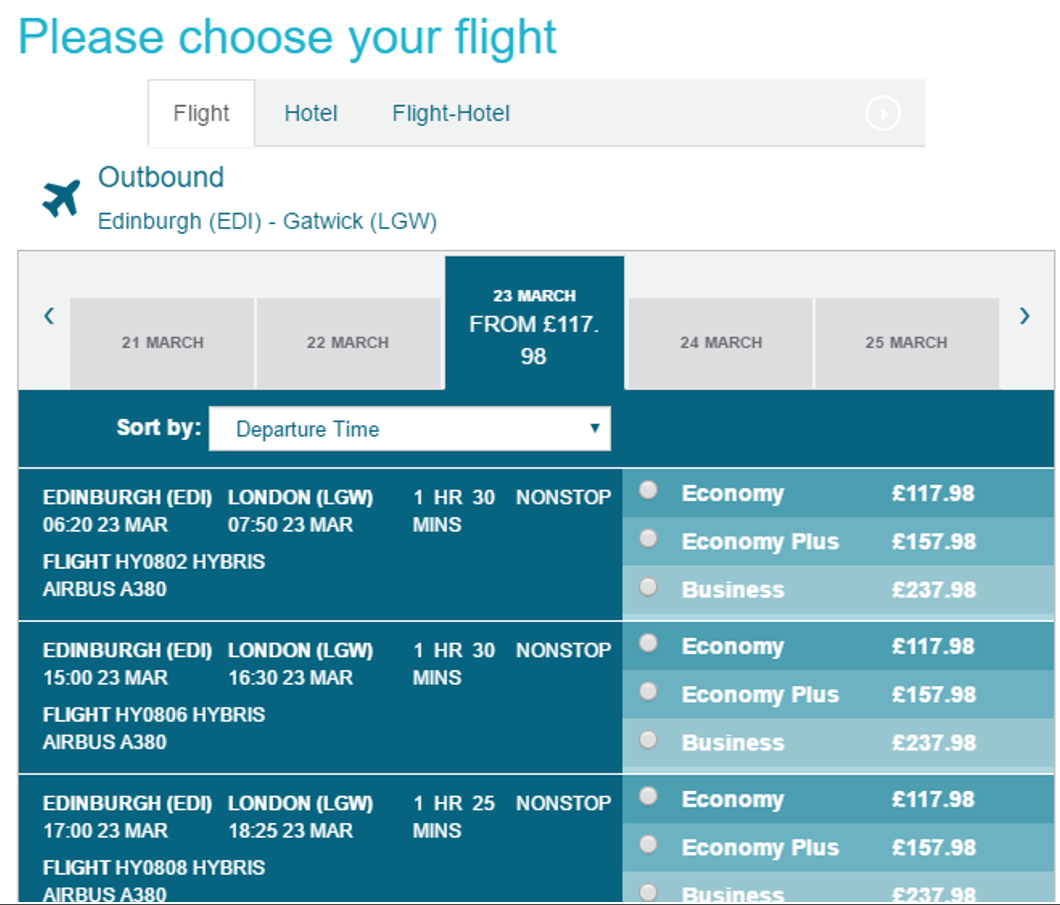
Travel Accelerator allows you to create packaged offers and bundled products.
Ancillary services are the extras, additional services, and things you would need to complete your holiday apart from booking your hotel and accommodation. They are represented as products in Travel Accelerator.
Architecture and Technical Details
Part I. Transport
Routes, Sectors, Transport Offerings
The key objects in the Transport module of Travel Accelerator are routes, sectors, and transport offerings.
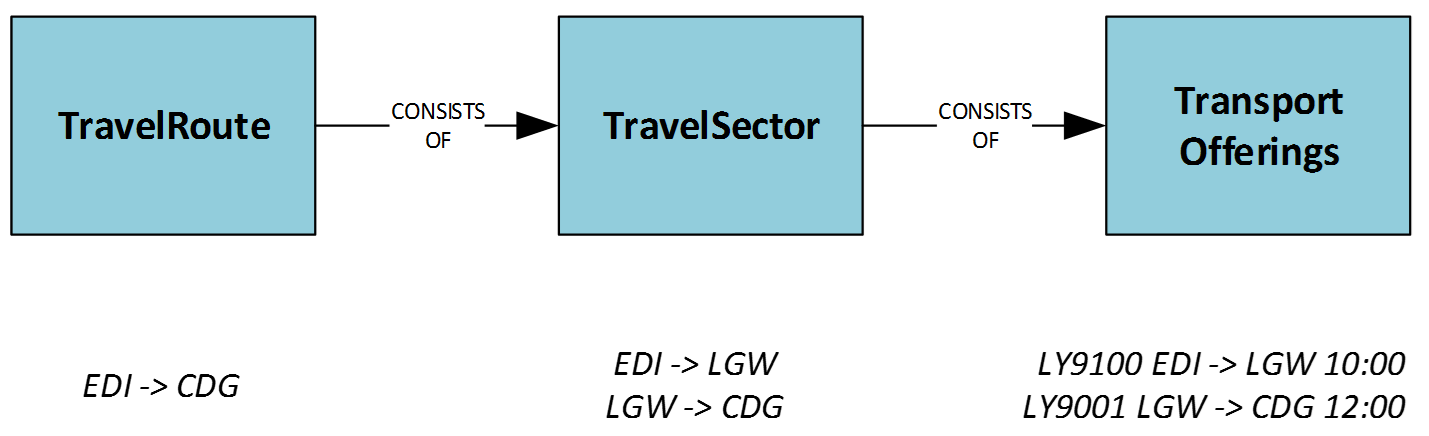
Routes can have one or more sectors — think of them as connected flights. Transport Offerings are the flights themselves. This is a representation of a particular schedule for a point-to-point travel segment.
It can represent any transport schedule, such as a bus or a cruise. In the default data setup, it represents a flight. Each transport offering also holds information about availability for booking classes (fare products) and ancillary products.
If the itinerary is made of two sectors and therefore transport offerings, hybris will first look up the mapping by travelRoute. If no mapping is available, hybris will perform two different lookups, one per sector, and combine these two options. The data setup in Travel Accelerator is made so that each multi-sector route has its own mapping.
Fare Search
After you complete the fare search form, the system displays a list of offers that meet the criteria. Internally, this process is very interesting. There are a number of sequential steps. Each step enriches the data from the input and pushes the updated object through the pipe to the next step.
There is an interesting point. Fare basis rules govern how and when fares can be used. These rules are evaluated using the Drools rules engine. This step is executed every time you perform a search. The system discards a fare product if the business rules are not met.
| Typical rules may look like: |
|---|
| A promotional trip must include a Saturday night stay. If there is no Saturday stayover, this trip will be discarded and removed from the delivered results. Second example. The number of days between ticket dates should be less than 4 days in order to call the trip “a minimum duration stay.” Some fares require you to stay in your destination for a certain amount of time. |
So, if you try to find flights from Edinburgh to London in the default setup, the Drools Engine will be called 71 times and SOLR will be called 4 times for a single user and a single booking request. In the out-of-the-box Electronics Accelerator, the Drools engine is called only once per shopping cart state.
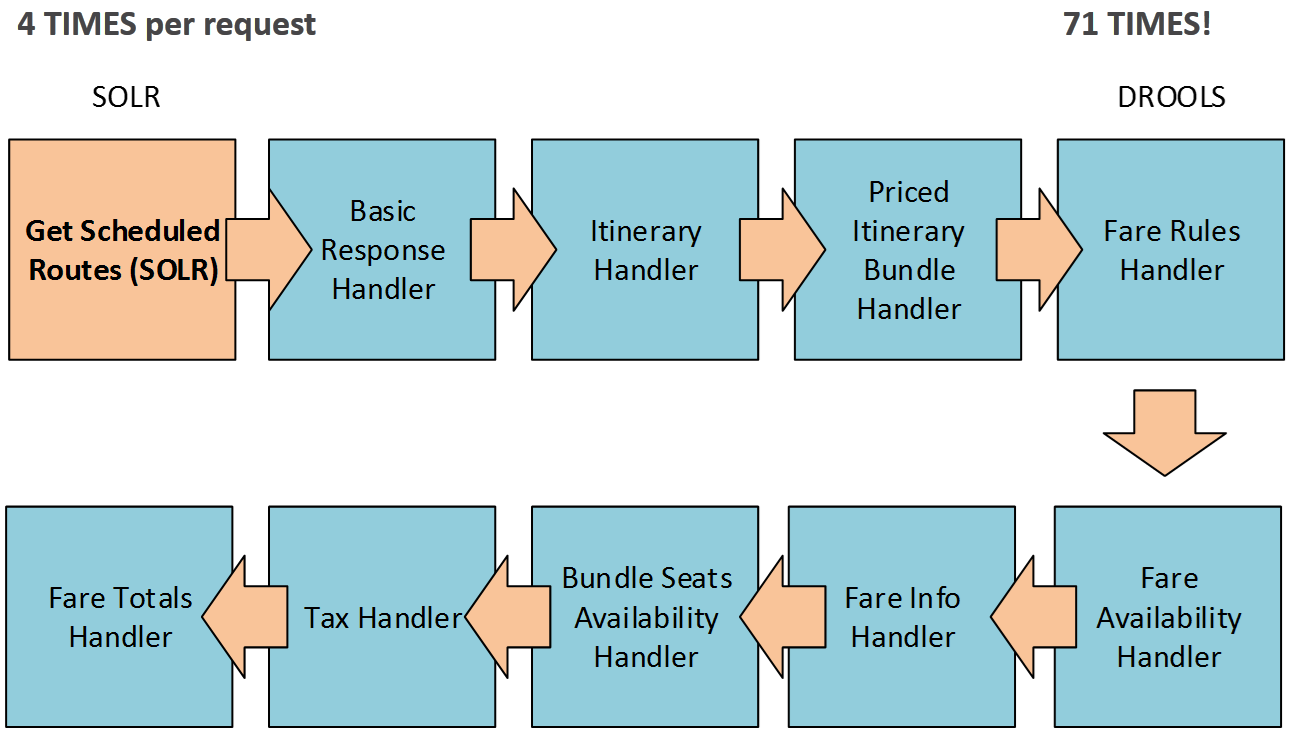
Another interesting point with this flow is that the SOLR request doesn’t have any limitation on the number of records from SOLR.
Below is a real SOLR request for a simple search (Gatwick to London, round trip, 31/03/17):
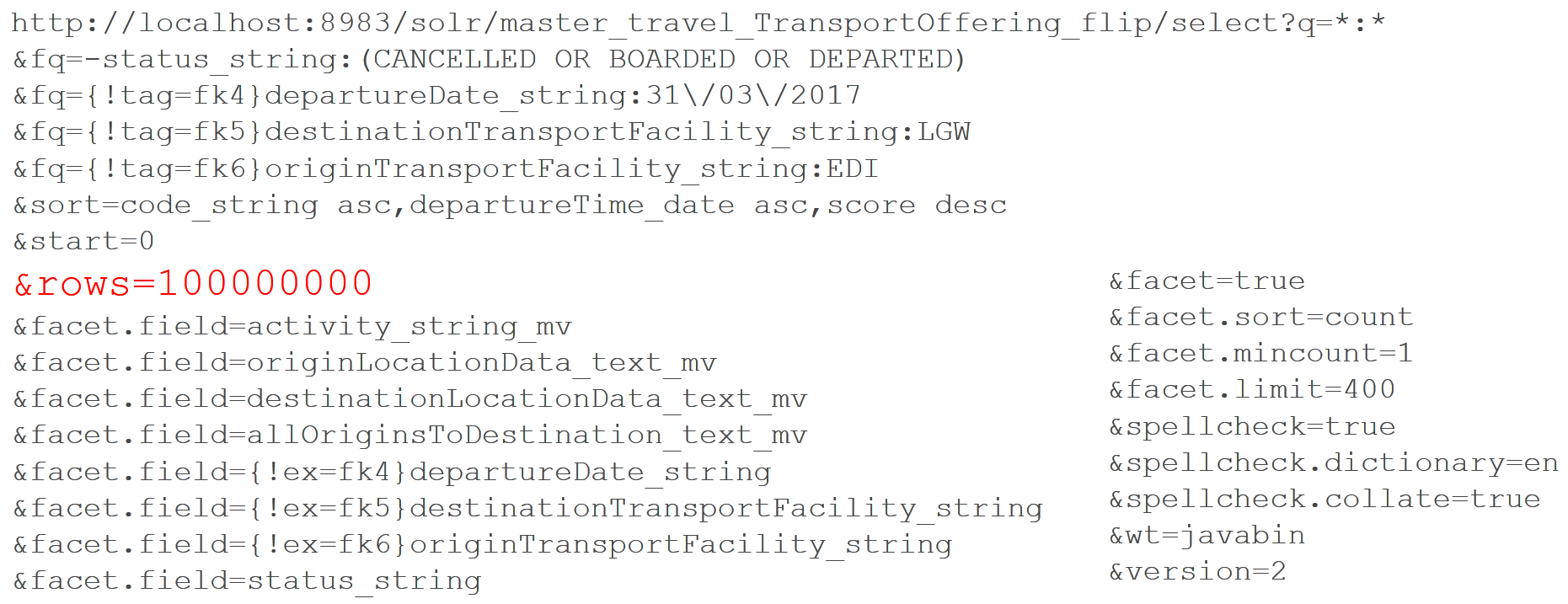
This ‘rows’ parameter is used to paginate results from a query. It specifies the maximum number of documents from the complete result set to return to the client for the request. The TransportOffering is a huge list of schedule items. And this request is performed four times in a row per one mentioned customer request (EDI->LGW, a round trip).
Products
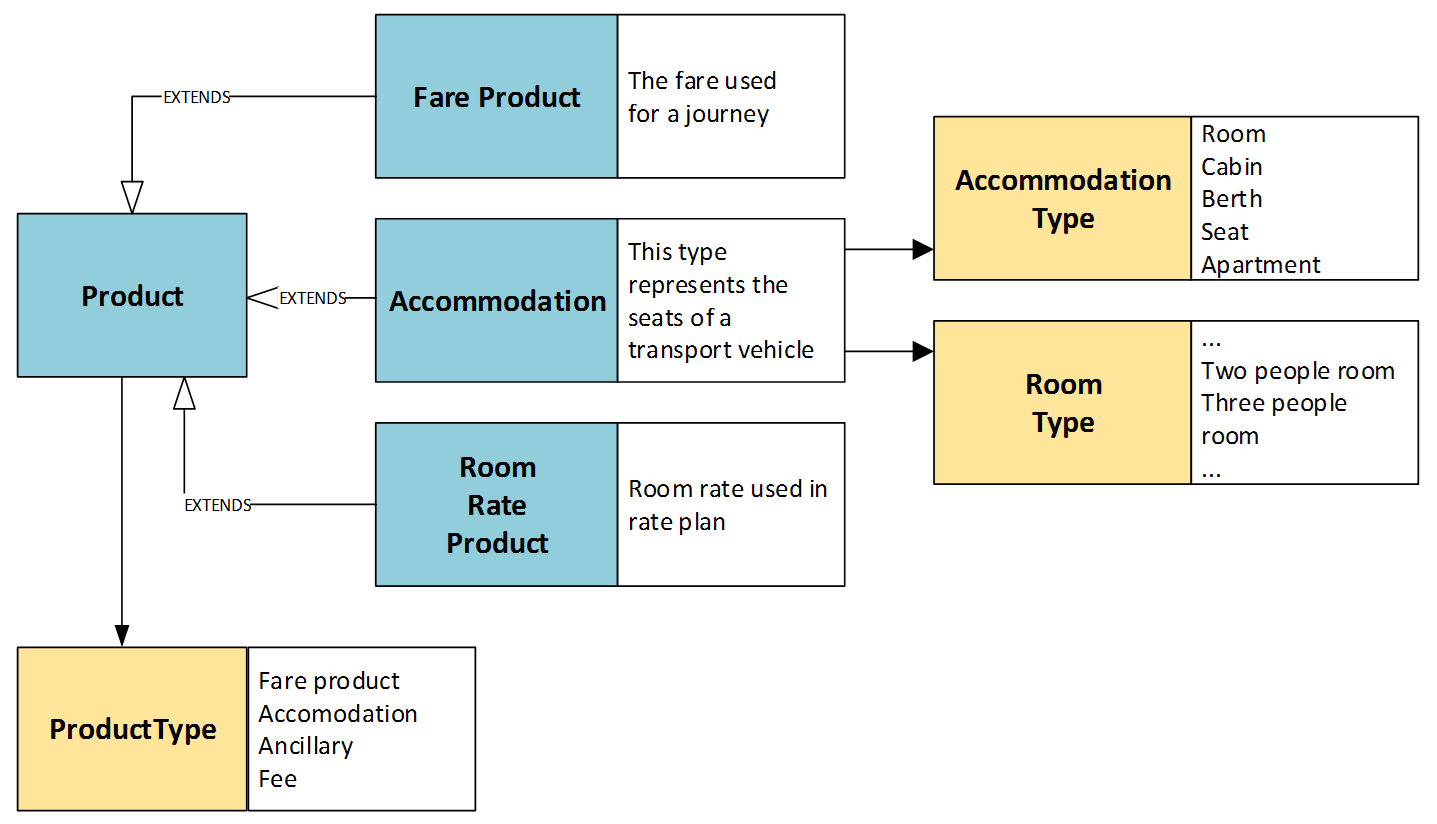
Product objects are leveraged for representing:
- Fares
- Seat groups
- Room rates
Fares can be of different types, like fees or ancillary products. Room rates will be explained later in the Accommodation section.
Accommodations can be of different types, such as rooms or apartments:
Let’s look closer at the fare product data model:
Prices. Prices are associated with seat groups, not particular seats. When you place the order, the fare product is reserved for you, not a seat. A seat can also be reserved, but that is a separate process.
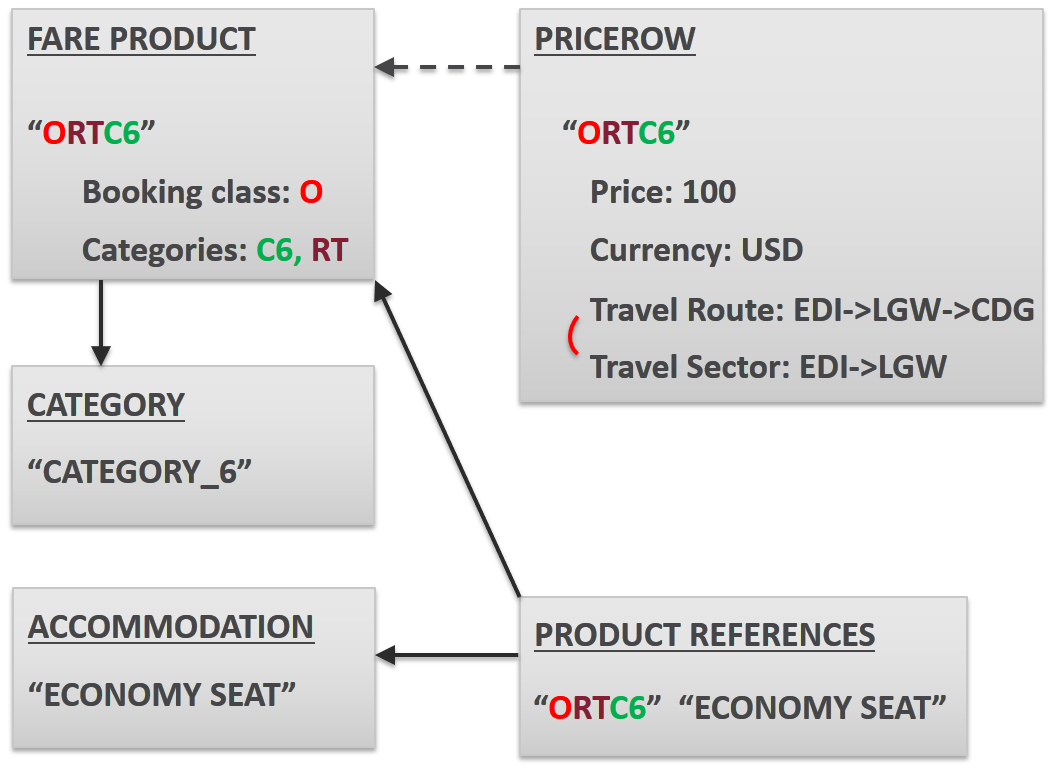
Travel Accelerator implements the handling of fare basis rules, taking inspiration from ATPCO fare rules.
Booking class “O” (along with some other letters) means “economy fare.” OW stands for “one-way.” RT means “return fare.” CAT 6 stands for Minimum Stay. All together, they represent a fare.
The fare products are grouped by accommodation level: economy or business seats.
Availability. The plane has a limited number of seats in different price groups. These price groups are represented by fare products, and availability is represented by hybris StockLevel. In the default hybris, StockLevel should refer to the warehouse. In Travel Accelerator, the warehouse is TransportOffering, a schedule.
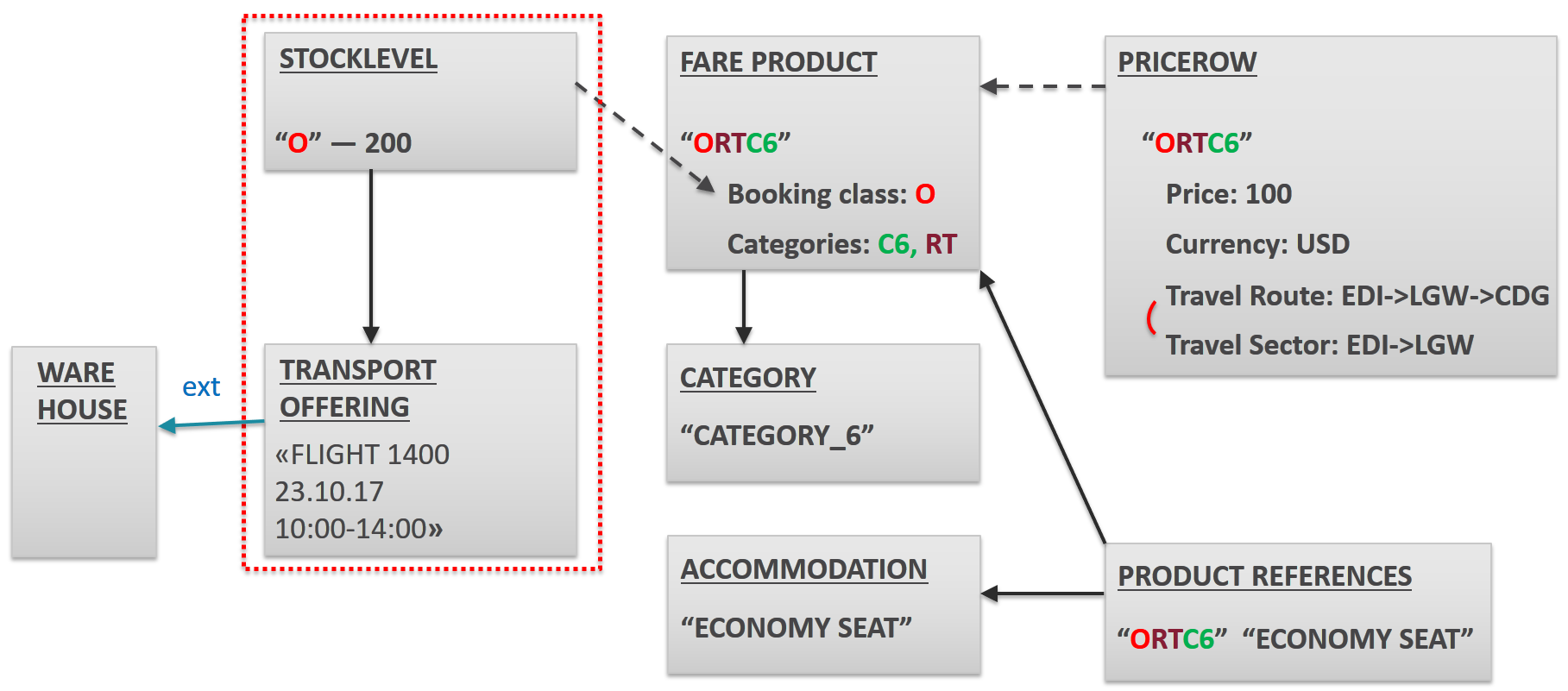
The diagram shows that there are 200 seats of the price/ticket group ORTC6 available for flight 1400, scheduled for 23.10.2017, 10am–2pm.
The particular vehicle type is represented by the ConfiguredAccomodation object. You can describe a seat map via a tree-like structure: AirCraft->Deck->Cabin->Row->Seat.
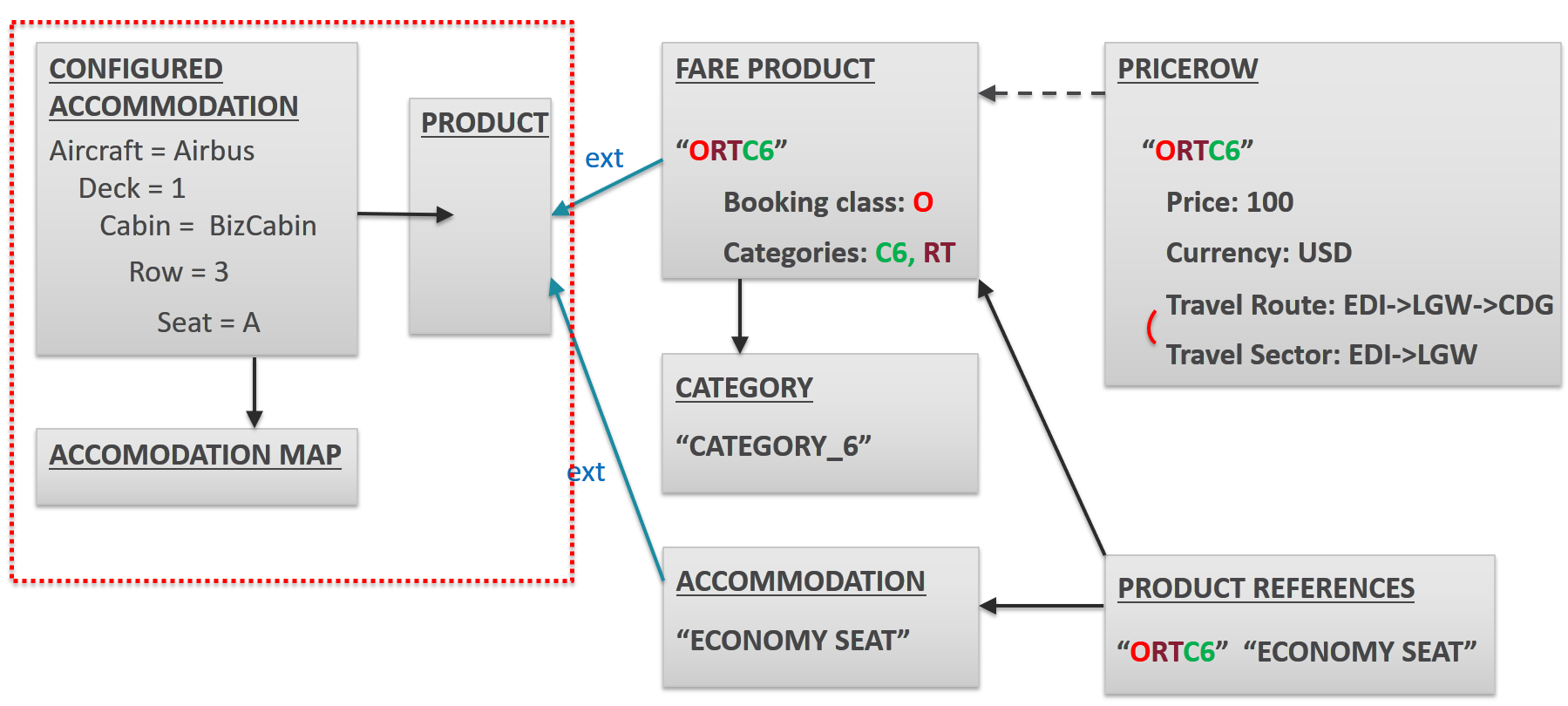
ConfiguredAccommodation describes particular seats.
Don’t confuse it with the Accommodation item. These terms are not the same. Accommodation is a product and therefore may have a price and some features. ConfiguredAccommodation, instead, represents a particular room or a particular seat.
It can be assigned to a ticket, but it is not involved in the reservation process. ConfiguredAccomodation is a particular form of accommodation that is part of a so-called accommodation map. An accommodation map has a self-explanatory name. For aircraft, it is a map of the plane.
It is associated with a specific Transport Offering.
Customers and Travelers
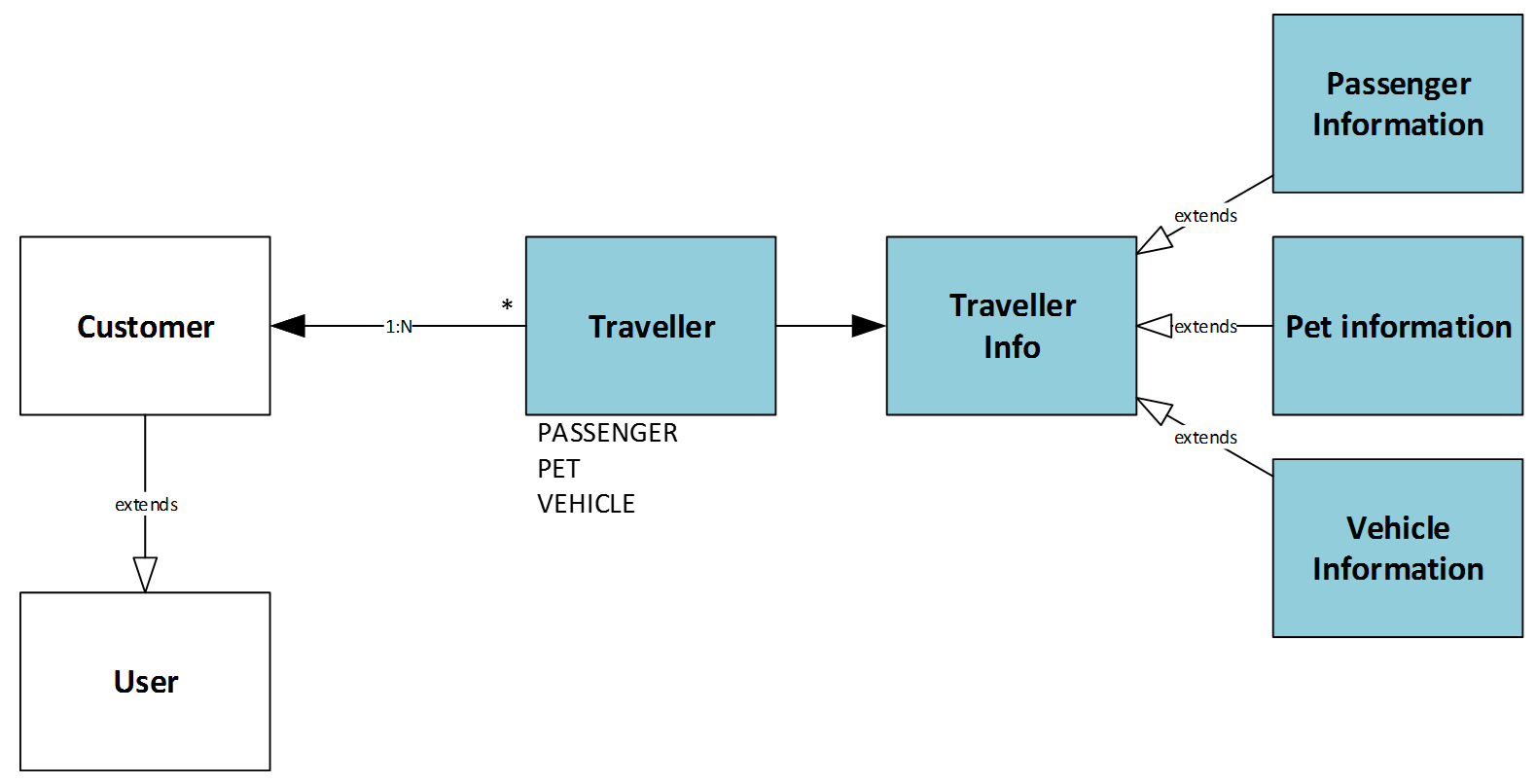
Travel Accelerator introduces a new object, Traveler. One order can have a customer, who pays, and travelers. Travelers are used to represent passengers, pets, and vehicles.
Orders
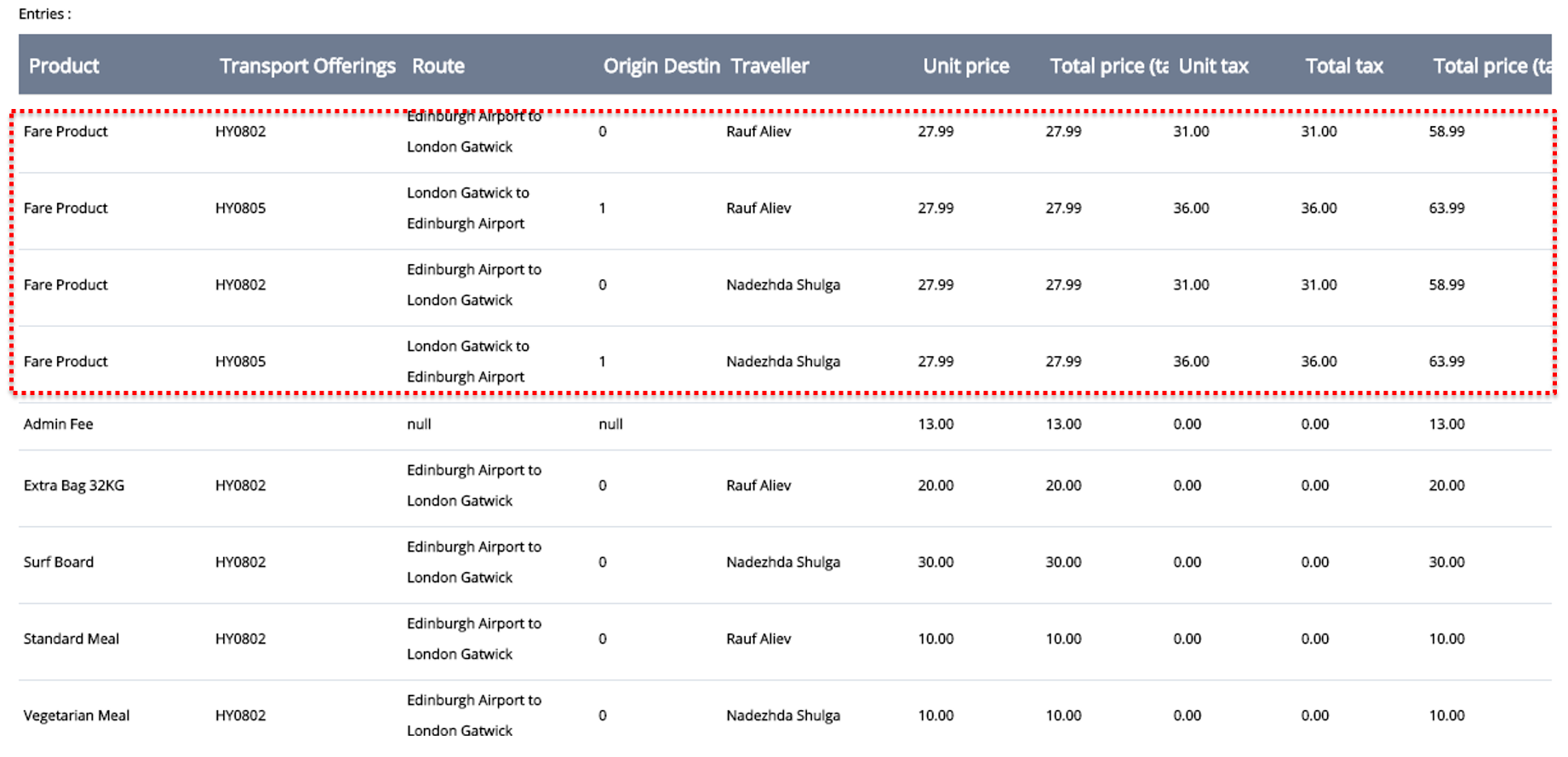
Order Entries refer to products of different types. See the Products section.
Part II. Accommodation
The accommodation module was introduced in Travel Accelerator 2.0. Starting with version 2, Travel Accelerator can be used for online booking for the hospitality sector, including lodging, event planning, theme parks, and so on.
Rate plans
A rate plan is a concept that is similar to a Fare Product in the previous section. It characterizes a group of rooms, not particular rooms. These plans can be applied to a number of hotels.
In the demo store, there is a naming convention for rate plan names: number of stars, max persons, rate plan restrictions, and rate plan country.
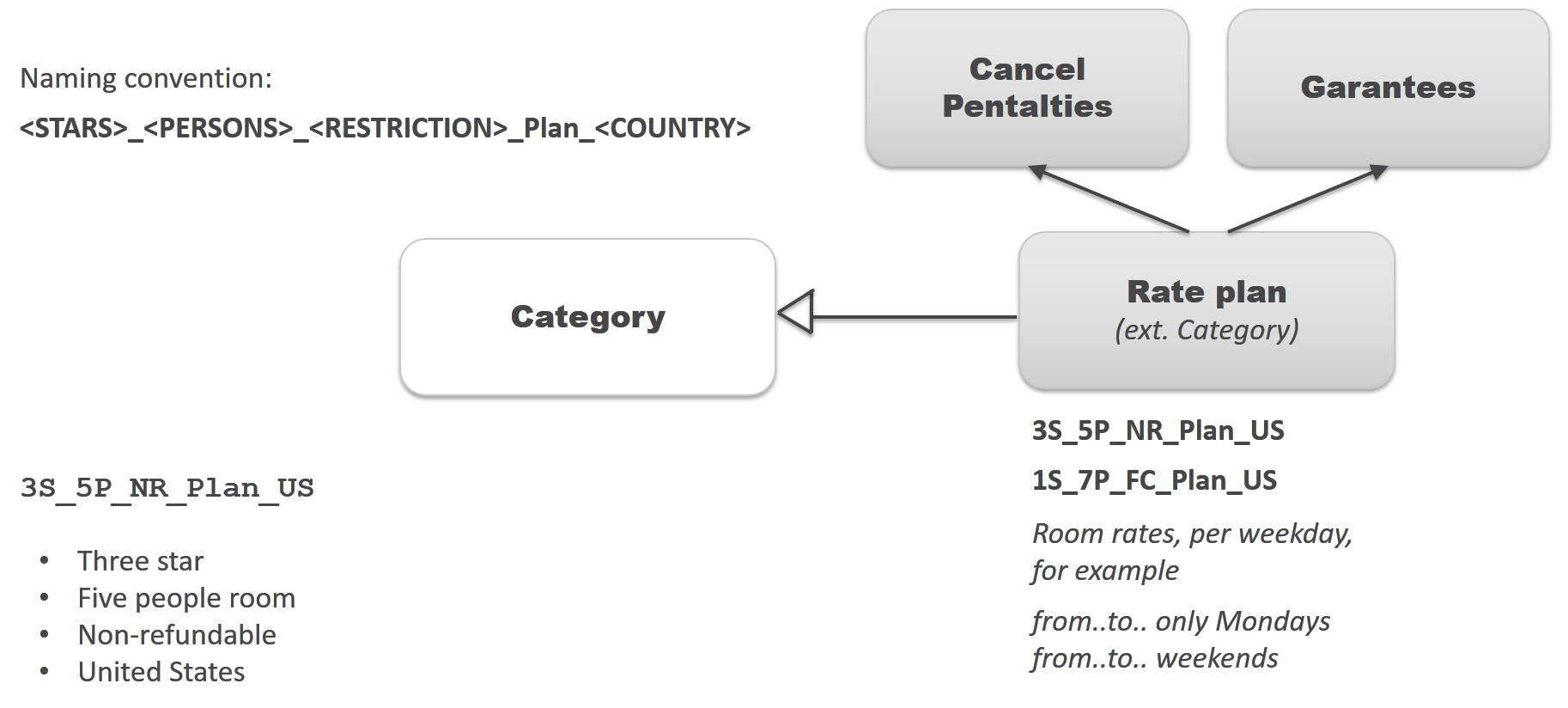
A ratePlan can also be put into a relation with Guarantees and Cancel Penalties.
A Guarantee can be a fixed or percentage amount of the total accommodation price.
A CancelPenalty is a fixed or percentage amount of the total accommodation price that is withheld when cancelling the booking. It can also depend on when the cancellation is done.
A ratePlan can also have some rate plan inclusions. These are the services included in the rate plan at no extra cost. For example, free parking.
Room Rate Products and Accommodations
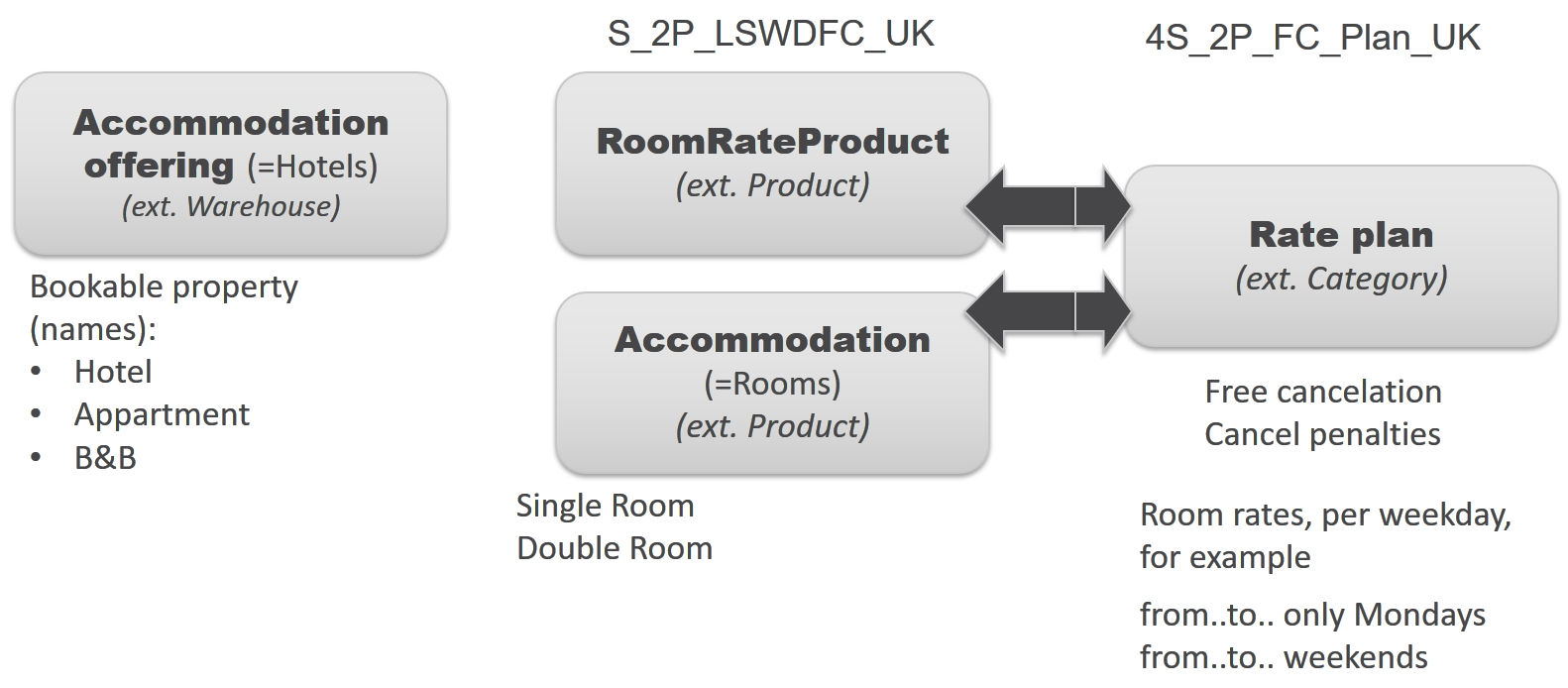
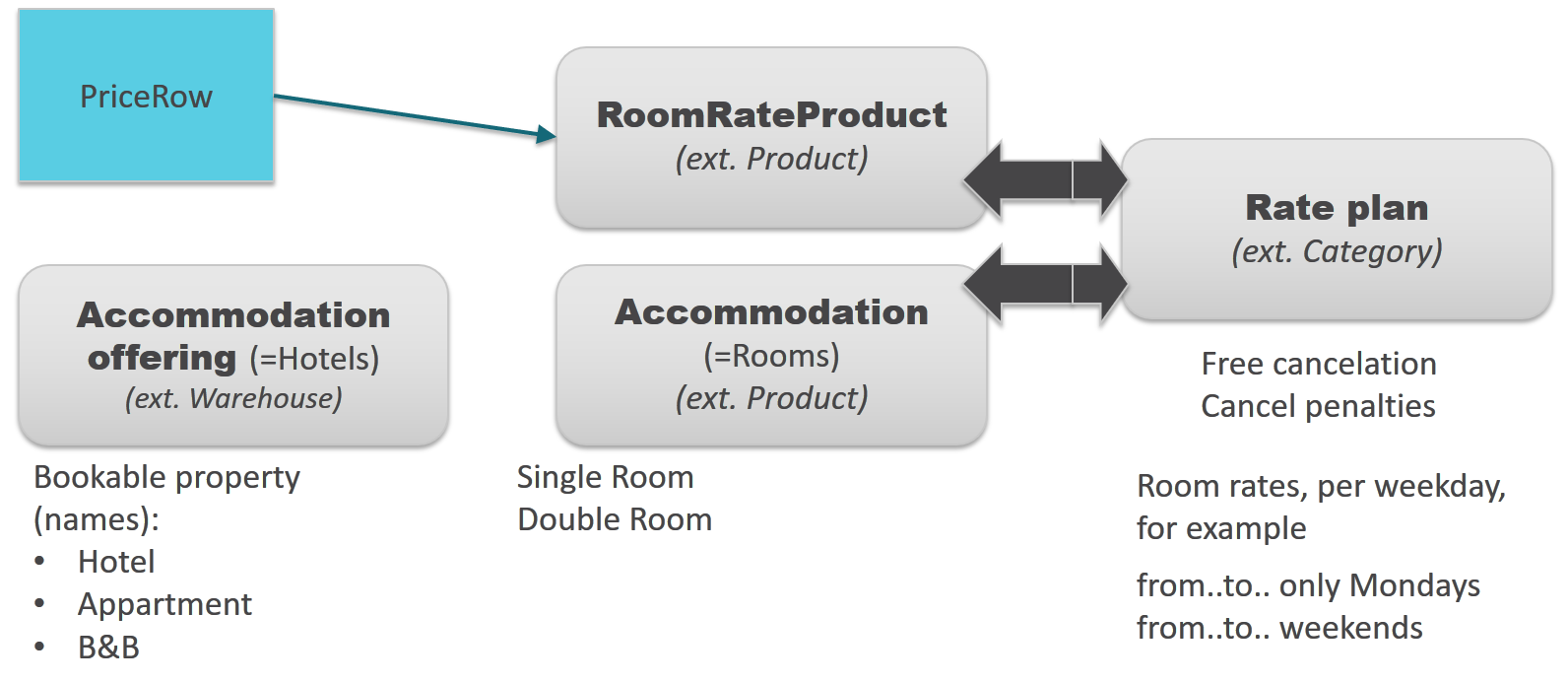
Room rate products are the products associated with a stay in a specific accommodation on a specific date.
In the demo store, there is a naming convention for room rate products similar to the one for rate plans. The naming convention for room rate products includes the hotel name, because, unlike rate plans, this object describes the specific room groups in the hotel.
The roomRateProducts are linked with the corresponding RatePlan via the product/category relation.
Prices
The prices are associated with RoomRateProducts. The price row says that the particular room group in the hotel has a particular price.
Availability
StockLevels show how many room rate products are available in the hotel. Hotels in this module are managed like warehouses in the default accelerator. Each hotel has hotel products: room rate products. These products have a stock value that shows how many rooms are available for booking.
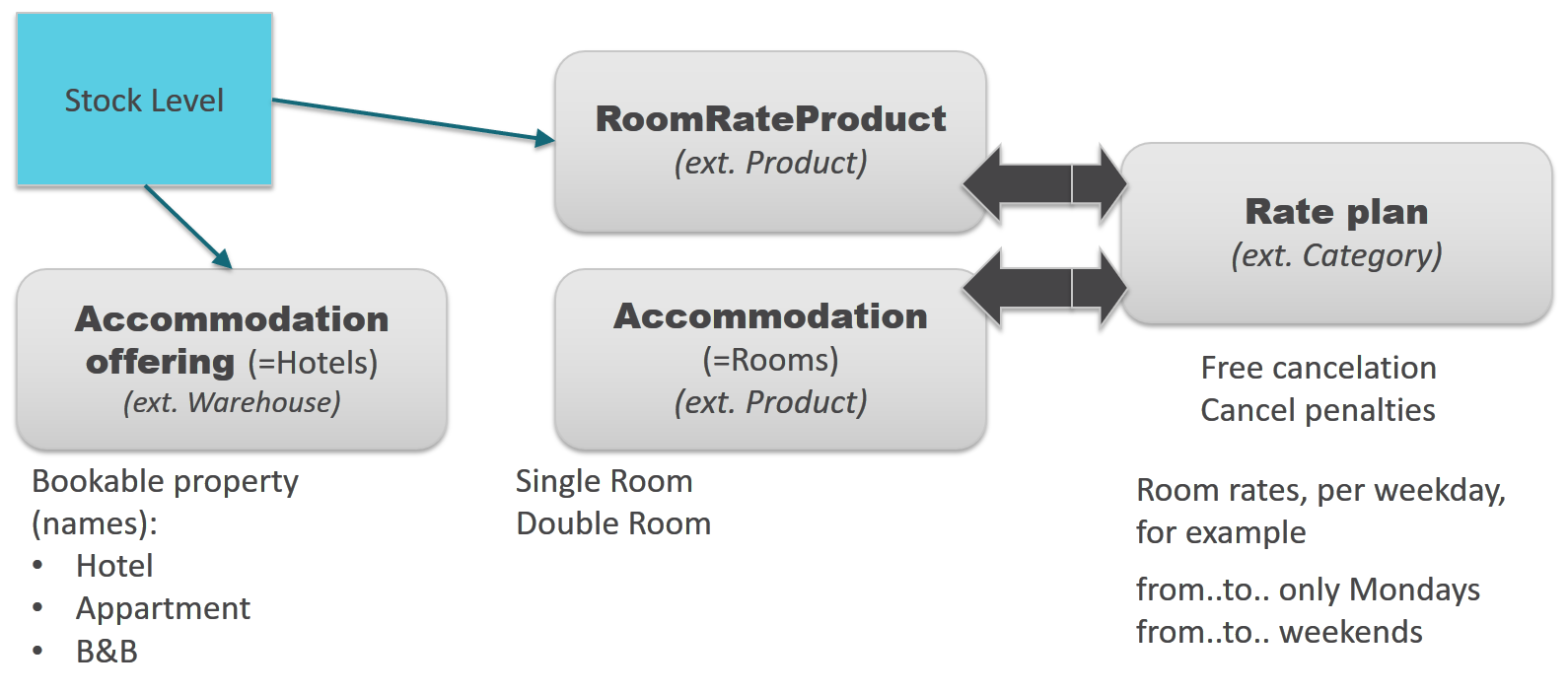
StockLevel can be defined not only for RoomRateProduct, but also for Accommodation, for example, “Single rooms.” The system finds a minimum when requested for availability. This minimum quantity between the stock level for a specific day in accommodation and room rate plan is selected to be shown to the customer as ‘X rooms available’ on the Accommodation Details Page.
The system calculates availability for the requested period of time, day by day.
Payment
When a user starts a booking and lands on the Payment Details Page, Travel Accelerator will provide up to two different payment options.
A Payment Option is a high-level concept basically representing the possibility to pay a certain amount at a certain moment in time. Travel Accelerator comes with two built-in payment options, each with its own set of rules to qualify as permitted.
- Advance payment
- Partially delayed payment
In the first case, the whole amount has to be paid at booking time.
The opportunity to pay the whole amount in advance is always provided: directly at the moment of booking, via the Payment Details Page, or after placing the booking, via the Booking Details Page.
The second option is more interesting. It is an opportunity to pay part of the booking at a certain moment in time after placing the order, and it is provided only under certain circumstances.
A transportation-only journey is always paid in advance. The accommodation part is more flexible. That is why I put payment-related information in the Accommodation section of this article. For this option, at least one of the rate plans associated with the accommodations that are going to be reserved must be linked to a Guarantee. A guarantee is a payment as assurance that the full payment will shortly occur, and it’s a typical concept in an accommodation context.
Conclusion
Markets:
- Travel Accelerator is a great platform for implementing ticket booking and accommodation booking services for service providers:
- transportation companies.
- hospitality companies.
- Travel Accelerator cannot be a good choice for:
- travel aggregators, especially if they are not directly linked to service providers’ data, and the raw availability data is not accessible.
What’s new:
- Version 2 comes with two modules: “ticket booking” and “accommodation.”
- Accommodation is a brand-new module in version 2.
Risks and known problems:
- There is a risk that the system will work too slowly for a large amount of data. You need to weigh all factors and risks before going to a large project with a huge schedule and non-trivial logic. At least the performance tests should be carefully conducted. The Drools engine can be a possible bottleneck. For a very large schedule, SOLR can be a bottleneck too.
Strong points:
- The data model is well designed.
- The modules are very good internally and well organized.
- For budget airlines, small hotels, and motels, this product seems very suitable. Businesses will be able to achieve a rapid time to market.
- B2B capabilities of hybris are organically integrated.
© Rauf Aliev, April 2017
Discussion
Powered by GitHub Discussions — sign in with a GitHub account to join the conversation.