
Variants are a common concept in eCommerce systems. Variants are products that differ from one another in some aspect but are based on the same model. Examples of variants include vehicle color or vehicle configuration.
Using variants may add a level of complexity. You should consider using variants if you need to reduce the complexity of managing many similar products. For example, importing product catalog updates from ERP is more complex if you use variants.
The same variant may have a different set of possible values for different product categories. For example, the variant attribute color may have different color sets for lipsticks and hair dyes.
I’ve listed five different patterns that are commonly used for product variant modeling. Hybris supports three of them out of the box: multi-variant products (see #5) and variant types (see #1 and #2).
- Default hybris product variant model
- Modified hybris product variant model
- Product families
- Using categories as base products
- Multi-dimensional products
I. Default hybris product variant model
Overview
According to this model, variant products are instances of special “concrete” variant types, organized into a two-level hierarchy. Each variant product has a reference to the base product.
Data model
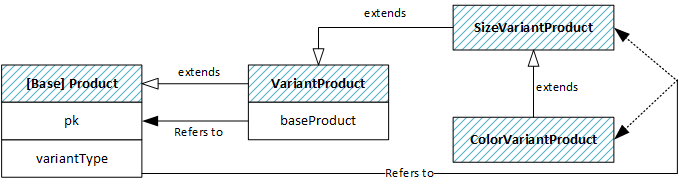
Product pages
- Every variant has its own product page.
- Base products don’t have separate pages.
Search results and category pages
- Only variant products are displayed in the search results.
- Base products aren’t displayed in the search results.
Cart/Order items
- A cart/order item can refer to either
ProductorVariantProduct. - Cart/order items can’t refer to a
Productwithout variants.
Known limitations and challenges
(a) If you need to convert an existing product of the Product type into VariantProduct, or vice versa, you will need to do a lot of cut-and-paste work in hybris Backoffice or Product Cockpit. The hybris platform does not support item type promotion. The only way is to deactivate the product and create a new one of the desired type.
(b) There are only up to two levels of variant products out of the box, such as Color and Size, or Style and Size.
(c) If your variants have similar images, your search results may be confusing. The user would see identical items with only slight differences in their names.
Recommendations
- Data:
- Refer to the variation type in the variant product name, such as “A blue vase” / “A red vase”.
- Use different images for different product variants. It will help you make product lists more readable and concise.
- Customization:
- Consider additional Product Cockpit operations, such as “convert to variant” / “convert to base product”.
II. Modified hybris product variant model
Overview
The key difference in this approach is how variant products are indexed. Unlike the traditional model, this approach doesn’t index and present variant products on category and search results pages as separate items. The product search result list is based on base products, not variant products. This is called variant rollup.
Data model
- The same as in the previous section (I).
Product pages
- The same as in the previous section (I).
Search results and category pages
- Only base products are displayed in the product list, such as category and search results pages. This is called “variant rollup”.
- Variant products are not presented in the product list.
Cart/Order entries
- The same as in the previous section (I).
Known limitations and challenges
- (a) and (b) from the previous section.
- Different sections may have different rollup configurations. Hybris doesn’t support this, so medium-sized customization is needed.
Technical details
You need to change the Solr indexing query so that only base products are indexed. To get the attribute values of the variants into the index, you use value providers and create Solr index entries where you accumulate these values for indexing.
The electronics demo store only indexes products, not variants. Maybe that can be used as a template to work from and modified to reference only the variant base.
A value provider is a Java bean you register via Spring that gives the actual values to the indexer. You need to configure an index entry and reference a value provider. Then you need to implement and register this value provider by changing SolrIndexedProperty.
III. Product families
Overview and data model
For this option, the data model is simpler: there are no additional items, tables, or item types for variant products.
- There is an attribute called “family” that has the same value for a group of similar products.
- There are variant-specific attributes that also group products inside the product family.
- There is no base product in the database. All products are equitable variants. If all variants have the same attribute value, there will be duplication.
- If you need to manage these attributes together, you need to implement custom functionality in Product Cockpit: “Product Family Editor”.
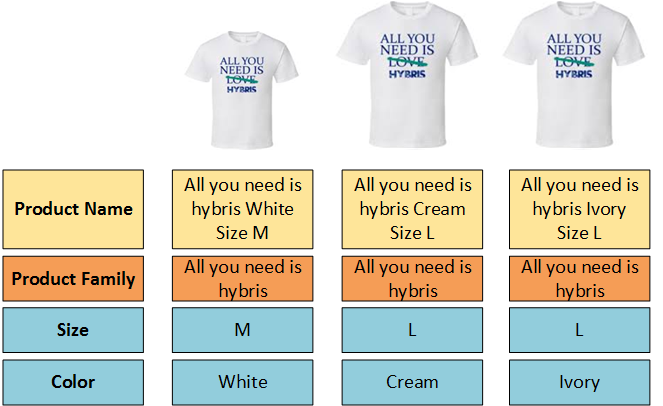
For regular products that have no variants, the product family field contains the same value as the Product Name field.
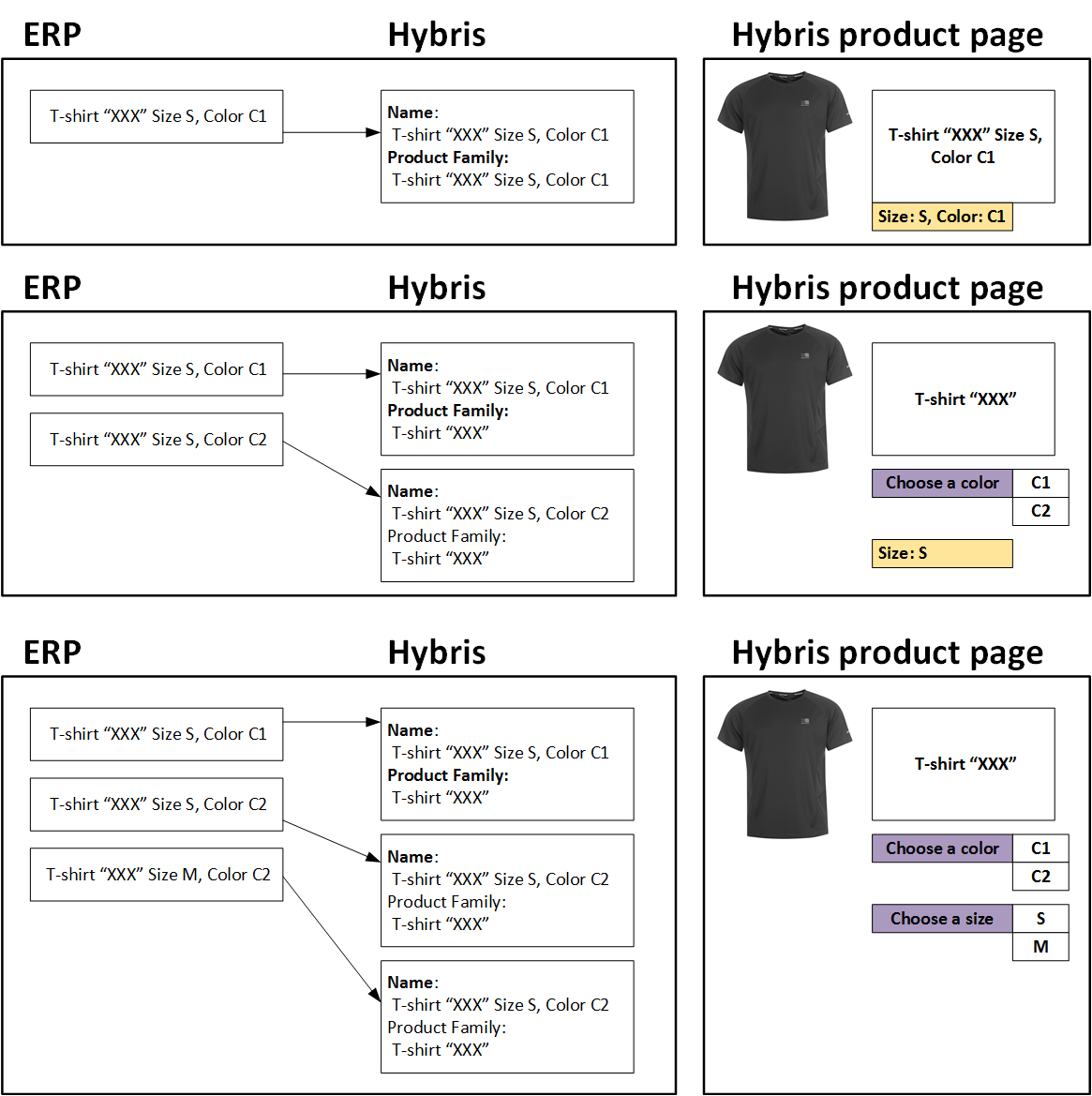
Very often, this data model reflects the ERP’s data model, which makes it easier to migrate data and implement regular data imports. Variant products can be created in ERP in any order, and hybris will group them automatically.
It is possible to create ProductFamily as a separate entity and connect it with a given Product not by a hard reference using PK, but through a kind of soft reference using the ProductFamily identifier. Decoupling will help you make enrichment of the product family optional.
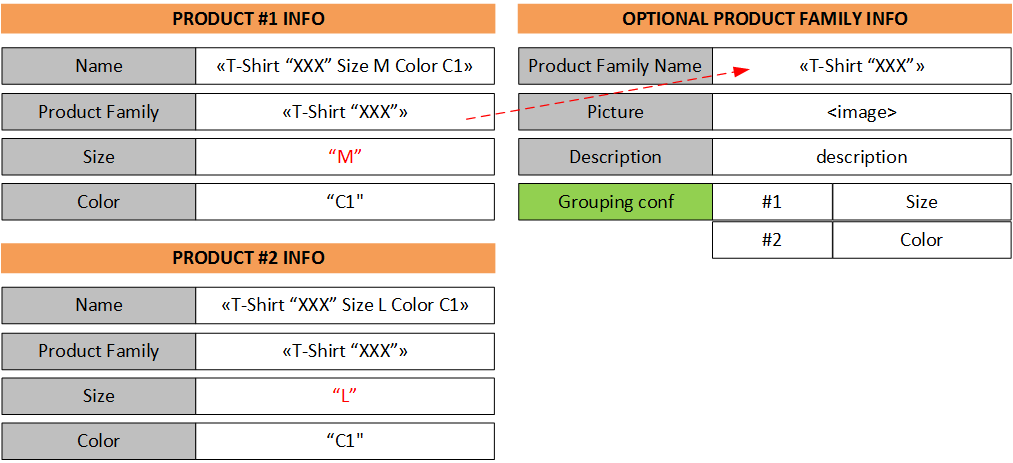
“Grouping configuration” is an optional attribute that helps hybris display the variant navigation properly. For example, the order of variant attributes in the form on the product page may be different. Another use of this field is to specify a set of variant attributes used in the form on the product page. By default, all variant fields are used to build the form.
Product pages
Since this approach is 100% custom, there is no default/OOTB behavior. So you can implement one of the following:
- Each variant has its own product page. There is in-page navigation between the products of the same product family.
- There is a product family page only. All variants are presented as a list of variations on the product family page with numerous BUY / more info buttons. There are no separate product pages for the variants.
If the family info is present in FamilyProductInfo by product family name, the data from FamilyProductInfo is used along with the variant product information. FamilyProductInfo is optional. Otherwise, only the variant info is used.
Search results and category pages
Since this approach is 100% custom, there is no default/OOTB behavior. So you can implement one of the following:
- Only product families are displayed in the product list, such as category and search results pages.
- Only variant products are presented in the product list.
The logic can be different for different product types.
If the family info is present in FamilyProductInfo by product family name, the data from FamilyProductInfo is used along with the variant product information. Otherwise, only the variant product info is used.
Cart/Order entries
- Since all the products are of the
Producttype, all cart entries refer to the variant products, if any, or to the regular product that has no variants.
Known limitations and challenges
The major drawback is data duplication and redundancy. That is why this approach is not suitable for every project. If you need to change common attributes for a group of variant products, you need to use the hybris Mass Edit feature or implement your own custom tools to make these operations easier.
IV. Using categories as base products
Overview
In this pattern, complex products are basically categories. All products inside the category represent product variants. The category page looks like a product page for categories of this kind.
It is convenient for complex products with a large number of variations and complex filtering. You can leverage Solr facet search and custom category page templates to make the interface more convenient and relevant to the specific product.
This approach is especially good for manufacturers with a limited set of base products and complex product variations.
All products have the same type, based on the default Product type.
Product pages
Product pages are only for variants. Category pages are used as base product pages.
Search results and category pages
The simplest option with minimal customization is to put only variant products in the search results.
Cart/Order entries
Since all the products are of the Product type, all cart entries refer to the variant products, if any, or to the regular product that has no variants.
Known limitations and challenges
Category pages need customization for the variant groups.
Using Category objects for purposes other than handling categories may confuse or mislead, so it should be documented properly, the special-purpose category type should be named properly, and so on.
Examples
For instance, this approach will work well for a tire shop. As you may know, tires are defined by the following key attributes:
- Brand – Model
- Seasons: all-year, winter, summer
- Width
- Height
- Diameter
Note that width, height, and diameter can be grouped in one field called “Tire size”.
Basically, all tires of the same Brand + Model + Season look similar. The description and other attributes are also the same, so tires can be used as a classic example of variant products.
Tires can be grouped differently depending on user preferences and marketing considerations:
- Brand – Model – Tire size
- Tire size – Brand
- Tire size – Seasons – Brand
- Car Brand – Car Model – Seasons – Brand
One possible solution for variant products is using categories for:
- Tire brands
- Tire seasons, such as all winter tires
- Tire models, as subcategories of tire brands
The following attributes can be used as filters:
- Brands
- Seasons
- Size: width / height / diameter
- Width
- Height
- Diameter
- Tire seasons
However, you need to design a procedure for adding new products. For example, if a product of a new brand arrives, you need to add both a brand and a product model.
V. Multi-dimensional products
Overview
Multi-dimensional products are described using multiple Category items (dimensions) and multiple VariantValueCategory items (attributes).
VariantCategory represents one of the variant dimensions, such as size or color. Unlike the alternative default approach, you can have more than two levels of dimensions.
In order to specify which dimensions are required for the product, the VariantCategory item is assigned to this product as a regular product supercategory. When one or multiple VariantCategory items are assigned to the Base Product item, it starts acting as a template indicating which dimensions are used for the variant products. These Variant Categories can be chained, i.e., organized into a hierarchical structure.
VariantValueCategory represents all available values for VariantCategory.
In order to specify which value the product variant attribute has for the specific product, the appropriate VariantValueCategory item is added to the variant product’s supercategories list.
Hybris uses the following field for product variant modeling, in addition to the main purpose of this attribute: positioning the product in the product hierarchy.
supercategoryHybris uses the following field differently for base products and variant products:
supercategoryFor base products, this field tells hybris about allowed variant types. For the variant product, it is a way of handling variant attribute values. For both product types, this field is also used for assigning a product to regular categories, such as navigation, brands, and so on.
Product pages
- Every variant product has its own product page.
- Base products don’t have separate pages.
Search results and category pages
- Only variant products are displayed in the search results.
- Base products aren’t displayed in the search results.
Known limitations and challenges
- Fixed list of possible values. If you have a new value for the variant attribute, you need to add it to the list first, and then pick it from the list.
- The type conversion issue is also relevant to this approach. The hybris platform does not support item type promotion. The only way is to deactivate the product and create a new one with the desired type.
© Rauf Aliev, October 2016
Discussion
Powered by GitHub Discussions — sign in with a GitHub account to join the conversation.