
Situation
In default hybris, it is required to upload separate image variants for different resolutions and purposes. As a rule, these images are downscaled copies of the larger image. In OOTB hybris, you need to resize or crop the images manually using third-party software installed on your PC.
There are a couple of reasons why SAP didn’t integrate automatic crop and resize into the platform.
The first is that different variants may have different proportions, and cropping may not work well for some images. Smart cropping needs input from designers, so you need to provide them with the appropriate tools.
The second reason is that a dumb resize won’t work for images that are full of small details or small fonts, where it is important to keep them readable.
Challenge
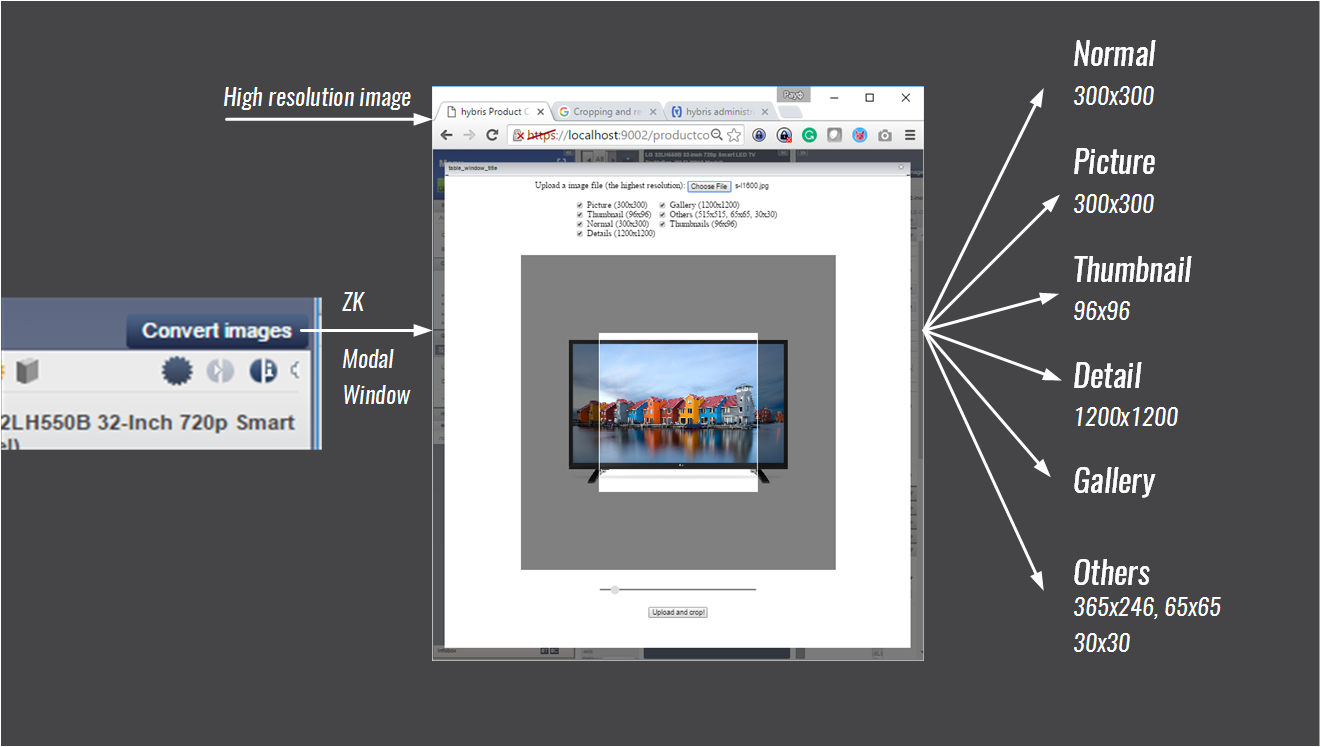
I would like to demonstrate a proof of concept for crop and resize functionality for hybris. It is well integrated into Product Cockpit and very convenient to use. With this feature, you will be able to significantly improve the product management process without losing flexibility.
There are different image types in the product data in hybris, to name a few:
- Thumbnail type, for search results and category pages
- Normal/picture type, for the product page as the main picture
- Detailed type, for pop-up gallery pages and other needs
In the default hybris package, automatic image resize functionality is provided by a module named “mediaconversion”. However, this module has some severe limitations that make it hardly suitable for most projects. To name a few:
- The MediaConversion module hasn’t been integrated into Product Cockpit. You need to launch it in HMC or on a schedule.
- There is no cropping feature in MediaConversion. As I wrote above, there are good reasons to treat this point as a major issue. For thumbnail generation, cropping is critical, especially for images with non-standard proportions.
- The OOTB MediaConversion module uses the third-party tool ImageMagick. This tool is a binary package, and you need to install it separately for your operating system.
- The OOTB MediaConversion module is not interactive. You can’t generate only the thumbnails without touching other image types or sizes, for example. All or nothing.
So my goal was to integrate crop and resize functionality into Product Cockpit and assign the generated image variants to the corresponding and chosen product attributes.
Complexity
There are two ways to implement interactive cropping:
- Using native ZK components
- Using JavaScript
Unfortunately, Product Cockpit uses a terribly old-fashioned version of ZK. Version 3.6.4, which is used by hybris, is seven years old. For example, slider functionality is not available in 3.6.4. Anyway, even in the latest versions of ZK, the full set of available components is not enough to solve the task in a good manner.
As for using third-party JavaScript libraries, the architecture of the ZK Framework is not fully compatible with JavaScript modules. You need to redesign and rewrite the modules completely to make them pluggable into ZK. The old versions of ZK, like 3.6.4, are even worse in terms of compatibility with external JavaScript code.
The native Product Cockpit interface is also poorly extensible. It is not easy to put any UI component into any place on the page. Some areas are easier to manage in terms of customization; some are not.
I put the button in the top-right corner, at the top of the product edit panel.
Solution
Technical details
Challenges
Integrating third-party JavaScript code with ZK Framework 3.6.3. I used an iframe in the modal window and an additional web context to host the additional JSP. To push data, converted images, from JSP back to ZK, I used the filesystem: a temporary filename in the temporary folder. To push commands from JavaScript to the ZK Framework, I sent a ButtonClick event from the iframe/JSP’s JavaScript to the parent window, the ZK modal window, namely to the hidden ZK button.
Architecture

I used the following libraries to implement crop and resize:
To overcome the limitation with integrating third-party JavaScript and building rich UI, I decided to configure an additional web context in the same module where the Cockpit customizations are, trainingcockpits in my case.
- A new context was added to the
trainingcockpitextension (/admintools). The context authorization is based on the same Spring Security configuration. - Crop functionality is in
/admintools/crops. - Product Cockpit customization:
- Editing area: a “convert images” button is added.
- Two methods are overridden:
update()to support “reload page”fireCurrentObjectChanged(prev, newOne)to support double-click in the browser area
- Both methods call the same method, which adds the button with the
onClickevent listener. - The event listener does the following things:
Create a modal window using ZK:
final org.zkoss.zul.Window window = (org.zkoss.zul.Window) Executions.createComponentsDirectly(zScript, "zul", null, params);
window.setWidth("95%");
window.setHeight("95%");
window.setPosition("center");
window.setClosable(true);
window.doModal();
Scale the image using Scalr.
Results are pulled by ZK, and the product model is updated.
The editing area should be refreshed:
UISessionUtils.getCurrentSession().getCurrentPerspective().getEditorArea().perspectiveChanged(perspective, perspective);
- Two methods are overridden:
- Editing area: a “convert images” button is added.
© Rauf Aliev, August 2016
Discussion
Powered by GitHub Discussions — sign in with a GitHub account to join the conversation.