
   |
This article is brought by Dzmitry Dymau (EPAM Project Manager), Julia Kardash (EPAM Business Analyst) and Rauf Aliev (EPAM Solution Architect) |
Introduction
Wish Lists (WLs) are collections of desired products saved by customers to their user account. Offering WLs is an effective way to reduce shopping cart abandonment and boosting sales. This feature gives customers the way to remind themselves of a product and also help merchants to measure interest to it. WL sharing to friends, colleagues, etc. expands the shop audience. This concept is widely used by e-merchants and generally included into a default set of e-commerce functionality.
The out-of-the-box hybris doesn’t have this feature. The reason is clear: SAP avoids creating too market-specific modules to not overcomplicate the core solution. You can find Wishlists in the list of hybris features, but the functionality having this name is no more than the data model. There is a similar feature called Saved Carts, that might be used in the role of WLs, but it is still too far from what is expected.
However this feature is frequently requested by EPAM’s clients. So we decided to create the universal solution ready to get plugged to any e-shop built in SAP hybris Commerce.
Solution
We decided to limit the first release scope by the following feature set:
- UX for multiple WLs support
- Email** notifications**:
- Price drop alert
- Back in stock alert
- Product promotion alert
- Batch Add to Cart
- **Download WL(s) as a PDF **
- Share WLs and products
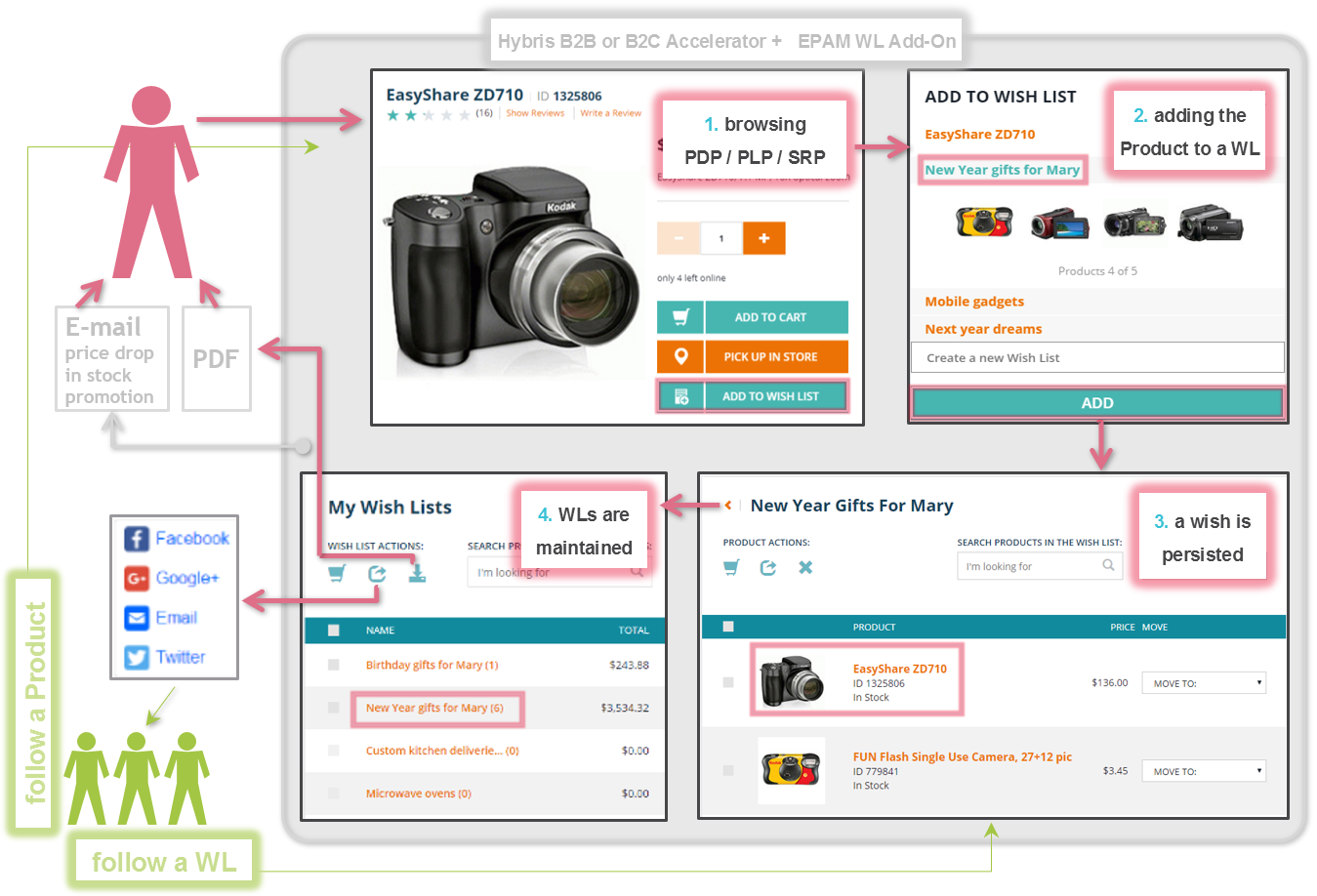
Key features
Multiple WLs support
- Adding Products to a WL from convenient places: Product List Page (PLP), Search Result Page (SRP), Product Detail Page (PDP)
- Multiple WLs creation from convenient places: mentioned above PLP, SRP, PDP plus My WLs page
- All necessary usability: see it in the video below
Notifications
What a client could expect after persisting his/her wish in a WL? Do not loose it? Sure! We provide even more: catch those selected products and with best prices. The three types of alerts are currently implemented:
- price drop
- back in stock
- promotion applied
The difference between the 3 events is important for tech people. For clients all them mean: now I can buy it!
Batch Add to Cart
The user can quickly add multiple products (from WL Details page) and WLs (from My WLs page) to Shopping Cart. Just do multi-select and press “Add to Cart”. The product amount will be increased in the cart by “+1” each time this action is done.
The result of adding is illustrated by the Add-On: the cart icon appears near to products and WLs.
PDF download
The PDF version of a WL can be used offline, printed, shared to other people… The PDF contains links which allow navigation a WL Details Page or a PDP.
Sharing
Sharing with friends or family will help to notify people about your wishes. For the shop this means boosted sales.
Channels:
- Social Networks
What is shared:
- from My Wish Lists page: whole named WL(s) are shared – so additional context is provided for a recipient
- from WL Details page: unnamed set of Products
Video
See the 9 minutes demo
Technical details
The EPAM WL Add-On supports responsive UI.
The OOTB WL data model is extended as shown below.
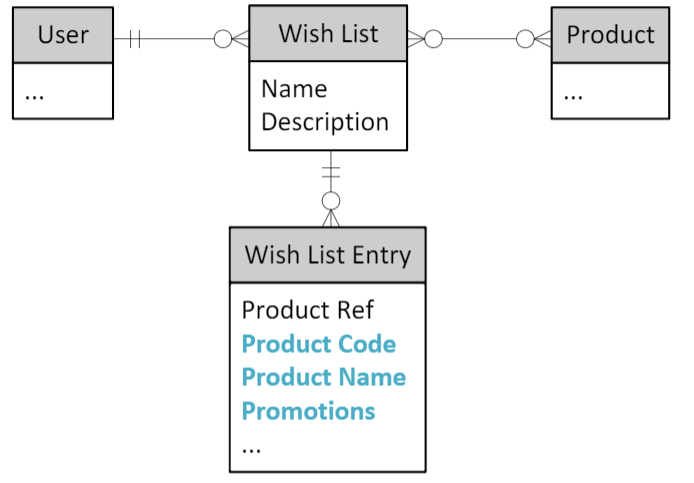
Product Name and Code attributes added to OOTB WishListEntry. This makes the WL product search faster by avoiding heavy join to the Products table.
Backoffice is extended by two parameters: max# of products and max# of WLs. This allows admin to keep performance under control.
Notifications
Product promotion alert
When the user adds preferred product to a WL the Add-On saves the snapshot of Potential promotions in the WishListEntry (see Promotions field in the data model).
There is a custom cron job that iterates over all WishListEntries and compares the active Potential product promotions info with the one stored in the snapshot.
The products are combined in the lists, so the customer receives only one e-mail per job execution. The job schedule is set by the admin according to marketing priorities.
Price drop alerts
This alert is sent by the similar scheme as the previous one. However it has another
- snapshot content: “previous price”
- trigger: “price has decreased”
Back in stock alerts
This alert is sent by the similar scheme as the previous one. However it has another
- snapshot content: “previous availability”
- trigger: “availability has changed from 0 to a positive value”
Discussion
Powered by GitHub Discussions — sign in with a GitHub account to join the conversation.