
Overview
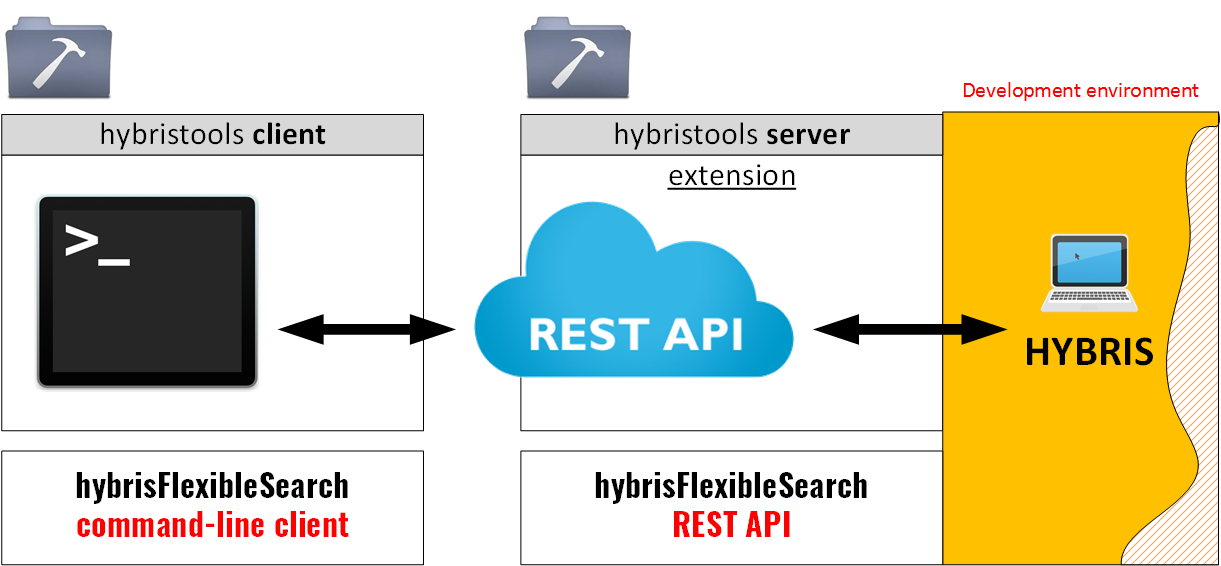
This tool is part of my hybris Runtime Developer tools package. The module consists of two parts: server side (a REST API) and client side (a command-line utility).
Features
- REST API and a console tool for
FlexibleSearchService - FlexibleSearch command-line interface
- Various output formats, such as TXT, TSV, CSV, XML
- Support for pipes and filters (
grep,awk,perl, etc.) - Cascade reference resolution (no more PKs in the output)
- Handy for testing and troubleshooting
- FlexibleSearch beautifier (reformatter)
Usage
API
http://localhost:9001/tools/flexiblesearch/execute?<params>Input parameters are mostly the same as in the console application.
Both GET and POST requests are supported.
Console app
It is a console wrapper for the API. See the API section for details.
./hybrisFlexibleSearch <parameters>or
hybrisFlexibleSearch.bat <parameters>-query="Select {pk} from {Product}"
-itemtype="…"
-fields="field1,field2"
-ref="Media:code Category:code,name"
-ref-from-conf
-catalogName=".."
-catalogVersion=".."
-language="en"
-output-format="TSV"|"CSV"|"value"
-user="user"
-verboseCommand-line parameters
| Command-line parameter | Description | Example |
|---|---|---|
| -? | Help and available options. Only for the console version. | |
| query (-q) | Flexible Query request. Starts with select {pk}. You can use the itemtype option instead of query for basic requests. |
query=Select {pk} from {Product} |
| itemtype (-i) | itemtype=X is a shortcut for select {pk} from {X}. You can use the itemtype option instead of query. |
itemtype=Product |
| ref (-r) | Optional. It is designed for customizing the external reference resolution process. For example, the Product type has an attribute named supercategories. It is a collection of CategoryModel. If resolution is disabled, the value of supercategories will look like (CategoryModel (3256854678324@23), CategoryModel (1464235643253@3)). By default, this option contains unique keys for the type.However, you can change it to your own logic. |
-ref "Category:code,name Media:code" |
| fields (-f) | Optional. A comma-separated list of attributes to display. If empty, the unique attributes of the type are used. | fields=code,name |
| catalogName (-cn) | Optional. If empty, the value from project.property is used (flexiblesearch.default.catalog.name). |
catalogName=electronicsProductCatalog |
| catalogVersion (-cv) | Optional. If empty, the value from project.property is used (flexiblesearch.default.catalog.version). |
catalogVersion=Online |
| language (-l) | Optional. If empty, en is used by default. |
language="en" |
| output-format (-of) | Optional. TSV, CSV, BRD, XML, IMPEX, CON. The default value is TSV. TSV. Tab-separated values. Good for copy-pasting to Excel for further processing or for filtering in Unix pipes. There is no quoting in TSV. This means that if you have a " symbol in the value, this symbol will be put in the output stream as is.CSV. Comma-separated values. Quoting is used for values with special symbols ( ", comma, or \n).BRD is BR-delimited, which means that each field takes a separate line, with an additional empty line between the rows. Important: if you have BRs in the attribute values, they will be removed. CON is for printing the output in the Windows/Unix console. It looks like CSV, but without quotes; columns are aligned and easy to read. XML means XML (not implemented yet). IMPEX. Output is ready to be imported again using the hybrisImpex utility. Not implemented yet. |
output-format=CSV |
| user (-u) | Optional. Changes the user for the FlexibleSearch request. | user=keenreviewer13@hybris.com |
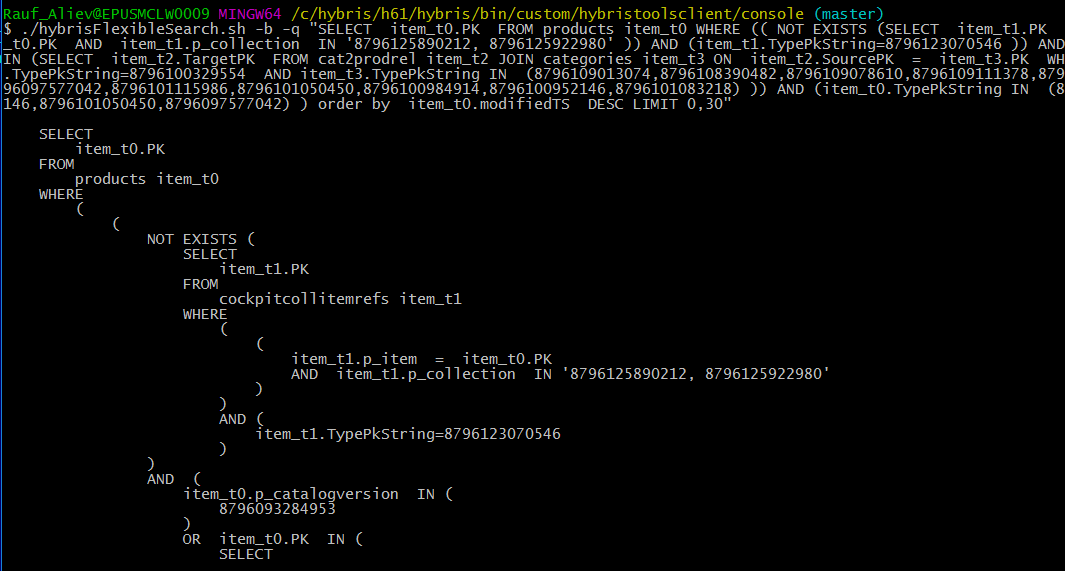
| beautify (-b) | Optional. Beautifier (reformatter). This option is used only with the query parameter. The query is not executed, only reformatted. All other options are ignored, including output-format. |
-b |
| pk | Identifies the type behind a PK and shows the results. You may need to use this option along with fields. It is useful if you need to request information about the item with the specified PK, but you are not sure, or do not know, what type is behind this PK. | -pk 8796176744449 |
| verbose (-v) | Turns debug mode on. The debug information is mixed with the output (not implemented yet). | |
| debug (-d) | Debug is on; the hybris log will contain the debug information. |
Examples of usage
API
$ curl "https://localhost:9002/tools/flexiblesearch/execute?query=select%20\{pk\}%20from%20\{Language\}&fields=isocode,name&maxResults=3&debug=true" -k 2>/dev/null
isocode name
en English
de German
es Spanish
$ curl "https://localhost:9002/tools/flexiblesearch/execute?query=select%20\{pk\}%20from%20\{Product\}&fields=code,supercategories&maxResults=3&debug=true" -k 2>/dev/null
code supercategories
266899 (electronicsProductCatalog:Online:827,electronicsProductCatalog:Online:brand_5)
65652 (electronicsProductCatalog:Online:588,electronicsProductCatalog:Online:brand_10)
284533 (electronicsProductCatalog:Online:1421,electronicsProductCatalog:Online:brand_10)Command line
Export to CSV, first 5 results of Product (select {pk} from {Product}):
$ bash hybrisFlexibleSearch.sh -itemtype Product -of CSV -mr 5
"catalogVersion", "code"
"electronicsProductCatalog:Online", "266899"
"electronicsProductCatalog:Online", "65652"
"electronicsProductCatalog:Online", "284533"
"electronicsProductCatalog:Online", "107701"
"electronicsProductCatalog:Online", "266685"
The same request in TSV (tab-separated values):
$ bash hybrisFlexibleSearch.sh -itemtype Product -of TSV -mr 5
catalogVersion code
electronicsProductCatalog:Online→266899
electronicsProductCatalog:Online→65652
electronicsProductCatalog:Online→284533
electronicsProductCatalog:Online→107701
electronicsProductCatalog:Online→266685
The same request, using the BRD output format:
$ bash hybrisFlexibleSearch.sh -itemtype Product -of BRD -mr 5
catalogVersion: electronicsProductCatalog:Online
code: 266899
catalogVersion: electronicsProductCatalog:Online
code: 65652
catalogVersion: electronicsProductCatalog:Online
code: 284533
catalogVersion: electronicsProductCatalog:Online
code: 107701
catalogVersion: electronicsProductCatalog:Online
code: 266685
The same request using FlexibleSearch and CSV:
$ bash hybrisFlexibleSearch.sh -query "Select {pk} from {Product}" -of CSV -mr 5
"catalogVersion", "code"
"electronicsProductCatalog:Online", "266899"
"electronicsProductCatalog:Online", "65652"
"electronicsProductCatalog:Online", "284533"
"electronicsProductCatalog:Online", "107701"
"electronicsProductCatalog:Online", "266685"
Requesting the names of supercategories. The ref option is used in this example.
$ bash hybrisFlexibleSearch.sh -query "Select {pk} from {Product}" -of CSV -mr 5 -f name,supercategories -ref "Category:name"
"name", "supercategories"
"Adapter AC Infolithium f Cybershot", "(Power Adapters & Inverters,Sony)"
"EF 2x II extender", "(Camera Lenses,Canon)"
"Binocular IS 10X30", "(Binoculars,Canon)"
"DC Car Battery Adapter", "(Power Adapters & Inverters,Sony)"
"Battery Video Light", "(Camera Flashes,Sony)"
$ bash hybrisFlexibleSearch.sh -query "Select {pk} from {Product}" -of CSV -mr 5 -f name,picture
"name", "picture"
"Adapter AC Infolithium f Cybershot", "electronicsProductCatalog:Online:/300Wx300H/266899-5310.jpg"
"EF 2x II extender", "<NULL> "
"Binocular IS 10X30", "electronicsProductCatalog:Online:/300Wx300H/284533-9485.jpg"
"DC Car Battery Adapter", "electronicsProductCatalog:Online:/300Wx300H/107701-5509.jpg"
"Battery Video Light", "electronicsProductCatalog:Online:/300Wx300H/266685-1385.jpg"You can change the catalog:
$ bash hybrisFlexibleSearch.sh -query "Select {pk} from {Product}" -of CSV -mr 5 -catalog apparelProductCatalog
"catalogVersion", "code"
"apparelProductCatalog:Online", "29532"
"apparelProductCatalog:Online", "300020294"
"apparelProductCatalog:Online", "300047513"
"apparelProductCatalog:Online", "45572"
"apparelProductCatalog:Online", "300040462"
Output format = CON (console)
Displays the result in a console-readable format. Similar to TSV, but the text is aligned into columns.

FlexibleSearch beautifier
To-do list for further versions
- File import/export
- Configuration import/export. The
-load-configparameter will allow you to replace some frequently used command-line parameters with a reference to a configuration file. - XML output format
- IMPEX output format
- Flexible Query parameters
Video
Download
The extension is available on request. Email: Rauf_Aliev@epam.com. Skype: rauf_aliev
© Rauf Aliev, August 2016
Discussion
Powered by GitHub Discussions — sign in with a GitHub account to join the conversation.