
Situation
Hybris search is designed primarily to work with products. There are no content-page search capabilities in Hybris.
Hybris uses Apache Solr for search. Using Solr allows Hybris to introduce features such as faceted search, fuzzy search, and search-based category pages.
Solr’s basic unit of information is a document, which is a set of data that describes something. These documents are composed of fields. A product document would contain the product attributes, product categories, keywords, and so on. Shoe size could be a field.
The structure of a Solr document is defined by the Solr schema. Some attributes can be defined as dynamic, allowing Hybris to store dynamic sets of product attributes in the Solr index.
The Hybris Solr indexer fetches information from the database, converts it into the Solr document format, and offloads these documents into Solr.
To fetch this data back from Solr, Hybris uses Lucene Query Language and the indexes created by the Solr indexer.
Solr is a lot faster than traditional databases, which makes it one of the best choices for e-commerce solutions. However, there are some important limitations.
Complexity
If your website has both plain static content and product pages, you may want to do a keyword search across both of them. For example, if your content pages are articles, such as reviews or news, they might be tagged in a similar way to product pages. These tags could be used as facets to filter pages, both product pages and content pages, on the same topic.
It is easy to configure Hybris to use two indexes, one per page type. The results will also be grouped by page type.
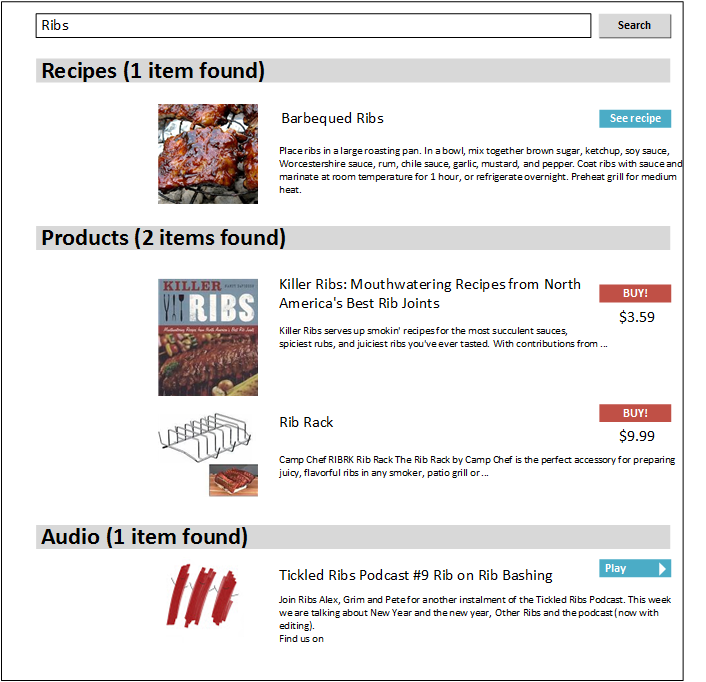
However, this approach does not allow customers to filter results, both pages and content, by topic, for example. The idea of today’s experiment is to get consolidated results. For the example mentioned above, it should look like this:
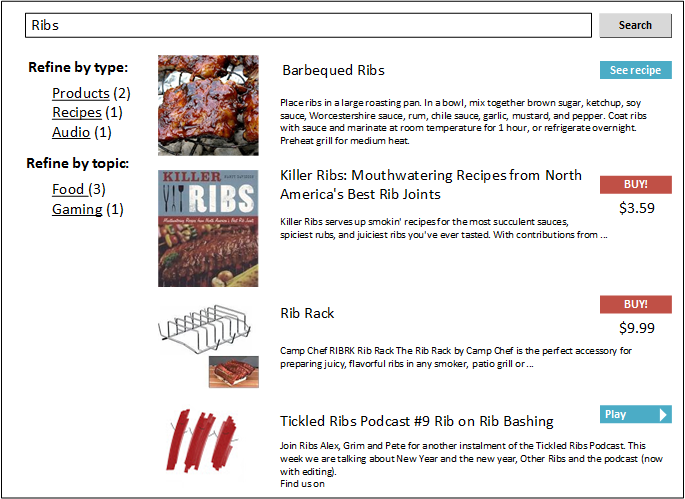
The first guess is to add a new type to the list of item types, or indexed types.

However, it will not work in Hybris. Hybris provides only one indexer OOTB, so it has one and expects only one.
The Hybris Solr indexer creates a Solr core per type. Hybris Solr Search is not able to mix items from different Solr cores. Moreover, Hybris Solr Search cannot work with a collection of item types. All the classes of Hybris Solr Search work with only one item type instance, even when you have more. If you have two types, Hybris Solr Search will use only the first item. In addition to that, Hybris Solr Search is designed to work with product catalogs only.
To overcome these limitations, you need to customize both the indexer and the search module. The technical details are under the video. How deeply they should be customized depends on the specific requirements.
Solution
Technical details
To make consolidation work, you need to:
Add a new
SolrIndexedTypeitem of theContentPagetype.Add a new full/update query. Let’s take the simplest one:
SELECT {PK} FROM {ContentPage}Add Solr indexed properties. They should be compatible with commerce Solr properties because they will share the same Solr core.
Create a new populator that extends
SearchSolrQueryPopulator. You need to do this to overcome the issue with the Hybris Search module and content catalogs.The original Hybris populator works with product catalogs only:
final Collection<CatalogVersionModel> catalogVersions = getSessionProductCatalogVersions();
…
target.setCatalogVersions(catalogVersions);
In my PoC, I got rid of it:
target.setCatalogVersions(new ArrayList<CatalogVersionModel>());Create your own
SolrCoreNameResolverto make Hybris use one core for different types.Create your own
ConfigurationExporterListener.beforeIndexandFullDirectIndexOperationStrategy.beforeIndexbecause they recreate the Solr core every time the indexer goes to the new type from theindexedTypeslist.Add your own keyword providers for content pages. For example, they can pull out all indexable content from all the page’s components and place it into one text Solr field, such as
keywords.
Any questions?
Contact me privately using the form below or leave your comment to this article.
© Rauf Aliev, June 2016
Discussion
Powered by GitHub Discussions — sign in with a GitHub account to join the conversation.