Migrating SAP Commerce Content with a Graph Database
In this article, I share my experience and architectural approach for executing complex CMS data migrations between different Content Catalogs within SAP Commerce Cloud, whether across the same environment or entirely separate ones, leveraging the power of a Graph Database. This methodology seamlessly accommodates advanced data transformations, such as mapping legacy components to new counterparts, restructuring page grids in the target catalog, and re-linking components to modified layouts. While these complex structural transformations deserve their own dedicated deep dive, this first part focuses specifically on the foundational import-export pipeline without transformations. Ultimately, using a GraphDB as our single source of truth fundamentally simplified the entire initiative—proving particularly invaluable for heavy lifting where one hierarchical data structure must be cleanly swapped for another.
Introduction
SAP Commerce (Hybris) CMS is deceptively complex. On the surface, a Content Catalog is just a collection of pages, slots, and components. But underneath, it is a deep, tangled web of cross-references, shared slots, template inheritance, navigation trees, media containers, restrictions, and localized content — all wired together.
When the task is to migrate CMS content from one Content Catalog to another or from one environment to another you quickly discover that SAP Commerce provides no turnkey solution out of the box. Content synchronization works only within the same catalog (Staged to Online) and does not support data transformations. ImpEx import/export is manual, brittle, and blind to the graph of dependencies between items. When it comes to thousands of pages, ImpEx must be autogenerated, so some solution is needed anyway. The point is that this solution can be built on top of the universal engine.
However, such tasks are common. The migrations between the environments, and, what is more important, the migrations accompanied with data transformations, such as mass replacement the legacy components with their updated counterparts.
One of the primary use cases is a site upgrade, redesign, or rebranding. Such initiatives are almost always accompanied by the development of new components, which are often not fully backward-compatible with the existing version. In the new version of the site, search facets might shift from vertical to horizontal or move from the left sidebar to the right. The layout of content pages may change because the brand team deemed it necessary. Even the content itself might require modifications—for instance, if the existing version relied on one set of styles, while the new version introduces completely different ones. This case is so typical that it occurs in nearly every other SAP Commerce Cloud project that has been live for more than a few years.
This article describes a system I built to solve this problem using a graph database as the data layer, similar to canonical in Datahub (anyone remembers?). The approach extracts the full CMS structure via REST APIs, loads it into a property graph, then uses graph traversal and dependency analysis to generate correct, dependency-ordered ImpEx files that can be imported into the target catalog. It handles media assets, circular dependencies, template slots, navigation hierarchies, and many-to-many relations.
The examples in this article use the OOTB Electronics storefront.
Why Not Just Use ImpEx Directly?
The first question any SAP Commerce architect asks: “Why not just export with ImpEx, transform it, and import into the new catalog?”
Here is why that approach fails at scale:
- You don’t know what to export. A single ContentPage references a PageTemplate, which defines ContentSlots, which contain Components, which reference child Components, which reference Media, MediaContainers, Restrictions, NavigationNodes, CMSLinkComponents, and more. There is no single FlexibleSearch query that gives you the complete transitive closure of everything a page depends on. Miss one item, and the import fails or produces a broken page. Exporting all objects means migrating abandoned, removed, invalid objects.
- Orphaned objects present a unique challenge. These are items that are no longer used by anything (such as deleted components) but still linger in the database. Naturally, we would prefer to leave them behind during migration. There are also components with expired restrictions—for instance, an advertisement that was displayed in the past and remains tied to pages, but has a date restriction so SAP Commerce simply skips it. Technically, this is no longer an orphaned object, yet it still should not be migrated
- Dependency ordering is non-trivial. ImpEx processes lines sequentially. If you INSERT_UPDATE a ContentSlotForPage before the Page it references exists, you get an error. If you create a CMSNavigationNode before its parent node exists, it fails. The correct import order depends on the actual reference graph of your data, not just the type hierarchy.
- Circular dependencies exist. CMSNavigationNode has a parent field pointing to another CMSNavigationNode. FAQQuestionContainer references FAQQuestion which references FAQQuestionContainer. You cannot (ok, can, but not reliably) solve these with a single INSERT_UPDATE pass — you need a first pass that creates stubs, then a second UPDATE pass that fills in the circular references.
- Shared content creates implicit coupling. A ContentSlot can be shared across multiple pages via template inheritance. A Restriction component might apply to dozens of pages. Migrating “just one page” actually requires migrating a subtree of shared components that may touch dozens of other pages.
Additionally, the tranformation layer needs to know about the type system and what is connected with what in the data model.
A graph database solves all five problems. It makes the dependency structure explicit, queryable, and traversable.
Migration Process
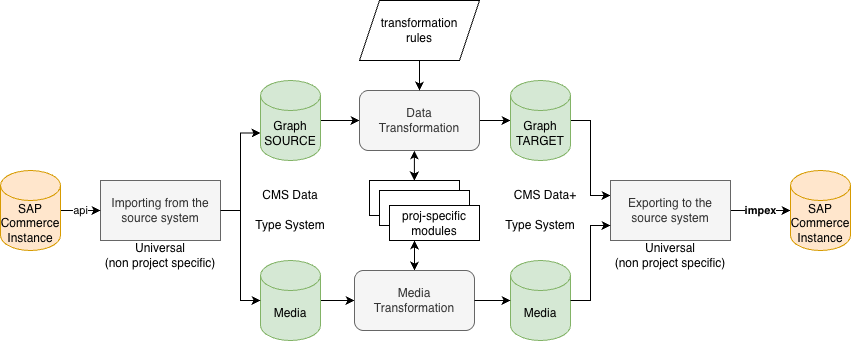
The migration pipeline is split into universal and project-specific layers, connected through a pair of graph databases — SOURCE and TARGET.
On the left side, data flows from the source SAP Commerce instance via REST API into the import layer. This layer is universal (non-project-specific): it extracts CMS data, the type system, and media assets into a local Graph SOURCE database and a media file store. This is the same extraction process regardless of the project or the nature of the migration.
The center of the diagram is the transformation layer — the only project-specific part of the pipeline. It reads from Graph SOURCE, applies transformation rules (e.g., replacing legacy component types with new ones, restructuring navigation trees, remapping media references), and writes the result into Graph TARGET. The transformation rules are declarative and operate on the graph structure: they can add, remove, remap, or restructure nodes and edges. Project-specific modules plug into this layer to handle custom component types or business-specific logic. Media transformation runs in parallel — renaming, reformatting, or filtering media assets as needed.
On the right side, the export layer reads from Graph TARGET and generates dependency-ordered ImpEx files along with the transformed media package. Like the import layer, this is universal: it knows how to serialize any graph of CMS items into valid ImpEx, regardless of what transformations were applied.
This separation — universal import, project-specific transformation, universal export — means that only the middle layer changes between projects. The import and export modules are reusable across any SAP Commerce CMS migration.
System Architecture
The migration system consists of three phases, orchestrated around a graph database.
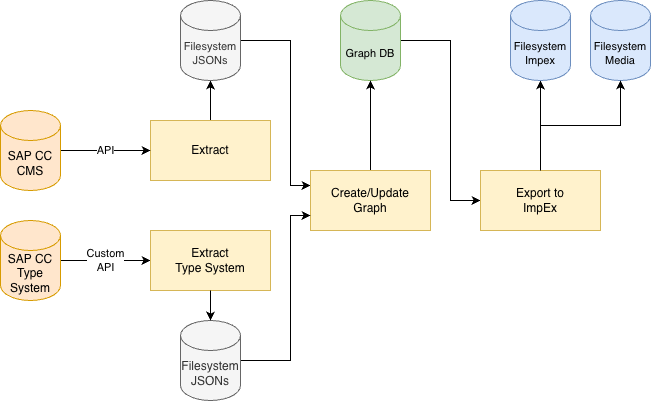
Phase 1: Extract (API to JSON)
This app talks to the SAP Commerce CMS REST API and creates a snapshot. It downloads the entire CMS structure to local JSON files. The extraction is organized in five sub-phases:
-
Pages — Fetching all pages across all concrete page types (ContentPage, EmailPage, ProductPage, CategoryPage).
-
Content Slots — For each page, fetching its content slot assignments via the /pagescontentslots endpoint. This returns which slots are attached to the page, their positions, and whether each slot comes from the page’s master template or is a page-specific override.
-
Slot-Component Placements — For each page, fetching the slot-to-component mapping via /pagescontentslotscomponents. This tells us which components sit in which slots, and in what order.
-
Component Details — Recursively fetching the full JSON for every component UUID discovered in phases 2 and 3. This is where the depth comes in: each component may reference child components, restrictions, navigation nodes, media items, and more. The system maintains a dynamically growing queue and fetches children as they are discovered. Components that the API refuses to return (HTTP 400/404 — typically internal SAP Commerce types not exposed via the CMS API) are recorded as stub nodes so the graph still captures the reference.
-
All Items — Optionally, fetching every item in the catalog via the general /cmsitems endpoint. This allows identifying “orphaned” components — items that exist in the catalog but are not reachable from any page through any slot or component chain.
The extraction is idenpotent and resumable. Progress is checkpointed after every API call. If something happens mid-run (the API returns HTTP 401), the system saves state and exits cleanly.
By the way, there was some complexity with the REST API: the OOTB endpoints were found broken for bulk pagination — certain items trigger server-side NullPointerExceptions depending on the pageSize parameter. Likely this is because Smartedit, which uses this API, never sends non-standard pageSizes. The fetching app works around this by fetching the first 20 items one-by-one then batching the rest at pageSize=10, with automatic per-item fallback when a batch fails)
The output is a directory tree:
data/
  electronics/electronicsContentCatalog/
    pages.json
    slots/homepage.json
    slots/faq.json
    ...
    page_components/homepage.json
    page_components/faq.json
    ...
    components/ElectronicsHompageSplashBannerComponent.json
    components/SiteLogoComponent.json
    ...
    all_items/page_0000.json
    all_items/page_0001.json ...
Phase 2: Load into Graph
Here the system reads the JSON files and builds a property graph in any Bolt-compatible graph database like Neo4j.
The graph model:
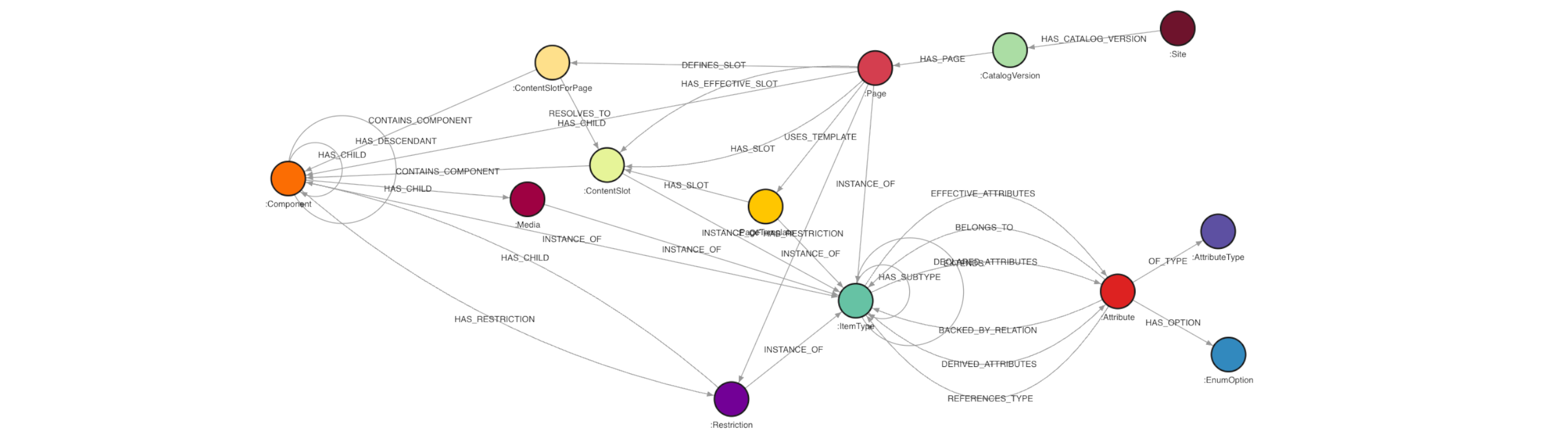
(:Site)-[:HAS_CATALOG_VERSION]->(:CatalogVersion)
(:CatalogVersion)-[:HAS_PAGE]->(:Page)
(:Page)-[:USES_TEMPLATE]->(:PageTemplate)
(:Page)-[:HAS_SLOT {position, fromMaster}]->(:ContentSlot)
(:PageTemplate)-[:HAS_SLOT {position}]->(:ContentSlot)
(:ContentSlot)-[:CONTAINS_COMPONENT {position}]->(:Component)
(:Component)-[:HAS_CHILD {field}]->(:Component)
(:Component)-[:HAS_RESTRICTION]->(:Restriction)
(:Component)-[:INSTANCE_OF]->(:ItemType)
(:ItemType)-[:EXTENDS]->(:ItemType)
ContentSlot nodes in the graph are keyed by (uid, catalogVersion), not just uid. The same logical slot name (e.g., “BreadCrumbSlot”) exists independently in each catalog version. Without the compound key, loading multiple catalogs would merge slots from different sites into a single node.
The fromMaster flag on HAS_SLOT edges is critical for migration. When a page’s slot has fromMaster=true, it means the slot and its components come from the PageTemplate and are shared across all pages using that template. When fromMaster=false, the page has overridden the slot with its own content. Migration must preserve this distinction.
HAS_CHILD edges carry a <<field>> property indicating which JSON field established the parent-child link (e.g., children, navigationNode, link, contentPage). This is essential for the export phase, which needs to reconstruct ImpEx relations accurately.
There is a separate module that loads the full SAP Commerce type system (from the /types API endpoint) into the graph as (:ItemType) nodes with (:Attribute) metadata. This gives the export script access to attribute schemas, ImpEx header formats, Java types, and localization flags — all from the graph itself.
The types are connected with the type instances.
Also, there is an additional enrichment step that computes the transitive closure of HAS_CHILD edges and writes HAS_DESCENDANT edges back to the graph. Running MATCH (p)-[:HAS_CHILD*1..]->(c) in the graph engine is extremely slow for large component trees. Computing it in Python (fetch all edges, BFS, batch-write) is orders of magnitude faster.
There also a component that compares the JSON source files against the graph to detect attributes and relationships that were not loaded to the graph. Essential for catching new UUID-reference fields introduced by custom component types.
Also at this phase it was useful to build automatically an HTML migration assessment report with per-site breakdowns, component type distributions, orphan analysis, shared content analysis, and template usage statistics.
Phase 3: Export (Graph to ImpEx)
This is the most complex part in the system. Given one or more page UIDs and a source catalog version, it:
-
Traverses the graph starting from the specified pages, following all outgoing relationships to collect every catalog-aware node reachable from those pages. It traverses explicit graph edges (HAS_SLOT, CONTAINS_COMPONENT, HAS_CHILD, USES_TEMPLATE, HAS_RESTRICTION, DEFINES_SLOT, RESOLVES_TO) and also decodes base64 references to discover additional dependencies. In fact, there are no base64 encoded data in the SAP Commerce DB, but since I decided to use the cmswebservices REST API, I had to follow the wrappers it exposes, and in some cases, it encodes the pieces of information with base64.
-
Groups collected nodes by typeCode — ContentPage, PageTemplate, ContentSlot, ContentSlotForPage, ContentSlotForTemplate, various Component types, Media, MediaContainer, Restriction, etc.
-
Fetches attribute schemas from the graph — For each exported type, it queries the (:ItemType)-[:EFFECTIVE_ATTRIBUTES]->(:Attribute) subgraph to get the full list of attributes, their Java types, ImpEx header format strings, localization flags, and uniqueness constraints.
-
Resolves missing attributes via the type hierarchy — If a custom component type is missing the uid attribute in its schema, the script walks up the (:ItemType)-[:EXTENDS]->(:ItemType) chain until it finds a parent that has it.
-
Analyzes inter-type dependencies — Using REFERENCES_TYPE edges from the type system and Java type analysis as a fallback, it builds a dependency graph between exported types. For example, ContentSlotForPage depends on ContentPage (via the page field) and ContentSlot (via the contentSlot field).
-
Topologically sorts the types — Using Kahn’s algorithm with cycle detection. Types that form dependency cycles (e.g., CMSNavigationNode → CMSNavigationNode via parent) are handled by splitting the export into two passes:
- INSERT_UPDATE pass: Creates the item with all non-circular fields.
- UPDATE pass: Fills in the circular reference fields after all items exist.
-
Generates ImpEx files — One file per type, numbered in dependency order (e.g., 000_PageTemplate.impex, 001_ContentSlot.impex, 002_ContentPage.impex,…). Each file inclu des:
- For readability – automatically extracted default values (when all items of a type share the same value for a field, it becomes a
in the header).[default=...]
- Properly formatted reference values with catalog version substitution.
- For readability – automatically extracted default values (when all items of a type share the same value for a field, it becomes a
-
Generates many-to-many relation files — ElementsForSlot (ContentSlot <-> Component), CMSComponentChildrenForCMSComponent, RestrictionsForPages, RestrictionsForComponents, and navigation relations.
-
Generates a merged
and packages it with media files into an ready for upload.importscript.impex
Content-aware Graph Browser
I developed a graph browser where you can select the page (homepage in the example below), see all its attributes, page and page template slots, select a slot from the list of available slots, find the components attached to the slot, select a component, see all attributes of a component. A component is assigned to the type, and you can check the types too.


The Electronics Catalog: A Walkthrough
To illustrate the system, let’s walk through migrating the OOTB Electronics storefront CMS from electronicsContentCatalog/Staged to a new NEWElectronicsContentCatalog/Staged.
Step 1: Extract
It discovers all pages (homepage, FAQ, search, category pages, etc.), then drills into each page’s slots, slot-component placements, and component details. For the Electronics storefront, this typically yields ~50 pages and ~500 components.
Step 2: Load into Graph
This creates the full graph.
The total number of vertexes in the graph is 7,352. The total number of edges is 126,768.
How many pages, slots, components?
MATCH (s:Site {uid:"electronics"})-[:HAS_CATALOG_VERSION]->(cv)-[:HAS_PAGE]->(p)
RETURN count(p);
Result: 73
What templates are used and by how many pages?
MATCH (p:Page)-[:USES_TEMPLATE]->(t:PageTemplate)
RETURN t.uid, t.frontendTemplateName, count(p) AS pageCount
ORDER BY pageCount DESC;

Step 3: Load Type System
This gives the export script access to attribute schemas. Without it, the export cannot generate correct ImpEx headers.
Step 4: Export
This traverses from each page, collects all dependencies, resolves the type schema, topologically sorts, and generates numbered ImpEx files:
export/electronics/<span class="hljs-number">20260531</span>_120000/

  <span class="hljs-number">00</span>_PageTemplate<span class="hljs-selector-class">.impex</span>

  <span class="hljs-number">01</span>_ContentSlot<span class="hljs-selector-class">.impex</span>

  <span class="hljs-number">02</span>_ContentPage<span class="hljs-selector-class">.impex</span>

  <span class="hljs-number">03</span>_ContentSlotForPage<span class="hljs-selector-class">.impex</span>

  <span class="hljs-number">04</span>_ContentSlotForTemplate<span class="hljs-selector-class">.impex</span>

  <span class="hljs-number">05</span>_CMSParagraphComponent<span class="hljs-selector-class">.impex</span>

  <span class="hljs-number">06</span>_SimpleBannerComponent<span class="hljs-selector-class">.impex</span>

  <span class="hljs-number">07</span>_CMSNavigationNode<span class="hljs-selector-class">.impex</span>

  <span class="hljs-number">08</span>_CMSNavigationNode_update<span class="hljs-selector-class">.impex</span>    ← circular dep (parent)

  <span class="hljs-number">09</span>_CMSLinkComponent<span class="hljs-selector-class">.impex</span>

  <span class="hljs-number">10</span>_Media<span class="hljs-selector-class">.impex</span>

  <span class="hljs-number">11</span>_MediaContainer<span class="hljs-selector-class">.impex</span>

  ...

  <span class="hljs-number">18</span>_ElementsForSlot<span class="hljs-selector-class">.impex</span>

  <span class="hljs-number">19</span>_RestrictionsForPages<span class="hljs-selector-class">.impex</span>
Step 5: Import
Then we apply this ImpEx to the target SAP Commerce Cloud server. The CronJob imports everything in dependency order.
Challenges
Template Slot Inheritance
SAP Commerce’s CMS has a concept of template-level slots vs. page-level slots. When a page uses a PageTemplate, the template defines a set of ContentSlots at named positions. A page can either inherit a template’s slot (sharing its components with all other pages using the same template) or override a slot position with its own page-specific ContentSlot.
The SAP CC’s CMS API expresses this through the slotStatus field:
- slotStatus=TEMPLATE → the slot comes from the template (shared)
- Any other value → the slot is page-specific (override)
The graph encodes this as a <<fromMaster>> property on HAS_SLOT edges. The export script uses this to decide whether to create ContentSlotForTemplate (shared) or ContentSlotForPage (page-specific) relations in the target catalog.
Circular Dependencies in Type Graph
Several CMS types have circular reference patterns:
- CMSNavigationNode has a <<parent>> field pointing to another CMSNavigationNode
- FAQQuestionContainer references FAQQuestion, which references back to FAQQuestionContainer
- CMSInverseRestriction wraps a CMSUserRestriction via <<originalRestriction>>
A standard topological sort cannot order types with circular dependencies. The system uses Kahn’s algorithm with explicit cycle detection. When a cycle is found:
- The cycle-causing fields are identified (e.g., <<parent>> for CMSNavigationNode).
- The initial INSERT_UPDATE file is generated without those fields.
- A separate UPDATE file is generated that fills in only the cycle-causing fields, after all items exist.
- Mandatory (non-optional) attributes are never deferred, even if they participate in a cycle — SAP Commerce requires them on INSERT.
Media and MediaContainer Resolution
Media items (images, logos, icons) in SAP Commerce live inside the Content Catalog and are referenced from components through localized, base64-encoded references (not on the DB level, rather than on the CMS API level) — often nested inside MediaContainer objects that group media by format (desktop, tablet, mobile).
The challenge is that Media and MediaContainer items are often not directly traversable via graph relationships in the current version. They appear as base64 references. For example, a
{

  <span class="hljs-string">"media"</span>: {

    <span class="hljs-string">"en"</span>: {

      <span class="hljs-string">"widescreen"</span>: <span class="hljs-string">"eyJ..."</span>,     <span class="hljs-regexp">//</span> → Media item <span class="hljs-keyword">for</span> widescreen

      <span class="hljs-string">"desktop"</span>: <span class="hljs-string">"eyJ..."</span>,        <span class="hljs-regexp">//</span> → Media item <span class="hljs-keyword">for</span> desktop

      <span class="hljs-string">"tablet"</span>: <span class="hljs-string">"eyJ..."</span>,         <span class="hljs-regexp">//</span> → Media item <span class="hljs-keyword">for</span> tablet

      <span class="hljs-string">"mobile"</span>: <span class="hljs-string">"eyJ..."</span>          <span class="hljs-regexp">//</span> → Media item <span class="hljs-keyword">for</span> mobile

    }

  }

}
Technically, it could have converted to the graph as well, but due to the big number of medias and no real need in having it part of the graph, I decided to keep them as JSONs.
The export script post-processes all exported components, scanning for media-related fields (media, mediaContainer, logoImage, backgroundImage, image, imageMobile, coverImage, previewImage, thumbnail), decoding every base64 reference found, and injecting the resulting Media and MediaContainer items into the export set.
A separate component handles downloading the actual binary media files from the source system, and another component uploads them to the target.
ImpEx Reference Formatting
SAP Commerce’s ImpEx format uses a specific syntax for referencing related items. The format depends on the attribute’s schema:
- catalogVersion(catalog(id), version) → requires catalogId:version format
- uid[unique=true] → just the UID string
- page(catalogVersion(catalog(id), version), uid) → requires catalogVersion:uid format
The export script reads the impexStr property from each attribute’s schema node in the graph and formats references accordingly. For references within the source Content Catalog, it substitutes the $TARGETCV macro. For references to other catalogs (e.g., Product Catalog), it preserves the original catalog coordinates.
Some types have broken or missing impexStr in the type system. For example, CMSNavigationEntry.item references generic Item type, which has no calculated impexStr. The module applies known overrides for these cases.
Relation Types (Many-to-Many)
SAP Commerce uses dedicated relation types for many-to-many associations:
- ElementsForSlot — ContentSlot ↔ Component
- CMSComponentChildrenForCMSComponent — parent ↔ child components
- RestrictionsForPages — Page ↔ Restriction
These cannot be expressed in standard INSERT_UPDATE statements. They require separate ImpEx blocks with source and target columns, each formatted with their catalog-version-qualified unique key.
The graph makes this easy: each relation type maps to a Cypher pattern. For example, ElementsForSlot is:
MATCH (s:ContentSlot)-[:CONTAINS_COMPONENT]->(c:Component)

WHERE s<span class="hljs-selector-class">.catalogVersion</span> STARTS WITH <span class="hljs-variable">$srcCatalogId</span>

RETURN s<span class="hljs-selector-class">.uid</span> AS source_uid, c<span class="hljs-selector-class">.uid</span> AS target_uid
Items That the API Refuses to Return
The CMS REST API does not expose all item types. Certain internal SAP Commerce types (e.g., some custom paragraph components, certain restriction types) return HTTP 400 when you try to fetch them by UUID. These items still exist in the catalog and are referenced by other components.
The system creates stub nodes for these items — minimal records with the decoded UID, a _fetchFailed: true flag, and an inferred typeCode (e.g., items with image file extensions are tagged as Media). This ensures the graph captures every reference even when the API cannot provide full details.
However, such items are rare exceptions and not essential.
The Graph as the Single Source of Truth
The key architectural insight is that the graph database is not just a visualization tool or an intermediate cache. It is the single source of truth for the entire migration:
- Impact analysis – “If I change this component, which pages are affected?” → A single Cypher query.
- Shared content detection – “Which components appear in slots of more than one page?” → Straightforward aggregation.
- Orphan identification – “Which components exist in the catalog but are not reachable from any active page?” → Set difference between all-items and graph-reachable items.
- Template analysis – “How many pages share the same template? What slots does each template define?” → Direct traversal.
- Migration scoping – “I need to migrate pages X, Y, Z. What is the total set of items I need to bring over?” → BFS from the page nodes, following all edges.
- Dependency ordering – “In what order should I create these items so that every reference resolves?” → Topological sort on the type dependency graph.
- Regression testing – Before and after migration, compare graph snapshots to verify that the target catalog has the same structure as the source.
Conclusion
Migrating CMS content between SAP Commerce catalogs is a problem that looks simple and is profoundly complex. The official tools (ImpEx, BackOffice, synchronization) were not designed for cross-catalog migration. The CMS data model — with its deep nesting, shared slots, template inheritance, opaque UUID references, and circular dependencies — demands a tool that can see the entire structure at once.
A graph database provides exactly that visibility. By extracting the CMS structure into a property graph, you transform an opaque, file-based data dump into a queryable, traversable model. Dependency analysis, impact assessment, orphan detection, and correct export ordering all become straightforward graph operations.
The system described in this article has been used to analyze and migrate catalogs with thousands of pages and tens of thousands of components across multiple retail brands. The same architecture applies to any SAP Commerce project facing cross-catalog CMS migration, catalog consolidation, or large-scale content restructuring.
The key takeaway: when your data is a graph, use a graph database. SAP Commerce’s CMS model is, fundamentally, a property graph with labeled nodes and typed edges. Treating it as such — rather than fighting it with flat files and sequential scripts — is the difference between a migration that works and one that doesn’t.

Comments are closed, but trackbacks and pingbacks are open.