
Situation
A “could have fired” message indicates that the promotion criteria have been partially fulfilled. For example, when you have two products in your cart and a promotion for three products, such as “buy 3, get 1 free,” the “could have fired” message could look like “buy one more product and get one free.”
SAP hybris 6.0 uses a new rule-based promotion engine that is faster and more flexible. However, because of the completely new paradigm, some capabilities that we had in previous versions of hybris are not present in hybris 6. One of them is “could have fired” messages.
In the new version, for this purpose you need to use fake promotions. This means that, for the example above, you need to create two promotions: one for a set of three products and another for a set of two products. When fired, the second promotion should show the “could have fired” message.
For some cases, this approach is quite flexible. For example, you can configure “could have fired” messages for products that are similar to the promotional product. This is a really strong point.
However, it is manual work. It is difficult to cover all the cases when a “could have fired” message could be shown. The “could have fired” promotions are difficult to manage and support.
Complexity
The new rule-based promotion engine is only integrated into the cart. Product pages, product lists, and search results will not use it at all.
Drools, the core of the hybris 6 promotion engine, is designed for a broad range of tasks. SAP hybris pushes data into Drools and receives a set of actions. There is no such thing as detecting “partially fired rules.”
Challenge
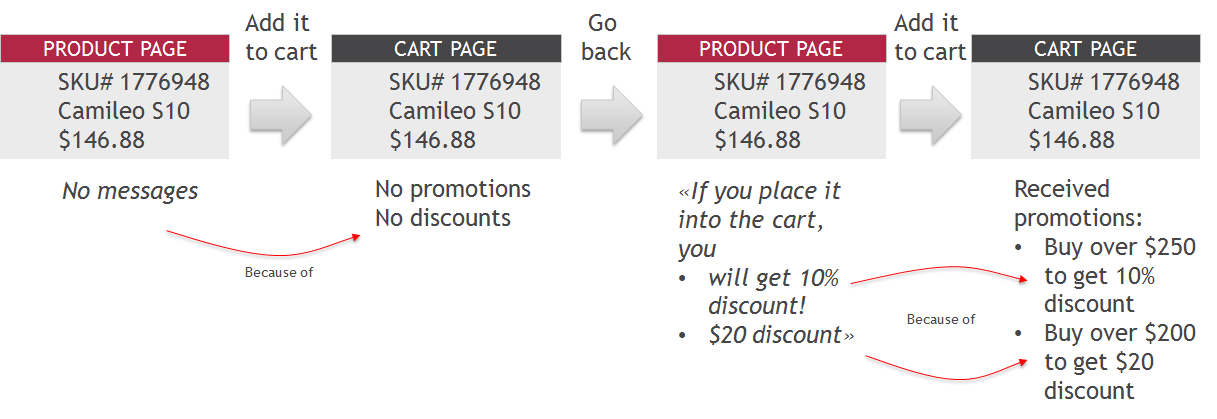
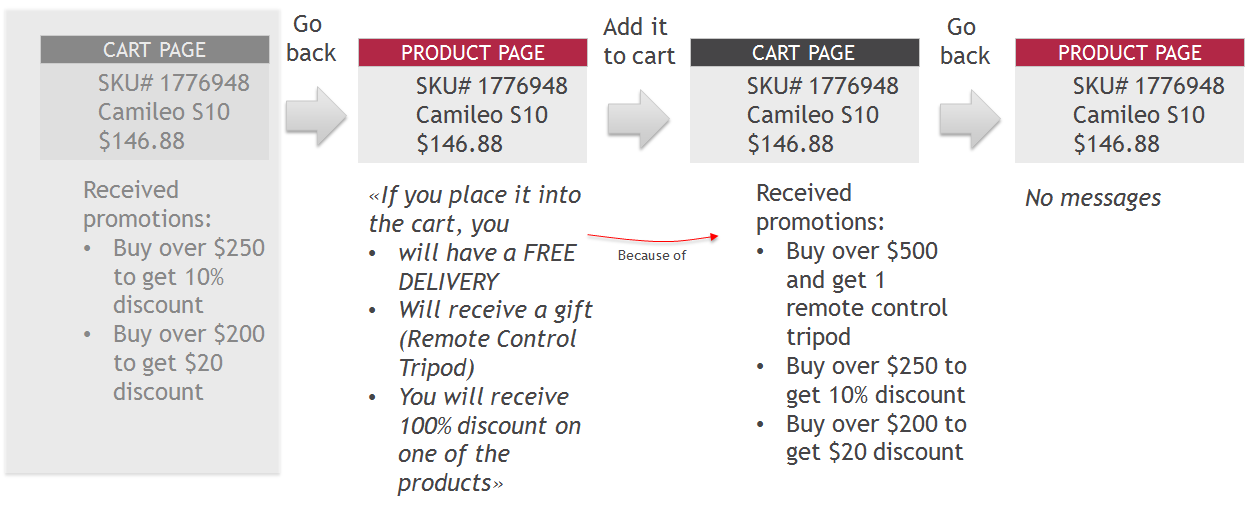
Create a proof-of-concept prototype with smart “could have fired” messages. The idea is to show tips on product pages, such as:
- “If you put this product in the cart, you will get a 10% discount.”
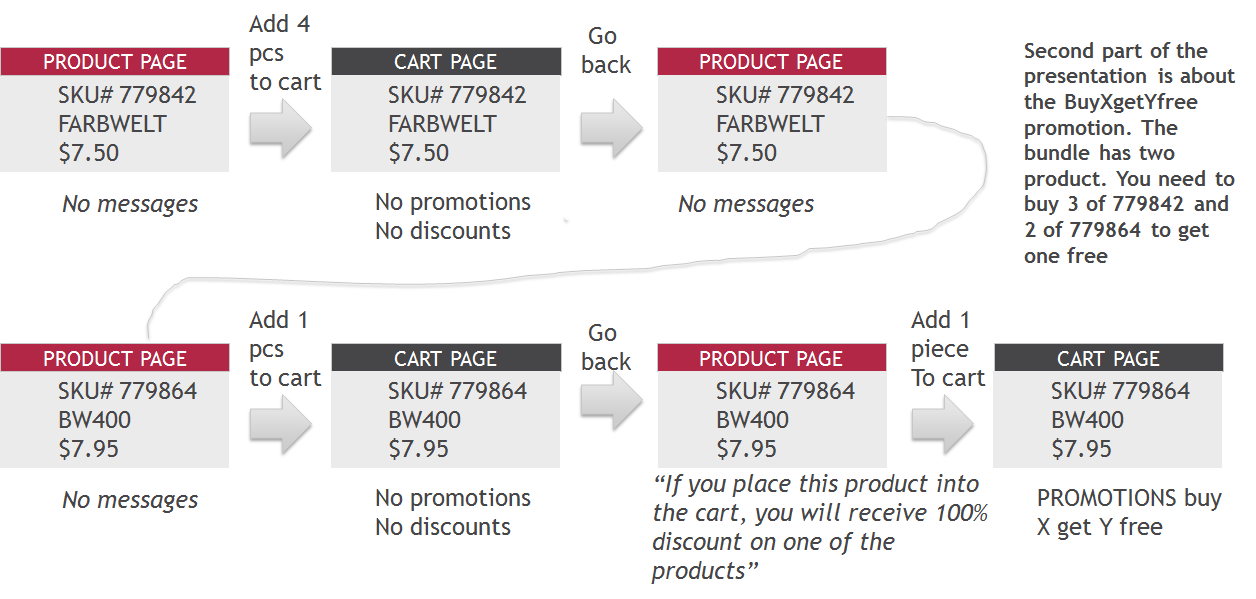
- “If you put this product in the cart, you will get a free product.”
- “If you put this product in the cart, you will have free delivery,” etc.
Solution
The product page controller evaluates promotions against the customer’s cart plus the current product. Then the results are compared with the ones from the shopping cart. Added actions are displayed as “could have fired” messages.
The caveat is in the promotion engine interfaces. For some reason, the classes don’t expose all the data available in the backoffice. Some methods and attributes that are used by hybris are not available to developers.
Video
In the video below, the following process is shown:
The second part is a bit more complicated:
Technical details
final CartModel existingCart = cartService.getSessionCart();
final CartModel virtualCart = modelService.create(CartModel.class);
cloneCart(existingCart, virtualCart);
final ProductModel product = productService.getProductForCode(productCode);
addProductToCart(virtualCart, product)

...
RuleEvaluationResult ruleEvaluationResultWithoutNewProduct =
promotionEngineService.evaluate(virtualCart, getPromotionGroups());
RuleEvaluationResult ruleEvaluationResult =
promotionEngineService.evaluate(existingCart, getPromotionGroups());
...
Iterator < AbstractRuleActionRAO > next6 = ruleEvaluationResult.getResult().getActions().iterator();
while (next6.hasNext()) {
AbstractRuleActionRAO actionRAO = next6.next();
if (actionRAO instanceof DiscountRAO) {
BigDecimal discountValue = ((DiscountRAO) actionRAO).getValue();
if (ruleEvaluationResultWithoutNewProduct.getResult() != null) {
Iterator < AbstractRuleActionRAO > next7 = ruleEvaluationResultWithoutNewProduct.getResult().getActions().iterator();
...
}
}
...
}
Any questions?
Contact me privately using the form below or leave your comment to this article:
© Rauf Aliev, June 2016
Discussion
Powered by GitHub Discussions — sign in with a GitHub account to join the conversation.