

This is the first article in a series of five on SAP Commerce Order Management. The series is written against a 2211 installation and focuses on runtime mechanics and project-level decisions that sit a layer below the high-level guides on the SAP Help Portal. Where something is already covered well in the official documentation, I link to it instead of retelling it.
I want to start with waiting, because waiting is where orders go to die.
About the code in this article
Java snippets below are an illustrative reconstruction: paraphrases written to communicate what the engine does, with names and structure deliberately simplified. They are not a reproduction of any implementation and should be read as diagrams. The ImpEx and XSD fragments are different — those are configuration files shipped in the distribution, and I quote them as they are, because the whole point of a process definition is that you can read and change it.An order is mostly idle
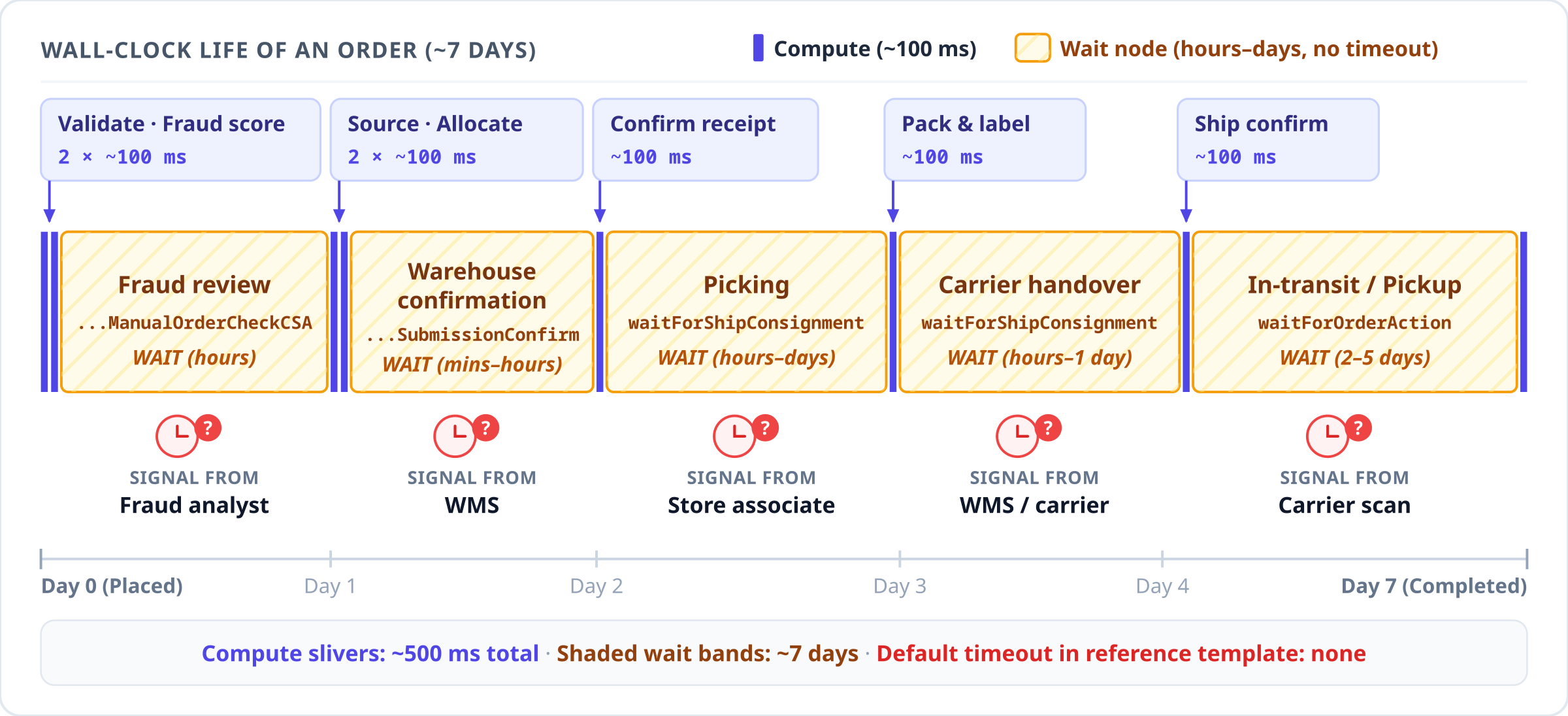
Take any order management system, in any product, and measure where the wall-clock time goes. Pricing, fraud scoring, inventory lookup and warehouse selection together take a few hundred milliseconds. Everything else is waiting: for a fraud analyst to look at a flagged order, for a warehouse to acknowledge that it received the pick list, for a picker to actually pick, for a carrier to collect, for a customer to walk into a store, for a returned parcel to arrive at a depot, for a payment gateway to settle a refund.
A commerce platform therefore has to model long-lived state that advances on external signals. That is a different engineering problem from request handling, and it fails differently. Two failure modes dominate:
The signal never arrives. A warehouse integration drops a message, a store associate goes on vacation with eleven pick tasks assigned, an external fulfillment system returns 200 OK and then forgets. The order sits in a valid, consistent, permanently stationary state. Nothing is broken in a way that any health check would notice.
The signal arrives in a shape the workflow does not accept. The event fires, but with a payload the definition does not recognize, or with two competing instructions at once. Now the workflow has to decide between ignoring it, failing, and guessing.
Industry practice around this is well settled, and worth stating explicitly because it gives
us a yardstick. BPMN has boundary timer events: you attach a clock to a state, and when the
clock runs out, the token leaves the state along a different path. Temporal and similar
durable-execution engines give you workflow.await(timeout) with an explicit deadline on
every blocking call. Message-driven designs use dead-letter queues plus a redelivery policy.
And almost everyone, regardless of engine, ends up with the same operational artifact: a
dashboard or report listing orders that have not changed state in N hours, grouped by the
state they are stuck in.
The common thread is that the absence of an event is itself modeled. It has a duration, a destination, and an owner.
How SAP Commerce models the waiting
Order Management runs on the platform's process engine, the same one behind order confirmation emails and the B2B approval flows. Three processes matter here, and they are separate business processes with separate lifecycles:
| Process | Scope | Created by |
|---|---|---|
order-process |
the order as a whole | order placement |
consignment-process |
one shipment | allocation |
return-process |
one return request | return request creation |
The first thing worth knowing is that these three definitions are not compiled into the
extension. They are data. Each is an ImpEx file that inserts a DynamicProcessDefinition
whose content attribute is the XML of the process:
INSERT_UPDATE DynamicProcessDefinition;code[unique=true];active;content
;order-process;true;"<?xml version='1.0' encoding='UTF-8'?>
<process xmlns='http://www.hybris.de/xsd/processdefinition'
         start='checkOrder' name='order-process'
         processClass='...OrderProcessModel'>
...
</process>"
You will find them under yacceleratorordermanagement/resources/impex/, one file per process.
That means the shape of the order lifecycle on your project is a row in a database table
rather than a code change, which matters for the rest of this article: every checklist item
below is closed by editing that row.
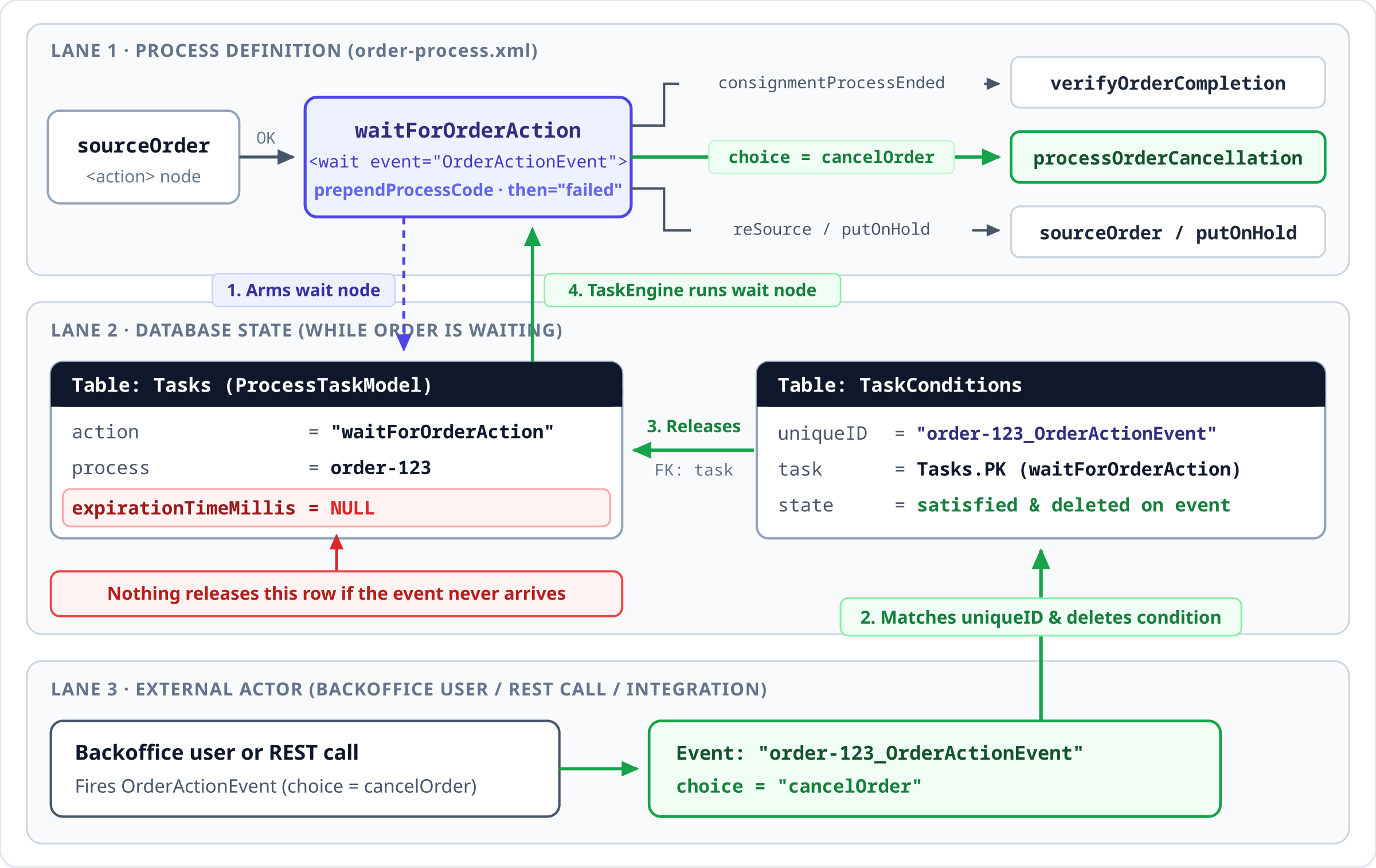
A node of type <wait> suspends the process until a named event fires. The implementation is
small and worth understanding, because it explains both the failure modes and the fix. When
the process reaches a wait node, the engine creates a task with a condition attached,
and then returns. Reconstructed:
// illustrative
void trigger(BusinessProcessModel process) {
    ProcessTaskModel task = new ProcessTaskModel();
    task.setRunnerBean("taskRunner");
    task.setAction(nodeId);
    task.setProcess(process);

    TaskConditionModel condition =
        modelService.create(TaskConditionModel.class);
    String code = evaluateEventName(eventExpression, process);
    if (prependProcessCode) {
        code = process.getCode() + "_" + code;
    }
    condition.setUniqueID(code);
    task.setConditions(Set.of(condition));

    // <- the branch this article is about
    if (timeout.isConfigured()) {
        task.setExpirationTimeMillis(timeout.getExpirationTime());
    }
    taskManager.scheduleTask(task);
}
So a waiting order is a row in Tasks joined to a row in TaskConditions whose uniqueID
is the event name the process is listening for. Firing the event means satisfying that
condition; the task engine then picks the task up and the process moves on. Nothing polls,
nothing holds a thread, and a node restart changes nothing, because the whole state is in the
database. For durability this design is very good.
The event name goes through Groovy
One detail in that reconstruction deserves a closer look, because it is easy to miss and often surprises people when they first spot it in a profiler.
The event name in a wait node is not used literally. It is wrapped in quotes and evaluated as a Groovy expression, with the process and its context parameters in scope. That is how the consignment definition can write this:
<wait id='waitForPreFulfillmentProcessToFinish'
      then='processConsignmentPreFulfillment'
      prependProcessCode='false'>
  <event>${process.code}_ProcessConsignmentPreFulfillmentEvent</event>
</wait>
${process.code} is a GString placeholder, resolved at the moment the wait node is armed.
This is how you correlate a wait with one specific outbound call instead of with the process
as a whole — anything reachable from the process or its context parameters can go into the
event name, so a custom integration can arm a wait that only its own callback will satisfy.
The cost side is that every entry into a wait node runs the scripting engine, including for a
constant string like CSAOrderVerified. On a high-volume installation that adds up to a
measurable amount of Groovy work, and it is worth a look if your task engine is busier than
the volumes suggest.
The ten places an order waits
Here is the complete set, read out of the three shipped process definitions. I am listing them in full because the list is the argument.
| # | Process | Wait node / Event | Waiting for |
|---|---|---|---|
| 1 | order | waitForManualOrderCheckCSACSAOrderVerified |
a human to clear a fraud-flagged order |
| 2 | order | waitForOrderActionOrderActionEvent |
any order-level action for the whole life of the order |
| 3 | consignment | waitForPreFulfillmentProcessToFinish${process.code}_ProcessConsignmentPreFulfillmentEvent |
a custom pre-fulfillment step to report back |
| 4 | consignment | waitForConsignmentSubmissionConfirmation${process.code}_ConsignmentSubmissionConfirmationEvent |
an external fulfillment system to confirm receipt |
| 5 | consignment | waitForShipConsignmentConsignmentActionEvent |
pick, pack, ship, cancel or reallocate |
| 6 | consignment | waitForPickupConsignmentConsignmentActionEvent |
the same, for a click-and-collect shipment |
| 7 | return | waitForConfirmOrCancelReturnActionConfirmOrCancelRefundEvent |
an agent to approve or reject the return |
| 8 | return | waitForGoodsActionApproveOrCancelGoodsEvent |
the goods to physically arrive and be accepted |
| 9 | return | waitForFailCaptureActionFailCaptureActionEvent |
a human to decide what to do about a failed refund |
| 10 | return | waitForFailTaxReverseActionFailTaxReverseEvent |
a human to decide what to do about a failed tax reversal |
Every one of these is a legitimate place to wait. An order under fraud review genuinely should
sit there until somebody looks at it. A consignment genuinely should sit in waitForShipConsignment
until the warehouse does something.
The question is what happens if nobody ever does.
What "never" looks like over a quarter
To put numbers on it, I simulated a modest operation: about 2,100 consignments a day, 70% from a
distribution center working two shifts six days a week, 30% shipped from stores that open
10:00 to 20:00 and close on Sunday. Pick times are drawn from realistic working-hour
distributions, and a small share of consignments never get their ConsignmentActionEvent:
0.3% for the DC (a dropped message), 1.0% for stores (an associate who never opens the task).
Together that is about one consignment in two hundred. The chart counts what sits in
waitForShipConsignment every hour for 90 days.
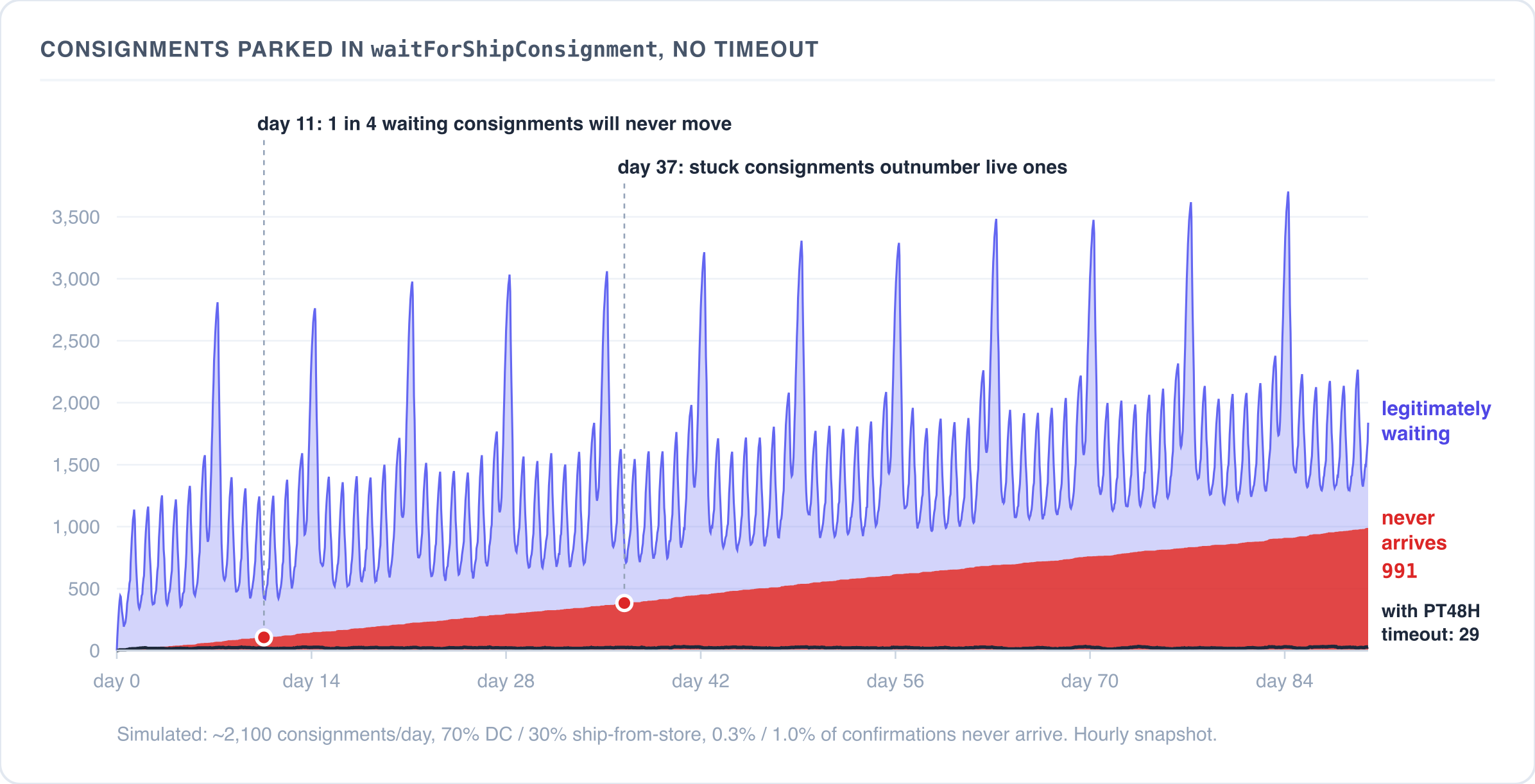
The stuck ones grow at a steady eleven a day and never leave, so by day 90 there are 991 of them. That part is plain arithmetic. What the simulation adds is how well they hide. The legitimate population swings by a factor of about eight every week, peaking on Sunday night when the stores are closed. Against that background, a backlog that grows by eleven a day does not show up as a trend on any chart of "orders in progress". Even so, by day 11 a quarter of the waiting consignments will never move, and by day 37 the stuck ones outnumber the live ones. No error is logged and no task fails. The process engine is doing exactly what the definition says.
The dark line at the bottom is the same simulation with a 48-hour timeout that declines the consignment and re-sources it. The number stuck at any moment stays under 35, because each lost consignment is out after two days and the next one replaces it.
The timeout attribute, and why it is left to the project
The process definition schema supports deadlines. From
platform/ext/processing/resources/processengine/processdefinition.xsd:
<complexType name="timeout">
  <annotation>
    <documentation>
      Allow to configure timeout for the wait node
    </documentation>
  </annotation>
  <attribute name="delay" type="duration" use="required">
    <annotation>
      <documentation>
        Delay after which wait will be timed out
      </documentation>
    </annotation>
  </attribute>
  <attribute name="then" type="tns:name" use="required">
    <annotation>
      <documentation>Transition on timeout</documentation>
    </annotation>
  </attribute>
</complexType>
delay is an XSD duration, so PT4H or P2D. then is the node to jump to when it expires.
The wait node implementation declares SupportsTimeout, and the branch we saw earlier sets
expirationTimeMillis on the task when a timeout is configured. The task engine's expiration
handling then calls back into the node, which routes the process to the timeout target. The
machinery is complete and has been there for years.
In the reference process definitions shipped with Order Management, none of the ten wait nodes configures a timeout out of the box.
This is easy to check on a fresh installation: grep -c timeout across the process
definition ImpEx files returns zero. Out of the box, there is no pre-configured fraud review
SLA and no deadline on an unpicked consignment. Until a project adds them, an external
fulfillment system that accepts a consignment and never confirms leaves node 4 armed
indefinitely, and a failed refund capture parks the return at node 9 until an operator
intervenes.
As a platform default, this makes complete sense. SAP cannot know whether your fraud review
SLA is thirty minutes or four days, and a reference timeout that fires at an arbitrary moment
would be worse than no timeout at all, because it would move orders without the business
understanding why. The shipped definitions in yacceleratorordermanagement are a starting
template, and deadlines are a project-level responsibility. Still, because timeouts live in
the underlying process engine schema rather than at the forefront of the Order Management
guides, teams frequently take the reference definitions to production as-is and only think
about deadlines the first time a warehouse integration quietly stops acknowledging.
What a reasonable set of deadlines looks like depends entirely on the business, but the shape is predictable:
| Wait node | Plausible deadline | Reasonable destination |
|---|---|---|
| fraud review | hours | escalate to a second queue, or auto-cancel |
| external fulfillment confirmation | minutes | re-send, then decline and re-source |
| consignment unpicked | the store's cut-off time | decline the consignment, which re-sources it elsewhere |
| return goods not received | the return window plus margin | cancel the return |
| failed refund capture | hours | notify finance |
The destination column matters more than the delay column. A timeout that routes to an end
node is a way of losing orders quietly. A timeout that routes to an action which raises a
visible exception record, or which triggers the existing decline-and-re-source path, turns a
silent stall into a piece of work somebody owns.
The delay column is harder than it looks, and the reason is in the XSD. delay is an XSD
duration, which measures wall-clock time. A business deadline such as "the store's cut-off
time" is measured on a calendar, and in the consignment process a single wait node serves
every warehouse, whatever its calendar. Running the same simulation with a fixed delay on
waitForShipConsignment shows what that means:
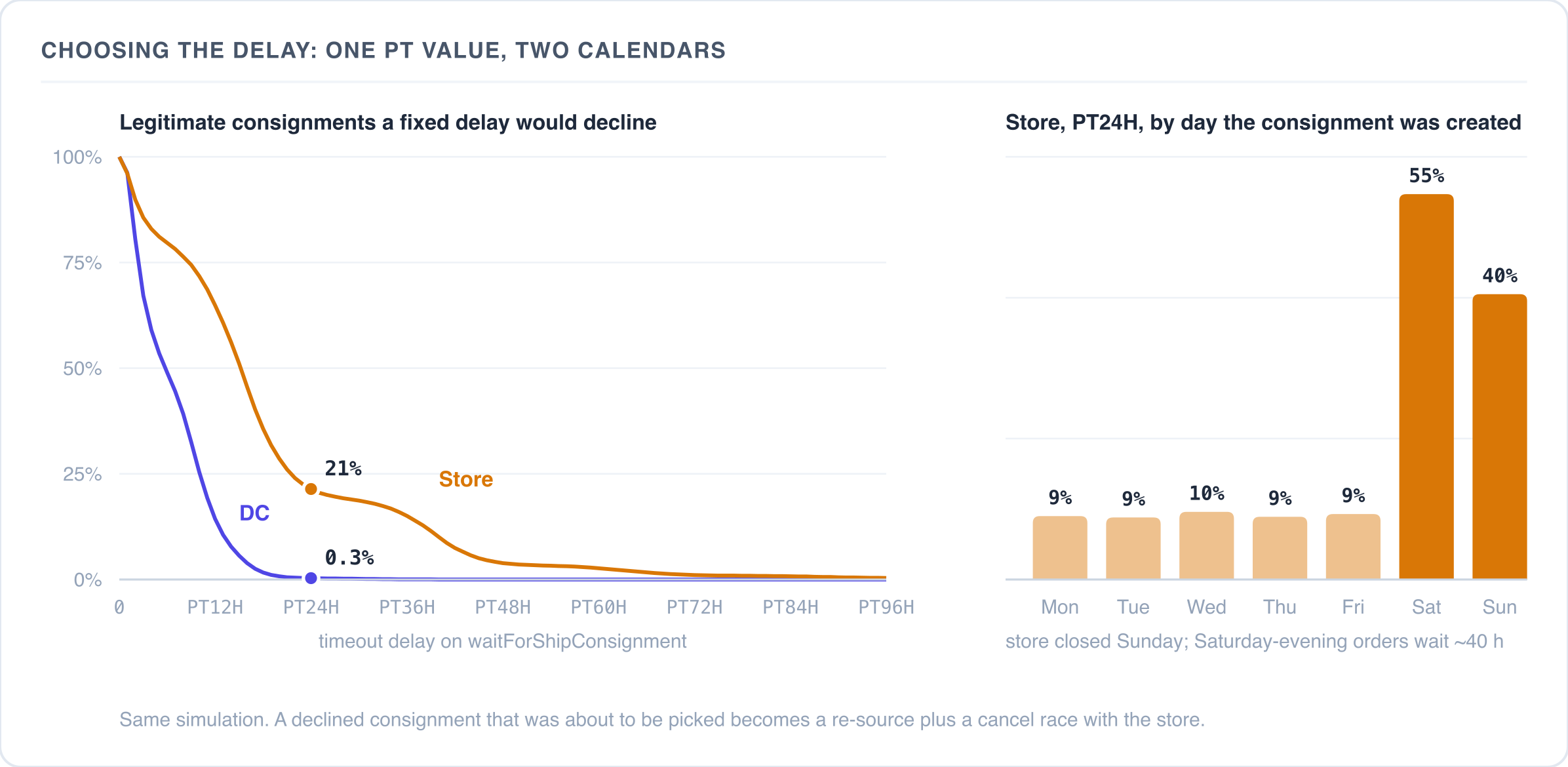
PT24H sounds generous, and for the DC it is: only 0.3% of healthy consignments would time
out. For stores, the same value declines 21% of consignments that would have been picked. The
average hides the pattern. From Monday to Friday about 9% are declined, mostly evening orders
that wait for the next opening. On Saturday the figure is 55%, because an order placed after
the store closes on Saturday waits about 40 hours for Monday morning. Every one of these false
declines re-sources an order that was on track and starts a race with an associate who may be
picking it at that moment. To get store false declines under 1%, the delay has to go up to
around PT72H. That is three days of silence before anyone hears about a DC consignment that
was lost in its first hour.
A practical answer is to treat the timeout as a check interval rather than a deadline. Set a short delay and route it to an action that measures the consignment's age in its warehouse's working hours. That action sends the process back to the wait node if the business deadline has not passed, and declines it if it has. The calendar logic then lives in Java, where it belongs, and the XSD duration only sets how often the check runs.
How then and choices resolve
Every wait node has a mandatory then attribute, and reading the definitions it is natural to
read it as the default successor. The real rule is narrower, and the difference shows up in
integration code.
Events can be fired with a choice — a named branch. The order process uses this heavily:
<wait id='waitForOrderAction' prependProcessCode='true' then='failed'>
  <case event='OrderActionEvent'>
    <choice id='consignmentProcessEnded' then='verifyOrderCompletion'/>
    <choice id='cancelOrder' then='processOrderCancellation'/>
    <choice id='cancelled' then='success'/>
    <choice id='reSource' then='sourceOrder'/>
    <choice id='putOnHold' then='putOrderOnHold'/>
  </case>
</wait>
The resolution logic, reconstructed:
// illustrative
String nextNode(NodeExecutionContext ctx) {
    if (!ctx.hasAnyChoice()) {
        return then; // no choice supplied -> the 'then' attribute
    }
    Set<String> choices = ctx.getChoices();
    if (choices.size() > 1) {
        throw new IllegalStateException(
            "multiple choices are not supported");
    }
    String next = this.choices.get(choices.iterator().next());
    if (next == null) {
        throw new IllegalStateException(
            "choice was not declared in the process definition");
    }
    return next;
}
Some consequences for anyone firing these events from code.
Firing OrderActionEvent on an order without a choice sends the order process straight to
the failed end node, which sets the process state to FAILED and stops it. An integration that
nudges orders along by firing the event and omits the choice terminates the process. The order
row survives, the consignments survive, the orchestration does not.
Firing it with a choice the definition does not declare raises IllegalStateException inside
the task runner. The task fails, the process does not advance, and the wait node is not
re-armed. The order is now stuck in a way that looks identical to "the event never came",
except there is a stack trace in the log, which is the only thing that distinguishes them.
Firing it with two choices at once raises the same exception. This one is easy to hit if you build a generic "apply these state changes" integration endpoint.
The consignment waits handle this more gracefully, and the trick is worth copying:
<wait id='waitForShipConsignment' prependProcessCode='true'
      then='waitForShipConsignment'>
then points at the node itself. A ConsignmentActionEvent with no choice re-arms the wait
instead of failing. The consignment stays where it was, which for an idempotent nudge is
exactly right. Whether the asymmetry between the order process and the consignment process is
deliberate, I cannot say, but if you are editing the order definition anyway, pointing its
then at a dedicated "unexpected event" action rather than at failed costs nothing and
removes a sharp edge.
Finding the orders that are stuck
Since a waiting process is a row, you can query it. The relevant tables are Tasks
(ProcessTask extends Task and shares it), TaskConditions and Processes.
One caveat that will cost you an hour if you don't know it: Task.expirationDate and
TaskCondition.expirationDate are dynamic attributes, computed in Java and absent from the
database. The persisted column is expirationTimeMillis. Writing the obvious FlexibleSearch
against expirationDate will not do what you want.
A serviceable starting point, in native SQL, to list waiting processes by age and by the node they are waiting in:
SELECT t.p_action                      AS wait_node,
       COUNT(*)                        AS stuck_count,
       MIN(p.createdTS)                AS oldest
FROM   tasks t
JOIN   processes p ON p.PK = t.p_process
WHERE  t.p_expirationtimemillis IS NULL
AND    p.createdTS < DATEADD(hour, -24, GETDATE())
GROUP  BY t.p_action
ORDER  BY stuck_count DESC;
Adjust the date function for your database. The output is the operational artifact I mentioned
at the top — orders that have not moved in N hours, grouped by the state they are stuck in —
and if you have not built a dedicated Backoffice view or alert for it yet, this query is the
quickest way to get one. Running it once against a production-like dataset is usually
instructive; waitForShipConsignment tends to dominate, and the long tail is where the
integration bugs are.
When you run it matters too. In the simulated quarter above, the 24-hour query run on Thursday at 09:00 returns 939 consignments that will never move and 54 that are just slow. Run on Monday at 09:00, it returns 903 stuck and 605 healthy ones, which are the store orders from the weekend. The same threshold that is clean mid-week is 40% noise after a weekend. If the query feeds an alert, run it mid-week, or measure age in working hours, as the timeout action above does.
Changing a definition under running orders
Adding a timeout means editing the process definition ImpEx and re-importing it. The edit itself is unremarkable:
<wait id='waitForManualOrderCheckCSA' then='orderManualChecked'
      prependProcessCode='true'>
    <event>CSAOrderVerified</event>
    <timeout delay='PT4H' then='escalateFraudReview'/>
</wait>
with escalateFraudReview being an action bean you supply. Note that the node now needs a
real destination — a timeout that points at an action which only logs is a way of marking the
problem as handled while leaving it unhandled.
Versioning is where this gets interesting, because it behaves differently from what the data model suggests.
A running BusinessProcess stores the definition name and the definition version it
started under, and the engine resolves every subsequent node against that pair. So far this
reads like ordinary workflow versioning: change the definition, and in-flight instances keep
running the shape they started with.
That isolation does not exist in practice, because nothing ever creates a second version.
DynamicProcessDefinition.version is a Long defaulting to 0, with a unique index on
(code, version, active), and the provider asserts that at most one active row exists per
code. The shipped ImpEx declares code[unique = true] and no version column at all, so
every re-import updates the same row — version 0 — in place. Every order ever started is
pinned to version 0, and version 0 is whatever you imported most recently.
The switchover is governed by a cache rather than by the deployment. ProcessDefinitionsCache
is a per-JVM map keyed by (name, version); a definition already in it is served from memory,
and the database is consulted only on a miss. Putting those two facts together gives the
actual behavior of a process definition change:
- in-flight processes do pick up the new definition, because they resolve to version
0and version0changed under them; - they pick it up when the node's cache is next populated, which in practice means a restart, so the change lands at deploy time, not at import time;
- cluster nodes that restart at different moments run different content for the same process version for as long as the rollout takes.
Usually this is harmless, because most edits add nodes rather than remove them. It stops being
harmless when an order is parked in a wait node that the new content no longer defines: node
lookup throws NoSuchNodeException, and the order is stuck with an exception that names a node
you have already deleted from the file you are looking at.
If you want genuine isolation, you have to build it yourself — insert a new row with an
explicit higher version, flip active, and leave the old row in place so in-flight processes
can still resolve against it. No ImpEx in the distribution demonstrates this, which is a
reasonable explanation for why almost nobody does it.
Where this leaves us
The process engine underneath Order Management is a solid piece of infrastructure: durable, restart-safe, defined in data, and perfectly capable of expressing deadlines. The reference Order Management definitions leave those deadlines unconfigured for the project to supply — which means that until you add them, the ten points where an order hands control to a human or an external system have no safety net under them. That is an essential checklist item for every implementation, and it is one you can close entirely from ImpEx.
Next in this series: how SAP Commerce picks a warehouse. The sourcing engine scores candidate locations with a weighted sum over a matrix — a clean model on paper whose relative normalization has some subtle consequences for how candidate sets behave in practice.
Discussion
Powered by GitHub Discussions — sign in with a GitHub account to join the conversation.