
Introduction
Inventory management is one of the challenging topics in e-commerce. As part of my research, I came up with some best practices in this area.
In this article, you can find information about inaccurate inventory records and inventory balance discrepancies, as well as techniques to compensate for inventory record errors and stock update delays.
I explain the details of inventory data importing: integration interfaces, guaranteed data delivery, failover and error handling, and mass update specifics. I am going to go over the architecture of lean stock updates that could be useful for marketplaces with millions of products and distributed warehouses.
You will find details about data anomalies and how to process products with multiple product units, use stock history, and implement rule-based product availability. I will also cover a large topic: stock management for different types of product bundles.
Inaccurate inventory records
This is an all-too-common problem when inventory data is not accurate. Outdated, damaged, or spoiled inventory, wrong labels, lost items, delayed stock updates, and other inventory-related issues occur everywhere. Inaccuracy takes shape in many forms, such as inaccurate quantities, inaccurate storage locations, inaccurate pricing, and inaccurate identification. This happens very often with retail companies, especially big-box retailers that have millions of SKUs.
There are various techniques you can use to compensate for inventory record errors. Two of them are widely used in e-commerce:
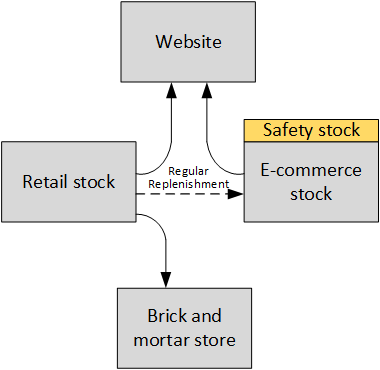
Safety stock. Safety stock is often used as protection against uncertainties in inventory operations, such as demand and supplier lead time. It can be extended to serve as a buffer against uncertainty in the inventory record.
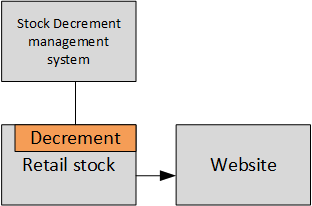
Constant decrement of the inventory record. If you are aware of the presence of stock loss and also know its stochastic behavior, another way to compensate for the error is to export the decremented value of the inventory records to hybris. How much? You can decrement by the average stock loss demand in each period. Since the actual value of the stock loss in each period is unknown, simply decrementing the record will still not eliminate the error in the inventory record. However, over time, this corrective action can be expected to perform better than leaving the inventory record unadjusted. You can use average stock loss classes with different decrements and associate them with product categories.
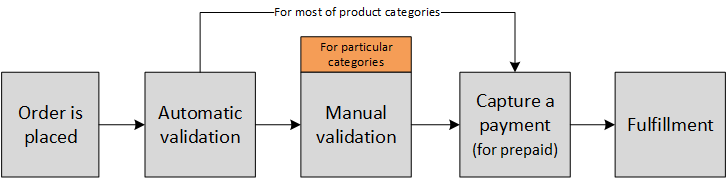
- Manual stock verification. Once checkout is completed, a special group of people validates the order, double-checks availability, and eventually confirms, edits, or denies the order. These people may contact the customer to go over the details if something is not clear. After the process is over, the system captures the payment for prepaid orders, and fulfillment is started. The customer is informed that the order has been placed. This approach is costly and old-fashioned, and nobody likes it. However, there are millions of e-shops in the world that use this approach, at least for certain product groups.
Product variants
Sometimes the same product is available in different styles or types. From the ERP standpoint, these are different items. For customers, all of them are different versions of the same product.
Hybris requires linking product variants with each other. There is a base product and optional variant products that have an attribute pointing to their base product. In some ERP systems, this grouping is achieved through product categories or the SKU pattern.
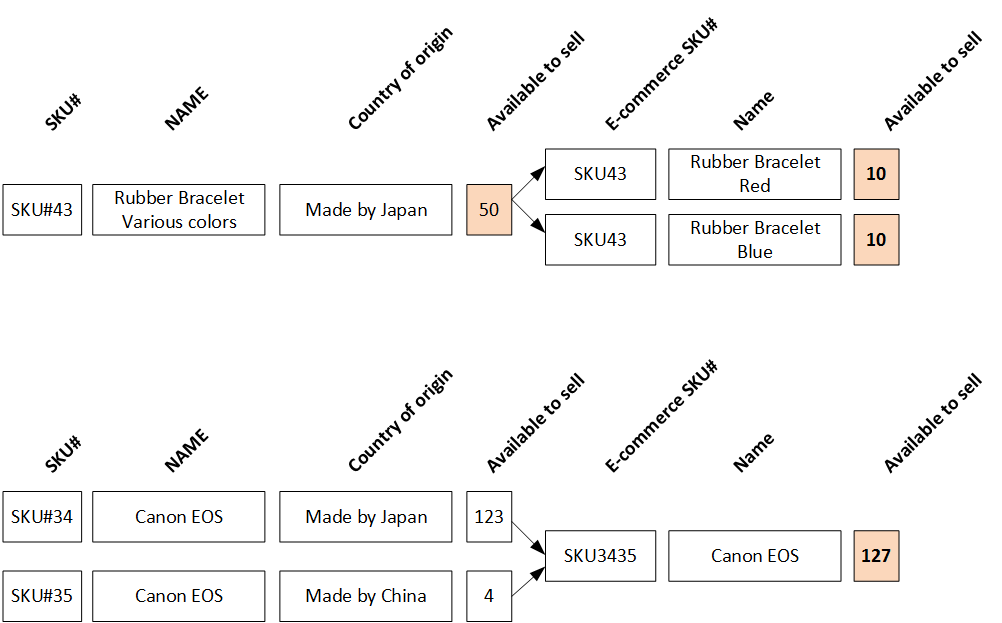
Sometimes the WMS knows nothing about variants. For example, cheap rubber bracelets may come in various colors with the same SKU. It is not a problem for traditional retail: the customer picks the right color, and there is no need to have separate SKUs in the WMS. However, for an e-commerce website, you may want to ask the customer about the color. How will you push this information to the warehouse once the order is placed? In comments? How do you determine the stock level for each color? These questions should be asked.
Merging and splitting products
Another pattern is based on the concept of backup suppliers. These warehouses should be 100% reliable in terms of product availability, but at the cost of a higher price for the seller.
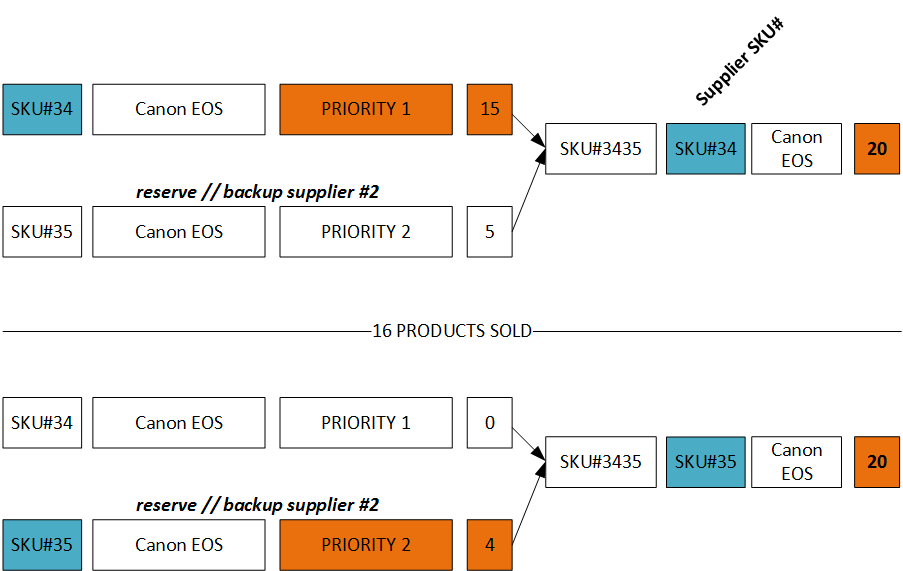
Using a backup supplier is certainly a red flag for the procurement department.
The last example of merging products is typical for furniture:
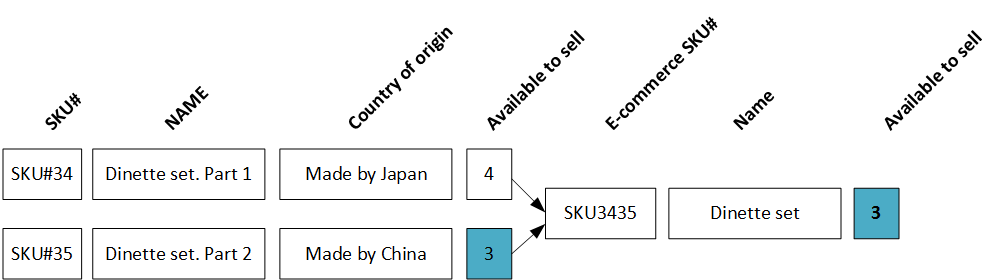
The same approach is used for bundles that are available when all components are available.
Inventory balance discrepancy
The e-commerce website is not the only consumer of WMS data. Other systems may update the information in it, and the changes may propagate with some delay. Certainly, you need to minimize this delay. However, for various reasons, this delay can be long enough to create issues with stock inaccuracy.
There are two main types of delays:
- Related to technical constraints: frequency, throughput, memory, or CPU limitations.
- Related to organizational constraints: for example, the stock will be updated only after hard copies of the documents are registered in the system.
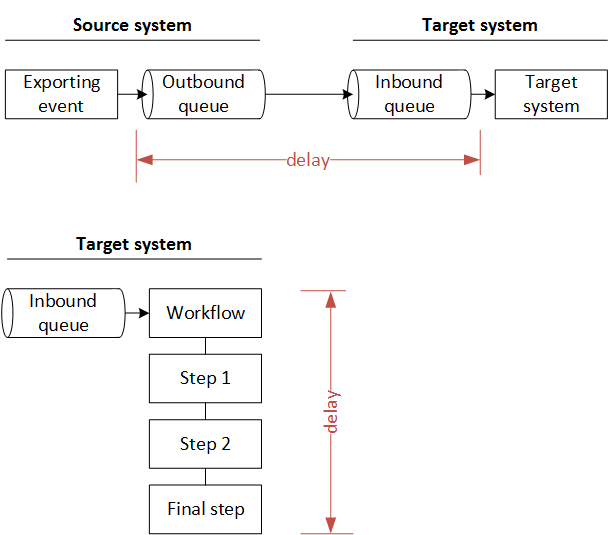
In the example below, “Warehouse reserve” is an inbound queue, and “hybris reserved” is an outbound queue.
The inbound queue (warehouse reserve) is tightly linked with the order management processes in WMS. Usually, it takes some time to process the update. It might be a technical delay or a workflow that comprises a set of steps for validating the order and processing the reserves. The initial state of the stock is 500 items.
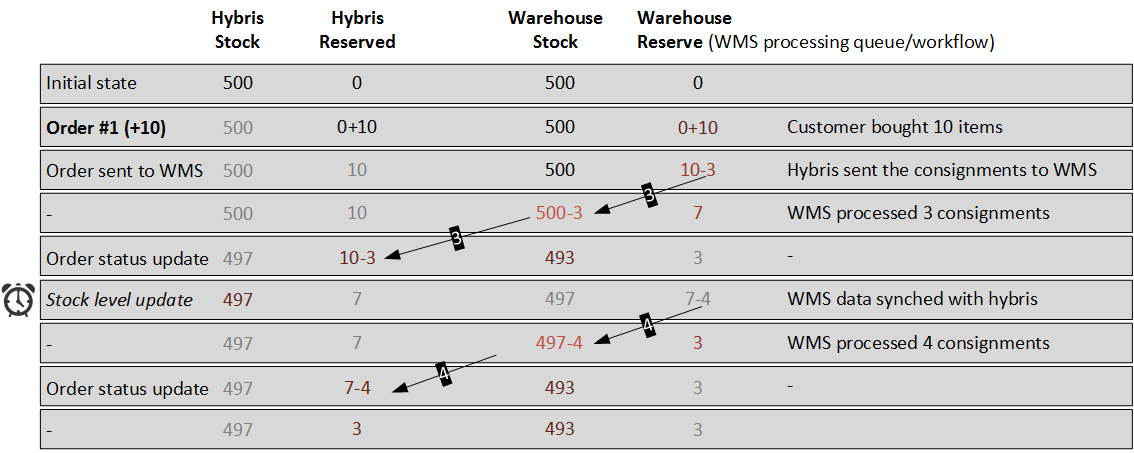
As we can see, three items are still being processed on the WMS side, and another three items were reserved by hybris. We initially had 500 items, and 10 items were sold, but at this moment the hybris stock level service shows 497 items. This value is more than the real stock has.
This is a reason why you need to send a synchronization request to WMS from the shopping cart. However, the warehouse shows 494, which is also more than 490. In order to mitigate the discrepancy, you need to use WMS unprocessed requests in the hybris availability calculation.
hybrisProductAvailability = (hybrisStock – hybrisReserved)hybrisRealtimeAvailabilityCheck(t) = (WarehouseStock(t) – WarehouseReserve(t))
hybrisRealtimeAvailabilityCheck(t) is mainly used in the shopping cart and checkout process. hybrisProductAvailability is mainly used for Solr indexing and product pages.
Let’s place another order, #2. There are two products in it.
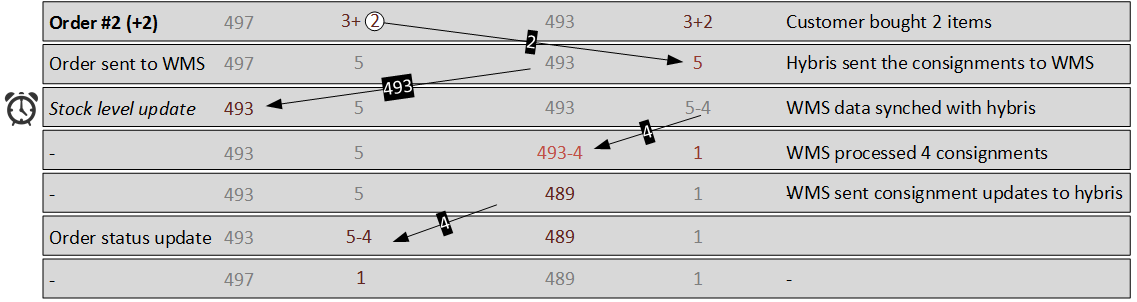
If we accept the order for 494 or 489 products, we won’t be able to fulfill the order because the stock has only 488 items.
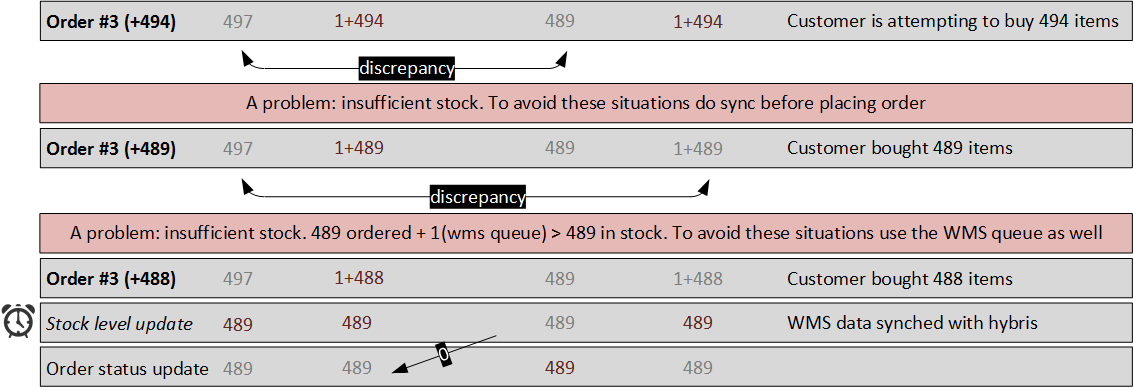
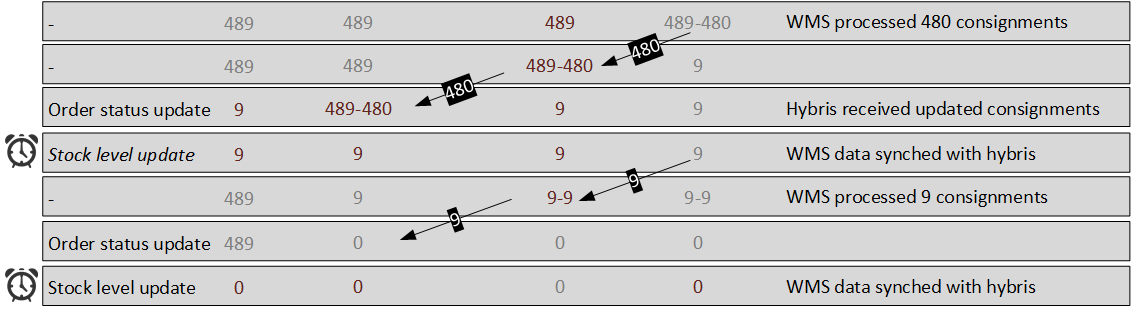
To summarize, you need two interfaces to your WMS service:
- Bulk updates. For each item:
- Current stock info, per item and warehouse.
- Reserved amount, per item and warehouse.
- Hot current stock info:
- Current stock info for the item, per warehouse.
- Reserved amount for the item, per warehouse.
Integration details
Hybris default integration diagram
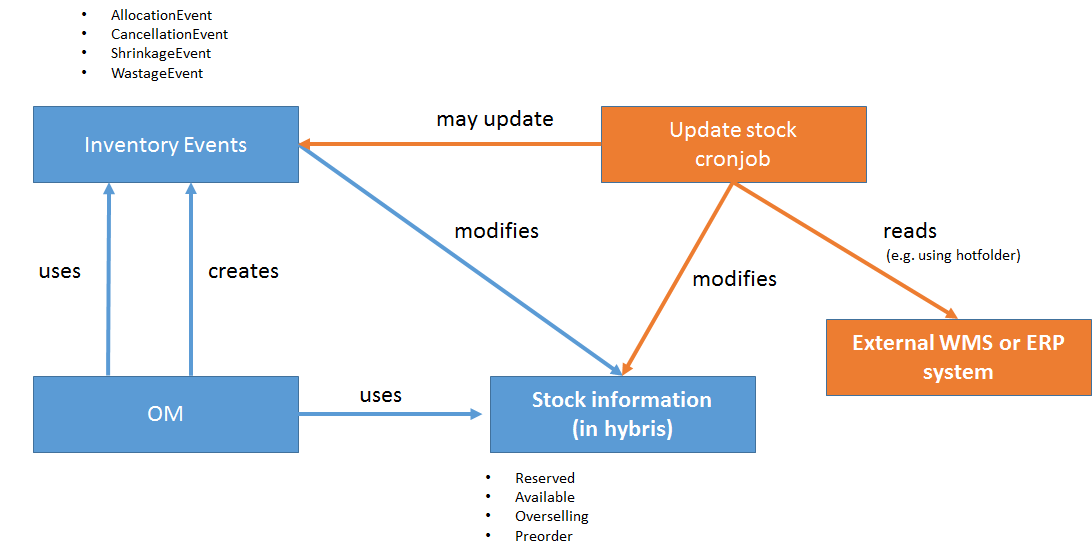
This diagram shows the stock-related processes only. Exporting orders is not shown here, nor are fulfillment-related processes.
Key integration interfaces
Async integration endpoints
- Sync order/consignment updates (WMS → hybris, hybris → WMS)
- Update hybris stock levels (WMS → hybris)
- Create WMS consignment (hybris → WMS)
Sync integration endpoints
- Check availability (hybris → WMS)
Guaranteed delivery
All asynchronous communication from and to hybris should flow through an Enterprise Message Bus. It is important to make messages persistent so that they are not lost even if the messaging system crashes.
All synchronous communication from and to hybris is recommended to flow through an API Gateway. Using a unified gateway for all API calls will allow you to monitor throughput and test API usage.
Failover and graceful error handling
I recommend using Netflix Hystrix to manage failures in the data exchange. This framework uses the circuit breaker pattern, which will stop further requests if a configurable number of requests starts to fail. This will ensure that the app servers are not endlessly hung up, allowing for graceful error handling.
Mass update with ImpEx
If you need to update large numbers of items using ImpEx, I recommend taking the following into account:
INSERT_UPDATEperforms three FlexibleSearch queries: twoSELECTs and oneUPDATE. See one of the previous articles for the details.- All unique attributes and reference object lookup attributes mentioned in the ImpEx header as constraints should have a database index for fast lookup.
For example:
INSERT_UPDATE StockLevel;available;warehouse(code)[unique=true];inStockStatus(code);productCode[unique=true]
...
For this example, let’s check the indexes for the following lookup attributes:
- For the Warehouse object: by the
codeattribute. - For the Product object: by the
codeattribute.
If you don’t have a significant number of warehouses, reading sequentially is faster than working through an index. Let’s look at the OOTB hybris configuration:
- There is no index for
warehouse.code; full scan; frequently used → in cache. Product.codeis in the index.
Lean stock update
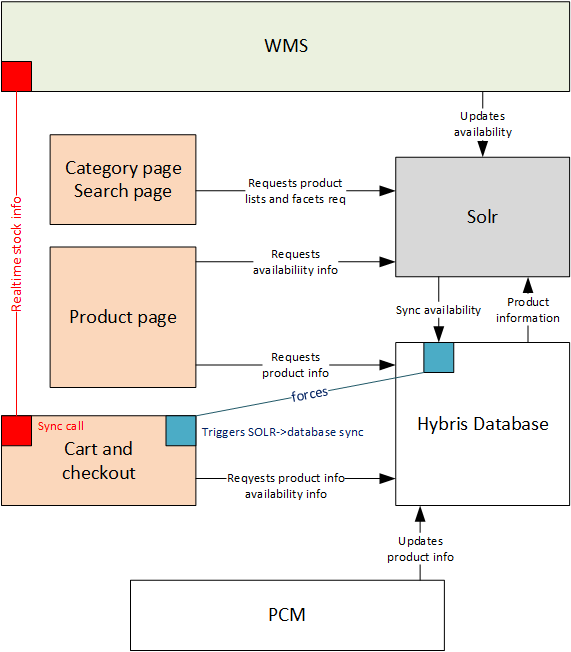
According to this concept, the WMS updates Solr rather than hybris. Solr updates the hybris database. Some events may force this update. It will reduce the database load significantly.
I used this concept in my hybris Marketplace PoC.
Incremental updates
Very often, the external product stock data provider, such as ERP or WMS, is a bottleneck for data exchange. Pulling all data is too expensive and slow. Incremental updates allow you to make this process more efficient by transferring changed data only. As a rule, something like a last modified time attribute is available in the source system. Using this attribute as a filter will significantly reduce server load and increase performance.
Solr and caching
I encourage you to have a look at my article about the hybris Marketplace. I used a set of 2M products, 16K categories, and 6000 facets. The numbers are too large to be used with conventional hybris. It became possible to use these with hybris only because all data is in the fast document-oriented Solr database rather than a relatively slow relational database. Availability information is also in Solr. In another PoC, I demonstrated that it takes seconds to update availability information for a large number of products, warehouses, and even customer groups.
Data anomalies
There are three types of anomalies: update, deletion, and insertion anomalies.
Updates
An update anomaly is a data inconsistency that results from data redundancy and a partial update.
Normally, there should not be any update anomalies if the system is designed properly. See the Inserts section below as well.
Deletes
A deletion anomaly is the unintended loss of data due to deletion of other data. Don’t remove objects if you want to avoid data inconsistency. Use special statuses to mark items as non-relevant.
Inserts
An insertion anomaly is the inability to add data to the database due to the absence of other data.
For our topic, there is a common issue related to insertion anomaly, as follows:
- There is a new warehouse in ERP, but the warehouse has not been added to the hybris warehouse list yet.
- There is a new product in ERP, but the product has not been added to the hybris product catalog yet.
- There is product availability data (stock levels) that has references to the products and/or warehouses mentioned above.
As a result, the stock update may end up with errors. It is clear that these situations should be planned well beforehand. Certainly, you need to insert stock level items only if all referencing objects are in place. However, you need to check it for each StockLevel item imported from WMS, which is not good for performance.
I recommend preprocessing the incoming data and splitting it into two parts: update and insert. Products and warehouses should be cached in memory to make preprocessing faster. The StockLevel items that were sorted out for insertion should be processed if all referenced components are found: product number and warehouse.
Historical data
Think about collecting historical data for all availability data updates in external NoSQL storage. It is a good source for further big data processing to implement such features as:
- Restock evaluation: “The product is temporarily not available now. The estimated arrival date is next week. You can pre-order it.”
- Availability alerts: “Inform me when this item becomes available.”
- Mark products as discontinued. If a product is unavailable for a long time, according to configuration, the system should send a message to administrators about that fact so they can mark this product as discontinued and redirect the customer to a replacement product.
- System health monitoring: “Are there any anomalies with product stock updates?” See the next section.
Also, the collected information is great for troubleshooting.
Bundles
There are four different types of bundles in hybris:
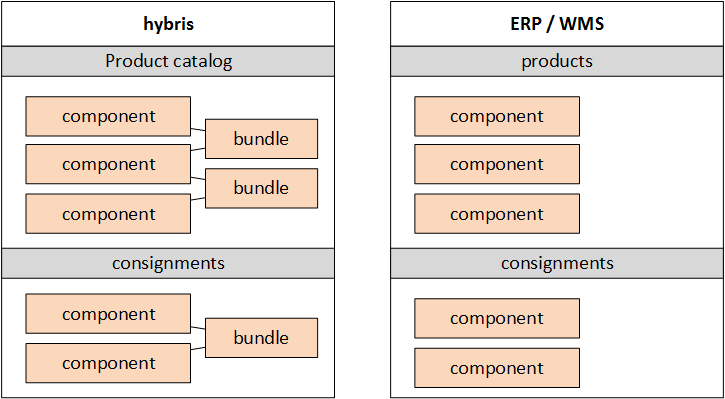
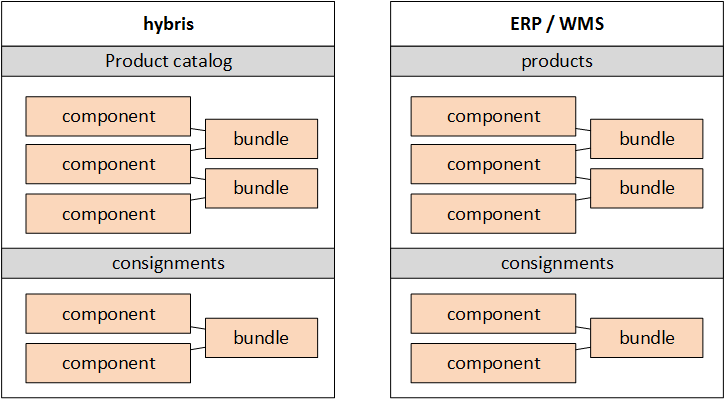
| hybris product catalog | ERP | |
|---|---|---|
| Type 1. Fully virtual | no bundle SKU | no bundle SKU |
| Type 2. ERP product grouping | no bundle SKU | bundle SKU is present |
| Type 3. Hybris product grouping | bundle SKU is present | no bundle SKU |
| Type 4. Bundles are regular products | bundle SKU is present | bundle SKU is present |
Type 1. Fully virtual
ERP is not aware of bundles, only of bundle components. Hybris does not have bundles in the product catalog.
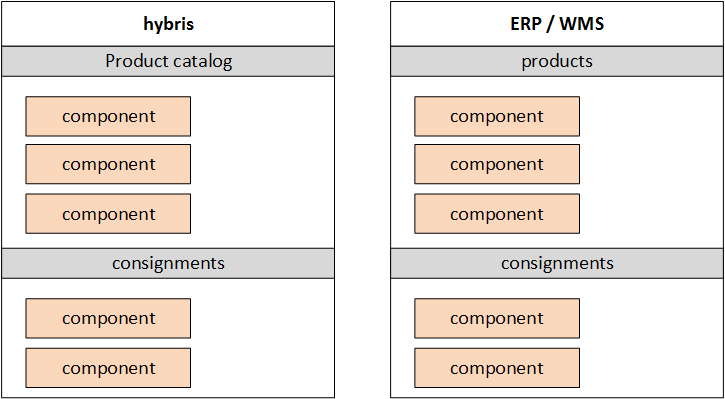
Example: Build your PC product configurator:
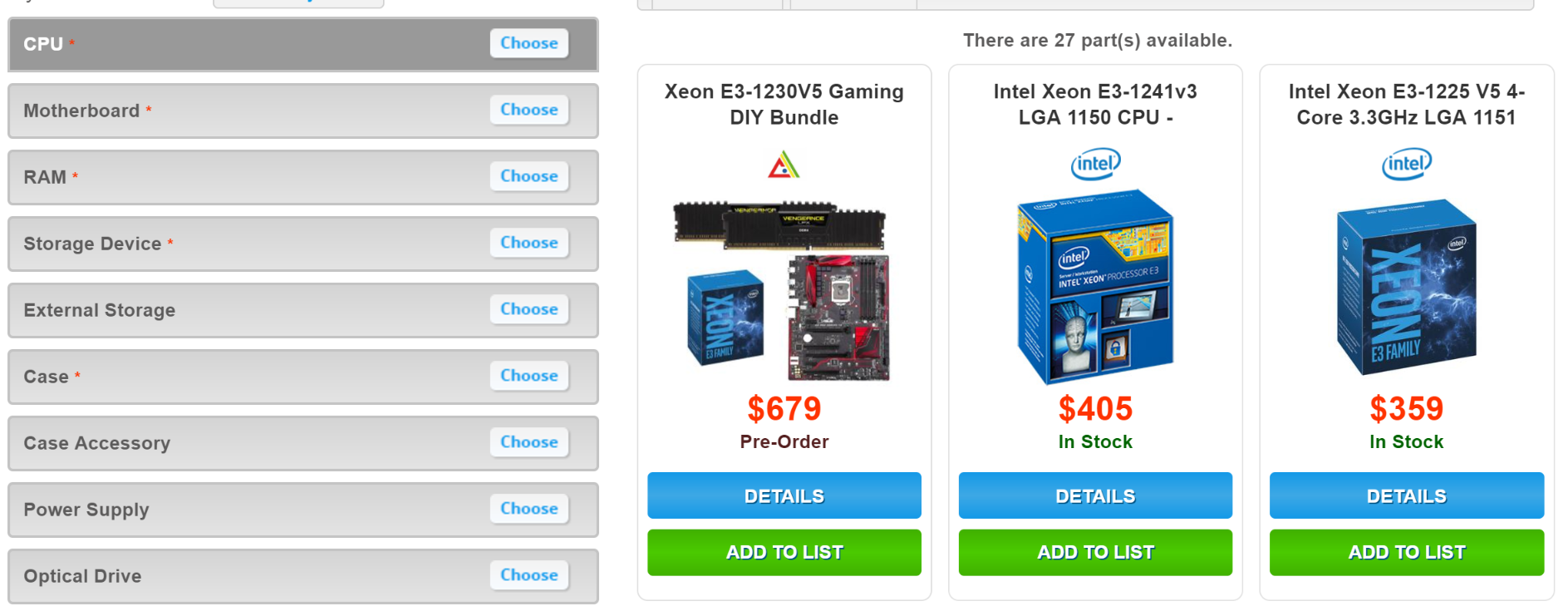
For this option, the availability of the bundle is based on the availability of bundle components. This option is used when the bundles are supposed to be built individually for customers based on their selection.
Type 2. ERP product grouping
Like the previous option, hybris is not aware of bundles. However, ERP has bundles as separate SKUs. This pattern is common in situations where ERP has SKUs for all possible combinations of components generated by a hybris-powered product builder, like the one shown above. Unlike the previous option, the bundles are stock-keeping units on the ERP/WMS side. If some bundles are unavailable, you will not be able to order them. In this option, real-time availability requests are essential because there is no way to store information about bundle availability in hybris. This pattern is good for systems where ERP bundles are virtual and the absolute number of possible bundles is huge. Otherwise, it is recommended to go with Type 4. ERP calculates bundle availability dynamically, by request, according to some algorithm known to ERP/WMS.
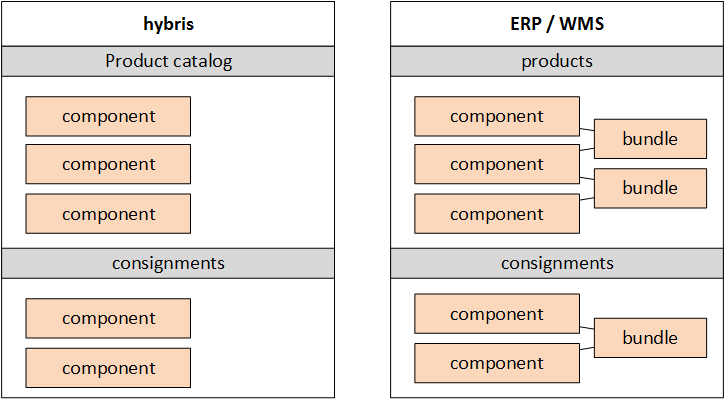
Type 3. Hybris product grouping
In this option, ERP is not aware of bundles. Bundles exist in hybris only. Bundle availability depends on information from ERP/WMS at the component level and from hybris at the component and bundle levels.
Type 4. Bundles are regular products
In this option, bundles exist both in ERP/WMS and hybris. Each bundle is a purchasable item with a separate SKU. The set of components of the bundle is just for reference; the availability information is based on ERP/WMS data for the bundle SKU.
Monitoring
Collecting historical data is great for system health monitoring. If you update your stock every day or every hour, you can create and continuously update a typical pattern of a single update or a group of sequential updates. Any deviations from these patterns can be flagged as real-time alerts to admins.
It is also a very useful tool for early identification of issues related to data exchange.
Multiple units
In some cases, handling products in different units of measure is necessary. For example, if you buy products in a country where the metric system is used and sell them in a country where the imperial system is used, you will need to convert the units.
Warehouse units and purchase units can be different.
- We buy eggs by trays: 30 eggs.
- We check all eggs individually when receiving them for quality control.
- We sell eggs by the dozen to customers.
For furniture, a kitchen set can consist of several components. Some of these components are purchasable separately, but some of them can be sold only as part of other units. In addition to that, some components are common for different kitchen sets. How do you determine the number of available kitchen sets by the known number and types of components?
- We buy wire in coils.
- We sell wire by the foot/metre and in coils.
For the last example, in ERP we deal with coils, but for the end customer, two different types of products are available:
- Wire by the foot.
- Wire in coils.
These products share the same stock items. From the customer’s perspective, these products are basically variants of one product, “wire”. In addition to that, there is one more challenge: you can’t connect two cuts to have a new longer cut. So there is no easy way to calculate the available stock for such products. If you have 100 feet of wire and your customer wants 90, you will possibly have difficulties with the remaining 10-foot cut. However, that is a topic for a separate article.
Another example of products with multiple units is soap. Soap products can be sold in bars or by weight. When soap is sold in bulk, the customer is asked about the weight of the piece. The same situation occurs with liquids and granular materials, which are common for construction material B2B e-commerce websites.
Rule-based product availability
Sometimes product availability should depend on a combination of many factors:
Availability = Function(RawStockData, CL, CS, PA, PPA, PM, DM)
- RawStockData, available items per warehouse.
- CL, customer location. For example, some items are unavailable for some areas.
- CS, customer status. For example, some items are available only for gold customers.
- PA, product attributes. For example, a category where the product is linked.
- PPA, product price attributes. For example, low-margin products are not available in some areas.
- PM, chosen payment method. For example, some products may not be available for pickup or delivery to distant areas when cash on delivery is chosen.
- DM, chosen delivery method. Some products may not be available for the chosen delivery method.
The best way to implement product availability rules is to use Drools, included in hybris 6.x. RawStockData can be wrapped into Drools Globals methods. The remaining listed components can be implemented as Drools Facts. There are different ways to write rules. The hybris rule builder can be leveraged for this purpose as well. The results can also be cached for faster lookup.
© Rauf Aliev, October 2016
Discussion
Powered by GitHub Discussions — sign in with a GitHub account to join the conversation.